I remember the exact moment I realized I needed a CDN. I had spent months building an online store for a client who handcrafted goods. We launched on a Monday, and by Tuesday, a popular lifestyle blogger featured one of our wallets. Suddenly, traffic spiked. People from New York, London, and Tokyo were trying to buy at the same time.
Instead of celebrating, I was watching my server—a single machine sitting in a data center in Virginia—curl up and die. The site took twenty seconds to load a single image. Shopping carts were timing out. It was a disaster.
When I frantically called my hosting provider, the tech support guy sighed and said, “You need a CDN, buddy.”
I nodded as if I knew what he meant, then immediately Googled it. That day changed how I build and manage websites forever. So, let me save you the panic I felt and break down exactly what a CDN is, why it matters, and how it works, using real-world experiences.
Table of Contents
What Exactly is a CDN?
CDN stands for Content Delivery Network.
To understand it, let’s step away from computers for a second. Imagine you run a world-famous pizza chain, but you only have one kitchen—in New York. If someone in New York orders a pizza, it arrives in 20 minutes. Hot, fresh, perfect.
But what if someone in London orders a pizza? It has to be flown across the Atlantic. It takes 12 hours and arrives cold, soggy, and inedible.
How do you fix this? You don’t make the New York kitchen work faster. You build smaller kitchens (distribution centers) all over the world. You keep the main kitchen in New York (to invent new recipes), but you send the popular recipes to the kitchens in London, Tokyo, and Sydney. Now, when someone in London orders a pizza, it’s made locally and arrives in 20 minutes.
That is exactly how a CDN works.
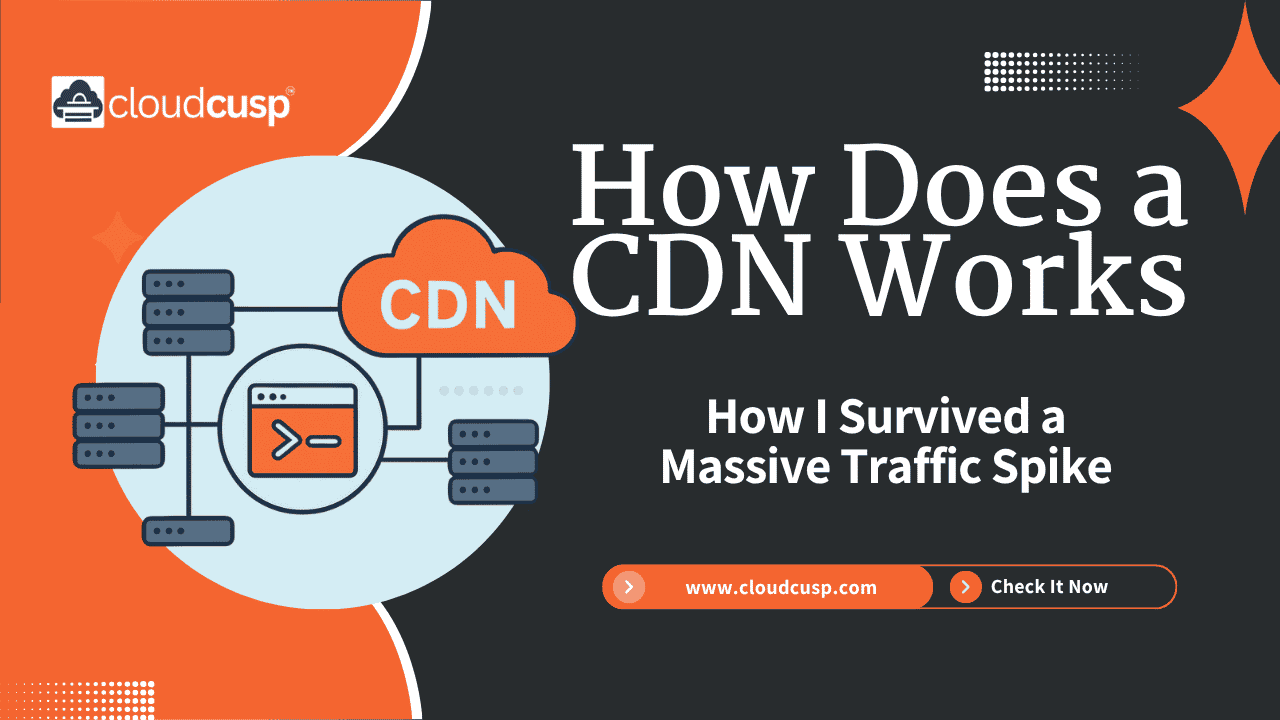
In web terms, your main server in Virginia is the Origin Server. The CDN is a network of distributed servers—called Edge Servers or Points of Presence (PoPs)—spread out across the globe. When your website loads, the CDN caches (saves a copy of) your images, videos, and text on these Edge Servers. When a user visits your site, they are served the content from the Edge Server closest to them, not the Origin Server across the world.
How Does a CDN Actually Work? (The Step-by-Step)
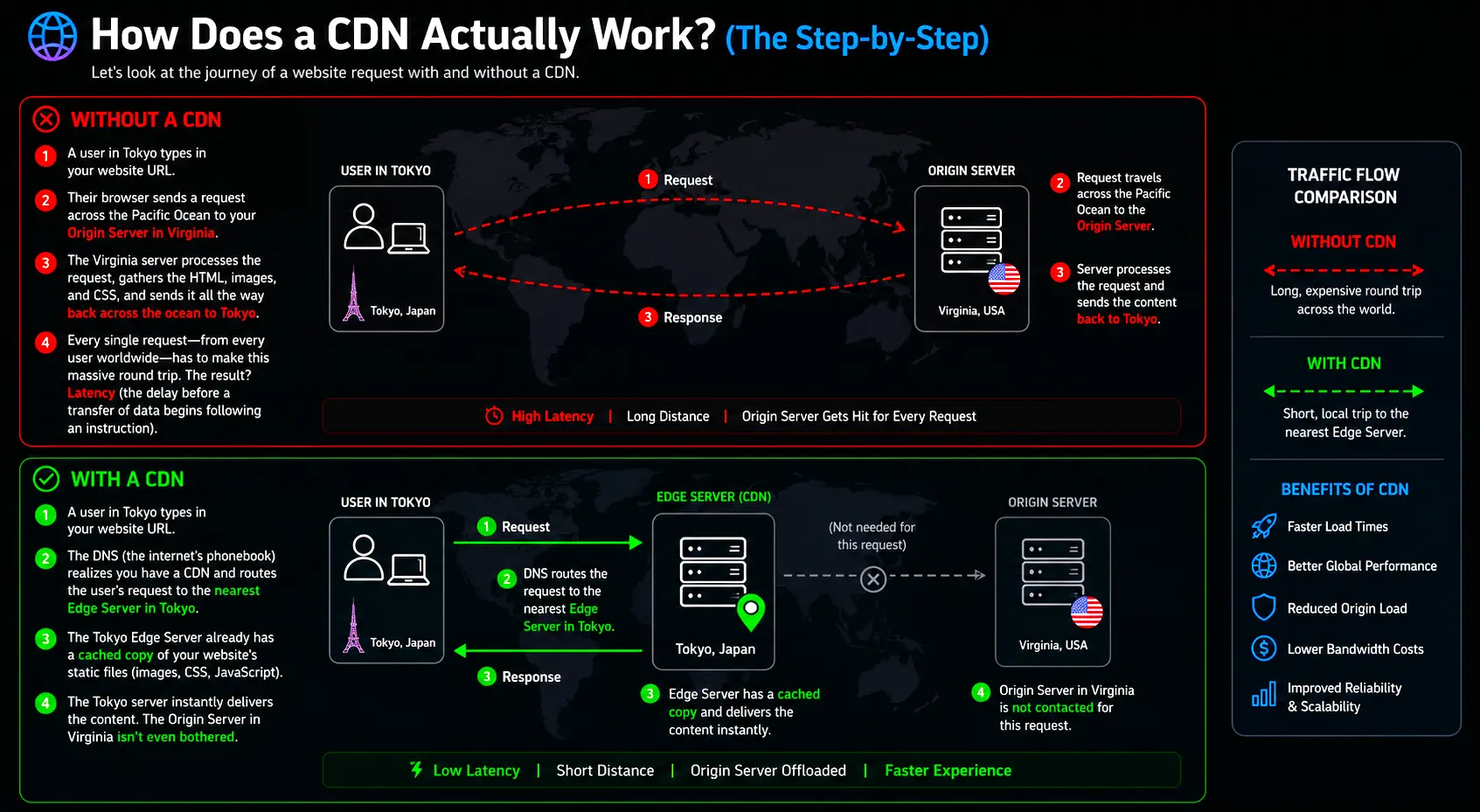
Let’s look at the journey of a website request with and without a CDN.
Without a CDN:
- A user in Tokyo types in your website URL.
- Their browser sends a request across the Pacific Ocean to your Origin Server in Virginia.
- The Virginia server processes the request, gathers the HTML, images, and CSS, and sends it all the way back across the ocean to Tokyo.
- Every single request—from every user worldwide—has to make this massive round trip. The result? Latency (the delay before a transfer of data begins following an instruction).
With a CDN:
- A user in Tokyo types in your website URL.
- The DNS (the internet’s phonebook) realizes you have a CDN and routes the user’s request to the nearest Edge Server in Tokyo.
- The Tokyo Edge Server already has a cached copy of your website’s static files (images, CSS, JavaScript).
- The Tokyo server instantly delivers the content. The Origin Server in Virginia isn’t even bothered.
Here is a visual representation of how the traffic flow changes:
Why Does a CDN Matter? (The Core Benefits)
After that initial disaster with the leather store, I integrated a CDN, and the transformation was night and day. Here is why a CDN is absolutely essential for modern websites:
1. Speeding Up Website Load Times
People are impatient. Studies show that if a website takes more than 3 seconds to load, over half of the visitors will leave. By serving data from a local Edge Server, a CDN drastically reduces the physical distance data has to travel. Less distance equals less latency, which equals faster load times.
2. Handling Traffic Spikes (High Availability)
Remember my leather store crash? That happened because of too many concurrent requests. A CDN acts as a shock absorber. Because the Edge Servers handle the majority of the traffic, your Origin Server barely breaks a sweat. If your site gets featured on the news or goes viral, the CDN absorbs the flood of visitors, keeping your site online.
3. Better Security
A good CDN is like a bouncer at a club. It hides the IP address of your Origin Server, making it harder for hackers to target it directly. Furthermore, CDNs provide robust DDoS (Distributed Denial of Service) protection. A DDoS attack happens when a hacker floods your server with millions of fake requests to crash it. A CDN can detect this abnormal traffic and filter it out at the Edge, before it ever reaches your Origin Server.
4. Reducing Bandwidth Costs
Web hosts charge you for the amount of data transferred from your server (bandwidth). If your Origin Server sends every image and video to every user, your bandwidth bill will be astronomical. Because a CDN serves the majority of your static content from its own Edge Servers, your Origin Server uses a fraction of the bandwidth, saving you serious money.
Here is a quick comparison to put it in perspective:
| Feature | Without a CDN | With a CDN |
|---|---|---|
| User Request Route | Directly to Origin Server (long distance) | To nearest Edge Server (short distance) |
| Load Time for Distant Users | Slow (High Latency) | Fast (Low Latency) |
| Origin Server Load | High (Handles every request) | Low (Only handles dynamic/cache-miss requests) |
| Vulnerability to DDoS | High (Server is exposed) | Low (Traffic is filtered at the Edge) |
| Bandwidth Costs | Expensive | Cheaper |
The Magic of Caching: How a CDN Stores Your Data
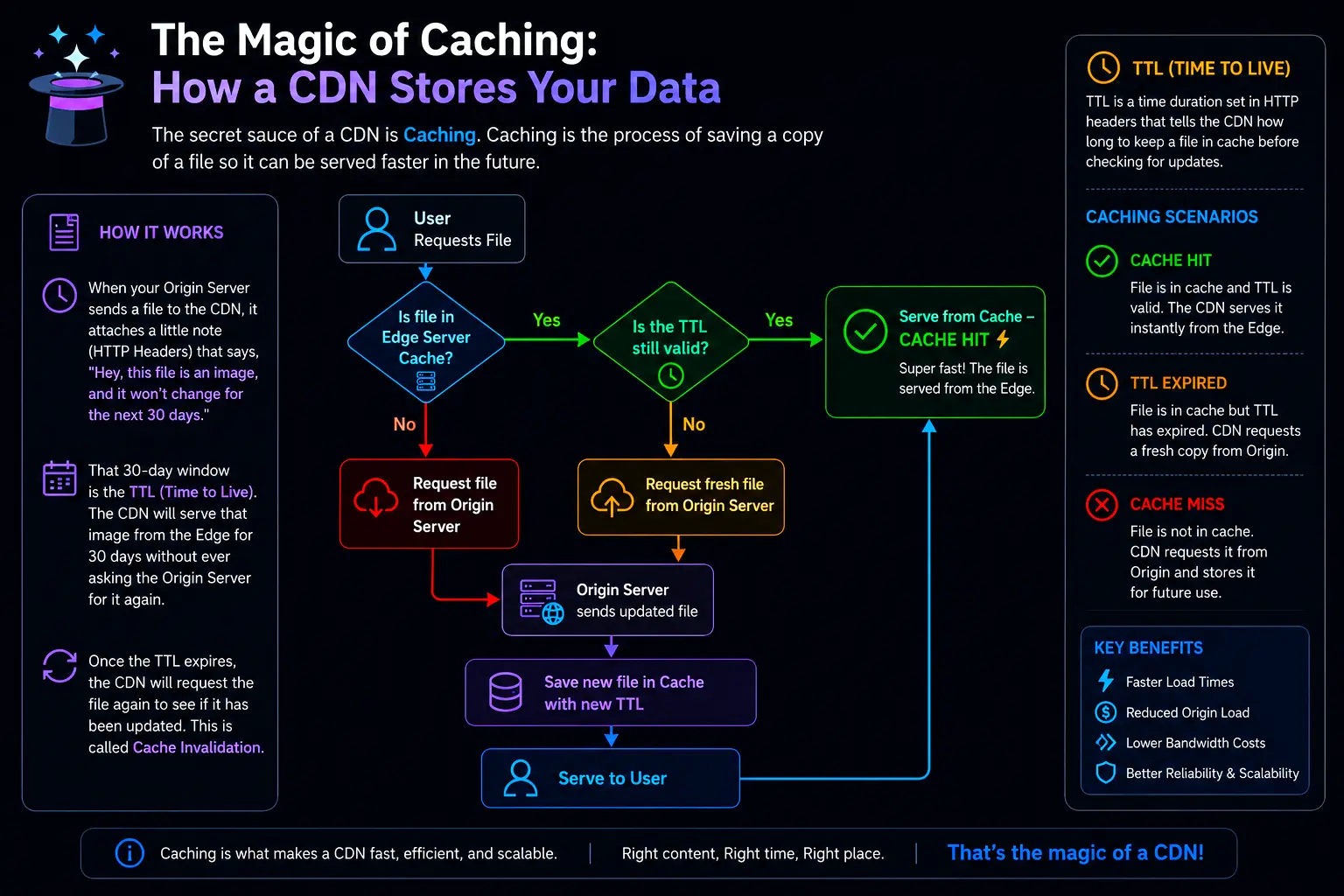
The secret sauce of a CDN is Caching. Caching is the process of saving a copy of a file so it can be served faster in the future.
But how does the CDN know what to save, and how long to save it? It all comes down to HTTP headers, specifically something called TTL (Time to Live).
When your Origin Server sends a file to the CDN, it attaches a little note that says, “Hey, this file is an image, and it won’t change for the next 30 days.” That 30-day window is the TTL. The CDN will serve that image from the Edge for 30 days without ever asking the Origin Server for it again.
Once the TTL expires, the CDN will request the file again to see if it has been updated. This is called Cache Invalidation.
A Personal Lesson on Cache Invalidation:
I once updated a client’s logo on a Wednesday, but when we loaded the site, the old logo was still showing. I refreshed a dozen times, cleared my browser cache, and nearly pulled my hair out. The Origin Server had the new logo, but the CDN was still serving the old one because the TTL hadn’t expired yet! I had to manually “purge” the CDN cache to force it to fetch the new logo. Most CDN providers have a big button in their dashboard that says “Purge Cache.” Use it wisely.
Static vs. Dynamic Content: What a CDN Actually Helps With
It’s crucial to understand that not all web content is created equal.
- Static Content: Files that do not change based on who is requesting them. Think images, CSS stylesheets, JavaScript files, PDFs, and fonts. CDNs are absolute masters at serving static content.
- Dynamic Content: Content that changes based on the user, the time, or the location. Think shopping cart totals, personalized dashboards, or a live Twitter feed.
A common misconception is that a CDN can cache dynamic content in the same way it caches a logo. It usually can’t (and shouldn’t), because your shopping cart shouldn’t be visible to the person sitting next to you.
However, modern CDNs still speed up dynamic content. They use smart routing—finding the fastest, least congested network path between the Edge Server and the Origin Server—and maintain open connections to reduce the time it takes to establish a secure link. So, while they aren’t caching your shopping cart, they are making the trip back to the Origin Server much faster.
Example: How a CDN Integrates Into Your Site
You might be wondering: Do I have to rewrite my website’s code to use a CDN?
Usually, no. Most CDNs work seamlessly in the background via DNS. You just change your domain’s nameservers to point to the CDN, and the CDN automatically routes traffic to the Origin Server.
However, one of the most common ways developers manually interact with CDNs is by loading open-source libraries (like jQuery or Bootstrap) from public CDNs, rather than hosting the files themselves.
Here is what it looks like in HTML:
Hosting the file locally (Without a CDN):
<!-- The browser must download this from your single Origin Server -->
<link rel="stylesheet" href="/css/bootstrap.min.css">
<script src="/js/jquery.min.js"></script>Loading the file from a Public CDN:
<!-- The browser downloads this from the closest Edge Server globally -->
<link rel="stylesheet" href="https://cdn.jsdelivr.net/npm/bootstrap@5.3.0/dist/css/bootstrap.min.css">
<script src="https://code.jquery.com/jquery-3.7.0.min.js"></script>Why do we do this?
Two massive reasons. First, the user might already have this file cached in their browser from visiting another website that uses the same CDN link. If it’s already cached, they don’t even have to download it again—instant load time! Second, it saves your server from having to deliver these heavy framework files.
Do You Really Need a CDN?
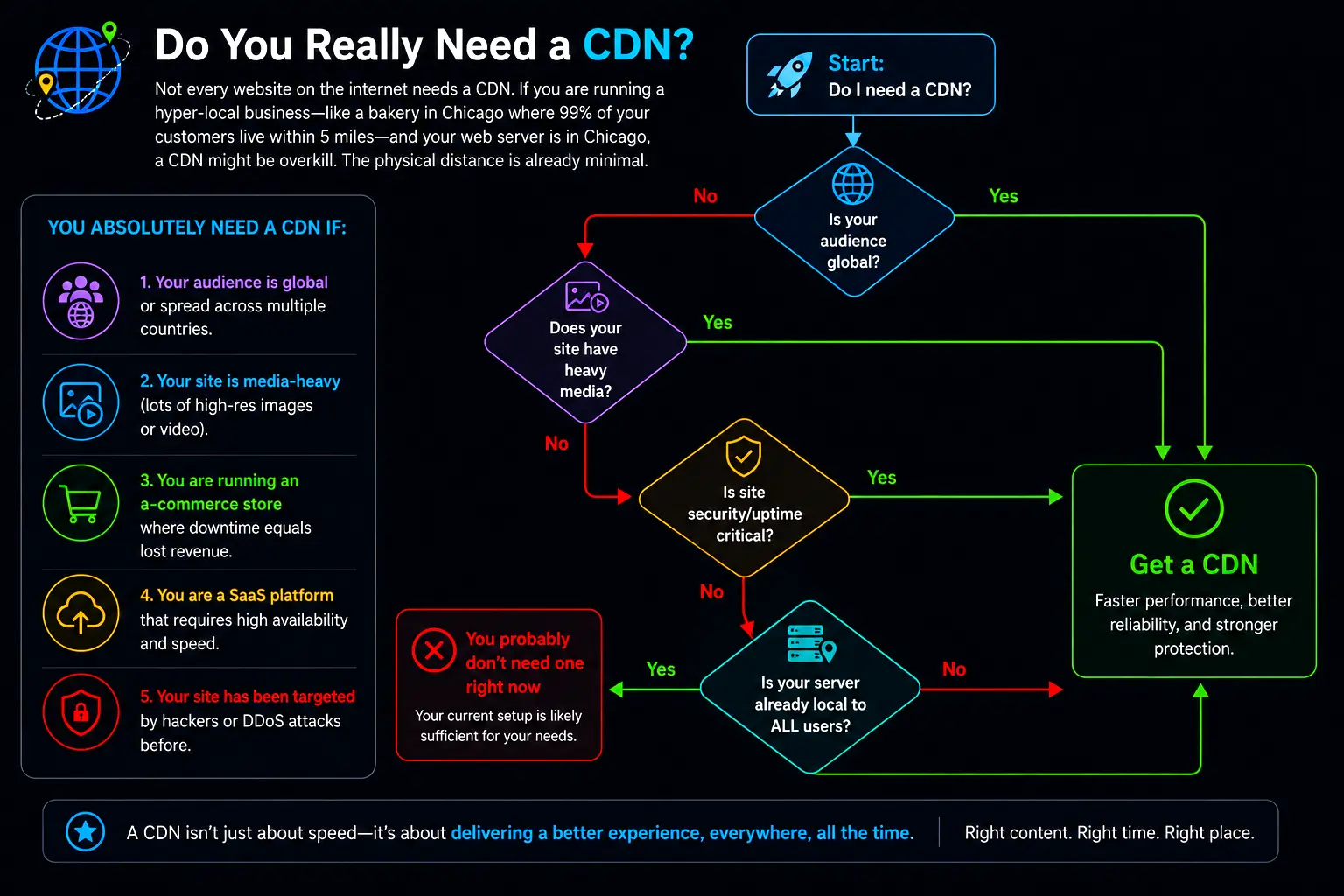
Not every website on the internet needs a CDN. If you are running a hyper-local business—like a bakery in Chicago where 99% of your customers live within 5 miles—and your web server is in Chicago, a CDN might be overkill. The physical distance is already minimal.
However, you absolutely need a CDN if:
- Your audience is global or spread across multiple countries.
- Your site is media-heavy (lots of high-res images or video).
- You are running an e-commerce store where downtime equals lost revenue.
- You are a SaaS platform that requires high availability and speed.
- Your site has been targeted by hackers or DDoS attacks before.
How to Choose the Right CDN
When I finally decided to get a CDN for the leather store, I was overwhelmed by the options. Here are the main things you should look for:
- Network Size (PoPs): Where are their servers located? If your audience is primarily in South America, make sure the CDN provider has a strong presence there.
- Ease of Use: Some CDNs require complex configurations and coding. Others (like Cloudflare) offer a simple dashboard where you just plug in your domain and flip a switch. For beginners, ease of setup is paramount.
- Security Features: Look for built-in WAF (Web Application Firewall), DDoS mitigation, and free SSL certificates.
- Pricing: CDNs range from completely free (basic tiers) to thousands of dollars a month for enterprise streaming. Most small-to-medium businesses can get by beautifully on a $20/month plan.
Some of the most popular players in the space include Cloudflare (incredible free tier, very beginner-friendly), Fastly (loved by developers for its instant cache purging), Amazon CloudFront (great if you are already in the AWS ecosystem), and Akamai (the granddaddy of CDNs, used by massive enterprises).
The Shield Effect: CDNs and DDoS Attacks
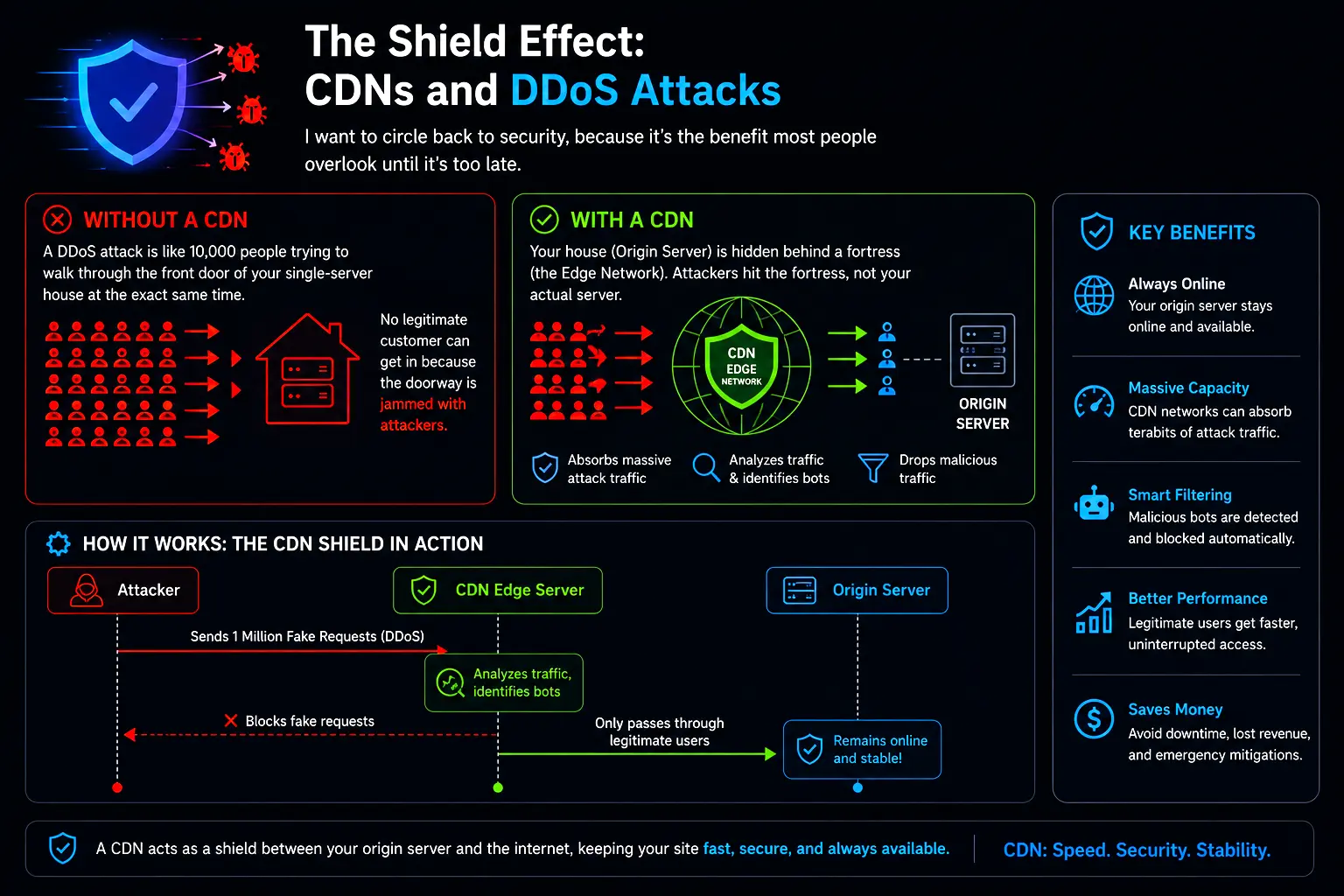
I want to circle back to security, because it’s the benefit most people overlook until it’s too late.
A DDoS (Distributed Denial of Service) attack is like 10,000 people trying to walk through the front door of your single-server house at the exact same time. No legitimate customer can get in because the doorway is jammed with attackers.
When you use a CDN, your house (Origin Server) is hidden behind a fortress (the Edge Network). If an attacker tries to flood your site, they are attacking the Edge Server, not your Origin Server. Because CDN providers have massive, incredibly powerful networks, they can easily absorb the traffic of a DDoS attack. Furthermore, their systems analyze the incoming traffic, identify the malicious bots, and drop them before they can clog up the pipes.
Wrapping It All Up
Learning about CDNs was a turning point in my career. I went from building websites that buckled under pressure to building resilient, lightning-fast applications that could handle traffic from anywhere in the world.
To summarize, a Content Delivery Network is a group of geographically distributed servers that work together to provide fast delivery of internet content. It matters because it lowers latency by shortening the physical distance between the user and the server, it absorbs traffic spikes to keep your site online, it shields your Origin Server from malicious DDoS attacks, and it lowers your bandwidth costs through caching.
Whether you’re running a personal blog or a booming e-commerce empire, if you want your site to be fast, secure, and reliable for users around the globe, integrating a CDN isn’t just an option anymore—it’s a necessity.
References & Further Reading:
FAQs
What is a CDN in the simplest terms?
Instead of making everyone in the world drive to your one main roastery in Seattle to get a cup of coffee, you open smaller shops in every major city. Now, a customer in London gets their coffee locally in minutes instead of waiting days for it to ship from Seattle. A CDN does exactly that for your website—it makes copies of your site and puts them on local servers all over the world so visitors get your pages instantly.
Does a CDN replace my web hosting?
Not at all! You still absolutely need your main web host (your Origin Server). Your host is where your website actually “lives”—it holds your database, your main files, and runs the backend of your site. A CDN just works alongside your host, acting like a helpful middleman that hands out copies of your site to visitors so your main host doesn’t get overwhelmed.
How does a CDN actually make my site faster?
It’s all about physical distance. Data travels at the speed of light, but when it has to cross oceans and continents through various cables and routers, those milliseconds add up (this delay is called latency). By putting a copy of your site on a server near the user—like in their own city or country—the data only has to travel a few miles instead of thousands of miles. Shorter distance equals faster load times.
Is a CDN only for massive, global websites?
Nope! While giant companies like Netflix and Amazon rely heavily on CDNs, they are incredibly useful for small businesses, too. Even if your audience is mostly in one country, a CDN still provides amazing security benefits (like hiding your server’s IP and blocking hackers) and can handle sudden traffic spikes if your site ever goes viral. Plus, many CDNs have free tiers that make them totally accessible for personal blogs.
Will a CDN mess up my shopping cart or user logins?
Don’t worry, it won’t! CDNs are smart. They know that things like images, logos, and CSS files never change from person to person, so they cache (save) those. But they also know that a shopping cart or a private user dashboard is unique to you. The CDN passes those dynamic, personalized requests straight through to your main server, so everything stays private and works exactly as it should.
What happens if I update my website? Will the CDN show the old version?
Sometimes, yes, but only for a little while. When you update a file, the CDN might still hold onto the old copy until its “Time to Live” (TTL) expires—kind of like how milk expires in the fridge. Once it expires, the CDN grabs your fresh update. If you make an update and need it to show up immediately (like changing a wrong phone number), you can just hit the “Purge Cache” button in your CDN dashboard. This instantly deletes all the old copies and forces the CDN to fetch your new one.
How does a CDN stop hackers and DDoS attacks?
It acts like a bouncer at a club. Normally, a hacker can find your main server’s address and send millions of fake traffic requests to crash it (a DDoS attack). When you use a CDN, your main server’s address is hidden. Hackers only see the CDN. Because CDNs have massive, powerful networks all over the world, if a hacker tries to flood you with traffic, the CDN just absorbs the hit at the edge and blocks the bad traffic before it ever reaches your actual server.
Can a CDN cause my website to go down?
It’s very rare. In fact, CDNs usually prevent your site from going down because if your main server has a glitch, the CDN can often serve up a saved copy of your site so visitors don’t see a blank error page. However, if the CDN itself has a massive global outage (which makes the news when it happens), your site might become unreachable. Fortunately, the big CDN providers have so much redundancy built-in that this hardly ever happens.