Have you ever ordered a pizza and just sat on the couch waiting? You don’t call the pizza place every five minutes asking, “Is it done yet? How about now?” That would be incredibly annoying for both you and the restaurant. Instead, you give them your phone number, and they call you when the delivery guy is at your door.
In the world of software, that phone call is exactly what a webhook is.
If you are building apps, automating workflows, or just trying to get different software tools to talk to each other, you have probably heard the term “webhook” thrown around. They sound incredibly technical, but by the end of this article, you are going to realize they are just a incredibly simple, common-sense way for computers to communicate.
TL;DR
The Problem: The Annoying Roommate (Polling)
To really understand why webhooks are so awesome, we first need to talk about the old way of doing things. In the tech world, the old way is called Polling.
Imagine you have a spreadsheet on your computer, and you want to know every time someone fills out a contact form on your website. Without webhooks, the only way your spreadsheet can know about a new form submission is if it constantly asks the website, “Hey, any new forms? How about now? Now? Any new forms yet?”
This is polling. Your app is acting like an annoying roommate constantly opening the fridge to see if there is new food, instead of just waiting for someone to say, “Dinner’s ready!”
Polling has some massive downsides:
- It wastes resources: You are making server requests even when nothing is happening.
- It’s slow: If you only check every 5 minutes, you could be 5 minutes late in getting the data.
- It causes traffic jams: If thousands of apps are constantly asking your website for updates, your website might crash under the pressure.
There had to be a better way. And that brings us to the hero of our story.
What is a Webhook?
A webhook is a way for an app to provide other applications with real-time information. Instead of you asking for data, the app pushes the data to you the second something happens.
It’s an event-driven notification system.
Going back to our pizza analogy:
- The Event: The pizza is out for delivery.
- The Webhook: The restaurant calling your phone.
- The Payload: The delivery guy saying, “I’m at the door with your pepperoni pizza.”
In technical terms, a webhook is simply an HTTP POST request triggered by an event. That’s it. No magic, no crazy algorithms. It’s just one computer sending a text message (data) to another computer’s specific URL the moment something happens.
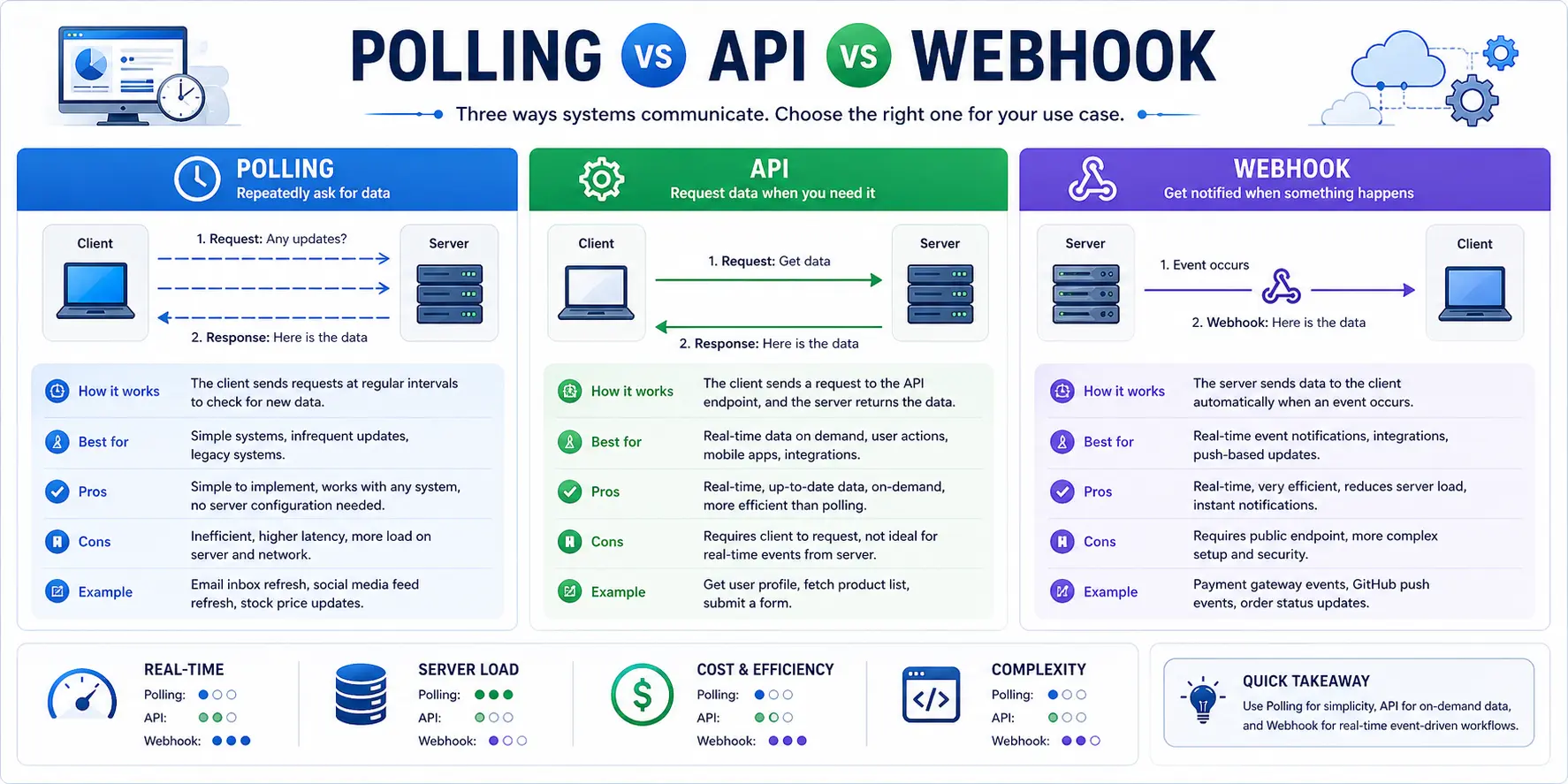
Polling vs. Webhooks: The Visual Difference
Let’s look at how these two methods differ in how they handle data.
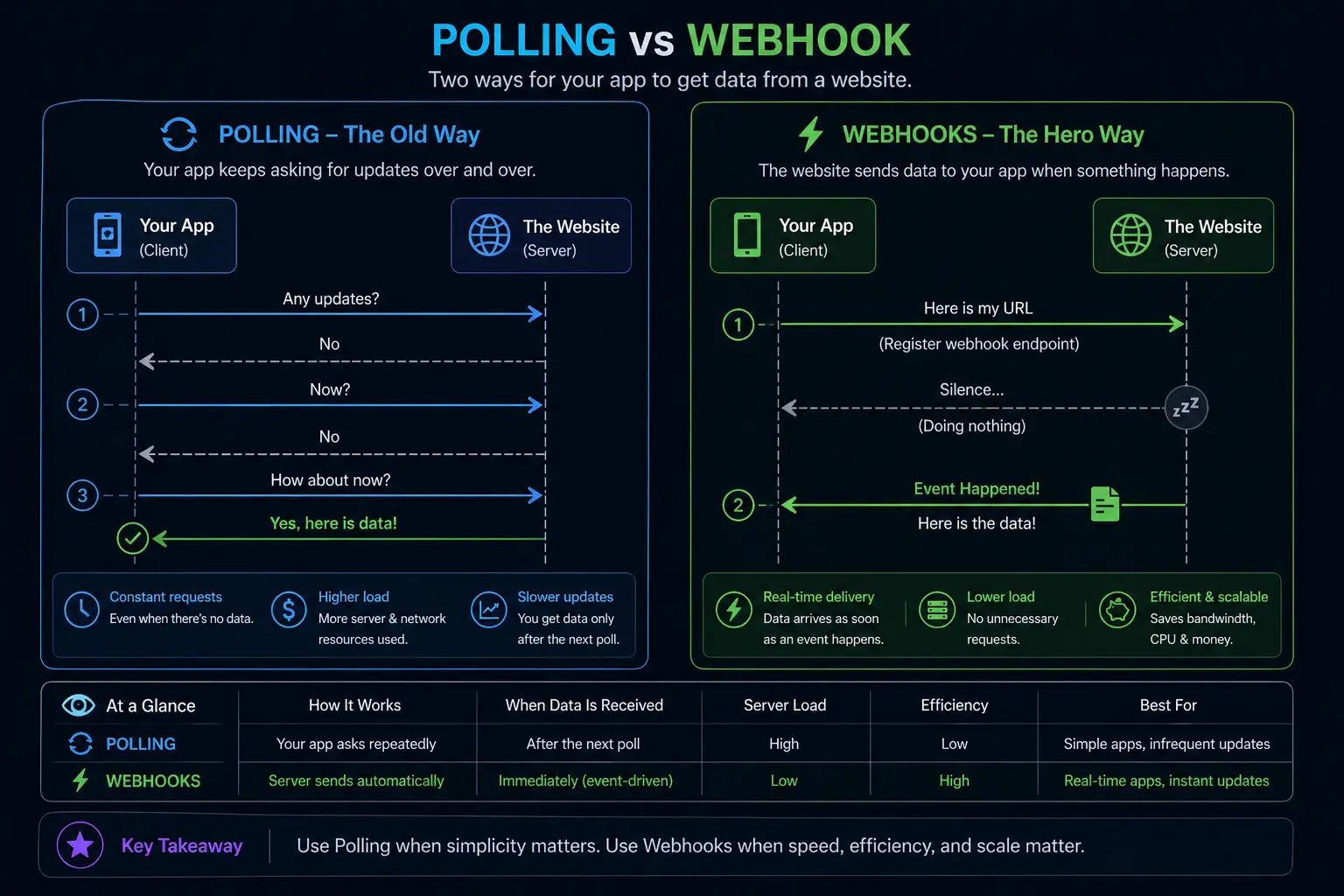
See the difference? Webhooks are quiet until they actually have something useful to say.
Under the Hood: How Webhooks Actually Work
Let’s break down the anatomy of a webhook. There are three main players in this game:
- The Sender (The Source): The app where the event happens (e.g., Stripe, GitHub, Shopify).
- The Receiver (Your App): The app waiting to hear about the event (e.g., your custom database, a Slack channel).
- The Endpoint (The URL): The specific “doorbell” on your app that the sender rings.
The Step-by-Step Flow
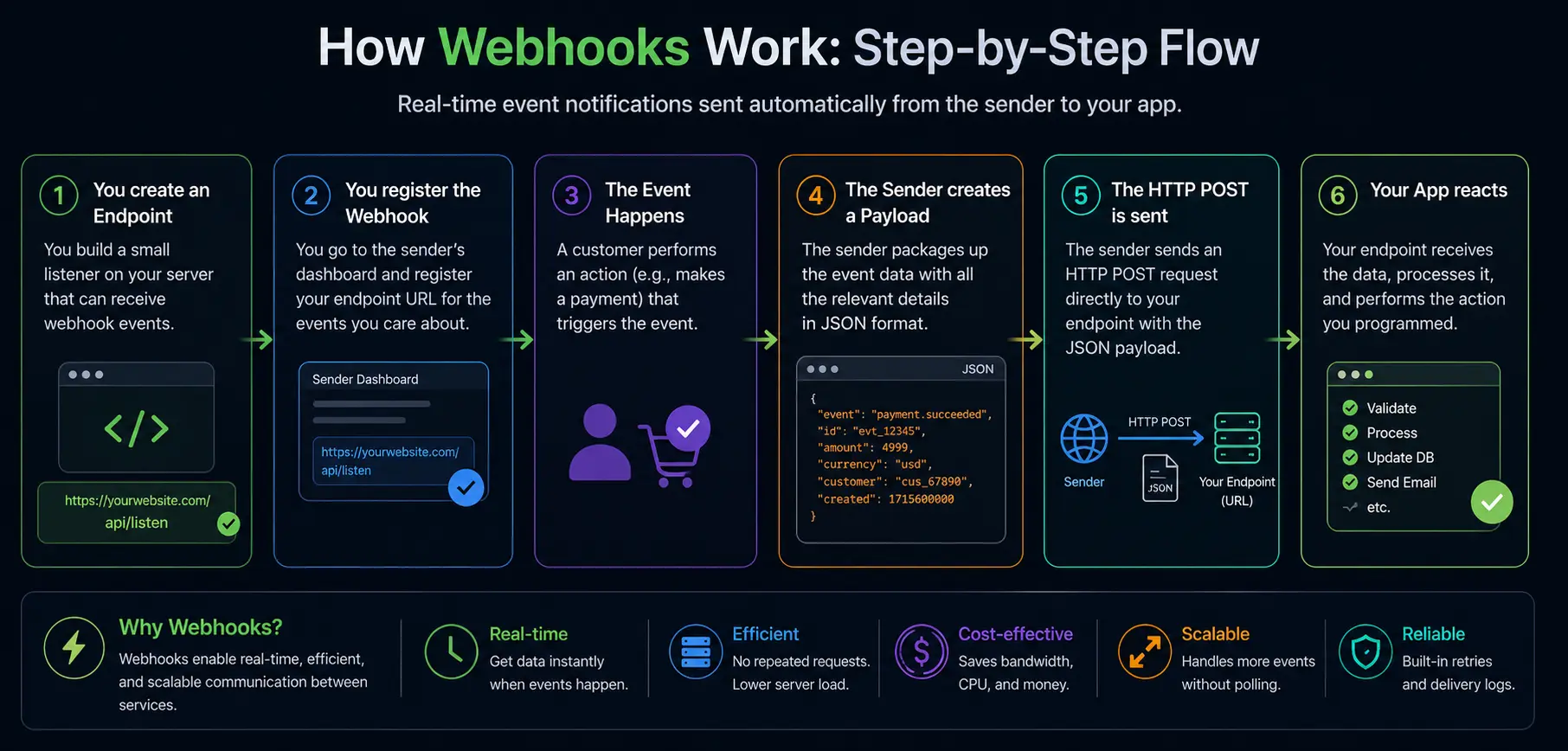
Here is exactly what happens when a webhook fires:
- You create an Endpoint: You build a small listener on your server. Let’s say it’s
https://yourwebsite.com/api/listen. - You register the Webhook: You go into the Sender’s dashboard (like Stripe) and say, “Hey, when a payment happens, send a message to
https://yourwebsite.com/api/listen.” - The Event Happens: A customer buys something on your site.
- The Sender creates a Payload: The Sender packages up all the details of the purchase (name, amount, date) into a formatted text block, usually in JSON format.
- The HTTP POST is sent: The Sender fires that JSON data directly at your URL.
- Your App reacts: Your endpoint receives the data, reads it, and does whatever you programmed it to do (like sending a “Thank You” email).
The Webhook Dictionary: Key Terms to Know
If you want to sound like you know what you’re talking about at tech meetups, memorize this table.
| Tech Term | Plain English Translation | Example |
|---|---|---|
| Endpoint | The specific web address where the data is sent. | https://myapp.com/webhooks/stripe |
| Event | The specific action that triggers the webhook. | payment_succeeded, user_created |
| Payload | The actual data packet sent over the internet. Usually formatted in JSON. | {"amount": 50, "currency": "USD"} |
| Signature | A secret digital stamp proving the sender is actually who they claim to be. | A long string of encrypted letters and numbers. |
Real-World Examples: Where Do You See Webhooks?
You interact with the results of webhooks every single day, even if you don’t realize it. Let’s look at some common scenarios.
1. The “New Sale” Alert (Slack + Shopify)
Imagine you run an online store. You can’t sit on Shopify all day refreshing the orders page. Instead, you set up a webhook in Shopify that says: “When a new order is created, send the details to this specific Slack channel.”
- The Event: New Order.
- The Payload: Customer name, item bought, total price.
- The Result: Your phone buzzes, and Slack says: “Cha-ching! John just bought a pair of shoes for $80!”
2. Automating Your Email List (Mailchimp + Your Website)
You have a landing page where people download a free PDF in exchange for their email. You don’t want to manually copy-paste those emails into Mailchimp every day.
- The Event: Form submitted.
- The Payload: First name, email address.
- The Result: The webhook fires, Mailchimp receives the payload, and instantly adds the person to your newsletter list.
3. Continuous Integration (GitHub + Your Server)
When a developer writes code and pushes it to GitHub, they don’t want to manually log into their live server to upload the files.
- The Event: Code pushed to the
mainbranch. - The Payload: The code files and the branch name.
- The Result: The webhook hits the live server, the server pulls the new code, and the website updates automatically.
Zero to Hero: Building Your First Webhook Receiver
Let’s get our hands a little dirty. You don’t need to be a senior software engineer to understand how to receive a webhook. Let’s look at a super simple example using Node.js (a popular JavaScript backend).
Don’t worry if you don’t code much, just read the comments to understand the logic.
// We are using Express, a common tool for building web servers
const express = require('express');
const app = express();

// This line is CRITICAL. It tells the server to translate incoming JSON data into readable JavaScript
app.use(express.json());

// This is our ENDPOINT. We are listening for a POST request at this specific URL.
app.post('/my-secret-webhook-url', (request, response) => {

    // 1. The Payload arrives! Let's look at what we got.
    const eventData = request.body;
    console.log("Ding dong! Webhook received!");
    console.log("Event Type:", eventData.type);
    console.log("Customer Email:", eventData.customer_email);

    // 2. Do something with the data (e.g., save to database, send an email)
    // ... your custom logic goes here ...

    // 3. THE MOST IMPORTANT PART: You MUST respond with a 200 OK status.
    // If you don't, the sender thinks you didn't get it and will keep trying!
    response.status(200).send('Got it, thanks!');
});

// Start the server listening on port 3000
app.listen(3000, () => console.log('Server is ready for webhooks...'));See? It’s not scary. You are literally just setting up a mailbox (app.post), opening the letter (request.body), reading it, and then yelling back “Got it!” (response.status(200)).
The Dark Side: Securing Your Webhooks
Here is a scary thought: If you set up a webhook endpoint at https://yourapp.com/webhook, anyone on the internet who figures out that URL can send fake data to it.
Imagine someone figuring out your Shopify webhook URL and sending thousands of fake “New Order” payloads. Your app might accidentally email fake receipts to people or mess up your inventory.
Because webhooks are essentially open doors, you have to add a deadbolt. This is called Webhook Verification.
The Secret Handshake (HMAC Signatures)
Most reputable companies (like Stripe, GitHub, PayPal) secure their webhooks using something called an HMAC signature (Hash-based Message Authentication Code). Here is how it works in plain English:
- When you register the webhook, the sender gives you a Secret Key (like a password).
- When the sender creates the payload, they use that Secret Key to mathematically scramble the payload data into a unique fingerprint (the Signature).
- They send both the payload AND the signature to your endpoint.
- Your server takes the payload, uses your copy of the Secret Key, and scrambles it the exact same way.
- The Check: If your scrambled fingerprint perfectly matches the sender’s fingerprint, you know the data is legit. If a hacker changes even a single comma in the payload, the fingerprints won’t match, and you reject the request.
If you are building webhooks, never skip this step. Always verify the signature before processing the data.
When Things Go Wrong: Retry Logic and Timeouts
The internet is messy. Cables get cut, servers crash, and your app might be temporarily rebooting right when a webhook tries to hit it. What happens then?
If your server is down, it can’t send that all-important 200 OK message back to the sender. When the sender doesn’t get a “Got it” reply, it assumes you didn’t receive the data.
This triggers something called Retry Logic.
How Retries Work
Most good webhook systems will try to send the payload again. But they don’t spam you. They use a smart system called Exponential Backoff.
- Attempt 1: Fails. Wait 1 minute.
- Attempt 2: Fails. Wait 5 minutes.
- Attempt 3: Fails. Wait 15 minutes.
- Attempt 4: Fails. Wait 1 hour.
- Attempt 5: Fails. Gives up permanently.
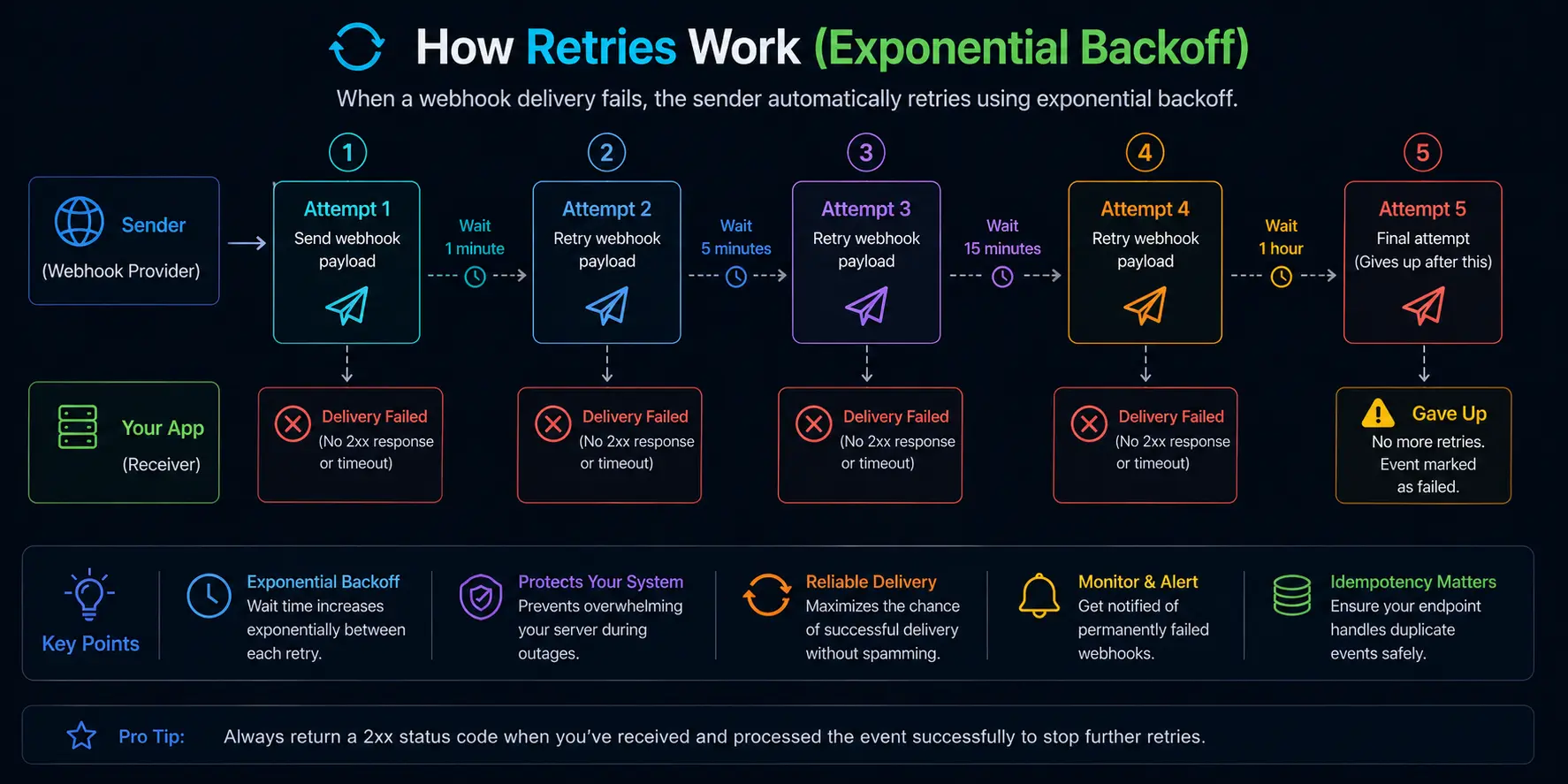
Pro Tip for Heroes: If your endpoint takes a long time to process the data (like generating a massive PDF report), the sender might “time out” before you finish and mark it as a failure. The best practice is to immediately return the 200 OK status, and then process the data in the background on your server. It’s like answering the doorbell immediately to say “I’ll take the pizza,” and then taking your time heating it up in the oven.
Clearing the Confusion: Webhooks vs. APIs
This is where almost every beginner gets tripped up. People often ask, “Isn’t a webhook just an API?”
No. They are related, but they serve entirely different purposes.
- An API (Application Programming Interface) is like a waiter at a restaurant. You ask the waiter for the menu, and the waiter brings it back. It is Request-Response. If you don’t ask, you don’t get.
- A Webhook is like a newspaper delivery. You subscribe once, and the publisher throws the paper on your porch every morning whether you asked for it that day or not. It is Event-Driven Push.
Here is a quick comparison to keep in your back pocket:
| Feature | REST API | Webhook |
|---|---|---|
| Who starts the conversation? | You (Your App) | The Sender App |
| Data Flow | Pull (You ask for data) | Push (Data is sent to you) |
| Best used for… | Fetching specific data on demand (e.g., getting a user’s profile). | Real-time notifications (e.g., user updated their profile). |
| Resource Usage | High (wastes requests checking for updates). | Low (only talks when necessary). |
| Need a constant connection? | No. | No (uses standard HTTP). |
The Golden Rule: Use an API when you need to ask a question. Use a Webhook when they need to tell you an answer.
Advanced Tactics: How to Look Like a Pro
If you want to take your webhook game from beginner to absolute hero, you need to start implementing a few advanced patterns.
1. Idempotency (Handling Duplicate Webhooks)
Because of the retry logic we talked about earlier, you will eventually receive the exact same webhook twice. It’s not a bug; it’s a feature designed to ensure no data is lost.
But what if the webhook is “Charge Customer $100”? If your app processes it twice, the customer gets charged $200. That’s a disaster.
To fix this, your endpoints must be Idempotent. This is a fancy math word that simply means: “Processing the same request multiple times produces the same result as processing it once.”
How to do it: Always look for an id or event_id inside the payload. Before you process the webhook, check your database to see if you have already processed an event with that exact ID. If you have, ignore it. If you haven’t, process it and save the ID.
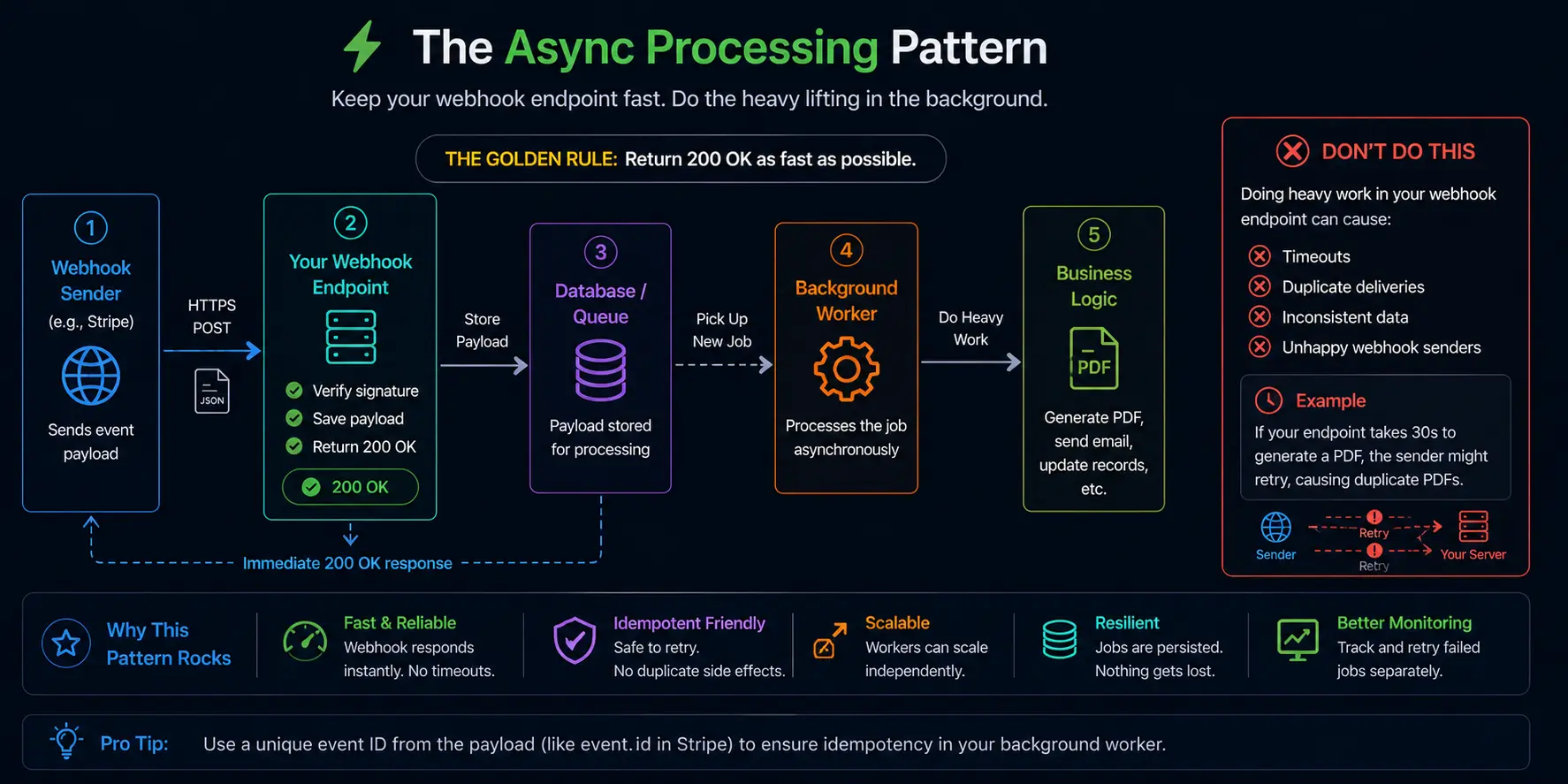
2. The Async Processing Pattern
I mentioned this briefly earlier, but it’s worth highlighting. Never do heavy lifting inside your webhook endpoint.
If Stripe sends you a payload, and your server takes 30 seconds to generate an invoice PDF before sending back a 200 OK, Stripe is going to assume the delivery failed and send the payload again. Now you are generating two PDFs.
Instead, your endpoint should be incredibly dumb and fast. It should do exactly three things:
- Verify the signature.
- Save the payload to your database (or a queue system like Redis/RabbitMQ).
- Return
200 OKimmediately.
Then, have a separate background worker on your server that watches the database for new entries and handles the heavy PDF generation safely.
3. Keep a Log of Everything
When webhooks break, they break in weird ways. You will wake up one day and a customer will say, “I paid but didn’t get my download link.”
You need to be able to play detective. Always log the raw, unedited payload of every webhook you receive into a table in your database. Don’t just log the important fields; log the whole JSON block. When things go wrong, this log is your only way to figure out what the sender actually sent you versus what your app thought it received.
Troubleshooting Common Webhook Nightmares
Even heroes face villains. Here are the most common webhook problems you’ll run into and how to defeat them.
- The 404 Not Found Error: This means the sender is trying to ring a doorbell that doesn’t exist. Double-check the URL you registered. Did you accidentally type
https://myapp.com/api/webhoook(three o’s) instead of two? - The 401 or 403 Forbidden Error: Your server is rejecting the request. 99% of the time, this is because your signature verification is failing. Check that the Secret Key on your server matches the one in the sender’s dashboard exactly. Sometimes copying and pasting adds hidden spaces at the end of the key.
- The 410 Gone Error: This means the sender has given up trying to reach you. The retry limit was maxed out. You’ll usually have to go into the sender’s dashboard, find the failed event, and manually click a “Resend Webhook” button.
- The 500 Internal Server Error: This is your app crashing while trying to read the payload. Maybe the sender changed the format of the JSON and your code is trying to read a field that doesn’t exist anymore. Always use
try/catchblocks in your code so your app doesn’t completely crash on a bad payload.
Wrapping Up
Look at you. You started this article wondering what the heck a webhook was, and now you understand HTTP POST requests, payload structures, HMAC signature verification, exponential backoff retry logic, and idempotency.
Webhooks are one of the most powerful tools in modern software development. They are the glue that holds the disconnected apps of the internet together. By shifting from a “pull” mindset to a “push” mindset, you can build systems that are faster, cheaper, and remarkably real-time.
The next time you set up an automation between Slack, Stripe, and your own custom database, you won’t be blindly clicking buttons in a dashboard hoping it works. You’ll know exactly what is happening behind the scenes: a simple, elegant HTTP request carrying a JSON payload, ringing the doorbell of your server.
Build something awesome with them.
References
FAQs
What exactly is a webhook ?
Think of a webhook as an automatic text message from one app to another. Instead of your app constantly asking, “Did anything happen yet?”, the other app sends you a message the exact second something occurs.
Is a webhook just another word for an API?
No, they are cousins but they do totally different jobs. An API is like a restaurant menu—you ask the waiter for a burger, and the waiter brings it to you. A webhook is like a newspaper delivery—you subscribe once, and they throw the paper on your porch every morning without you having to ask for it each day.
Do I need to be a programmer to set up webhooks?
It really depends on what you are doing. If you are using automation tools like Zapier or Make, you can use webhooks just by clicking buttons and filling out boxes. But if you want to receive webhooks directly into your own custom software, yes, you (or a developer) will need to write a little bit of code to create a “listening” page to catch the data.
What happens if my website is down when a webhook tries to send data?
The sending app is smart enough to know you didn’t answer. It will wait a little bit and try again. It will usually keep trying a few times with longer pauses in between. If your site stays down for too long, it will eventually give up and mark the message as failed.
Can hackers send fake data to my webhook URL?
Yes, if you leave the door wide open. That is why good sending apps use a secret password to create a unique digital stamp for every message. Your app uses that same secret password to check the stamp. If the math doesn’t match, your app knows it is a fake and tosses the data in the trash.
Why did I get the exact same webhook notification twice?
This is totally normal and actually a safety feature. If the sending app doesn’t hear your app say “Got it!” fast enough, it assumes the internet ate the message and sends a backup just to be safe. Your app should be smart enough to recognize duplicates and ignore the second one so you don’t accidentally process the same order twice.
What are people talking about when they say “the payload”?
The payload is simply the actual stuff inside the box. When the app sends the text message (the webhook), the payload is the data inside that message—like the customer’s name, the order total, and the date. It is usually formatted in a very simple, easy-to-read text layout called JSON.
Do I have to pay to use webhooks?
The technology itself is completely free; it is just a standard way computers talk to each other over the internet. However, the software tool you are using might have limits. For example, a free plan on a software platform might only let you set up 5 webhooks, and you would need to upgrade to a paid plan if you need 50.
Can I send webhooks between everyday tools like Gmail, Slack, and Google Sheets?
Absolutely. You do not have to build custom software to enjoy webhooks. Automation platforms act as the middleman. You can tell the platform, “When Gmail gets a specific email, send a webhook to Slack,” and the platform handles all the confusing technical stuff for you.
How do I test a webhook without breaking my live website?
You never want to test on your live site. There are free websites out there that give you a temporary, fake URL just for testing. You plug that fake URL into your webhook settings, trigger the event, and watch the testing website show you exactly what data arrived. Once it looks perfect, you swap the fake URL for your real one.