Hey there. If you’ve spent any amount of time building software, integrating systems, or just trying to make two different apps talk to each other, you’ve probably bumped into these two terms: API and Webhook or Webhook vs API.
I remember when I first started out as a developer. I was building a simple e-commerce application. I needed to charge a credit card and then update my database when the payment was successful. I thought I had it all figured out by just using an API. But what followed was a messy nightmare of endless checking, wasted server resources, and delayed updates. It wasn’t until a senior developer sat me down and explained the magic of Webhooks that my approach to integrations changed forever.
In this article, I’m going to walk you through the exact differences between APIs and Webhooks. We’ll skip the overly academic jargon and look at this through the lens of real-world experience. I’ll share examples, show you some code, and by the end, you’ll know exactly which tool to pull out of your developer toolbox for any given situation.
Let’s dive in.
Table of Contents
The Pizza Analogy: Setting the Stage
Before we get into the technical weeds, let me explain this using an analogy that has never failed me when explaining this to clients or junior devs.
Imagine you order a pizza.
The API Approach:
You call the pizzeria. You place your order. Then, every two minutes, you pick up your phone, call the pizzeria, and ask, “Is my pizza ready?” They reply, “No, it’s still in the oven.” You do this 15 times until finally, they say, “Yes, it’s ready, you can come pick it up.”
This is how an API works. You (the client) have to continuously ask the server for an update. This is called Polling. It’s exhausting for both you and the pizzeria.
The Webhook Approach:
You call the pizzeria and place your order. Then, you hang up and go watch Netflix. When the pizza is put in the box, the pizzeria calls you and says, “Hey, your pizza is ready, we are sending it to your house.”
This is a Webhook. The server sends data to you automatically when an event occurs. You don’t have to ask. You just wait for the phone to ring.
Keep this analogy in mind as we break down the technical details.
What is an API? (The Pull Mechanism)
API stands for Application Programming Interface. In simple terms, an API is a messenger that takes requests from one application, delivers it to another application, waits for a response, and brings that response back to you.
When you use an API, you are engaging in Synchronous communication. This means you ask a question, and you expect an immediate answer. You don’t hang up the phone until the pizzeria gives you the status.
How APIs Work in Practice
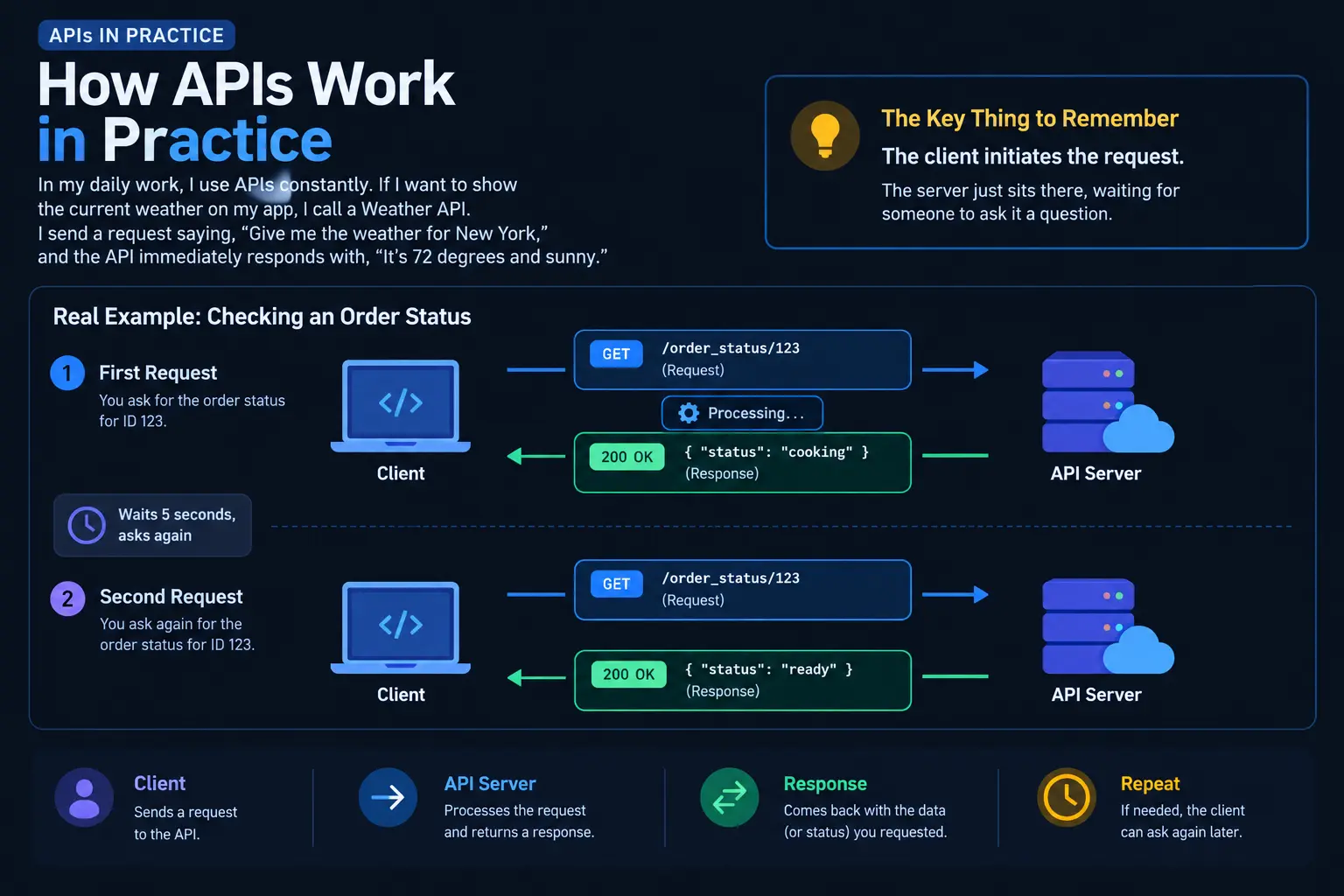
In my daily work, I use APIs constantly. If I want to show the current weather on my app, I call a Weather API. I send a request saying, “Give me the weather for New York,” and the API immediately responds with, “It’s 72 degrees and sunny.”
The defining characteristic of an API is that the client initiates the request. The server just sits there, waiting for someone to ask it a question.
Here is a visual representation of how an API handles communication:
The Problem with APIs: The Polling Trap
APIs are perfect for fetching data that already exists. But they are terrible for finding out when an event happens.
Let’s go back to my e-commerce payment example. If I want to know when Stripe (the payment processor) has successfully charged my customer’s card, I can’t just ask Stripe’s API once. The payment might take 2 seconds, or it might take 5 minutes because the bank is slow.
If I rely solely on an API, I have to write a loop:
1. Ask Stripe: "Is payment done?" -> "No."

Wait 10 seconds.

2. Ask Stripe: "Is payment done?" -> "No."

Wait 10 seconds.

3. Ask Stripe: "Is payment done?" -> "Yes."
This is called Polling. It is highly inefficient. It clogs up your server resources, it hits the API provider’s rate limits, and it introduces latency.
What is a Webhook? (The Push Mechanism)
A Webhook (sometimes called a “Reverse API”) flips the script entirely. Instead of you asking the server for updates, you tell the server, “Here is my phone number. Call me when something happens.”
Webhooks are Asynchronous. You send your request to the API to start a process, and then you immediately hang up. You don’t wait around. Later, when the process is finished, the server will send an HTTP POST request to a specific URL that you provided. This URL is your Webhook Endpoint.
How Webhooks Work in Practice
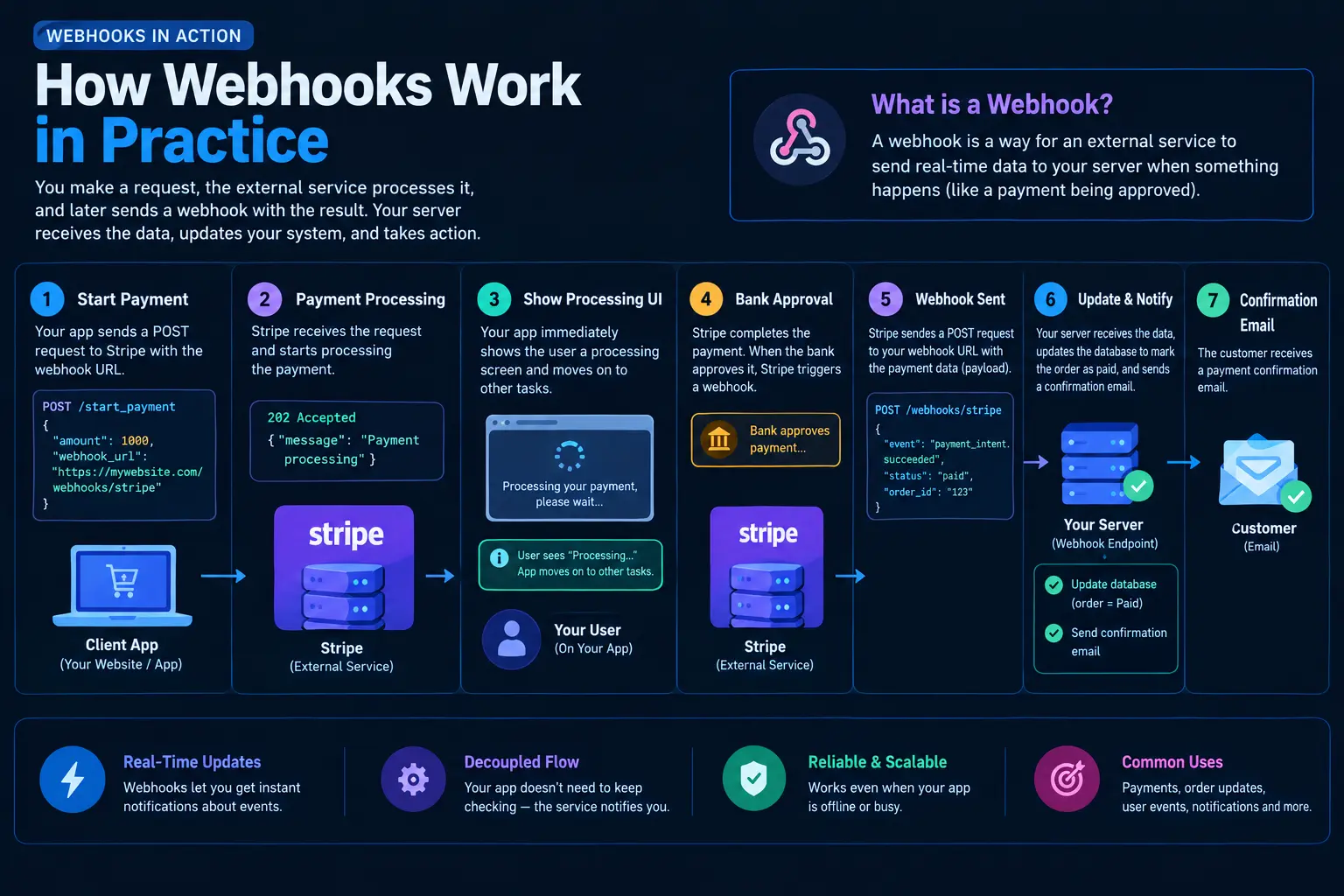
When a customer buys a product on my site, I send an API request to Stripe to charge the card. But in that request, I include a parameter: webhook_url = "https://mywebsite.com/webhooks/stripe".
I then immediately show the user a screen that says, “Processing your payment, please wait…”
Behind the scenes, Stripe processes the payment. When the bank approves it, Stripe triggers a Webhook. Stripe’s servers send a Payload (a package of JSON data) to my https://mywebsite.com/webhooks/stripe URL.
My server receives this data, updates my database to mark the order as “Paid,” and sends a confirmation email to the user.
Here is the flow of a Webhook:
The Power of Event-Driven Architecture
Webhooks are the backbone of what we call Event-Driven Architecture. You set up systems to react to events rather than constantly checking for them.
I use webhooks for everything nowadays:
- GitHub sending a webhook to my CI/CD pipeline when someone pushes new code.
- Shopify sending a webhook when inventory drops below zero.
- Slack sending a webhook when a specific keyword is mentioned in a channel.
They are incredibly powerful, but they do come with their own set of headaches—which we’ll get to shortly.
The Showdown: Webhook vs API
To make this super clear, let’s put them side-by-side in a comparison table. This is the table I keep taped to my desk for quick reference.
| Feature | API (Application Programming Interface) | Webhook (Reverse API) |
|---|---|---|
| Communication Type | Synchronous (Request/Response) | Asynchronous (Event-driven) |
| Who Initiates? | The Client asks for data. | The Server pushes data to the client. |
| Analogy | Calling the pizzeria to ask if the pizza is ready. | The pizzeria calling you when the pizza is ready. |
| Data Transfer | Client requests specific data. | Server sends a Payload of data automatically. |
| Real-time Updates? | Only if you Poll continuously (inefficient). | Yes, near real-time updates as soon as an event happens. |
| Best Used For | Fetching current state, creating records, simple queries. | Receiving notifications of state changes, background processing. |
| Implementation | Easier to test and debug. | Harder to test; requires a publicly accessible URL. |
When to Use an API vs a Webhook
Knowing the difference is only half the battle. Knowing when to use which is what makes you a great developer. Let me share some rules of thumb I’ve developed over the years.
When to use an API:
You should use an API when you need to perform a direct action or fetch data that already exists.
- Fetching User Profiles: When a user logs into your app, you need their profile data right now. You make an API call to your database.
- Searching a Database: If a user types “blue shoes” in a search bar, you can’t wait for a webhook. You need the results immediately.
- Creating a Record: When you create a new post on Facebook, your app sends a POST request to Facebook’s API to create that post.
When to use a Webhook:
You should use a Webhook when you are waiting for an event to occur that you have no control over, and the timing is unpredictable.
- Payment Status Updates: As mentioned, waiting for banks to clear funds. (e.g., Stripe, PayPal).
- Third-Party App Integrations: When someone signs up for your newsletter via Mailchimp, Mailchimp sends a webhook to your app so you can send them a custom welcome email.
- IoT (Internet of Things): When a temperature sensor in a warehouse goes above 80 degrees, the sensor sends a webhook to trigger the cooling system.
Let’s Look at Some Code
Sometimes seeing the code makes the concept click. Let’s look at how we would handle both an API call and a Webhook receiver using Python (Flask).
Example 1: Making an API Call
Here, we are the client. We are asking an external service for the weather. We initiate the request.
import requests

# This is an API call. We are PULLING data.
def get_current_weather(city):
    api_url = f"https://api.weatherapi.com/v1/current.json?key=YOUR_API_KEY&q={city}"

    # We send a request and wait for the response
    response = requests.get(api_url)

    if response.status_code == 200:
        data = response.json()
        return f"The weather in {city} is {data['current']['temp_c']}°C"
    else:
        return "Failed to get weather data."

print(get_current_weather("London"))Example 2: Receiving a Webhook
Here, we are setting up an Endpoint on our server. We are not asking for anything. We are just building a receiver and waiting for an external service (like Stripe) to push data to us.
from flask import Flask, request, jsonify

app = Flask(__name__)

# This is a Webhook receiver. We are receiving PUSHED data.
@app.route('/webhooks/stripe', methods=['POST'])
def handle_stripe_webhook():
    # The data comes to us in the request body
    payload = request.json

    # We check what kind of event happened
    if payload['event_type'] == 'payment_succeeded':
        order_id = payload['data']['order_id']
        amount = payload['data']['amount']

        # Update our database
        print(f"Order {order_id} paid successfully! Amount: {amount}")

        # We must respond with a 200 OK so Stripe knows we got the message
        return jsonify({"status": "success"}), 200

    elif payload['event_type'] == 'payment_failed':
        print("Payment failed. Notify the user.")
        return jsonify({"status": "success"}), 200

if __name__ == '__main__':
    # We run our server, waiting for external services to call it
app.run(port=5000)Notice the difference? In the API example, we reached out. In the Webhook example, we set up a route (/webhooks/stripe) and waited for the external service to hit it.
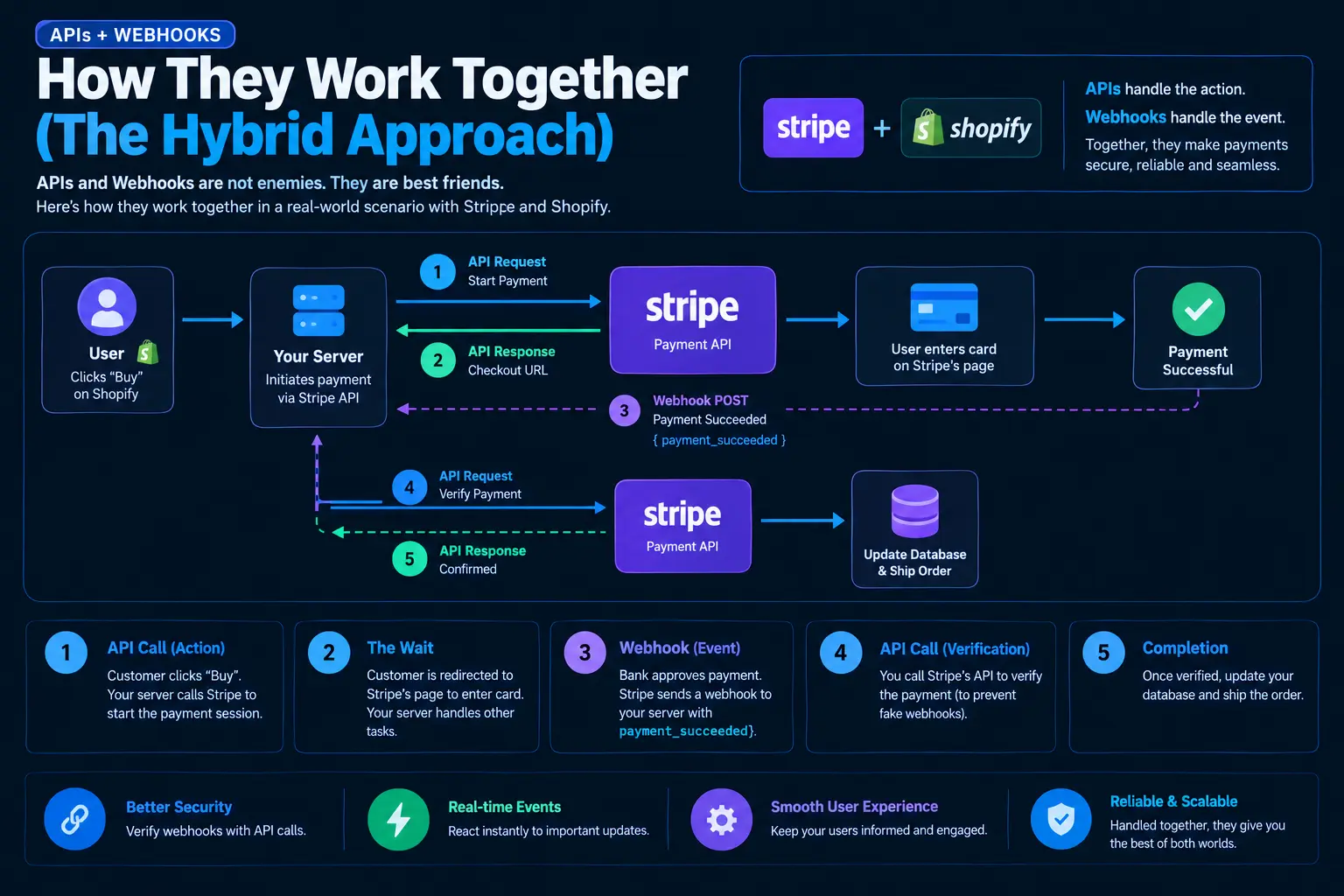
How They Work Together (The Hybrid Approach)
Here is a secret that took me a few years to figure out: APIs and Webhooks are not enemies. They are best friends.
In modern software architecture, you rarely choose just one. You use them together. Let me explain a real-world hybrid scenario involving Stripe (payments) and Shopify (e-commerce).
- The API Call (Action): A customer clicks “Buy” on your Shopify store. Your backend server makes an API call to Stripe to initiate the payment session. Stripe replies via API with a URL to redirect the customer to.
- The Wait: The customer is redirected to Stripe’s page to enter their credit card. Your server moves on to handle other customers.
- The Webhook (Event): The customer types in their card. The bank approves it. Stripe sends a Webhook to your server with the payload
payment_succeeded. - The API Call (Verification): Wait, aren’t we done? No! Good security dictates that when you receive a webhook, you shouldn’t just trust it. You should take the ID from the webhook, and make an API call back to Stripe asking, “Hey, did order 123 actually succeed?” to verify the webhook wasn’t spoofed by a hacker.
- Completion: Once verified via API, you update your database.
Here is a diagram of how this beautiful dance looks:
The Dark Side: Challenges and Pitfalls
I would be doing you a disservice if I only talked about how great these tools are. Both APIs and Webhooks come with their own unique sets of challenges. I’ve lost weekends to these issues, so hopefully, I can save you some pain.
API Challenges
- Rate Limiting: If you poll an API too fast, the provider will cut you off. I once had my IP banned by a currency exchange API because I was checking the rate every millisecond. You have to respect the limits set by the provider.
- Latency: If you are chaining multiple API calls together (e.g., call API A, wait for response, use that data to call API B), the user experience can become sluggish. The wait time adds up.
- Versioning: APIs change. The developers might deprecate an old endpoint. If you aren’t careful, your app will break overnight when they update their version.
Webhook Challenges
Webhooks are notoriously tricky to debug. Because the server initiates the request, you can’t just hit “run” in your local IDE and see what happens.
- The Localhost Problem: If you are developing on your local machine (e.g.,
localhost:5000), an external service like Stripe cannot reach your webhook endpoint because your local machine isn’t exposed to the public internet.- My Solution: I use tools like Ngrok. Ngrok creates a secure tunnel from a public URL directly to your localhost. It’s a lifesaver.
- Security: Anyone could send a POST request to your webhook URL. How do you know it actually came from Stripe and not a malicious hacker trying to trick your system into thinking a payment was made?
- My Solution: Always verify Webhook Signatures. Services like Stripe include a cryptographic hash in the webhook header. You use a secret key to hash the payload yourself and compare it to the header. If they match, it’s legit.
- Missing Webhooks: What if your server is down for maintenance when Stripe tries to send the webhook? The data is lost forever, right?
- My Solution: Good webhook providers have a retry mechanism. If your server returns an error (or doesn’t respond within a few seconds), the provider will wait and try again (e.g., in 5 minutes, then 1 hour, then 6 hours). You must ensure your webhook receiver is Idempotent—meaning if it receives the same webhook twice, it doesn’t accidentally process the order twice.
Final Verdict: Which One Wins?
If you’ve read this far, you already know the answer: neither wins. They serve entirely different purposes.
Think of an API as your proactive worker. It goes out, asks questions, fetches data, and creates things. It is synchronous and direct.
Think of a Webhook as your alarm system. It sits quietly in the background, waiting for a specific event to trigger, and then immediately notifies you so you can take action. It is asynchronous and reactive.
When you are building your next application, ask yourself the Pizza question: Do I need to keep calling the pizzeria to ask if it’s ready (API), or should I just leave them my number and wait for them to call me (Webhook)?
Once you frame the problem that way, the choice becomes incredibly clear. Mastering both of these communication methods is absolutely essential for building modern, scalable, and efficient software systems.
Conclusion
Understanding the distinction between APIs and Webhooks is a rite of passage for any backend developer or system integrator. APIs handle the heavy lifting of synchronous requests, while Webhooks provide the elegant, event-driven backbone for real-time updates. By combining them effectively, you can build robust architectures that don’t waste server resources or frustrate users with latency.
If you want to read more deeply into the technical specifications of these methods, I highly recommend checking out the following resources that I’ve found invaluable over the years:
- Postman’s API Learning Center – A fantastic deep dive into how APIs function and how to test them.
- MDN Web Docs: HTTP Overview – To truly understand APIs and Webhooks, you need to understand the underlying HTTP protocol that carries them.
FAQs
What is the absolute simplest way to remember the difference?
Think of ordering a pizza. An API is when you keep calling the pizzeria every five minutes asking, “Is my pizza ready yet?” A Webhook is when you give them your phone number and go watch TV. They call you the second the pizza goes in the delivery box. APIs make you “pull” the information; Webhooks have the information “pushed” to you.
Can I just use an API for everything and skip webhooks?
You can, but it’s going to cause headaches. If you use an API to wait for something that takes an unpredictable amount of time (like a bank processing a payment), you have to write code that constantly asks, “Are we done yet? Are we done yet?” This is called polling. It wastes server resources, slows your app down, and might make the API provider block you for asking too many questions too fast.
Are webhooks faster than APIs?
For getting updates on a process, yes, webhooks are much faster. An API only tells you something has happened when you ask it. A webhook tells you the exact millisecond the event happens. However, for doing an immediate action—like searching for a user or fetching today’s weather—APIs are actually faster because they respond instantly to your direct request.
Do webhooks replace APIs?
Not at all! They are partners, not rivals. You actually need APIs to make webhooks work. For example, you use an API to tell a payment processor, “Hey, charge this customer $50, and here is my webhook URL to call when it’s done.” You can’t set up a webhook without first using an API to tell the system to start the process and where to send the callback.
Why are webhooks so hard to test?
Because they come from the outside. When you are coding on your personal laptop at home, your local website address (like localhost:3000) isn’t visible to the rest of the internet. So, an external company like Stripe can’t reach your computer to send a webhook. To test them, developers have to use special tunneling tools (like Ngrok) that temporarily expose their local computer to the internet so the webhook can reach it.
What exactly is a “webhook URL” or “endpoint”?
It’s just a specific web address on your website that is built to receive automated messages. Instead of showing a nice webpage with buttons and pictures for a human to look at, it’s a hidden page that only listens for incoming data (JSON) from other computers.
How do I know a webhook is really from who it says it’s from?
This is a huge security concern. If a hacker finds your webhook URL, they could send a fake message pretending to be a payment processor, tricking your app into thinking an order was paid for. To prevent this, good services send a secret, scrambled code (a signature) with every webhook. Your app unscrambles this code using a password only you and the sender know. If it matches, you know it’s legit.
What happens if my server is down when a webhook is sent?
If your server is offline or crashing, it won’t be able to receive the webhook, and normally, that data would be lost. However, good webhook providers have an automatic retry system. If they try to send a webhook and your server doesn’t reply with a “Got it!” message, they will wait a few minutes and try again. They’ll keep trying for hours or days until your server comes back online.
Which one is easier for a beginner to learn?
APIs are definitely easier to start with. You just type a web address, hit enter, and boom—you get data back immediately. You can even test them in your web browser. Webhooks require you to understand how to build a server, how to receive incoming data, and how to handle background tasks. It has a steeper learning curve.
Can you give me a real-world example of using both together?
Sure! Let’s say you buy a shirt on an online store.
The store uses an API to tell the credit card company, “Charge this customer $20.”
The store doesn’t make you wait on a loading screen; it takes you to a “Processing” page.
A few seconds later, the bank approves it and sends a Webhook to the store saying, “The $20 was successfully charged!”
The store then uses another API to email you your receipt and ship the shirt.