Let me start with a confession. The first time I needed to change how URLs worked on a website I was building, I broke the entire site. Not “one page is slightly off” broken — I mean every single link returned a 404, and I spent two full evenings convinced the hosting company was at fault. It wasn’t the hosting. It was me, calling a function at the wrong time and having absolutely no idea what I was actually doing.
That’s the thing about the Rewrite Rule API. It looks deceptively simple on the surface — a couple of function calls, a bit of regex, done. But underneath, there’s a whole system that decides how every URL on your site gets translated into actual content. Once you understand that system, everything clicks. Until then, you’re just copy-pasting snippets from forums and praying.
So this article is me sitting down with you, coffee in hand, explaining the whole thing the way I wish someone had explained it to me back then. No jargon dumps, no academic tone — just how it works, why it works that way, and the mistakes I’ve personally made so you don’t have to.
Table of Contents
What Is the Rewrite Rule API, Actually?
Every content management system with pretty URLs has the same underlying problem: the real content in the database doesn’t live at a nice address. A blog post with ID 27 isn’t naturally found at mysite.com/blog-post-27. It’s found at mysite.com/index.php?p=27. That’s the real address. It works, but it’s ugly, forgettable, and terrible for sharing.
The Rewrite Rule API is the translation layer. It’s a system that lets you define patterns — “if a URL looks like this, treat it as that internal request.” Those patterns are called rewrite rules, and the URLs they produce are what we call permalinks.
Here’s the mental model that finally made it click for me:
A rewrite rule is a lookup entry that converts a human-friendly URL into a machine-friendly query string.
That’s it. Everything else — the tags, the flushing, the query vars — is plumbing around that one idea.
And when I say “translate,” compare these two:
| Ugly (raw query string) | Pretty (via rewrite rules) |
|---|---|
index.php?p=27 | /my-first-blog-post/ |
index.php?cat=4&paged=2 | /travel/page/2/ |
index.php?genre=8&book=91 | /books/fantasy/harry-potter/ |
Same content, same database queries. The rewrite system just maps between them.
Why I Stopped Treating URLs as an Afterthought
Early in my career, I treated URLs as decoration. Someone wants pretty links? Fine, flip the setting, move on. Then I worked on a site migration where changing the URL structure without redirects tanked the site’s search rankings for four months. That experience taught me two things:
- URLs are a contract. People bookmark them, Google indexes them, other sites link to them. Change them carelessly and you break the contract.
- URLs are UX. A URL like
/books/fantasy/harry-potter/tells a person exactly where they are on your site before they even look at the page./?p=91&genre=8tells them nothing.
The Rewrite Rule API is essentially a structured way to design that contract. Instead of accepting whatever URL pattern the system spits out by default, you can craft patterns that match how your content is actually organized. Running a recipe site? /recipes/vegetarian/30-minute-pasta/ reads like a filing system. Running a university department? /courses/fall-2025/advanced-calculus/ does the same.
The key phrase here is custom URL patterns for specific content types. If you have a content type with its own natural structure — books that belong to genres, courses that belong to semesters, products that belong to categories — the Rewrite Rule API is how you make the URL mirror that structure.
What Actually Happens When Someone Types Your URL
This is the part most tutorials skip, and skipping it is exactly why people end up confused. Here’s the journey of a request, from the moment someone hits Enter:
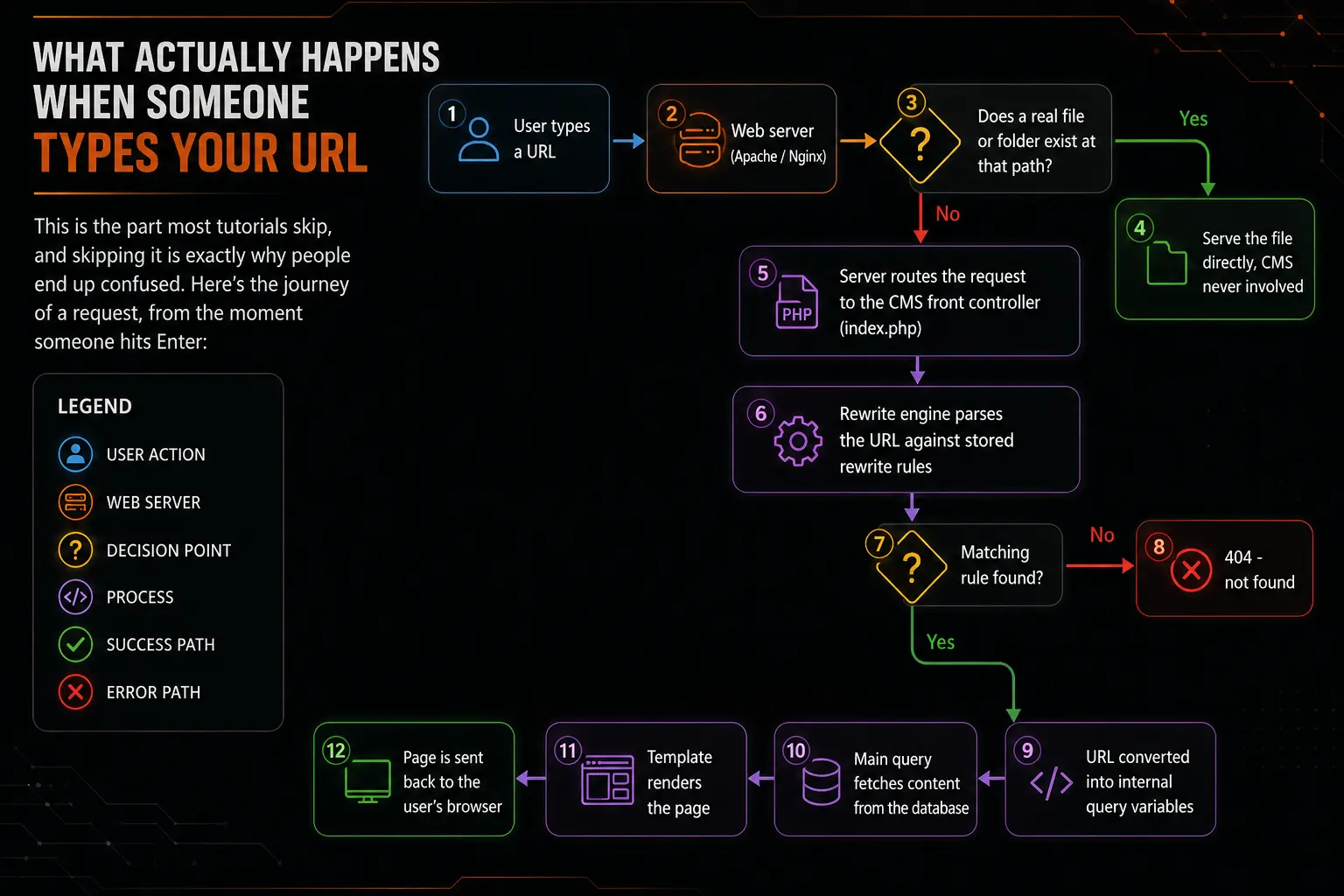
Two things on this diagram deserve emphasis:
First, the file check. The rewrite system only kicks in when the URL doesn’t point to an actual file. If someone visits /wp-content/uploads/photo.jpg, the server just hands over the image — no rules, no database, nothing. This is why the whole “front controller” pattern is so efficient: static assets bypass the CMS entirely.
Second, the rules are loaded from storage, not from your code. When your plugin registers rules with code, that registration doesn’t take effect for visitors until the full rule set is rebuilt and saved. This detail — called flushing — is responsible for more frustration than everything else in this article combined. I’ll dedicate a whole section to it shortly.
The Three Building Blocks
When you strip the Rewrite Rule API down, you’re really working with three concepts. Get comfortable with these and you can handle almost anything.
1. Rewrite Rules
A rule is a pair: a regular expression (the pattern to match against the incoming URL) and a replacement (the internal query string to produce). The system keeps them in a big ordered list and checks incoming URLs against that list from top to bottom.
2. Rewrite Tags
Rewrite tags are placeholders like %postname% or %year% that live inside permalink structures. They’re the vocabulary the system uses when building rules for standard content. When you set a permalink structure, the system expands those tags into regex and generates the actual rules behind the scenes.
3. Query Variables
Once a rule matches, the URL becomes a set of internal query variables — things like pagename, p, cat, or your own custom ones. Those variables drive the main database query. No query variable, no content. This is a common failure point: people write a beautiful rule, it matches perfectly, and the page still 404s because the variable the rule produces was never registered.
Here’s a quick reference table of the standard rewrite tags I actually end up using:
| Rewrite tag | Matches | Example URL fragment | Notes from my experience |
|---|---|---|---|
%postname% | The post slug | /hello-world/ | The workhorse of most sites |
%year% / %monthnum% / %day% | Numeric date parts | /2025/07/14/ | Great for archives, awful as the only slug (see pitfalls) |
%category% | Category slug(s) | /travel/guides/ | Can nest deeply — watch out |
%author% | Author slug | /authors/jane/ | Underrated for multi-author sites |
%post_id% | The numeric ID | /27/ | Life-saver when slugs change often |
%pagename% | The static page slug | /about-us/ | For hierarchical pages |
%search% | Search term | /search/kittens/ | Rarely needed manually |
Anatomy of a Rewrite Rule
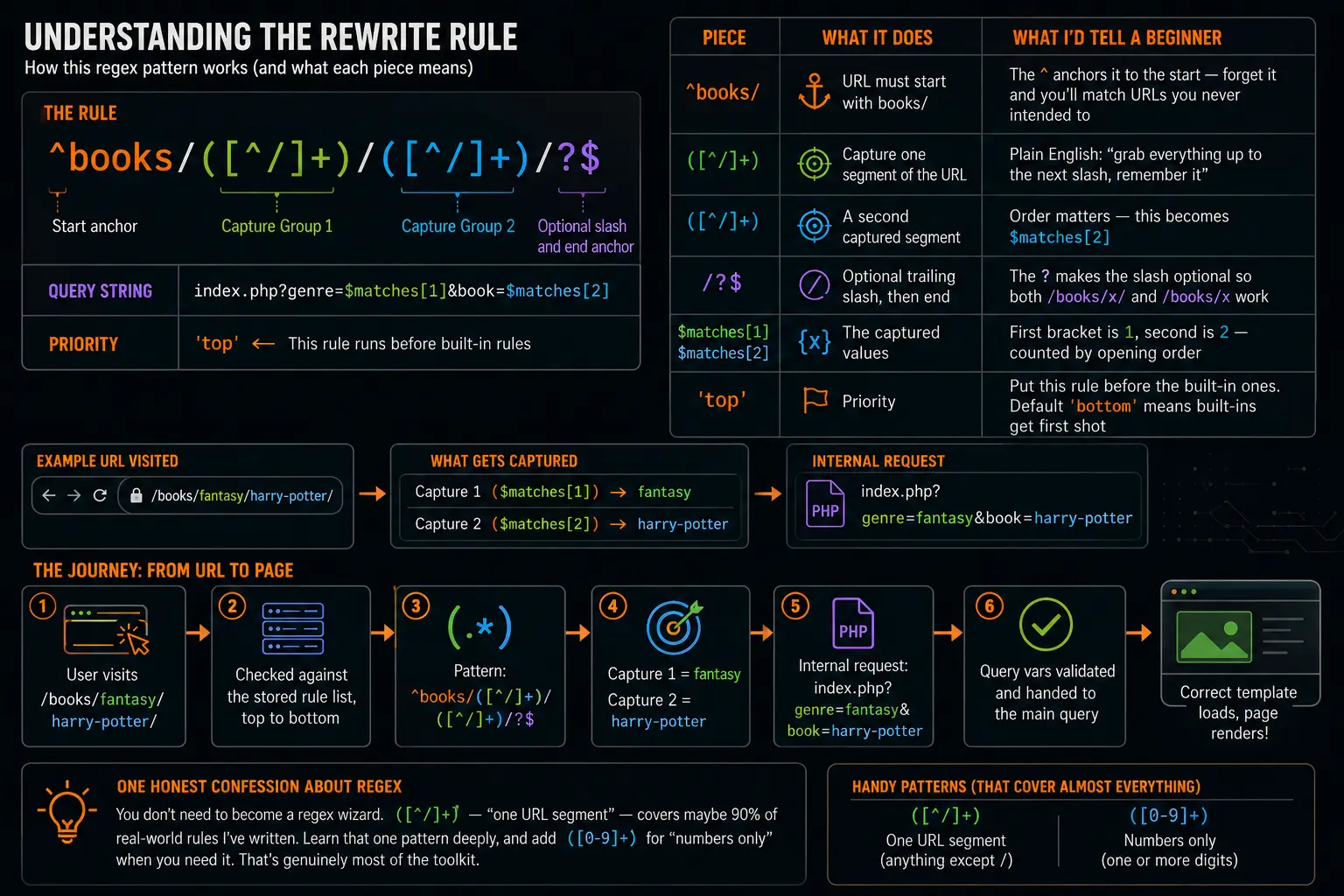
Let’s take a real, working rule apart piece by piece, because staring at these things without explanation is how I lost my first weekend to this topic.
add_rewrite_rule(
    '^books/([^/]+)/([^/]+)/?$',
    'index.php?genre=$matches[1]&book=$matches[2]',
    'top'
);Breaking down each piece:
| Piece | What it does | What I’d tell a beginner |
|---|---|---|
^books/ | URL must start with books/ | The ^ anchors it to the start — forget it and you’ll match URLs you never intended to |
([^/]+) | Capture one segment of the URL | Plain English: “grab everything up to the next slash, remember it” |
([^/]+) | A second captured segment | Order matters — this becomes $matches[2] |
/?$ | Optional trailing slash, then end | The ? makes the slash optional so both /books/x/ and /books/x work |
$matches[1] / $matches[2] | The captured values | First bracket is 1, second is 2 — counted by opening order |
'top' | Priority | Put this rule before the built-in ones. The default 'bottom' means built-ins get first shot |
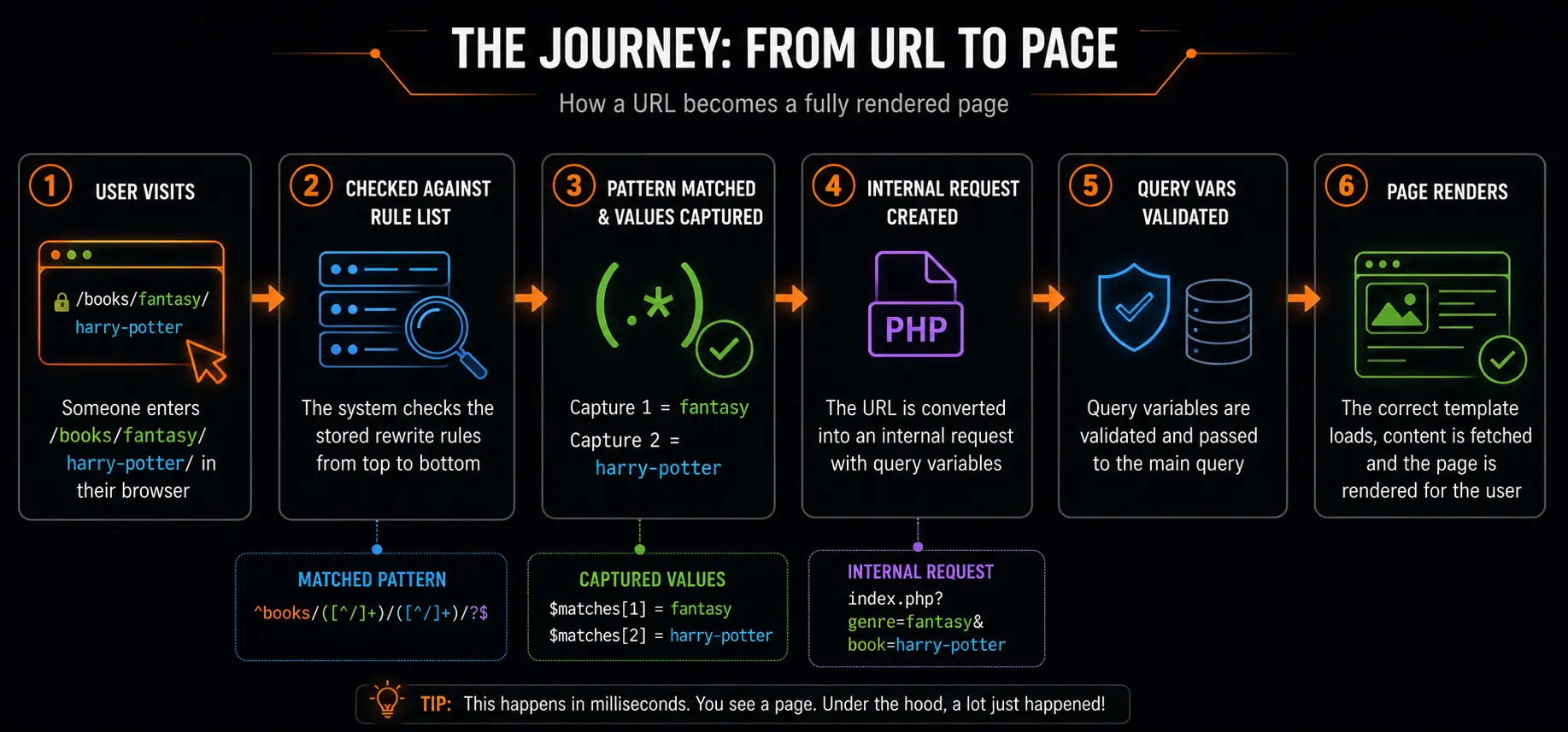
So when someone visits /books/fantasy/harry-potter/, the system matches the pattern, captures fantasy and harry-potter, and internally the request becomes:
index.php?genre=fantasy&book=harry-potterHere’s that same journey drawn out:
One honest confession about the regex: you don’t need to become a regex wizard. ([^/]+) — “one URL segment” — covers maybe 90% of real-world rules I’ve written. Learn that one pattern deeply, and add ([0-9]+) for “numbers only” when you need it. That’s genuinely most of the toolkit.
My First Custom Rule, Step by Step
Theory time is over. Let’s build something small and real: a plugin that handles /genre/anything/ URLs. I’ll write it the way I’d actually write it today, then explain each step.
/**
 * Step 1: Register the rewrite tag and the rule.
 */
function myplugin_register_rewrites() {
    // Declare the custom tag so the system knows about it
    add_rewrite_tag( '%genre%', '([^&]+)' );

    // Map the pretty URL pattern to query vars
    add_rewrite_rule(
        '^genre/([^/]+)/?$',
        'index.php?genre=$matches[1]',
        'top'
    );
}
add_action( 'init', 'myplugin_register_rewrites' );

/**
 * Step 2: Whitelist our custom query variable.
 * Without this, the value gets thrown away before your code sees it.
 */
function myplugin_query_vars( $vars ) {
    $vars[] = 'genre';
    return $vars;
}
add_filter( 'query_vars', 'myplugin_query_vars' );Two steps, and both matter. The query_vars filter is the one everybody forgets — and I do mean everybody, including me, twice, on the same project, which my commit history will happily confirm. The symptom is infuriating: the rule matches, no 404, but when you try to read the value, you get an empty string. The system sanitized your variable out of existence because you never told it that variable was allowed.
Then, to actually use the value:
// Inside a template file, or hooked somewhere sensible:
$genre = get_query_var( 'genre' );

if ( ! empty( $genre ) ) {
    // e.g. list all books in this genre
    $books = new WP_Query( array(
        'post_type' => 'book',
        'tax_query' => array(
            array(
                'taxonomy' => 'genre',
                'field'    => 'slug',
                'terms'    => sanitize_title( $genre ),
            ),
        ),
    ) );
}Notice the sanitize_title() — values pulled from URLs should always be cleaned before being used in queries. If my years of doing this have taught me one security habit, it’s this: never trust anything that came from a URL.
Flushing: The Mistake That Made Me Doubt My Sanity
Time for the section I promised. Here’s the rule that caused all my early suffering:
Registering a rewrite rule in code does not make it take effect. Rules only work after the stored rule set is regenerated — a process called flushing.
The full rule list is saved in the database and loaded on every request. Calling add_rewrite_rule() adds your rule to the list in memory, but visitors are served from the saved copy. Until you flush, there’s a mismatch between what your code knows and what the system actually serves.
The right way to handle this in a plugin:
function myplugin_activate() {
    myplugin_register_rewrites(); // make sure rules are added first
    flush_rewrite_rules();        // now save them to the database
}
register_activation_hook( __FILE__, 'myplugin_activate' );

function myplugin_deactivate() {
    flush_rewrite_rules();        // clean up on the way out
}
register_deactivation_hook( __FILE__, 'myplugin_deactivate' );And here’s the lifecycle visually:
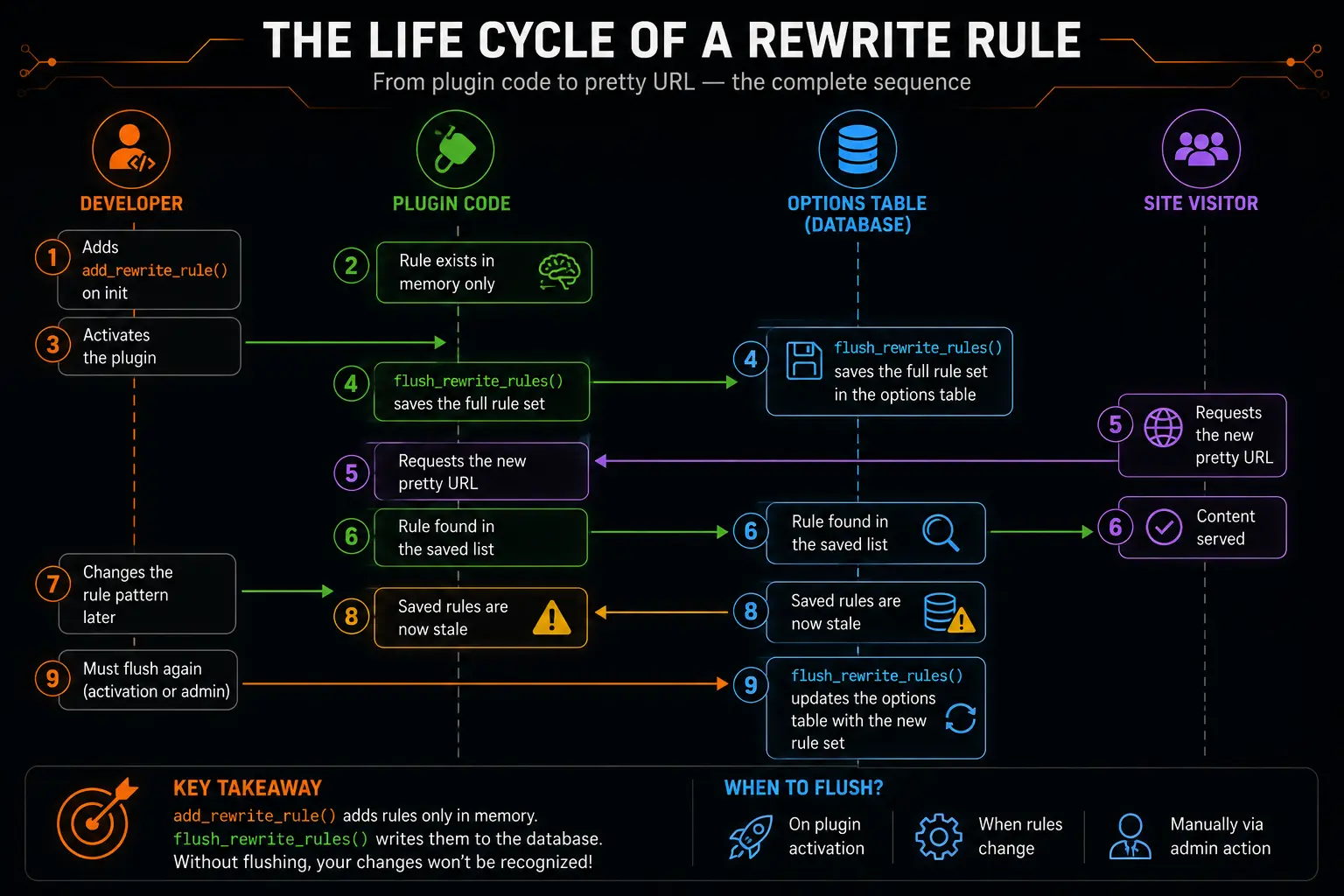
Two warnings I’ve learned the hard way:
- Never call
flush_rewrite_rules()on every page load. I’ve seen plugins do this. It rebuilds and rewrites the entire rule set on every single request. On a busy site, that’s a performance disaster. Flush on activation, on deactivation, and otherwise only when you deliberately change your rules. - The rule must be registered before you flush. If activation runs the flush but your
add_rewrite_rule()call only happens somewhere the activation hook doesn’t reach, you’ll flush without your rule — the worst of both worlds.
There’s a quick manual escape hatch, too: visiting the permalink settings page in the admin area and clicking Save Changes triggers a flush. When a rule “just refuses to work,” this is my first diagnostic step. It fixes the problem roughly half the time — which tells you something about how often the flush is the actual culprit.
Content Types Get Rewrites for Free (Mostly)
Here’s something that took me embarrassingly long to realize: for a lot of cases, you don’t need to write manual rules at all. When you register a custom content type or custom taxonomy properly, the system generates sensible rewrite rules for you automatically.
register_post_type( 'book', array(
    'public'      => true,
    'has_archive' => true,
    'rewrite'     => array(
        'slug'       => 'library',
        'with_front' => false,
    ),
) );That single rewrite argument gives you:
mysite.com/library/— the archive listing all booksmysite.com/library/harry-potter/— an individual book page
The two arguments worth knowing well:
slug— controls the first URL segment. Without it, your URLs would use the internal name (book) instead of the friendlierlibrary.with_front— whenfalse, strips the site’s global permalink prefix from these URLs. If your permalink structure starts with/blog/, books won’t inherit it. I once shipped a site where every custom URL awkwardly began with/blog/because I didn’t know this argument existed. One line fixed it. One line!
So my honest workflow recommendation: reach for content-type registration first, and only drop down to manual rewrite rules when the generated URLs genuinely don’t match your structure. Manual rules are powerful, but they’re also one more thing to maintain, test, and flush.
The Mistakes I’ve Made So You Don’t Have To
Every item in this list is a real mistake from a real project of mine. I’m sharing them because they’re predictable mistakes — almost everyone walks into the same holes.
- Forgetting to flush. The number one cause of “my rewrite rule doesn’t work.” Symptom: perfect code, perfect 404. Fix: flush via activation hook or the permalink settings page.
- Forgetting the
query_varsfilter. Rule matches, page loads, variable comes back empty. Register the variable. - Rule ordering collisions. Rules are matched top to bottom. A broad rule placed at
'top'can swallow URLs meant for a more specific rule below it. When two rules could match the same URL, the first one wins — full stop. - Changing URL patterns without redirects. During a redesign I once moved an entire section without setting up redirects and watched search traffic slowly evaporate. Always map old URLs to new ones when you restructure.
- Overly greedy patterns. A pattern like
^(.*)/books/(anything, then books) will match URLs you never dreamed of. Be specific; anchor with^and$. - Slugs that change. Titles get edited, slugs change, links break. For content where the title is volatile, consider including
%post_id%in the URL so old links still resolve. - Testing while logged in and thinking it’s the code. Caching layers behave differently for logged-in users. My rule “wasn’t working” once purely because a cache plugin was serving stale 404s to visitors. Clear everything before blaming your regex.
And here’s the pitfall table I keep pinned in my notes file:
| Symptom | Actual cause (usually) | Quick check |
|---|---|---|
| 404 on the new URL | Rules never flushed | Save permalinks in settings, retest |
| No 404, but empty variable | Variable not whitelisted | Check the query_vars filter |
| Wrong page loads | Rule order collision | Inspect the full rule list, reorder with 'top'/'bottom' |
| Works logged in, fails logged out | Page cache serving stale responses | Purge all caches |
| Works, then randomly breaks later | Another plugin flushed the rules and a registration ran too late | Audit hook timing and plugin conflicts |
Performance: The Part Nobody Talks About
Here’s the reassuring news: a healthy rewrite setup is fast. The rule list is loaded once from storage and matched in memory. A few dozen rules cost essentially nothing.
But there are two places it can degrade:
Rule list bloat. Every content type, every taxonomy setting, and every manual rule adds entries. Some badly built plugins add hundreds of rules, some nearly identical. When I inherit a site with URL problems, inspecting the rule list size is one of my first checks. Keep rules lean and let content-type registration handle the bulk of the work.
Greedy regex. Patterns with nested wildcards (like (.*) appearing twice with a / between them) cause catastrophic backtracking on certain URLs. The classic case: %category% on sites with deeply nested categories. If a site mysteriously takes seconds to return 404s, this is a prime suspect.
The practical takeaway: prefer ([^/]+) over (.*), keep your structures shallow, and don’t register rules you don’t use.
When You Shouldn’t Use Rewrite Rules at All
After everything above, this might sound like heresy from me, but here goes: sometimes the answer isn’t a rewrite rule.
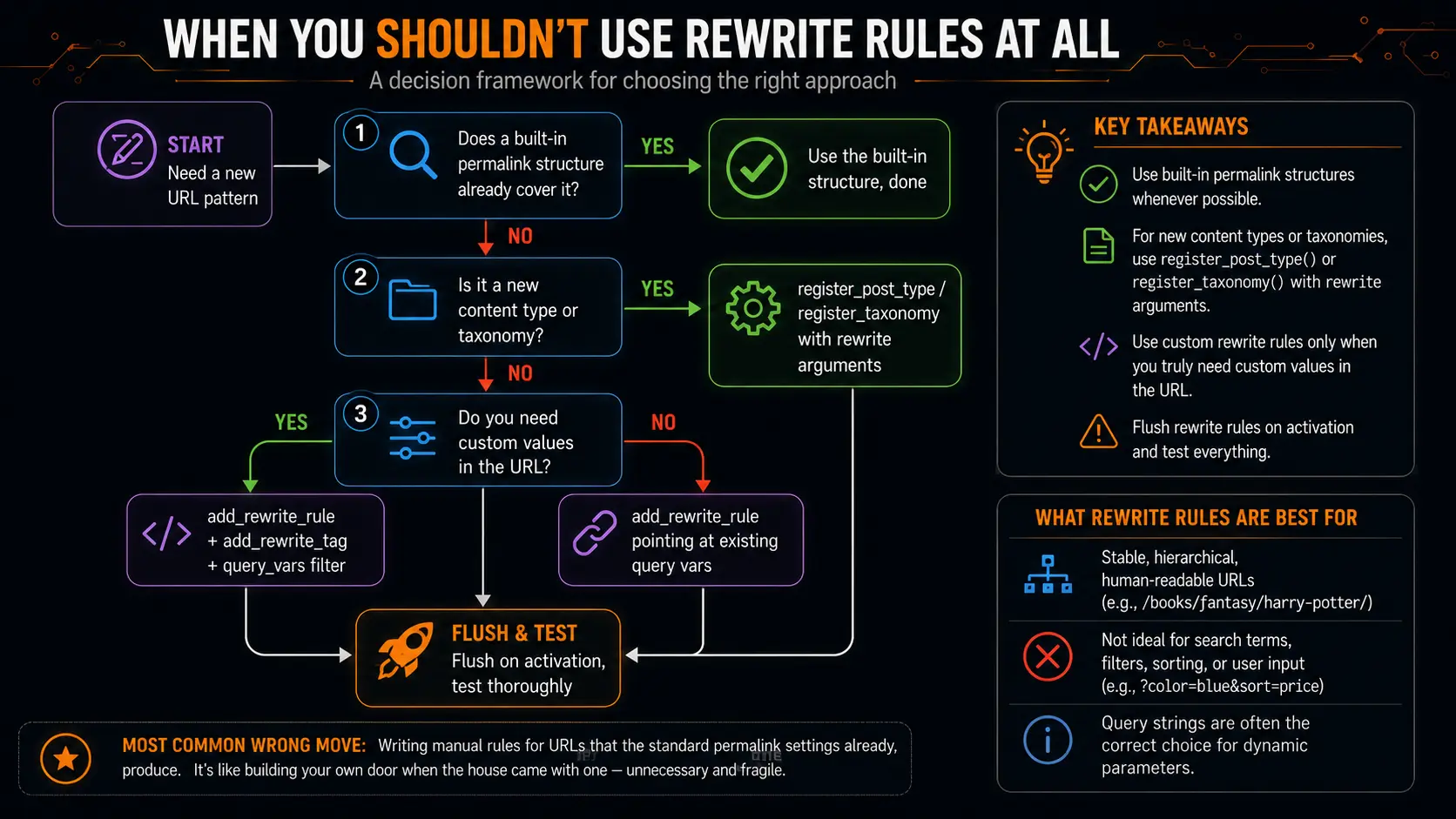
This flowchart is basically the decision process I run in my head for every project now. The most common wrong move I see from beginners is writing manual rules to handle URLs that the standard permalink settings already produce. It’s like building your own door when the house came with one — technically possible, functionally unnecessary, and one more thing that breaks later.
Also worth saying: if your URL pattern includes things like search terms, filters, or sorting options (?color=blue&sort=price), query strings are often the correct choice rather than something to hide. Rewrite rules shine for stable, hierarchical, human-readable addresses — not for every parameter under the sun.
A Few Parting Habits
If I could compress years of trial and error into a short list of habits, it would be these:
- Design URLs on paper before writing any code. Sketch the full structure, check it against your content model, and make sure it’ll still make sense in two years.
- Flush deliberately, never casually. Activation, deactivation, deliberate changes — nothing else.
- Register the query vars the moment you register the rule. Same commit, same function, no exceptions. Future-you will be grateful.
- Test with a fresh cache and in a private browser window. Cache plugins and logged-in states have lied to me more times than I can count.
- Redirect old URLs whenever structure changes. Your search rankings and your users both depend on it.
Wrapping Up
The Rewrite Rule API intimidated me for a long time because I interacted with it backwards — I copied snippets, things broke, and only later did I understand the actual system underneath: URL patterns get matched against a stored list of rules, matched URLs become query variables, and those variables drive the content lookup. Once that pipeline is clear in your head, everything else — the tags, the flushing, the ordering, the query_vars filter — stops being mysterious and starts being predictable.
Pretty URLs aren’t vanity. They’re part of how people navigate your site, how they remember it, and how search engines understand it. The Rewrite Rule API is simply the honest, structured way to take control of that — instead of letting it take control of you.
If you want to go deeper after this, these are the three references I’d point you toward — the official documentation covers the fine details of each function we discussed:
add_rewrite_rule()reference – developer.wordpress.org/reference/functions/add_rewrite_rule/flush_rewrite_rules()reference – developer.wordpress.org/reference/functions/flush_rewrite_rules/- The
WP_Rewriteclass documentation – developer.wordpress.org/reference/classes/wp_rewrite/
Happy rewriting — and if a rule won’t work at 2 a.m., check the flush first. Trust me.
FAQs
My rewrite rule looks perfect, but the page still shows a 404. What am I doing wrong?
Nine times out of ten, it’s the flush. Adding a rewrite rule in your code only registers it in memory — the site actually serves visitors from a saved copy of the rules stored in the database. Until you regenerate that saved copy (by flushing), your new rule simply doesn’t exist as far as visitors are concerned. The quickest fix is to open the permalink settings page in your admin area and hit Save Changes. That forces a flush. If the 404 disappears, you’ve found your culprit. I’ve lost entire evenings to this, so now it’s the first thing I check, every single time.
Is it safe to flush rewrite rules on every page load, just to be sure they’re always up to date?
No, and please don’t. Flushing rebuilds the entire rule set and writes it back to the database. Doing that on every request means your site is doing heavy maintenance work constantly, even when nothing changed. On a busy site, this can genuinely hurt performance. The right approach is to flush only at meaningful moments — when your plugin is activated, when it’s deactivated, or when you deliberately change your rules. Outside of those moments, leave the saved rules alone.
My rule matches and the page loads, but when I try to read the value from the URL, it comes back empty. Why?
This one got me twice on the same project. The value from your URL gets passed around as a query variable, and the system only keeps variables that have been explicitly whitelisted. If you never registered your custom variable through the query vars filter, the system quietly throws the value away before your code ever sees it. The fix is one small function that adds your variable name to the allowed list. Once you do that, the value suddenly appears, and you’ll wonder why it was ever missing
Do I need to learn regular expressions properly to use rewrite rules?
Honest answer: not really, at least not deeply. In all my years of doing this, two tiny patterns cover almost everything — one that means “grab a single chunk of the URL up to the next slash” and one that means “numbers only.” If you understand those two, plus the symbols that anchor a pattern to the start and end of a URL, you can handle the vast majority of real-world rules. Full regex mastery is only needed for genuinely exotic URL structures, which are rare.
My rule works perfectly when I’m logged in, but visitors get errors. What’s going on?
Caching is almost certainly playing tricks on you. Many caching plugins treat logged-in users and anonymous visitors completely differently — they serve fresh pages to you and cached, stale pages to everyone else. So your rule might be working fine, but visitors are being handed old cached 404 pages. Clear every cache you have (the caching plugin, any CDN, your browser) and test again in a private browser window. This has fooled me more times than I’d like to admit.
Two of my rules could match the same URL, and the wrong page keeps loading. How do I control which one wins?
Rules are checked in order, top to bottom, and the first match wins — that’s it, no exceptions. If a broad rule sits above a more specific one, the broad rule swallows the URL first and the specific one never gets a chance. When you register a rule, you can choose whether it goes to the top of the list (before the built-in rules) or the bottom. Think about priority deliberately: general patterns should sit lower, and precise patterns should sit higher. If you’re getting a page you didn’t expect, rule ordering is one of the first things to inspect.
When should I write a custom rewrite rule versus just using the built-in permalink settings?
Start with the built-in options first, always. If you’re registering a new content type or taxonomy, the system can generate sensible URLs for you automatically — you just tell it what slug to use and whether it should inherit the site’s URL prefix. Manual rewrite rules are for the cases where those generated URLs genuinely don’t fit your structure — for example, when a URL needs to carry a custom value that isn’t a post, page, or taxonomy term. My rule of thumb: if the standard tools can produce the URL you sketched on paper, use the standard tools. Manual rules work fine, but they’re extra code to write, test, and maintain.
I’m redesigning my site and want to change the URL structure. Is it safe to just switch the rules over?
Please don’t do it without redirects — this mistake cost me four months of search traffic on one project. URLs are a kind of promise: people bookmark them, other sites link to them, and search engines have indexed them. If you change the structure and the old addresses suddenly dead-end, all of that accumulated value evaporates. Before you flip the switch, map out every old URL and set up a redirect from each one to its new home. It’s tedious, especially on large sites, but it’s the difference between a seamless migration and a slow traffic bleed.
Do rewrite rules slow my site down?
A healthy setup, no. The full rule list gets loaded once and matched in memory, and a few dozen rules cost practically nothing. But there are two ways it can degrade. First, rule bloat — some plugins register hundreds of near-identical rules, and that list grows with every content type and setting. Second, greedy patterns — regex with nested wildcards can force the system into heavy backtracking work on certain URLs, which shows up as strangely slow 404 responses. The practical advice: keep patterns tight and specific, prefer matching a single URL chunk over matching “anything,” and don’t register rules you don’t actually use.
Should every parameter — like filters and sort options — be hidden inside a pretty URL?
No, and this is a mistake I see often. Rewrite rules shine for stable, readable, hierarchical addresses — things like a genre, a category, a course name. They’re the wrong tool for transient stuff like “color equals blue” or “sort by price.” Those values change constantly, generate endless URL combinations, and mean nothing to a human reading them. Query strings (the part after the question mark) exist precisely for that kind of variable data. Mixing both is completely normal: a clean, pretty base URL with a small set of query parameters on top is a sign of a well-thought-out structure, not a lazy one.