If you have ever worked with a database for more than a year, you know exactly what happens to it. It’s a lot like a garage. When you first move in, everything is neatly organized. You have a shelf for tools, a box for sports equipment, and the car fits perfectly. But fast forward a few years, and you start shoving old receipts, broken electronics, and half-empty paint cans into every corner. Suddenly, you can’t even park your bike in there, let alone find a hammer when you need one.
A database works the exact same way. Over time, it collects junk data. I’m talking about old user sessions, abandoned shopping carts, temporary logs, and duplicate records. At first, this junk doesn’t bother anyone. But eventually, it starts to slow down your queries, eat up your expensive cloud storage, and make your reporting tools spit out wrong numbers.
Cleaning up this mess is what we call Database Optimization. But here is the catch: you can’t just run a DELETE command and call it a day. If you don’t do it right, you might actually make your database slower.
Today, we are going to talk about how to properly clean up your database. We will look at how to identify the junk, how to safely get rid of it, and how to use built-in database functions like ANALYZE and OPTIMIZE to make sure your database runs like brand new.
Table of Contents
What Exactly is “Junk Data”?
Before we start throwing things away, let’s agree on what “junk” actually means in the tech world. Junk data isn’t necessarily evil or malicious. Most of the time, it’s just data that has outlived its usefulness.
Here are the most common types of junk data you’ll find hiding in your tables:
- Orphaned Records: Imagine a user deletes their account, but your system forgets to delete the comments they left on blog posts. Those comments are now “orphans”—they point to a user ID that no longer exists.
- Soft-Deleted Rows: A lot of modern apps don’t actually delete data when you click “Delete”. Instead, they flip a switch in the database that says
is_deleted = true. This is great for undoing mistakes, but after six months, that data is just taking up space. - Transient Data: Things like password reset tokens, session cookies, or temporary verification codes. These are only meant to live for a few minutes, but due to bugs or poor cleanup scripts, they linger forever.
- Hard Duplicates: When a user clicks the “Submit Order” button twice because the internet was slow, and your database hastily created two identical orders.
- Stale Logs: Application error logs or analytics events from three years ago that nobody will ever look at again.
The Ripple Effect of a Messy Database
Why should you care about a few million extra rows? Storage is cheap, right? Well, it’s not just about storage. Here is a table showing exactly how junk data hurts your system:
| Symptom | What’s Happening Under the Hood | Real-World Business Impact |
|---|---|---|
| Slow Page Loads | The database has to sift through millions of dead rows to find the 50 active ones you actually asked for. | Customers get impatient and abandon your website. |
| High Cloud Bills | Your database provider charges you based on Input/Output Operations (IOPS). Reading junk data costs IOPS. | You pay thousands of dollars extra just to read useless data. |
| Inaccurate Reports | Your marketing team pulls a report on “Total Active Users,” but it includes 100,000 soft-deleted spam accounts. | Bad business decisions based on fake metrics. |
| Backup Fatigue | Your nightly database backups take 5 hours instead of 1 hour because they are backing up gigabytes of junk. | System recovery takes much longer during a critical outage. |
The Lifecycle of Data Decay
It helps to visualize how a perfectly healthy table slowly turns into a landfill. It rarely happens overnight. It’s a slow decay.
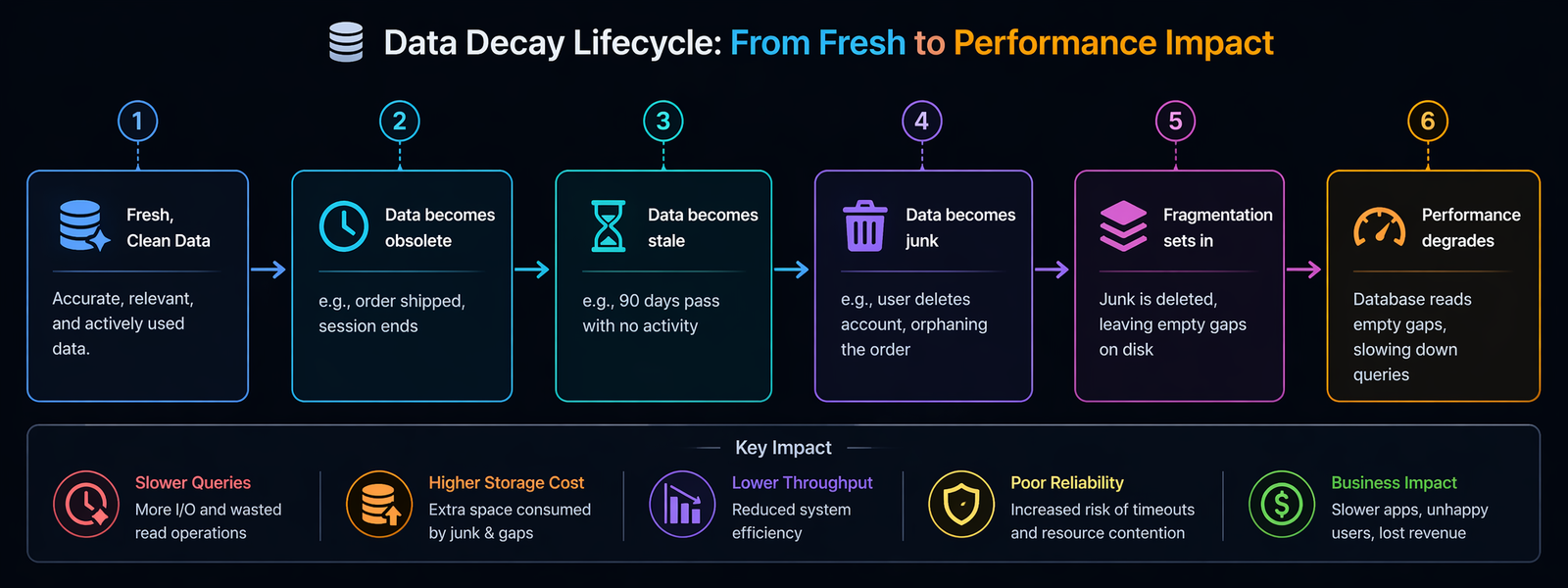
Once you hit last stage , your app is feeling the pain. To fix it, we need to follow a very specific three-step process: Analyze, Clean, and Optimize.
Step 1: Analyze (Look Before You Leap)
The biggest mistake junior developers make is writing a massive DELETE query and firing it at a production database. If you do that, you will likely lock the table, crash your app, and get a very angry phone call from your boss.
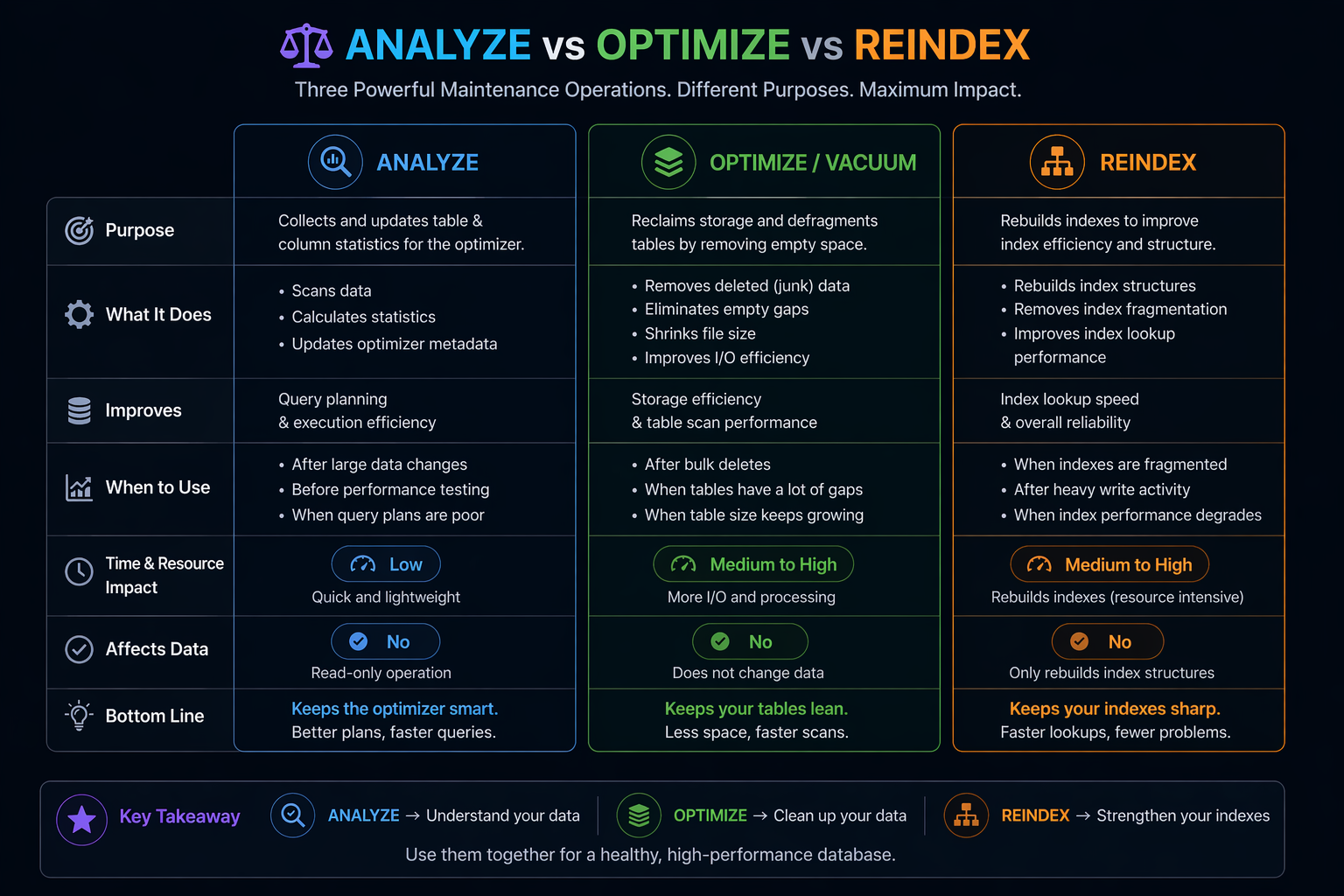
Before you touch a single row, you have to use the ANALYZE function.
What does ANALYZE do?
Think of your database’s query planner as a GPS navigation system. When you type in a destination, the GPS looks at the map, checks traffic patterns, and calculates the fastest route.
In a database, the “map” is stored in something called statistics. The database keeps a running tally of roughly how many rows are in a table, what the average data size is, and which columns have a lot of unique values.
When you run an ANALYZE command, you are telling the database: “Hey, go take a fresh look at this table and update your map.”
Use Case for ANALYZE
Let’s say you have a table called user_sessions. Over the last year, it grew from 100,000 rows to 50,000,000 rows (mostly junk). But your database’s internal “map” still thinks the table only has 100,000 rows.
When you run a query to find active sessions, the GPS looks at the outdated map and says, “Oh, this is a tiny table, I’ll just do a full table scan.” A full table scan on 50 million rows takes ages and crashes your server.
If you run ANALYZE TABLE user_sessions;, the database updates its map. The next time you run a query, the GPS sees the massive 50 million row count and says, “Whoa, this is huge! I better use the index to find what I need.”
A Quick Code Example:
-- In PostgreSQL
ANALYZE user_sessions;

-- In MySQL
ANALYZE TABLE user_sessions;Note: This command doesn’t change your data. It just updates the math the database uses to make decisions.
Step 2: The Actual Cleanup (Taking Out the Trash)
Now that your database’s “map” is up to date, it can actually help you find the junk efficiently.
When deleting junk, never delete everything at once. If you try to delete 10 million rows in one command, the database will try to write an “undo log” of all 10 million rows in case you want to reverse the transaction. This will fill up your hard drive and crash the system.
Instead, you do something called Batch Deleting. You delete the junk in small, bite-sized chunks.
Example: Cleaning up soft-deleted users older than a year
-- Delete in chunks of 5,000 rows at a time
DELETE FROM users
WHERE is_deleted = 1
AND deleted_at < NOW() - INTERVAL '1 year'
LIMIT 5000;You would write a simple script on your server to run this query, wait a second, run it again, wait a second, and repeat until it returns 0 rows deleted. This keeps your database breathing normally while you take out the trash.
Step 3: Optimize (Reorganizing the Bookshelf)
Okay, so you’ve successfully deleted 40 million rows of junk data. You high-five your team and go home. But on Monday morning, you check your server, and the database is still slow. What happened?
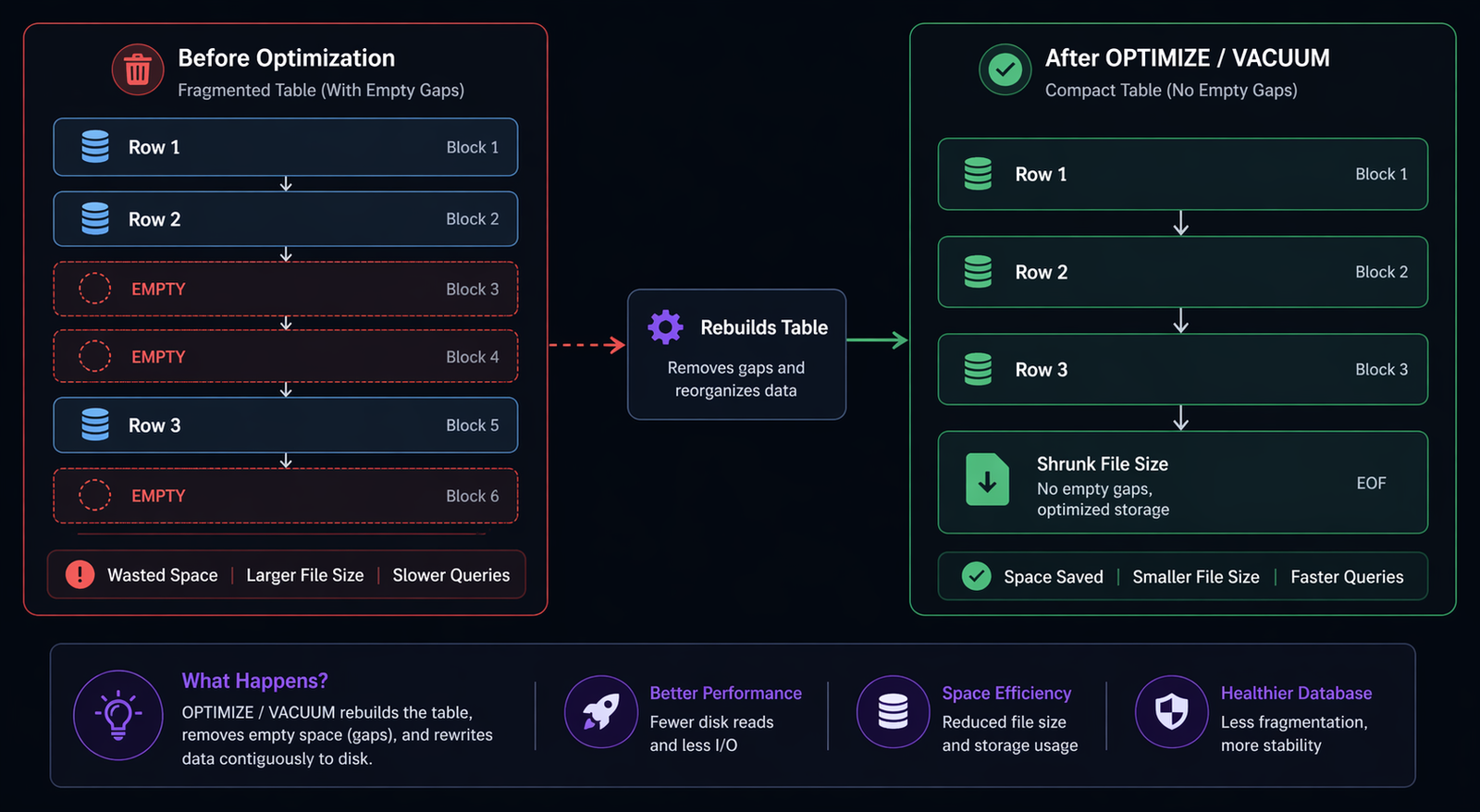
This is the part that confuses a lot of people. When you delete data from a database, the database doesn’t actually erase it from the hard drive. It just marks that space as “empty” and makes a note that it can be reused later.
Imagine a bookshelf. Deleting data is like pulling random books out from the middle of the shelf. You now have empty gaps. When the database wants to read a book, it has to skip over all these empty gaps, which wastes time. This is called Fragmentation.
To fix this, we use the OPTIMIZE function (in MySQL) or VACUUM (in PostgreSQL).
How OPTIMIZE / VACUUM Works
When you run an optimize command, the database literally takes all the remaining books off the shelf, pushes them tightly together so there are no gaps, and then shrinks the bookshelf so it takes up less room in your garage.
Use Cases for OPTIMIZE
- After massive deletions: As we just discussed, anytime you delete more than 20-30% of a table’s rows, you should optimize it to reclaim disk space and fix fragmentation.
- For static lookup tables: Tables that rarely change (like a list of countries or zip codes) can be optimized once to pack them as tightly as possible, resulting in lightning-fast reads.
- When using VARCHAR heavily: If you have tables where you are constantly updating text fields (like a user’s bio), the text size changes, causing rows to no longer fit in their original slots. Optimizing rewrites the table so everything fits perfectly again.
Example:
-- In MySQL (Rebuilds the table entirely)
OPTIMIZE TABLE users;

-- In PostgreSQL (Reclaims space but requires a full lock, unlike VACUUM)
VACUUM FULL users; Warning: OPTIMIZE TABLE and VACUUM FULL will lock the table, meaning your app cannot read or write to it while it’s running. Always do this during off-peak hours, like 2:00 AM on a Sunday.
Another Hidden Culprit: REINDEX
While we are on the topic of database functions, there is one more you need to know about: REINDEX.
If OPTIMIZE cleans up the main table, REINDEX cleans up the indexes. What is an index? If the table is like a book, the index is like the index page at the back of the book that says “The word ‘Apple’ can be found on page 42.” It helps the database find data incredibly fast.
But when you constantly add and delete data, the index gets bloated with empty pointers to rows that no longer exist. An inflated index is worse than no index at all because the database wastes time reading a bloated index, only to find out the data isn’t there.
Use Case: You ran your batch delete script to clear out old log data, but your queries are still slow. You run EXPLAIN (a command that shows you how the database is executing a query) and see it’s using the index, but it’s still taking 3 seconds.
You run REINDEX TABLE logs;. The database rebuilds the index page at the back of the book, removing all references to deleted logs. Suddenly, your query takes 0.02 seconds.
Real-World Scenarios: When to Use What
It’s one thing to understand the definitions, but it’s another to know when to pull which lever. Let’s look at a few real-world use cases.
Scenario 1: The E-Commerce Cart Abandonment
An online store notices their shopping_carts table is 50 Gigabytes in size. But looking at active carts, there are only about 5,000 people shopping right now.
- The Problem: Millions of abandoned carts from the last three years.
- The Action: First, run
ANALYZE TABLE shopping_carts;so the database knows the true size. Then, write a batch-delete script to remove carts older than 30 days wherestatus = 'abandoned'. Finally, runOPTIMIZE TABLE shopping_carts;to shrink that 50GB file back down to 1GB. - The Result: The checkout page loads faster because the database isn’t wading through dead carts, and the company saves $200 a month on database storage costs.
Scenario 2: The SaaS Application’s Daily Report
A project management tool generates a daily report of “Tasks Completed Yesterday.” It used to take 2 seconds to run, but now it takes 45 seconds, timing out the user’s dashboard.
- The Problem: The
taskstable has 10 million rows. 8 million of them are in astatus = 'archived'state. - The Action: Instead of deleting them (because the business wants to keep them for compliance), you decide to just fix the query performance. You run
ANALYZE TABLE tasks;. Then, you runREINDEX TABLE tasks;because the index on thestatuscolumn is heavily fragmented from constantly moving tasks from “active” to “archived.” - The Result: The query planner realizes it can use the fresh index to instantly skip the 8 million archived rows. The report generates in 0.5 seconds again.
The Proper Database Maintenance Workflow
To tie all these functions together, here is a flowchart of how a healthy database maintenance cycle should look. You shouldn’t be doing this manually every day; you should ideally script this to run automatically during a maintenance window.
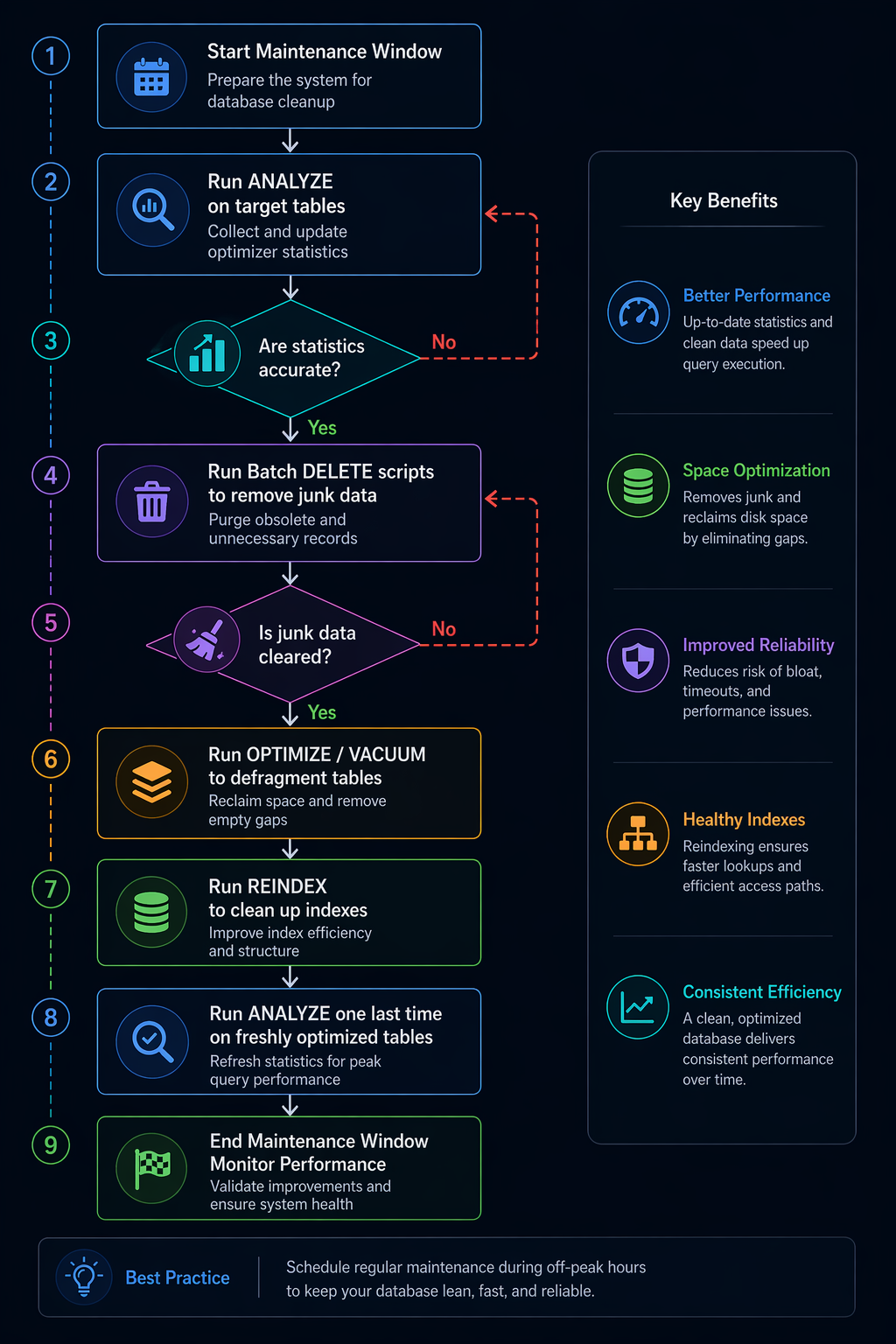
Notice how ANALYZE appears twice? You analyze before the cleanup so the database can help you write efficient delete queries. Then you analyze after the cleanup so the database has accurate math for the newly shrunken tables.
Best Practices to Keep the Garage Clean
Cleaning up a massive database is a stressful, high-risk job. The best way to handle junk data is to stop it from piling up in the first place. Here are a few tips from the trenches:
- Implement a Retention Policy: Decide before you write code how long data is allowed to live. Error logs? 90 days. User sessions? 24 hours. Abandoned carts? 7 days. Write these rules down and stick to them.
- Use Database Partitioning: This is a game-changer. Partitioning is like having multiple mini-bookshelves instead of one giant one. You can partition your
logstable by month. When October is over, you don’t have to run a slowDELETEquery. You just run a single command that drops the entire October partition. It takes 0.01 seconds and frees up all the space instantly. - Move, Don’t Delete: Sometimes business rules say you have to keep data for 7 years for legal reasons. But that data doesn’t belong in your fast, expensive, primary database. Set up an “Archive Database” on cheaper, slower storage. Write a script that moves old data there once a year.
- Fix the Application Code: If you find yourself cleaning up millions of orphaned records, don’t just blame the database. Go fix the application code that forgot to delete them in the first place.
Wrapping Up
Databases are incredibly powerful, but they aren’t magical. They are simply filing cabinets that rely on us to keep them organized. When we ignore junk data, we are basically forcing our applications to dig through a landfill just to find a single piece of paper.
By understanding the proper order of operations—using ANALYZE to update your database’s map, carefully batching your DELETE queries to avoid crashes, and following up with OPTIMIZE and REINDEX to physically tighten up the files—you can keep your database running at peak performance.
Treat your database cleanup like spring cleaning. It might be a bit of a hassle on a Sunday morning, but once it’s done, everything just feels a little bit faster, a little bit cheaper, and a lot less stressful.
References:
FollowUP:
FAQs
What exactly counts as “junk data” in a database?
Think of junk data as the digital equivalent of old receipts, expired coupons, and broken electronics you keep in a drawer. In a database, this includes things like abandoned shopping carts from two years ago, expired password reset links, temporary error logs, and “soft-deleted” user accounts (where you clicked delete, but the system just hid the profile instead of actually erasing it). It is any information that no longer serves a purpose to your active application.
Why can’t I just run one giant delete command to wipe out all the junk at once?
If you try to delete millions of rows in one single command, your database will likely freeze up or completely crash. When a database deletes things, it writes a temporary “undo” note in case something goes wrong. If you delete 10 million rows at once, the database tries to write 10 million undo notes, which completely clogs up the system and locks the tables so your users can’t use your app. You always have to delete in small, slow chunks.
I deleted a ton of rows, but my database file size didn’t get any smaller. Did I do something wrong?
You didn’t do anything wrong; this is just how databases work under the hood. When you delete data, the database doesn’t actually erase it from the hard drive. It just puts a “vacant” sign over the space. It’s like pulling books out of a bookshelf—you have empty gaps now, but the bookshelf is still the exact same size. To actually shrink the file size and get rid of those empty gaps, you have to run a specific command (like OPTIMIZE or VACUUM) to physically squish the remaining data together.
What is the difference between cleaning the data and optimizing the database?
Cleaning the data is the act of removing the useless information (the actual deletion). Optimizing the database is what you do afterward to clean up the physical mess left behind by the deletion. Optimization defragments the hard drive space, removing all the empty gaps and reorganizing the remaining live data so it can be read as fast as possible.
What does the “ANALYZE” function actually do? Does it delete anything?
No, the ANALYZE function does not touch a single piece of your actual data. What it does is update the database’s internal “map” or statistics. It tells the database things like, “Hey, this table actually has 5 million rows now, not 500.” This helps the database’s navigation system (the query planner) choose the fastest route to find the data you ask for in the future.
Will running the OPTIMIZE command take my website offline?
In most standard database setups, yes, it will cause a brief outage for that specific feature. Because the OPTIMIZE command is literally rebuilding the table and squishing everything together, it puts a padlock on the table while it works. Nothing can read or write to it while the optimization is happening. Because of this, you should always schedule heavy optimizations for the dead of night or the weekend when your traffic is at its absolute lowest.
What is an index, and why do I need to “REINDEX” it after a cleanup?
An index is like the index page at the back of a massive textbook—it tells the database exactly where to find specific information without reading the whole book. When you delete millions of rows of junk data, the index page gets filled with references to data that no longer exists. “REINDEX” simply tears out the old, messy index page and writes a fresh, accurate one, which drastically speeds up your searches.
How often should I be cleaning and optimizing my database?
There is no single perfect answer, as it depends on how busy your app is. A small blog might only need it once a year. A massive e-commerce site processing thousands of orders a day might need to run automated cleanup scripts weekly. A good rule of thumb is to set up a retention policy (for example, “delete logs older than 90 days”) and run a cleanup script nightly in small chunks, saving the heavy optimization for once a month.
What if my boss says we legally have to keep all user data for 7 years? How do I optimize if I can’t delete anything?
This is a very common scenario in finance and healthcare. If you are legally required to keep the data, you shouldn’t delete it from your primary, fast, expensive database. Instead, you should “archive” it. You write a script that copies the old data to a completely separate, cheaper, slower storage database, and then delete it from the main one. Your main app stays lightning fast, but you still have the data safely stored away in case the auditors come knocking.
How can I stop junk data from piling up in the first place?
The best way to handle junk data is to stop creating it. You can do this by fixing the root cause in your application code. If your database is full of orphaned records (like comments left by deleted users), fix the code so that deleting a user automatically deletes their comments, too. Additionally, you can use database “partitioning,” which essentially puts different months of data into separate virtual folders, allowing you to drop an entire month of old logs instantly without affecting the rest of the system.