When I first started building WordPress themes and plugins, I had a very narrow view of the world. I built everything in English, assuming that was the only language that mattered. Then, a client came to me and said, “This looks great, but my audience is in Spain and Brazil. I need this in Spanish and Portuguese by next week.”
I stared at my code. I had hardcoded every single sentence. Every “Submit” button, every “Read More” link, and every error message was baked right into the logic. I realized I was facing a nightmare of copy-pasting files and doing “find and replace” operations, which would break the moment I updated the code.
That was my crash course in Internationalization (often abbreviated as i18n because there are 18 letters between ‘i’ and ‘n’). If you’re a developer or a site builder, understanding how this system works in WordPress isn’t just a nice-to-have skill; it’s the difference between building a local project and a global product.
In this article, I’m going to walk you through the WordPress i18n system the way I wish someone had explained it to me years ago—without the heavy jargon, using real-world analogies.
Table of Contents
The Core Concept: It’s Not Translation (Yet)
The biggest confusion I see among new developers is mixing up Internationalization and Localization. They are two sides of the same coin, but they happen at different times.
Think of it like building a house.
- Internationalization is the architectural phase. You design the house with generic pipe fittings and standard electrical sockets so that it can adapt to any country’s appliances. You don’t install a British plug; you install a universal socket.
- Localization is the interior design phase. Once the family moves in, you fill the house with British tea kettles or Japanese rice cookers.
In WordPress terms, Internationalization is the code you write to make your theme or plugin translatable. Localization is the actual process of translating it into a specific language.
If you do the first part right, the second part is a breeze. If you skip it, well, you end up in the situation I was in with my client.
The Engine: How WordPress Talks to Humans
WordPress is written in PHP, but it uses a specific framework to handle languages called Gettext. This is an industry standard, but WordPress wraps it in its own specific functions.
Here is the basic flow of how it works, which I visualize as a library system.
- The Code: You write a function in PHP asking for a text string.
- The Key: You provide a “text domain” (think of this as the book’s ISBN number).
- The Translation File: WordPress looks up that string in a specific file.
- The Output: If it finds a translation, it serves it. If not, it serves the original English text.
The Files That Make It Happen
When you dig into a properly built WordPress plugin, you’ll usually find a folder named languages or i18n. Inside, you’ll see files with extensions like .pot, .po, and .mo. When I first saw these, my eyes glazed over. Here is what they actually do, explained simply:
| File Extension | What it stands for | Who uses it | Analogy |
|---|---|---|---|
| .POT | Portable Object Template | Developers | The “Blank Form.” This is the master list of all strings used in your code. It has no translations in it, just the English source text. |
| .PO | Portable Object | Translators | The “Filled Form.” This is a human-readable file where a translator has written the translations for specific languages (e.g., es_ES.po for Spanish). |
| .MO | Machine Object | WordPress (The System) | The “Compiled Code.” The server cannot read .po files quickly. This file is a binary version of the .po file that the computer can read instantly. |
My Golden Rule: Never edit the .mo file directly. It’s binary gibberish. You edit the .PO file, and a software (like Poedit) compiles it into the .MO file for WordPress to use.
The Developer’s Toolkit: Coding for the World
Now, let’s look at how this looks in code. This is where the magic happens.
In standard PHP, you might write:
echo "Hello World";In WordPress, you never do that if you want to support i18n. You wrap that string in a function.
echo __('Hello World', 'my-text-domain');Let’s break that down.
__()is a standard WordPress function that looks for a translation. If none exists, it just returns “Hello World”.'my-text-domain'is a unique identifier. This is crucial. If you have ten plugins installed, and they all have a string saying “Save”, how does WordPress know which translation to use? It uses the text domain.
A Real-World Coding Example
Here is a snippet of how I used to write code vs. how I write it now.
The Wrong Way (Hardcoded):
<div class="error">
    <p>Error: Please enter a valid email address.</p>
</div>The Right Way (Internationalized):
<div class="error">
    <p>
        <?php _e('Error: Please enter a valid email address.', 'my-awesome-plugin'); ?>
    </p>
</div>Notice I used _e() here. In WordPress, there are two main functions:
__()returns the string (useful for assigning to variables)._e()echoes the string directly to the screen (useful for HTML output).
Handling Context and Plurals
One of the trickiest parts of i18n is context. The word “Post” in English can mean a blog post, a piece of wood, or mail. In other languages, these are completely different words.
WordPress handles this with _x() and _ex(). These allow you to add a comment for translators.
// The translator sees the context "verb"
_ex('Post', 'verb: to publish content', 'my-theme');

// The translator sees the context "noun"
_ex('Post', 'noun: a blog entry', 'my-theme');Plurals are another headache. In English, we have “1 comment” and “2 comments”. But some languages have multiple plural forms (like Russian or Arabic). WordPress uses _n() to handle this logic mathematically.
$comments_count = get_comments_number();

printf(
    _n(
        'There is %s comment.',
        'There are %s comments.',
        $comments_count,
        'my-theme'
    ),
    $comments_count
);The system looks at the number ($comments_count). If it’s 1, it grabs the first string. If it’s more than 1, it grabs the second. For complex languages, the .PO file headers define the plural rules, so the developer doesn’t have to write if/else statements for every language in the world.
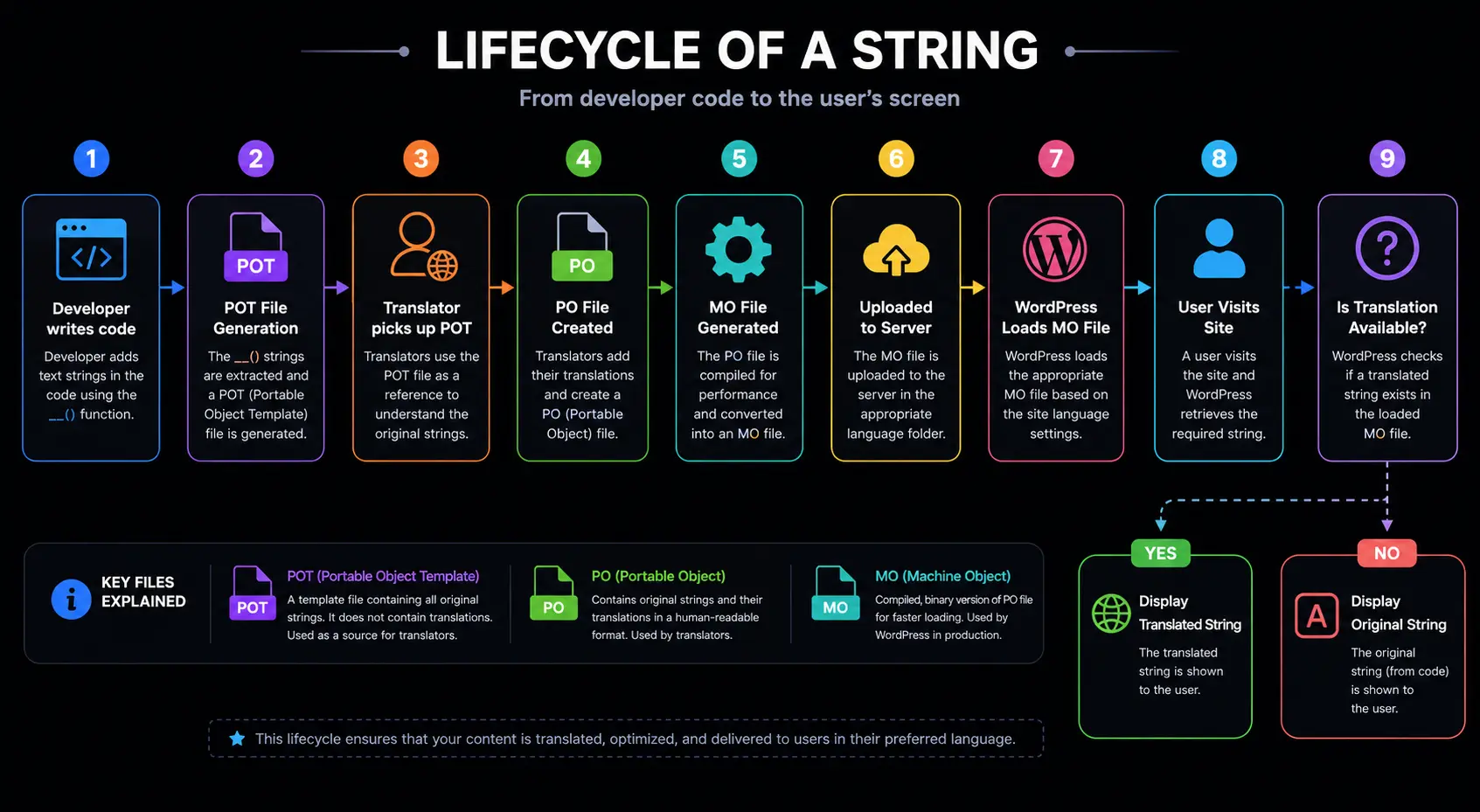
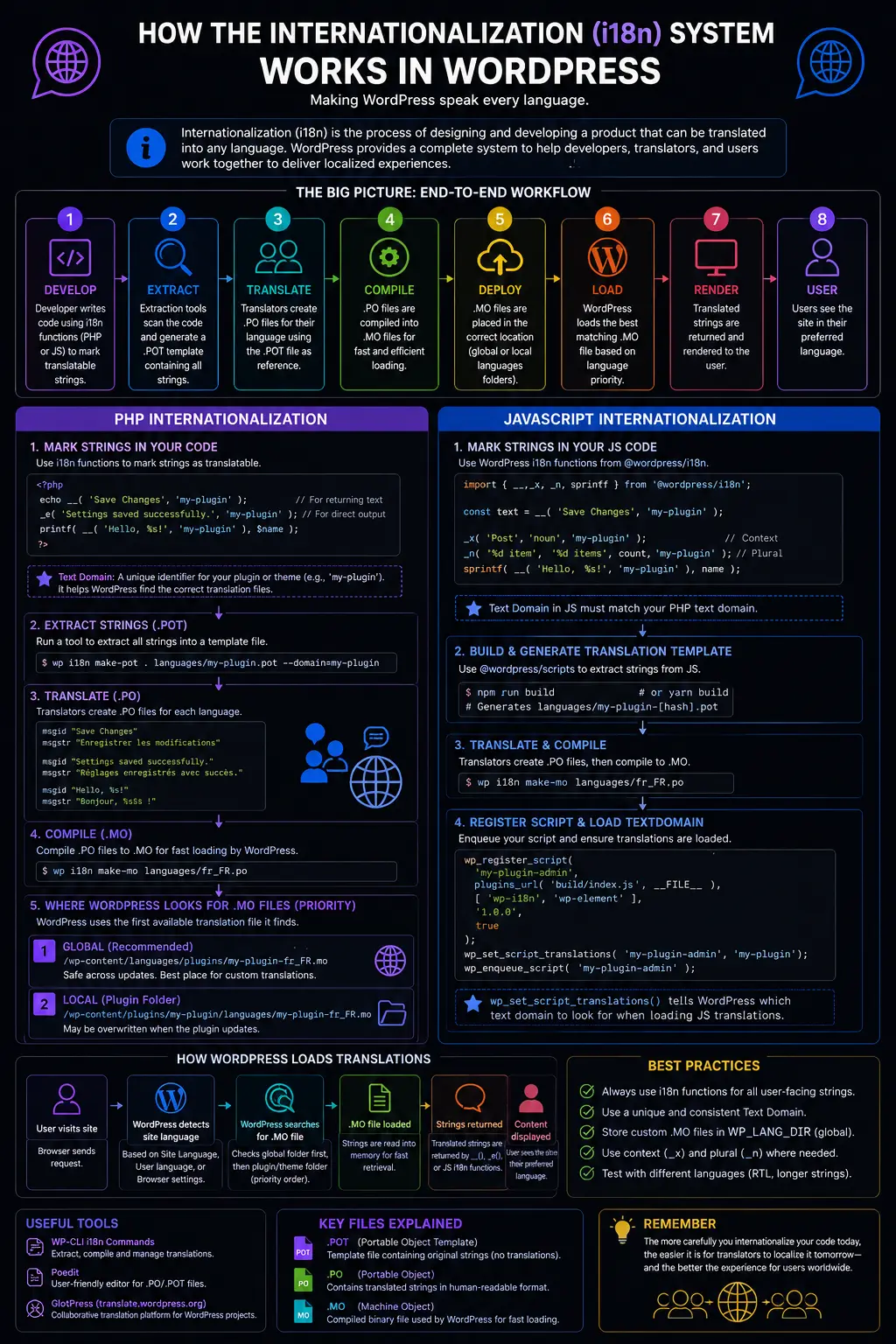
The Workflow Diagram
To really visualize how this system flows from developer to user, I created this diagram. It shows the lifecycle of a string.
How WordPress Loads the Language
This is a technical detail that bit me early on. Where do you put these files?
WordPress doesn’t just magically find them. You have to tell WordPress where to look. This is done using the load_plugin_textdomain() or load_theme_textdomain() function.
Typically, you hook this into the init action.
function my_plugin_load_textdomain() {
    load_plugin_textdomain(
        'my-awesome-plugin',   // The unique text domain
        false,                 // Deprecated argument, usually false
        dirname( plugin_basename( __FILE__ ) ) . '/languages' // The folder path
    );
}
add_action( 'init', 'my_plugin_load_textdomain' );When this runs, WordPress looks in the /languages/ folder. It looks for a file named my-awesome-plugin-es_ES.mo (if the site is set to Spanish). If it finds it, it loads the translations into memory.
The Performance Check
One thing I learned the hard way: loading translations takes memory. Every time a page loads, WordPress parses the .mo file. If your .mo file is huge (like WooCommerce, which has thousands of strings), it can slow down your site.
To solve this, modern WordPress development uses Language Packs. Instead of bundling the translations inside the plugin zip file, translations are hosted on the WordPress.org translate website. When a user installs your plugin, WordPress checks if the user’s language has a translation pack available and downloads just that language pack. This keeps the plugin lightweight for everyone else.
The Translation Workflow: A User Perspective
Let’s flip the coin and look at it from the translator’s perspective. If you are a developer, understanding this helps you code better.
The standard tool for translators is Poedit (or the translation editor on WordPress.org). Here is the process a translator goes through:
- They open the
.POTfile you provided. - They select the target language.
- They see a list of “Source Text” (your English strings) and empty boxes for “Translation”.
- They fill in the boxes.
- They hit “Save”.
- Poedit automatically generates the
.POfile (human readable) and.MOfile (machine readable).
This separation of duties is the beauty of the system. The developer doesn’t need to know Spanish, and the translator doesn’t need to know PHP.
A Closer Look at String Extraction
How do you get that .POT file in the first place? You don’t type it out manually. That would be madness.
WordPress provides a command-line tool (or you can use software like Poedit to scan your folder) to extract strings. It scans your code looking for the __() and _e() patterns.
Here is a simplified flow of how string extraction works:
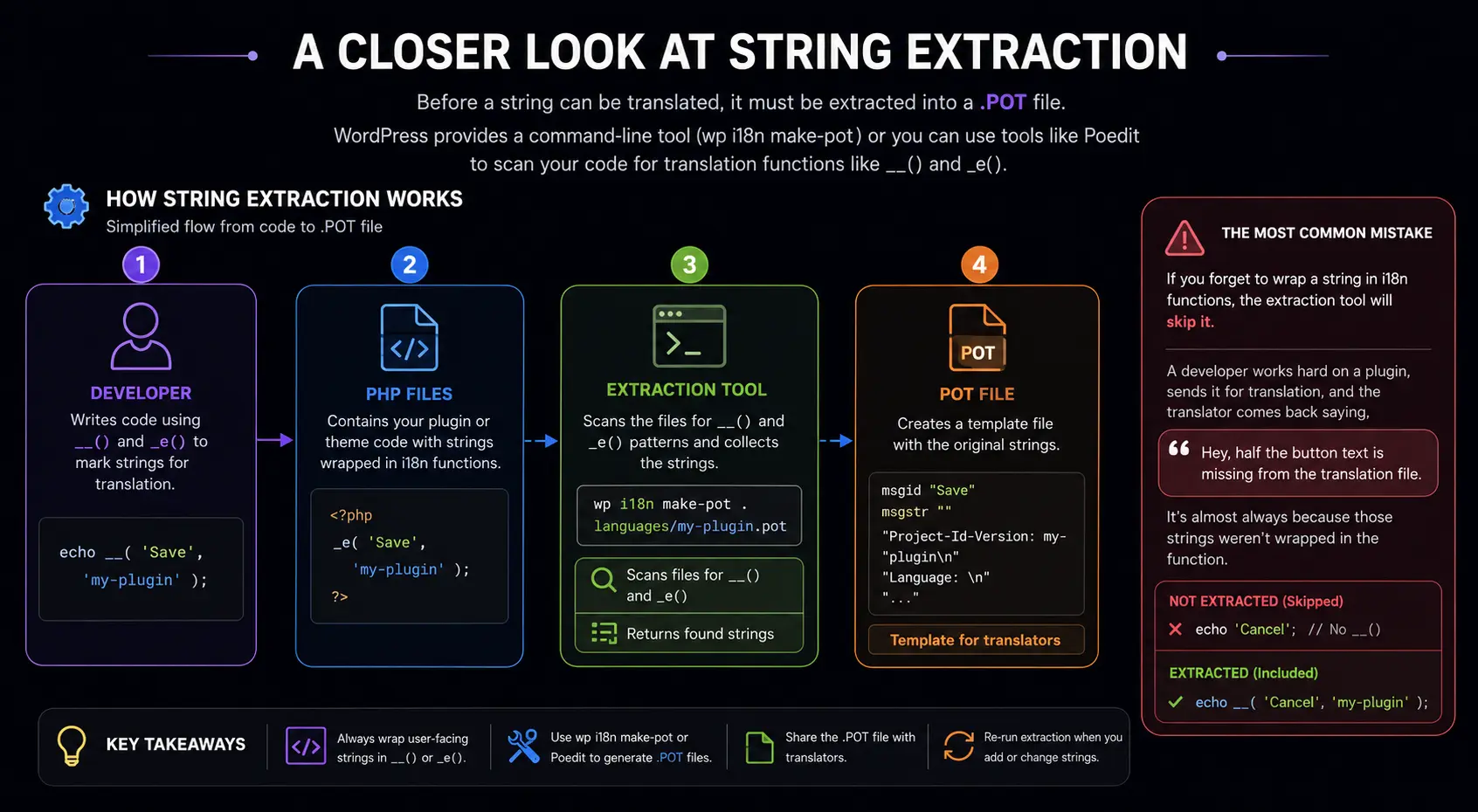
If you forget to wrap a string in the i18n functions, the extraction tool will skip it. This is the most common mistake I see. A developer works hard on a plugin, sends it for translation, and the translator comes back saying, “Hey, half the button text is missing from the translation file.” It’s almost always because those strings weren’t wrapped in the function.
JavaScript and the Modern Era
For a long time, JavaScript was the wild west in WordPress internationalization. Developers would just pass strings via wp_localize_script. It was messy.
Now, we have wp.i18n. This package brings the same PHP functionality to JavaScript. If you are building a block for the Gutenberg editor, you can use it natively.
JavaScript Example:
import { __ } from '@wordpress/i18n';

const buttonLabel = __( 'Publish', 'my-theme' );It works exactly the same way as PHP. The build process (using Webpack and Babel) can extract these strings into a .pot file or a .json file, which WordPress loads when the scripts run.
The Architecture of Loading
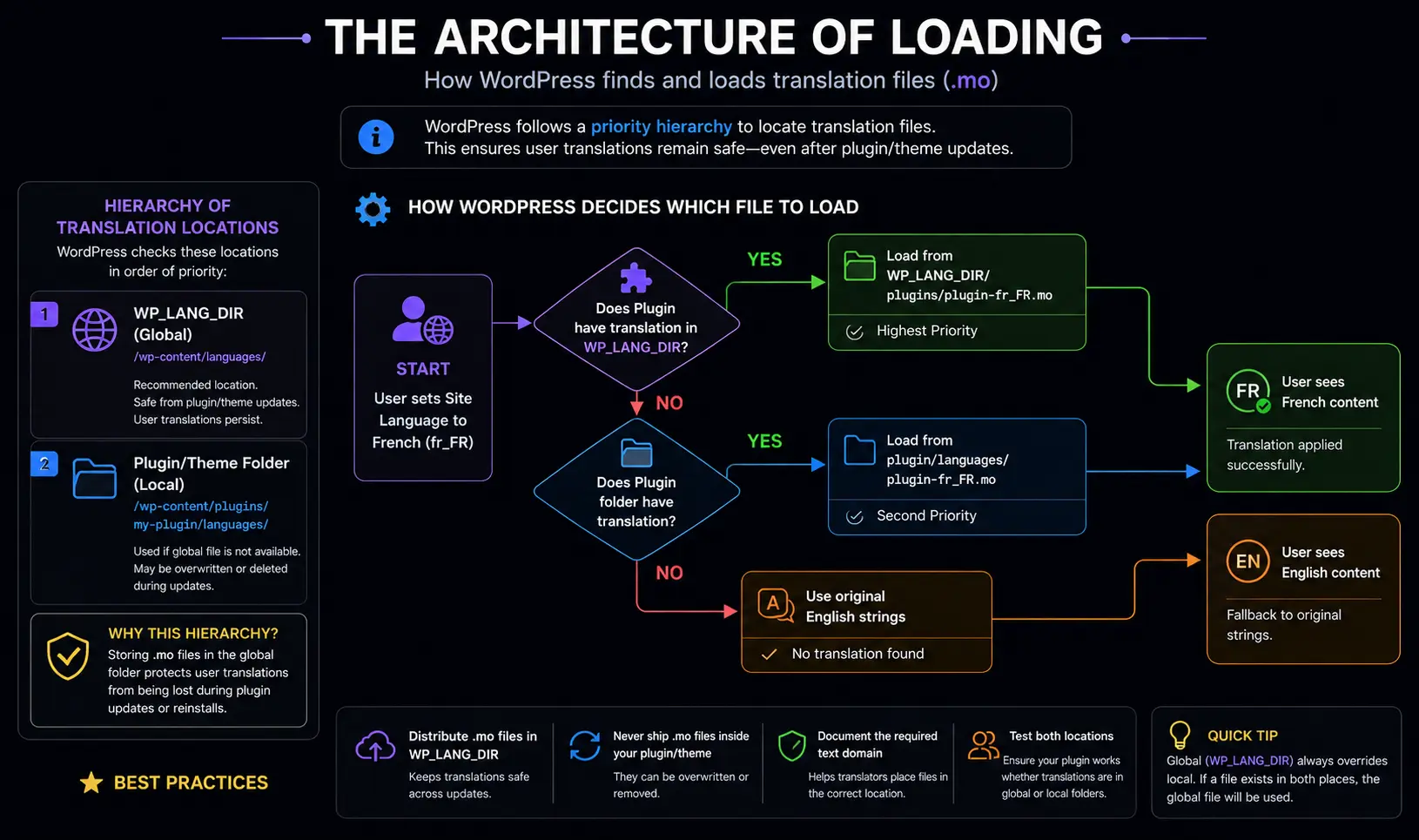
Let’s look at the hierarchy of where WordPress looks for translations. It doesn’t just check one place. It checks a priority list.
- WP_LANG_DIR: The global languages folder (
/wp-content/languages/). - Plugin/Theme Folder: The local folder inside your plugin (
/wp-content/plugins/my-plugin/languages/).
The reason for this hierarchy is updates. If you put the .mo file inside the plugin folder, and the user updates the plugin, that file might get overwritten and deleted. By using the global WP_LANG_DIR, users can keep their translations safe even if they delete and reinstall the plugin.
Here is how the system determines which file to load:
Common Pitfalls I’ve Encountered
Over the years, I’ve made every mistake in the book regarding i18n. Here are a few to avoid:
- Variables inside strings: Don’t do
__('Welcome ' . $name . '!', 'text-domain'). The extraction tool won’t understand the variable.- Correct way: Use placeholders like
sprintf(__('Welcome %s!', 'text-domain'), $name);.
- Correct way: Use placeholders like
- HTML in strings: Try to keep HTML out of the translation string. Different languages might need to move the bold tag or the link tag.
- Bad:
__('Click <a href="#">here</a>', 'text-domain') - Better: Use placeholders for the HTML or separate the link text.
- Bad:
- Empty Text Domains: I often see
__('String')without the second parameter. This works, but it falls back to the core WordPress translations, which might be disabled or different. Always define your own text domain.
Why This Matters Beyond “Just Translation”
You might be wondering, “My site is in English, do I need to care?”
Absolutely. Internationalization isn’t just about language; it’s about maintainability.
By using the i18n system, you separate your content (text) from your logic (code). Even if you never translate the site, this separation makes your code cleaner. If you need to change the wording of an error message, you know exactly where to look (or you can filter the text string using the gettext filter without touching the core plugin files).
Furthermore, accessibility tools often interact with these systems. Screen readers and text-to-speech engines rely on proper language attributes, which are often set and managed via the i18n system.
WrapUP
The WordPress Internationalization system is a robust, elegant solution to a complex problem. It relies on the Gettext standard, utilizes specific file types (POT, PO, MO), and requires developers to be disciplined in how they write strings.
From my experience, the hardest part isn’t the code—it’s the mindset shift. Once you start thinking of every string as a variable that might change, you naturally write better, cleaner, and more globally accessible code. It transforms your project from a local tool into a product ready for the global stage.
Whether you are building a simple theme or a complex plugin, integrating i18n from day one saves you from the nightmare I faced with my Spanish client years ago. It’s the mark of a professional WordPress developer.
References:
- WordPress Developer Documentation: Internationalization
- WordPress Codex: Translating WordPress
- Gettext Manual
FAQs
What exactly is the difference between Internationalization and Localization?
Think of Internationalization as preparing a suitcase for a trip without knowing the destination—you make sure it has compartments for anything you might need. Localization is when you actually pack the suitcase for a specific place, like packing a raincoat for London or sunscreen for Miami. In technical terms, Internationalization is the code setup that makes translation possible, while Localization is the actual act of translating the content for a specific audience.
Why do I have to use those special functions like __() instead of just typing my text?
If you type text directly into your code, it is “hardcoded.” This means it is stuck that way forever. When you use a function like __(), you are putting a wrapper around your text. This wrapper tells WordPress, “Check if there is a translated version of this available. If there is, show that. If not, show the original.” It acts like a smart switch for your language.
What is a “Text Domain” and why is it so important?
A Text Domain is like a unique ID badge for your plugin or theme. Imagine you have ten different plugins installed, and they all use the word “Save.” Without a Text Domain, WordPress wouldn’t know which “Save” belongs to which plugin. The Text Domain ensures that when you translate your plugin, you are only changing your words, not the words in someone else’s plugin.
What is the difference between the .POT, .PO, and .MO files?
These are just different stages of the translation file. The .POT file is the master template that contains only the original English text—it’s the blank form. The .PO file is where the actual human translation happens; it contains the original text and the translated text side-by-side. The .MO file is the machine-optimized version of the .PO file. WordPress reads the .MO file because it loads much faster than the others.
Do I need to know a foreign language to make my theme translatable?
Absolutely not. Your job as a developer is simply to make the strings “translatable.” You write the code in English (or your native language) and wrap it in the proper functions. You then generate the .POT file. Later, a professional translator or a user who speaks another language can take that .POT file and do the actual translation work without needing to understand your code.
Why shouldn’t I put variables inside the translation strings?
A lot of languages change the order of words in a sentence. If you write code that says “You have” + $count + “messages,” a translator cannot move the number to the front for their language. Instead, you should use placeholders (like %s). This allows the translator to write the sentence in the correct order for their language, like “Messages: 5” or “5 Messages,” without breaking your code.
Does using internationalization slow down my website?
It has a very small impact, but it is generally negligible for most sites. WordPress is smart; it only loads the language files that are needed for the current page. However, if you have a massive plugin with thousands of text strings, loading them all at once can slow things down slightly. This is why many developers now use “Language Packs,” which only download the specific language file a user needs.
Can I use this system for JavaScript files, or is it only for PHP?
In the past, this was difficult, but modern WordPress makes it very easy. There is now a JavaScript version of the system called wp.i18n. It works almost exactly the same way as the PHP functions. You can wrap your JavaScript alerts and button labels in these functions, and WordPress will translate them just like it does for the PHP parts of your site.
What happens if a translation string is missing from the file?
WordPress is built to be fail-safe. If it looks for a translation for “Submit” and cannot find it in the loaded language file, it simply defaults to the original text you wrote in the code. This means your users will still see “Submit” in English (or whatever your default language is) rather than seeing an error message or a broken layout.
Can I change a translation without editing the plugin code?
Yes, and this is one of the best features. Since the text is run through a filter, you can use a small snippet of code in your own theme’s functions.php file to intercept the string and change it. This is great if you want to rename “Add to Cart” to “Buy Now” without touching the core WooCommerce plugin files, ensuring your changes don’t disappear when you update the plugin.