I remember the first time I tried to add an AJAX functionality to a WordPress site. I was fresh out of building static HTML pages where everything was simple. You click a link, the browser loads a new page. Easy. But then a client wanted a “Like” button on their blog posts that updated the count without refreshing the page.
I thought, “How hard can it be?”
Well, within two hours, I was staring at a console full of errors, a spinning loading wheel of doom, and a growing sense of despair. I scoured the internet, copy-pasted code snippets from shady forums, and basically treated WordPress AJAX like some sort of dark magic.
If you are in that boat right now—staring at your screen wondering why your AJAX request keeps returning a giant, annoying 0—take a deep breath. WordPress AJAX has a reputation for being confusing, but once you understand the underlying flow, it actually makes perfect sense.
In this article, I’m going to walk you through everything I’ve learned about WordPress AJAX the hard way, but explained the easy way. We’ll skip the overly academic jargon and talk about how this actually works in the real world, complete with diagrams, code, and the common traps we all fall into.
Table of Contents
What is AJAX, and Why Should You Care?
Before we dive into WordPress-specific stuff, let’s quickly talk about what AJAX actually is.
AJAX stands for Asynchronous JavaScript And XML. Let’s break that down into human terms:
- Asynchronous: This is the magic word. It means “happening in the background.” When you click a button on a website, the browser doesn’t freeze up waiting for the server to respond. You can keep scrolling, reading, or clicking other things.
- JavaScript: This is the language running in your browser that sends the request.
- And XML: Honestly, nobody really uses XML anymore. We use JSON (JavaScript Object Notation) now. So technically, it should be called AJAJ, but that sounds like a bad boy band, so we stuck with AJAX.
Think of traditional web browsing like a phone call. You ask a question, the other person goes silent to look up the answer, and you sit there waiting until they finally speak again.
AJAX is like texting. You send a text asking a question, put your phone in your pocket, and go about your day. When the other person texts back, your phone buzzes, and you look at the answer. The rest of your life (or webpage) didn’t pause while you waited.
Real-World Uses for AJAX
If you want your WordPress site to feel modern, smooth, and app-like, you need AJAX. Here are some common places you’ll use it:
- Adding items to a shopping cart without leaving the product page.
- Submitting a contact form and showing a “Success!” message without a page reload.
- Liking or disliking a post or comment.
- Loading more posts when a user clicks a “Load More” button at the bottom of a blog.
- Live search, where results appear as you type in the search bar.
The WordPress Twist: Why It’s Different Here
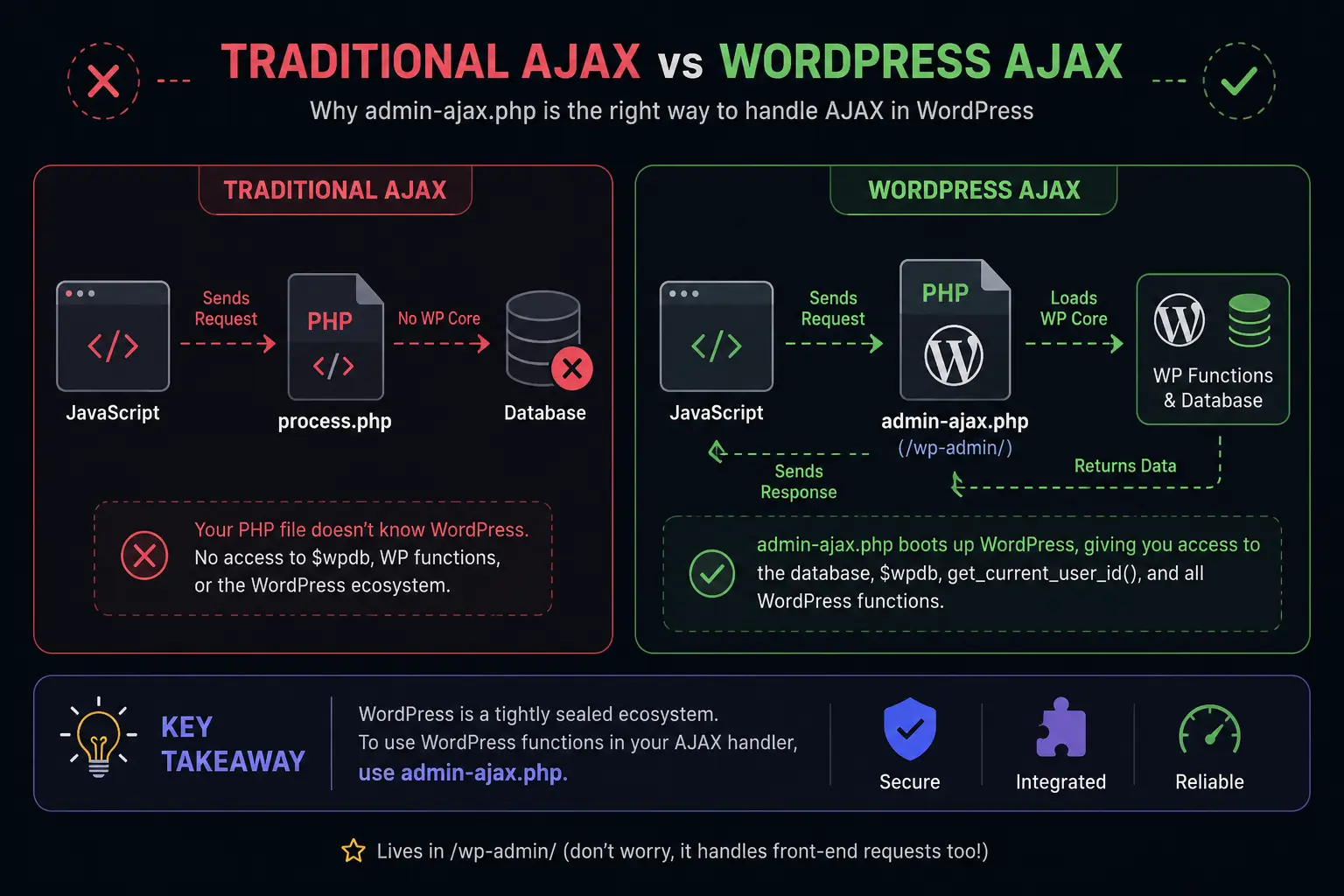
If you’ve worked with AJAX outside of WordPress, you’re probably used to creating a standalone PHP file, sending your JavaScript request to that file, and echoing out the result.
Do not do this in WordPress.
I made this mistake early on. I created a custom process.php file in my theme, sent my AJAX request there, and immediately hit a brick wall: my PHP file didn’t know what WordPress was. It couldn’t access the database, it didn’t know what $wpdb was, and it certainly couldn’t use WordPress functions like get_current_user_id().
WordPress is a tightly sealed ecosystem. To use WordPress functions inside your AJAX handler, you must load the WordPress core.
Instead of creating a separate file from scratch, WordPress gives you a centralized doorway: admin-ajax.php.
This file lives in the /wp-admin/ folder (don’t worry about the “admin” part, it handles front-end requests too). When you send an AJAX request to admin-ajax.php, it boots up the WordPress environment, processes your request, and sends back a response.
Here is a visual look at how the traditional way differs from the WordPress way:
The Golden Ingredients of a WordPress AJAX Request
Every successful AJAX implementation in WordPress requires four main ingredients. Miss one, and your recipe fails.
- The JavaScript: The code on the front-end that triggers the event and sends the data.
- The
ajaxurl: The URL of theadmin-ajax.phpfile, so your JavaScript knows where to send the data. - The Action: A specific name/label that tells WordPress which PHP function to run when the request arrives.
- The PHP Hook: The PHP function that catches the request, does the work, and sends the response back.
Let’s walk through these step-by-step with a real example. Let’s build a simple “Like” button for a post.
Step 1: Enqueuing the Script and Passing the ajaxurl
The first hurdle beginners face is finding the URL to admin-ajax.php. On the WordPress admin dashboard, WordPress conveniently defines a JavaScript variable called ajaxurl for you. But on the front-end of your site? It doesn’t exist.
If you try to use ajaxurl on the front-end, your console will scream ReferenceError: ajaxurl is not defined.
To fix this, we use a WordPress function called wp_localize_script(). This function allows us to pass data from PHP into our JavaScript file before the page loads.
Here is how you do it in your theme’s functions.php file:
function my_enqueue_scripts() {
    // 1. Enqueue your JavaScript file
    wp_enqueue_script( 'my-like-script', get_template_directory_uri() . '/js/like.js', array('jquery'), '1.0', true );

    // 2. Pass the ajaxurl to the JavaScript
    wp_localize_script( 'my-like-script', 'myAjaxObject', array(
        'ajaxurl' => admin_url( 'admin-ajax.php' ),
        'nonce'   => wp_create_nonce( 'my_like_nonce' ) // We'll explain this shortly!
    ));
}
add_action( 'wp_enqueue_scripts', 'my_enqueue_scripts' );What did we just do?
- We registered our JavaScript file (
like.js). - We used
wp_localize_scriptto create a JavaScript object calledmyAjaxObject. - Inside that object, we passed the correct URL to
admin-ajax.php. - We also passed something called a nonce (more on this in the security section).
Now, inside our like.js file, we can access the URL simply by typing myAjaxObject.ajaxurl.
Step 2: The JavaScript (Sending the Request)
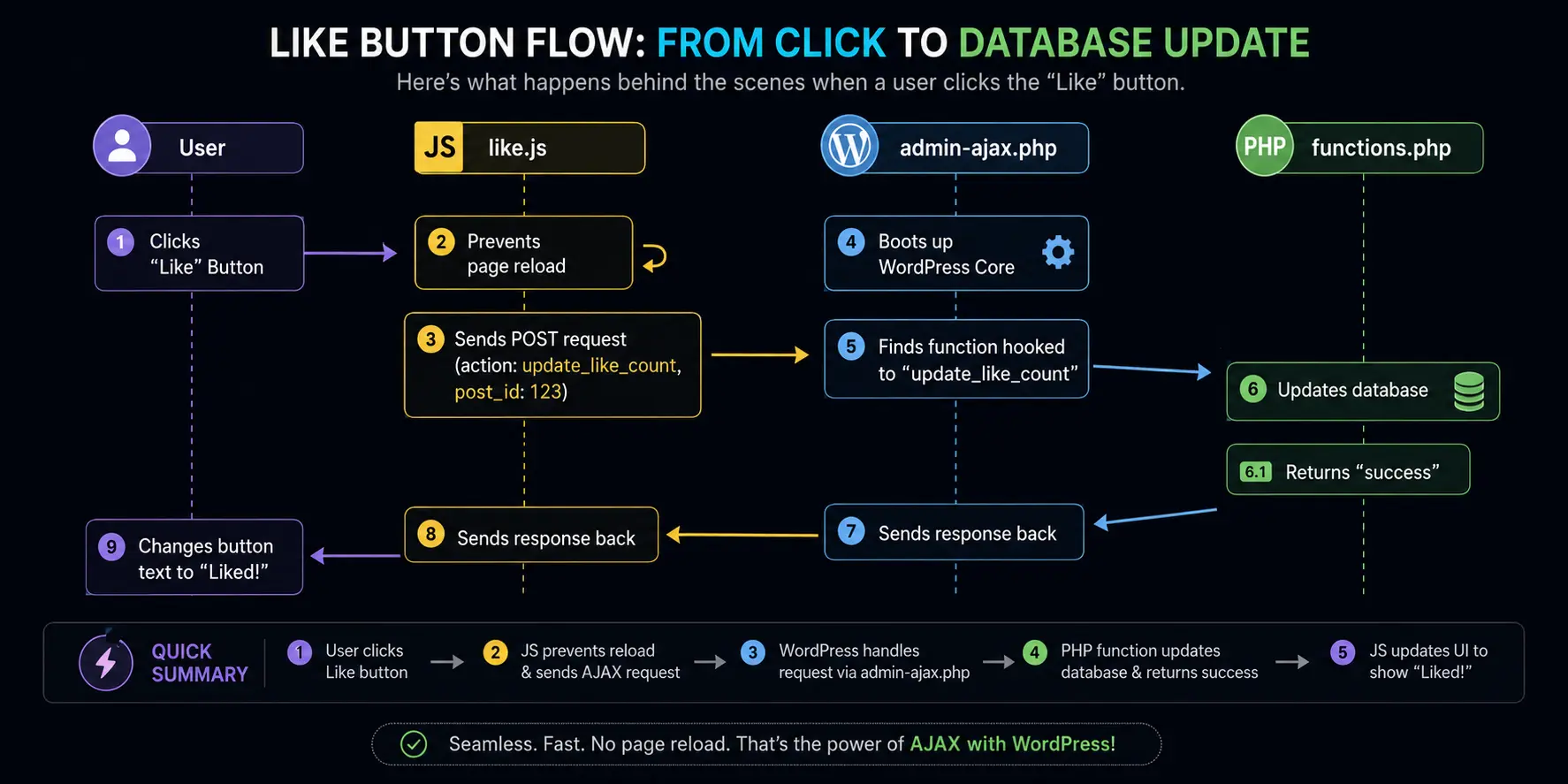
Now let’s write the JavaScript. We need to listen for a click on our Like button, prevent its default behavior, gather some data, and send it to WordPress.
Here is what the HTML for our button might look like (inside your theme template, like single.php):
<button class="like-button" data-post_id="<?php the_ID(); ?>">
    Like this Post
</button>Notice the data-post_id attribute? That’s a neat way to pass the WordPress Post ID into our JavaScript.
Now, let’s write the jQuery inside our like.js file:
jQuery(document).ready(function($) {

    // Listen for the click
    $('.like-button').on('click', function(e) {
        e.preventDefault(); // Prevent any default action

        // Get the post ID from the data attribute
        var post_id = $(this).data('post_id');

        // Send the AJAX request
        $.ajax({
            url: myAjaxObject.ajaxurl,  // The URL we passed via PHP
            type: 'POST',               // We are sending data, so use POST
            data: {
                action: 'update_like_count', // THE ACTION HOOK NAME
                post_id: post_id,            // The data we want to send
                nonce: myAjaxObject.nonce    // The security token
            },
            success: function(response) {
                // If the server responds successfully
                if (response === 'success') {
                    $('.like-button').text('Liked!');
                } else {
                    alert('Something went wrong: ' + response);
                }
            },
            error: function() {
                alert('Connection error. Please try again.');
            }
        });

    });

});Look closely at the data section of the AJAX call. The absolute most important line here is action: 'update_like_count'. This is the string that tells WordPress which PHP function to look for. If this doesn’t match your PHP hook, nothing will happen.
Here is the flow of what we just set up:
Step 3: The PHP Handler (Catching the Request)
Now we need to catch that request on the server side and update the post’s like count. We do this by hooking into specific WordPress actions.
There are two hooks you must always remember:
wp_ajax_[your_action_name]– This fires for logged-in users (Administrators, Editors, Subscribers, etc.).wp_ajax_nopriv_[your_action_name]– This fires for non-logged-in visitors (“no privileges”).
If you want your AJAX to work for everyone, you must hook into both. If you only want it to work for logged-in users (like saving a user profile setting), you only use the first one.
Let’s add this to our functions.php:
// Hook for logged-in users
add_action( 'wp_ajax_update_like_count', 'my_update_like_count_function' );

// Hook for non-logged-in users
add_action( 'wp_ajax_nopriv_update_like_count', 'my_update_like_count_function' );

// The actual function that does the work
function my_update_like_count_function() {

    // 1. Check the Security Nonce
    check_ajax_referer( 'my_like_nonce', 'nonce' );

    // 2. Sanitize the incoming data
    $post_id = intval( $_POST['post_id'] );

    // 3. Do the actual work (e.g., update post meta)
    $current_likes = get_post_meta( $post_id, 'like_count', true );
    $new_likes = $current_likes + 1;
    update_post_meta( $post_id, 'like_count', $new_likes );

    // 4. Return the response
    echo 'success';

    // 5. ALWAYS die() at the end!
    wp_die();
}The Unbreakable Rules of the PHP Handler
- Verify the Nonce:
check_ajax_referer()ensures the request came from your site, not a malicious bot. We’ll dig into this below. - Sanitize Everything: Never trust data coming from the browser. We used
intval()to ensure thepost_idis an integer, not malicious code. - Always
wp_die(): If you forgetwp_die()(ordie()), WordPress will append a0to the end of your response. So instead of returningsuccess, it will returnsuccess0, which will break your JavaScript logic. WordPress requires this to terminate the script properly.
Security: The Nonce (Your Best Friend)
I skipped over the nonce earlier, but it is the most critical part of any AJAX request.
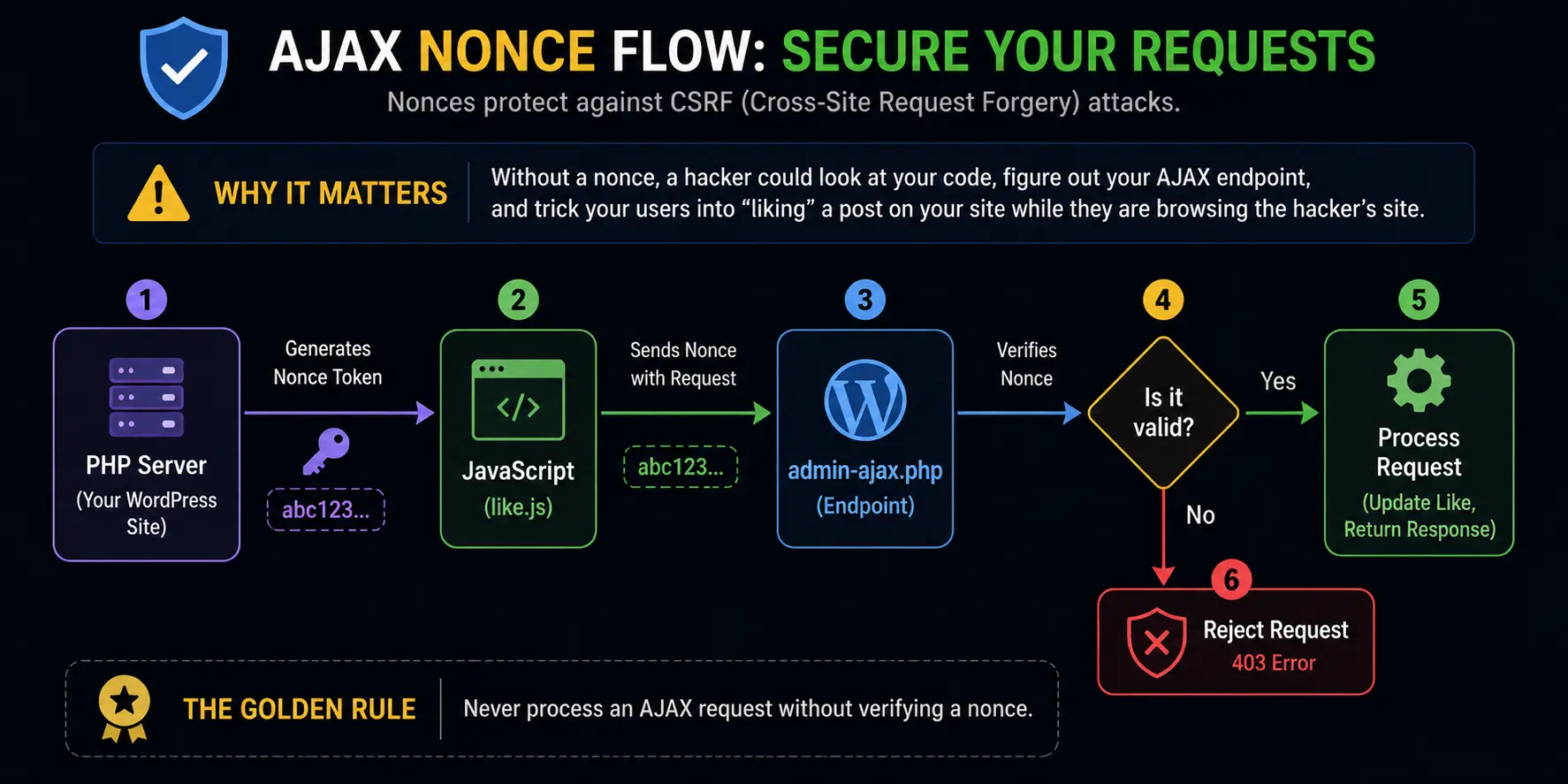
“Nonce” stands for Number used ONce. Imagine you are entering a highly secure building. The front desk gives you a visitor pass that expires at the end of the day. Without that pass, you can’t get past the elevators.
A WordPress nonce is like that visitor pass. It is a cryptographic token generated by your server. When you pass it to your JavaScript via wp_localize_script, your JS hands it back to the server on every request. The server checks it. If the token is valid and hasn’t expired, the request goes through. If it’s missing or invalid, the request is denied.
This prevents CSRF (Cross-Site Request Forgery). Without a nonce, a hacker could look at your code, figure out your AJAX endpoint, and trick your users into “liking” a post on your site while they are browsing the hacker’s site.
The Golden Rule: Never process an AJAX request without verifying a nonce.
Troubleshooting: The “Returns 0” Nightmare
If there is one thing every WordPress developer experiences, it’s sending an AJAX request, the wheel spins, and the response comes back as 0. Just a lonely, frustrating 0.
Here is a quick troubleshooting table I keep taped to my mental desk whenever my AJAX breaks:
| Symptom | Likely Cause | How to Fix It |
|---|---|---|
Returns 0 | You forgot wp_die() at the end of your PHP function, OR your action hook names don’t match. | Add wp_die(). Double-check wp_ajax_your_action matches the action string in your JS. |
Returns -1 | The nonce verification failed. | Ensure you are passing the nonce in JS and verifying it in PHP with check_ajax_referer(). |
Returns 400 Bad Request | The URL you are sending the request to is wrong, or the action variable is missing from your JS data. | Check that myAjaxObject.ajaxurl is correct and action: 'my_action' is in your JS data object. |
Returns 500 Internal Server Error | There is a fatal PHP error in your handler function. | Check your PHP syntax. Enable WP_DEBUG in your wp-config.php to see the exact error. |
| Nothing happens (No response) | The JS event isn’t firing, or the URL is completely broken. | Open browser DevTools (F12) -> Network Tab. Watch the request. Is it firing? Is it red? |
Logged-In vs. Logged-Out: The Hidden Trap
Here’s a scenario that bites almost every developer at least once:
You build an amazing AJAX feature. You test it while logged in as an admin. It works perfectly! You deploy it to the live site. Ten minutes later, a visitor emails you saying the feature is broken.
What happened? You forgot wp_ajax_nopriv_.
Remember:
wp_ajax_= Logged-in users only.wp_ajax_nopriv_= Logged-out users only.
If you want both to use it, you need to hook your function to both actions:
add_action( 'wp_ajax_my_action', 'my_function' );
add_action( 'wp_ajax_nopriv_my_action', 'my_function' );Also, if you need to know who is making the request in your PHP function, you can check get_current_user_id(). If it returns 0, the user is not logged in. This is super useful for things like limiting “Likes” to one per logged-in user.
The Modern Era: Is admin-ajax.php Dead?
You might read older articles (or even some newer ones) that say admin-ajax.php is terrible and you should never use it. Why the hate?
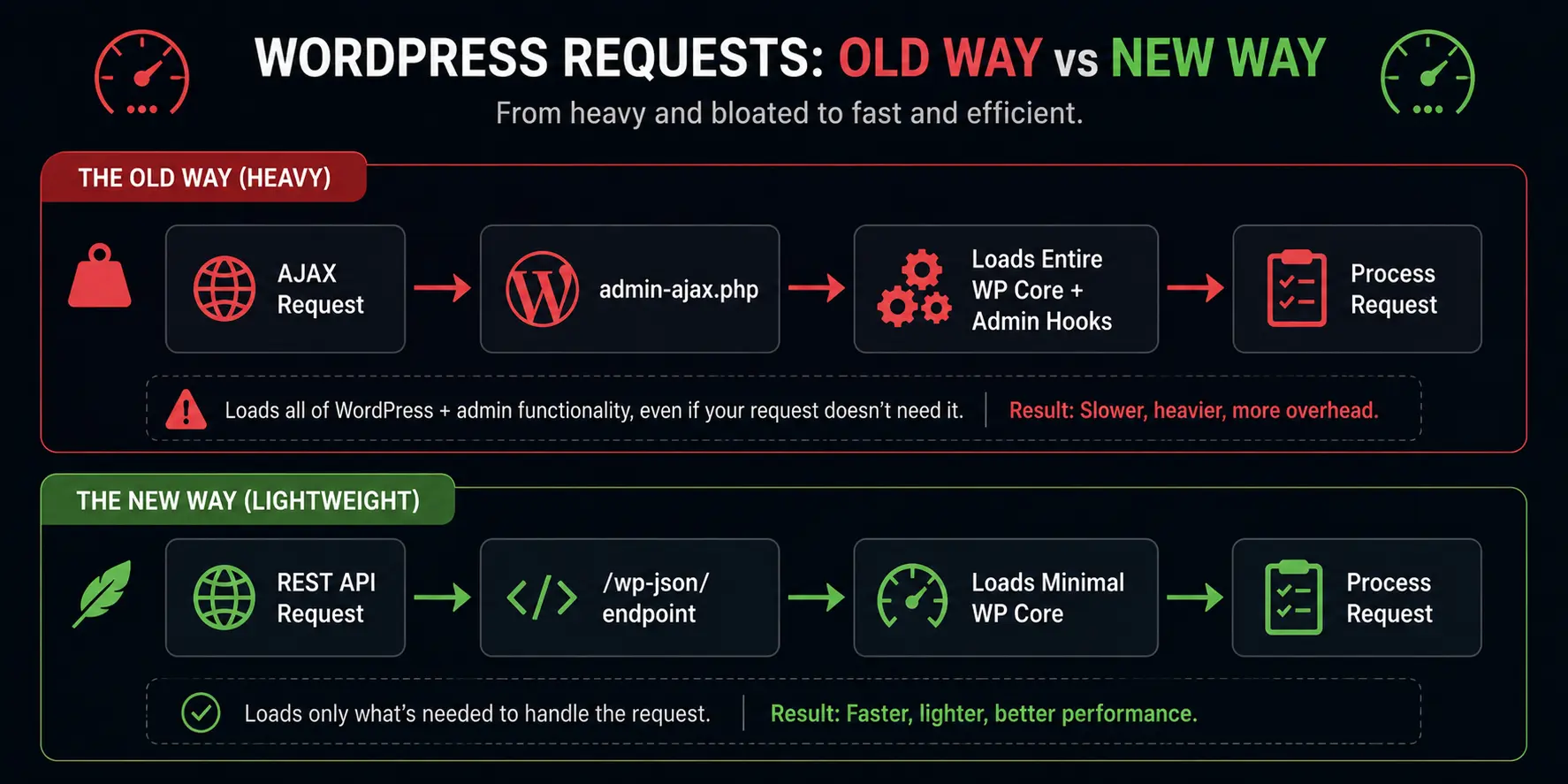
The main issue is performance. When you send a request to admin-ajax.php, WordPress has to load almost the entire WordPress core. It loads all the plugins, the theme functions, and a bunch of admin-related code. It’s heavy. It’s like starting a massive freight train just to deliver a single pizza.
In recent years, WordPress introduced the REST API. The REST API is a much faster, more modern way to handle asynchronous requests. It uses specific endpoints (like /wp-json/wp/v2/posts/123) and only loads the bare minimum of the WordPress core to process the request.
So, should you still use admin-ajax.php?
Yes, absolutely.
While the REST API is better for heavy, data-driven applications, admin-ajax.php is still 100% valid, officially supported, and much easier for beginners to wrap their heads around. For simple things like a contact form or a like button, the performance difference is practically invisible to the human eye.
As a rule of thumb:
- Use the REST API if you are building a React/Vue frontend, a mobile app, or handling massive amounts of data.
- Use
admin-ajax.phpif you are building standard themes, simple plugins, or just need a quick and reliable asynchronous feature without the overhead of setting up REST routes.
Best Practices for WordPress AJAX
Before we wrap up, here are a few golden rules I’ve learned from years of making mistakes:
- Always give user feedback: When a user clicks your AJAX button, don’t leave them guessing. Show a loading spinner, disable the button temporarily, or change the text to “Processing…”. There is nothing worse than clicking a button, nothing seeming to happen, and clicking it 5 more times (which sends 5 duplicate AJAX requests!).
- Use
wp_send_json_success()andwp_send_json_error(): Instead of justechoing strings, use these WordPress functions. They automatically format your response as a neat JSON object and include thewp_die()for you.
Example:wp_send_json_success( array( 'new_count' => 5 ) ); - Keep your JavaScript clean: Use
wp_localize_scriptproperly. Don’t hardcode URLs into your JS files. If you move your site from a local server to live hosting, hardcoded URLs will break. - Don’t query the database if you don’t have to: If your AJAX request is just toggling a display state (like showing/hiding a menu), do that purely with CSS and JavaScript. Don’t send a request to the server just to change a visual element that doesn’t need to be saved.
Conclusion
Learning WordPress AJAX is a rite of passage. It bridges the gap between static, boring page reloads and the dynamic, smooth experiences that modern web users expect.
Yes, the admin-ajax.php system feels a bit clunky compared to modern frameworks. Yes, the 0 at the end of your response will drive you crazy until you remember wp_die(). But once you grasp the flow—JavaScript sends the action, admin-ajax.php routes it, PHP processes it, and JavaScript handles the response—you unlock the ability to build almost anything.
Start small. Build a simple button that updates a post meta value. Use your browser’s DevTools Network tab to watch the request fly out and the response come back. Once you see that successful ping, the magic fades, and it just becomes a tool in your belt.
Keep experimenting, always secure your nonces, and never forget to wp_die().
References & Further Reading:
- WordPress Codex: AJAX in Plugins – The official, albeit slightly dated, documentation that started it all.
- WordPress Developer Handbook: AJAX – The modern, updated handbook for AJAX implementation.
- WordPress Nonces – Developer Handbook – Essential reading for understanding and implementing security in your AJAX requests.
FAQs
What exactly does AJAX do in simple terms?
AJAX lets your website talk to the server in the background. Think of it like texting instead of making a phone call. You can send information (like clicking a “Like” button or submitting a form) to the server, and the server can send back an update, all without making the entire webpage refresh. It makes your site feel fast and smooth, just like a mobile app.
Why can’t I just create my own separate PHP file to handle AJAX requests?
You can, but it will cause a massive headache. If you create a standalone PHP file, it has no idea that WordPress even exists. It cannot access the database, it cannot use WordPress functions, and it cannot tell if a user is logged in. By using the built-in admin-ajax.php file, WordPress boots up its core system first, giving your PHP code access to all the tools and security features it needs to work properly.
Why does my AJAX request keep returning a giant “0” at the end?
This is the most common WordPress AJAX mistake! It almost always happens because you forgot to add wp_die(); at the very end of your PHP function. WordPress requires this command to know that your script is completely finished. If you leave it out, WordPress automatically spits out a “0” to signal the end of the process, which messes up your JavaScript response.
What is a “nonce” and why does everyone say I need one?
A nonce is a temporary security token, kind of like a one-time visitor pass. It stops hackers from tricking your users into making unwanted requests from outside your website. You generate the pass in PHP, hand it to your JavaScript, and your JavaScript must show that pass to the server when it makes a request. If the pass is missing or expired, the server blocks the request. Never skip adding a nonce; it keeps your site safe.
My AJAX works perfectly for me, but logged-out visitors say it’s broken. Why?
You probably forgot to use the “nopriv” hook. In WordPress, wp_ajax_your_action only runs for users who are logged in. If you want visitors who are just browsing your site to use your AJAX feature, you must also add wp_ajax_nopriv_your_action and attach it to the exact same PHP function.
How do I tell my JavaScript where the admin-ajax.php file is located?
WordPress automatically gives this URL to the admin dashboard, but it does not provide it for the front-end of your site. To fix this, you use a PHP function called wp_localize_script when you add your JavaScript file. This function acts like a bridge, allowing you to grab the URL from PHP and hand it over to your JavaScript as a variable so your code knows exactly where to send the request.
What is the “action” variable, and why is it so important?
Think of the action variable as a name tag for your request. When your JavaScript sends data to the server, it includes this name tag so WordPress knows what to do with the data. WordPress looks at the action name and searches your PHP files for a matching hook. If the action name in your JavaScript
Is using admin-ajax.php bad for my site’s speed?
It can be a bit heavy. Because admin-ajax.php loads almost the entire WordPress core just to process a single request, it takes more server power than a super lightweight endpoint. However, for simple things like submitting a contact form or updating a like count, the speed difference is barely noticeable to a human. If you are building a massive application that makes dozens of requests a second, you might want to look into the WordPress REST API instead.
How can I tell why my AJAX request is failing?
Your best friend for fixing AJAX issues is your web browser’s Developer Tools. Right-click anywhere on your webpage, select “Inspect,” and click on the “Network” tab. When you trigger your AJAX request (like clicking the button), a new entry will pop up in that list. Click on it, and you can see exactly what data was sent to the server and what error message the server sent back, which makes fixing the problem much easier.
Can I use AJAX on the front-end of my site, even though the file has “admin” in the name?
Absolutely! The name admin-ajax.php is super confusing for beginners, but it is just a historical artifact from the early days of WordPress. Even though it has “admin” in the name, it is the official, correct way to handle both front-end and back-end AJAX requests for all users, whether they are administrators or completely anonymous visitors.