Let me tell you a story. A few years ago, I was running a moderately successful blog about digital marketing and productivity. I was getting about 15,000 unique visitors a month. I had affiliate links plastered everywhere, a sidebar asking people to subscribe to my newsletter, and I even had a premium eBook for sale.
My traffic was good. My content was solid. But my bank account? It was laughable.
I was stuck in the classic blogger trap: I had an audience of readers, but I didn’t have paying customers. I was treating my blog like a digital magazine, hoping people would just magically click a “Buy Now” button. It wasn’t until I hit a wall of burnout that I realized something had to change. I needed a system.
That’s when I discovered the power of a CRM (Customer Relationship Management) system.
Now, I know what you’re thinking. “Isn’t a CRM for car dealerships, real estate agents, and massive corporate sales teams?”
That’s exactly what I thought. But once I swallowed my pride and implemented one for my blog, everything shifted. I went from making a few hundred bucks a month in random affiliate commissions to generating a steady, predictable income from digital products and courses.
In this article, I’m going to break down exactly how a CRM helps bloggers turn casual readers into loyal, paying customers. I’ll use plain English, share some of my own hard-learned lessons, and show you the exact steps to make it happen.
Table of Contents
The Problem: The “Leaky Bucket” Blog
Before we talk about the solution, we need to understand the problem. Most bloggers operate on a “hope and pray” business model.
- You write a killer blog post.
- You share it on social media.
- People visit, read it, maybe leave a comment, and then… they leave.
- You hope they remember your URL and come back next week.
This is a leaky bucket. You are pouring time and money into getting traffic, but the traffic slips right through the holes in the bottom.
Readers don’t buy from you the first time they visit your blog. Statistics show that it takes an average of 7 to 8 touchpoints before someone makes a purchasing decision. If a reader visits your blog, leaves, and never hears from you again, that’s one touchpoint. You’re asking them to buy from a stranger.
A CRM fixes this by capturing those readers, remembering who they are, and systematically building a relationship with them until they are ready to buy.
What Exactly is a CRM for a Blogger?
At its core, a CRM is just a very smart, highly organized digital filing cabinet mixed with an automated assistant.
For a blogger, a CRM takes over the job of remembering who your readers are. Instead of just storing their email address, it tracks their behavior. It knows if they clicked a link in your newsletter. It knows if they visited your “Hire Me” page. It knows what blog topics they care about most.
When I first started, I was using a basic email newsletter tool. It could send an email to a list of people, but it couldn’t “think.” A basic email tool sends the same message to everyone. A CRM system sends the right message, to the right person, at the right time, based on their actual behavior.
Honestly, when I first looked into setting this up, it felt overwhelming. I spent weeks comparing enterprise-level software that cost hundreds of dollars a month. Eventually, I stumbled upon CloudCusp Mailer, which was refreshingly simple and actually made sense for a solo blogger like me. It handled the heavy lifting without requiring a computer science degree to set up.
The Reader-to-Customer Journey
To understand how a CRM works, you need to see the journey. Let’s map out how a random Google searcher becomes a paying customer.
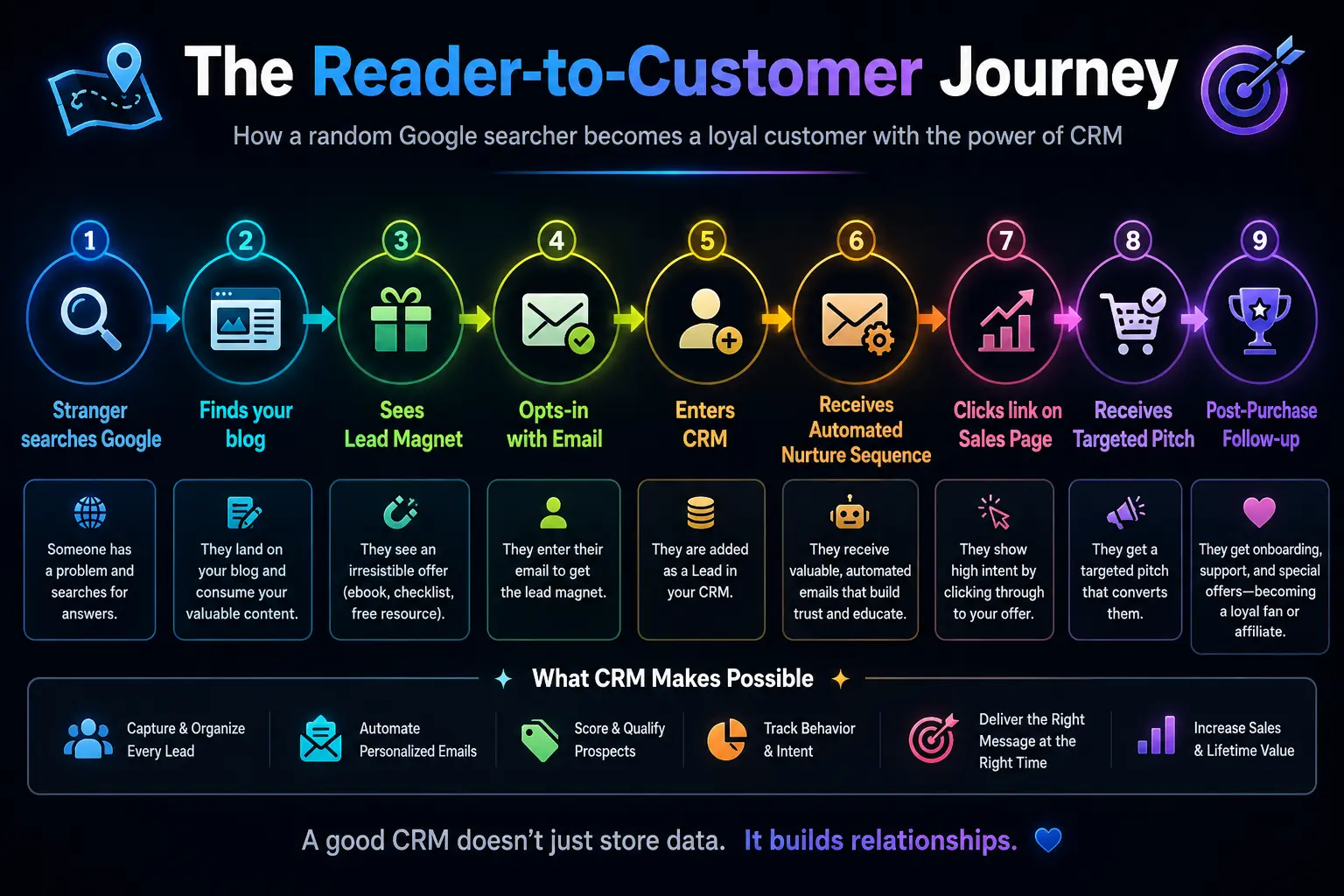
Let’s break down each phase of this diagram and how the CRM makes it happen.
Phase 1: Capturing the Audience (Lead Generation)
You can’t put a reader into a CRM if you don’t have a way to capture their information. The days of “Subscribe to my blog for updates!” are dead. Nobody wants more updates in their inbox.
You need a Lead Magnet. This is a free, valuable piece of content you trade for their email address. It could be a checklist, a template, a mini-course, or an ebook.
Here is where a CRM shines. Your CRM will host the signup forms and automatically deliver the lead magnet.
Let’s say you write a blog about meal planning. Your lead magnet is a “7-Day Vegan Meal Prep Guide.” When a reader visits your blog, they see a pop-up form.
Here is a simplified look at how the HTML form on your blog connects to your CRM:
<!-- A simple opt-in form that sends data to your CRM -->
<form action="https://your-crm-api.com/add-subscriber" method="POST">
    <h3>Grab your free 7-Day Meal Prep Guide!</h3>
    <input type="hidden" name="lead_magnet" value="Vegan_Meal_Prep">
    <label for="fname">First Name:</label>
    <input type="text" id="fname" name="firstname" required>

    <label for="email">Email:</label>
    <input type="email" id="email" name="email" required>

    <button type="submit">Send Me The Guide!</button>
</form>When the user clicks “Send Me The Guide!”, the CRM receives this data. Instantly, the CRM does three things:
- Adds the person to your database.
- Tags them as interested in “Vegan” content.
- Triggers an automated email containing the PDF download link.
You didn’t lift a finger. The CRM did it all.
Phase 2: The Art of Tagging and Segmentation
This is where a basic email list and a CRM completely diverge.
If I have 10,000 people on a basic email list and I send an email about a new “Keto Diet” eBook, I’m sending it to vegans, carnivores, gluten-free folks, and people who just want dessert recipes. Most of them will ignore it. Some will unsubscribe because it’s not relevant.
A CRM uses Segmentation and Tags.
When someone downloads the Vegan guide, the CRM slaps a “Vegan” tag on their profile. If someone else downloads a “High-Protein Meat Recipes” guide, they get a “Meat-Eater” tag.
Here is a table showing how I segment my own blogging audience:
| Segment / Tag | How they got the tag | What I promote to them | Resulting Conversion Rate |
|---|---|---|---|
| Beginner-Bloggers | Downloaded “Start a Blog” checklist | WordPress hosting affiliate link, Beginner SEO course | 3.5% |
| Advanced-SEO | Attended a technical SEO webinar | Premium keyword research tool, High-end consulting | 8.2% |
| DIY-Designers | Read 3+ posts about Canva | Canva Pro affiliate link, Design templates | 5.1% |
| Cold-Subscribers | Haven’t opened an email in 60 days | Re-engagement campaign, deep discount on old product | 1.2% |
By segmenting your audience, you ensure you are only pitching products to people who actually want them. This builds massive trust. Your readers feel like you actually know them, because you aren’t sending them irrelevant junk.
Phase 3: The Automated Nurture Sequence
Once a reader is in your CRM and tagged, the real magic begins. You need to build a relationship. In the blogging world, this is called a Nurture Sequence (or an onboarding sequence).
This is a series of pre-written emails that the CRM sends out automatically over a period of days or weeks. The goal is to move them from “Who is this person?” to “I trust this person’s advice.”
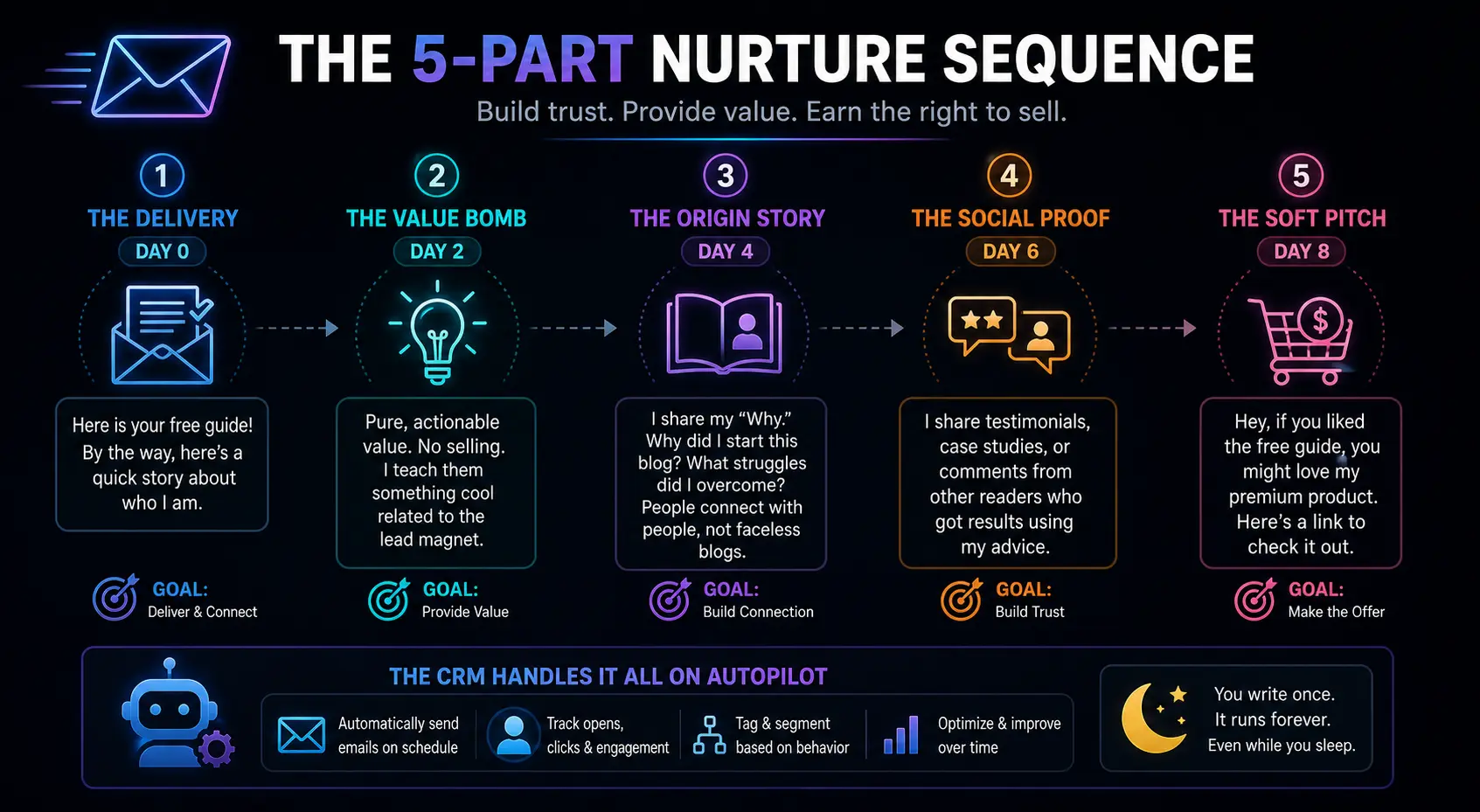
Here is a standard 5-part nurture sequence I use for almost every new lead:
- Email 1: The Delivery (Day 0) – Sent immediately. “Here is your free guide! By the way, here’s a quick story about who I am.”
- Email 2: The Value Bomb (Day 2) – Pure, actionable value. No selling. I teach them something cool related to the lead magnet.
- Email 3: The Origin Story (Day 4) – I share my “Why.” Why did I start this blog? What struggles did I overcome? People connect with people, not faceless blogs.
- Email 4: The Social Proof (Day 6) – I share testimonials, case studies, or comments from other readers who got results using my advice.
- Email 5: The Soft Pitch (Day 8) – “Hey, if you liked the free guide, you might love my premium product. Here’s a link to check it out.”
The CRM handles this entire sequence on autopilot. I wrote those emails once, and they have been sent to thousands of people over the years while I sleep.
Phase 4: Behavioral Tracking and Lead Scoring
This is the feature that blew my mind when I first started using a CRM.
A CRM doesn’t just track if an email was opened. It tracks clicks. It can track if a subscriber visited your sales page. It can track how many times they opened your emails.
Some CRMs use something called Lead Scoring. You assign points to different actions.
- Opens an email: +1 point
- Clicks a link in an email: +3 points
- Visits your pricing/sales page: +5 points
- Watches a webinar replay: +10 points
Let’s say you set a rule: If a subscriber hits 15 points, they are a “Hot Lead.”
When a subscriber hits 15 points, the CRM can automatically trigger a special, highly-targeted email.
Example: “Hey [Name], I noticed you’ve been checking out my stuff on advanced SEO lately. Since you’re clearly serious about this, I wanted to personally invite you to check out my Masterclass. Here’s a 20% off code just for you.”
I actually use CloudCusp Mailer for this specific function. I set up a rule that if someone visits my “Consulting” page twice within a week, the CRM sends me an SMS so I can reach out to them personally. It makes the reader feel incredibly special, and it has landed me multiple high-ticket consulting clients directly from my blog.
Phase 5: The Pitch (Turning Intent into Cash)
Up until now, the CRM has been doing the warming up. Now it’s time to close the deal.
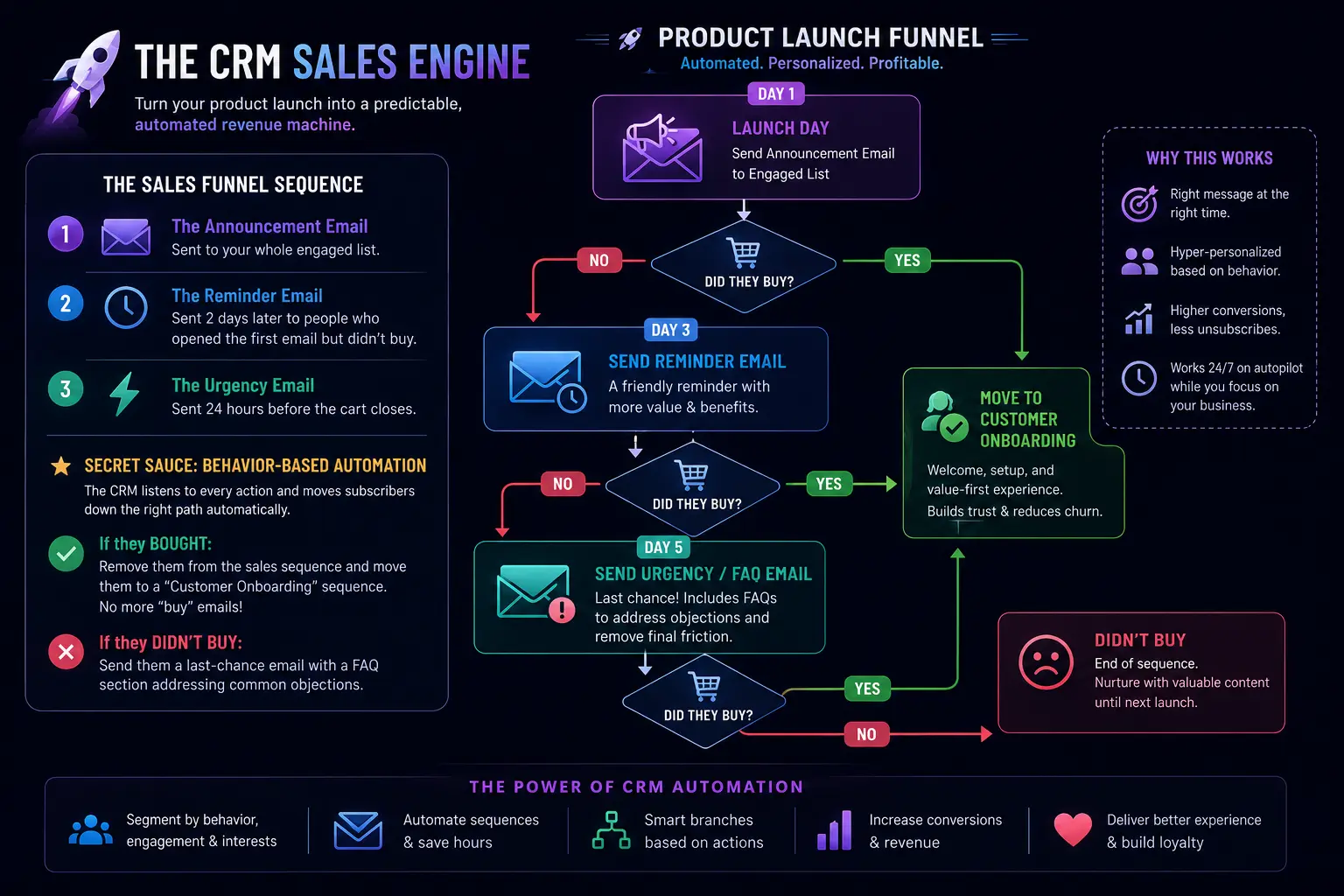
When you launch a product—a course, an ebook, a membership site—the CRM is your sales engine. Instead of sending one generic broadcast email, you create a Sales Funnel.
A sales funnel in a CRM looks like this:
- The Announcement Email: Sent to your whole engaged list.
- The Reminder Email: Sent 2 days later to people who opened the first email but didn’t buy.
- The Urgency Email: Sent 24 hours before the cart closes.
But here is the secret sauce: The CRM allows you to filter these emails based on behavior.
- If they bought the product: The CRM removes them from the sales sequence and moves them to a “Customer Onboarding” sequence. (There is nothing worse than getting an email asking you to buy a product you just bought!).
- If they didn’t buy: The CRM sends them a last-chance email with a FAQ section addressing common objections.
Let’s look at a visual representation of a product launch funnel:
Phase 6: Post-Purchase Nurturing (The LTV Play)
Most bloggers think the game is over once the credit card is processed. That is a massive mistake.
The real money in blogging is in Lifetime Value (LTV). It is much easier to sell a second product to someone who already bought from you than it is to find a brand new customer.
When someone buys your $50 ebook, your CRM should immediately shift their profile from “Prospect” to “Customer.”
Once they are a customer, the trust barrier is broken. They have given you money, and you delivered value. Now, the CRM can start upselling them.
- 7 days after they buy the ebook, the CRM can send an email: “Hey, hope you loved the ebook! If you want to go deeper, I have a full video course that expands on this. Here’s a link.”
- 30 days later, the CRM can ask for a testimonial.
- 60 days later, the CRM can pitch them a higher-ticket item, like a coaching program.
I have a specific sequence set up in Cloudcusp Mailer that triggers 14 days after someone buys my beginner blogging course. It offers them a bundle of my advanced templates at a discount. Because the CRM automates this, that sequence generates passive income for me every single week without me having to remember to send an email.
Common Mistakes Bloggers Make with CRMs (And How to Avoid Them)
I’ve made every mistake in the book when it comes to CRM setup. Learn from my failures so you don’t have to.
1. Overcomplicating the Tags
When I first realized I could tag people, I went crazy. I had tags for “Opened email on a Tuesday,” “Clicked a link about coffee,” “Lives in a cold climate.” My CRM became a messy, unusable disaster.
The Fix: Keep your tags strictly tied to business outcomes. Tag by lead magnet downloaded, products purchased, and broad interest categories. If a tag doesn’t help you send a more targeted email, delete it.
2. Writing Robotic Emails
Just because a CRM is a software program doesn’t mean your emails should sound like they were written by a robot.
The Fix: Write like you speak. Use the reader’s first name (which the CRM can dynamically insert). Use casual language. If you wouldn’t say it to a friend over coffee, don’t put it in your CRM email sequence.
3. Set It and Forget It (Too Much)
Automation is great, but markets change. People get bored of the same emails.
The Fix: Review your CRM sequences every 6 months. Check your open rates and click-through rates. If an email in your sequence is underperforming, rewrite it. Update the links. Make sure the content is still relevant.
4. Ignoring the Unsubscribes
It hurts your ego when people unsubscribe. But in a CRM, unsubscribes are actually a good thing. They are cleaning your list for you.
The Fix: Don’t beg people to stay. Make it easy to unsubscribe. A clean list of 2,000 engaged readers who open your emails is infinitely more valuable than a list of 20,000 people who delete your emails without reading them. High deliverability is key to making sales.
The Financial Reality: CRM vs. No CRM
Let’s look at some numbers to make this real.
Imagine you have 5,000 blog visitors a month.
- Without a CRM: You have a basic signup form where 2% join. You send a weekly broadcast email. You pitch a $50 product once a month.
- With a CRM: You have targeted lead magnets. 5% join. They go through an automated nurture sequence, get scored, and receive a targeted pitch when they show buying intent.
| Metric | Without a CRM (Basic Email) | With a CRM (Automated System) |
|---|---|---|
| Monthly Traffic | 5,000 visitors | 5,000 visitors |
| Conversion to Email | 2% (100 new emails/mo) | 5% (250 new emails/mo) |
| Total List Size (Year 1) | ~1,200 subscribers | ~3,000 subscribers |
| Sales Conversion Rate | 0.5% of total list | 3% of total list (via scoring/segmentation) |
| Monthly Product Sales | 6 sales = $300 | 90 sales = $4,500 |
| Time Spent Managing | 5+ hours/week writing emails | 1 hour/week monitoring automations |
The numbers speak for themselves. By utilizing the tools a CRM provides—segmentation, automation, lead scoring, and behavioral triggers—you aren’t just getting more emails. You are building a highly efficient, automated sales machine.
Conclusion: Stop Treating Your Blog Like a Diary
If you take one thing away from this article, let it be this: Your blog is not a diary. It is a business.
Traffic is vanity. Revenue is sanity. Having a million page views means nothing if those readers click the “back” button and forget your name by lunchtime.
A CRM bridges the gap between a passive reader and an active customer. It captures their interest, organizes their data, builds a relationship through automated value, and strategically presents your paid offers when they are most likely to buy.
Yes, there is a slight learning curve. Yes, it takes a weekend to set up your first funnel and write your nurture sequence. But once it’s running, you will experience the true magic of blogging: waking up to “New Sale!” notifications while you were sleeping.
If you are tired of writing amazing content for free and want to finally turn your readers into a paying community, it’s time to ditch the basic newsletter tool. As I mentioned earlier, I personally use and recommend CloudCusp Mailer because it strips away the unnecessary corporate bloat and gives bloggers exactly what they need: forms, tagging, and visual automation builders.
Take control of your audience. Start treating them like the valuable individuals they are, and watch your blog’s revenue transform.
References & Further Reading:
FAQs
What exactly does a CRM do for a blogger?
Think of a CRM as a super-smart assistant who never sleeps. Instead of just storing email addresses like a basic contact list, it actually remembers what your readers do. It knows which free guides they’ve downloaded, which blog posts they’ve clicked on, and what they’ve bought. It helps you keep track of your relationship with every single reader so you know exactly what to offer them next.
How is a CRM different from my normal email newsletter tool?
A standard newsletter tool is like a megaphone—you shout the exact same message to everyone on your list at the same time. A CRM is more like a walkie-talkie. It allows for two-way tracking and conversation. You can send different emails to different people based on their specific interests. For example, a CRM makes sure you don’t send a promotional email for a meat-heavy recipe eBook to a reader who only downloads your vegan guides.
Do I need a huge audience to start using a CRM?
Absolutely not. In fact, it’s better to start when your audience is small. When I first started, I only had about 200 email subscribers. Having a CRM allowed me to treat those 200 people like VIPs. Because I was sending them highly relevant, targeted content, they bought from me much faster than if I had waited until I had 10,000 random subscribers.
What is a “lead magnet” and why do I need one to make the CRM work?
A lead magnet is just a fancy marketing term for a freebie. It’s a checklist, a template, a short ebook, or a video that you give away in exchange for a reader’s email address. You need one because people are protective of their inboxes. Nobody wants to subscribe just to get “updates.” A lead magnet gives them an immediate reason to hand over their email so your CRM can start building a relationship with them.
What does “tagging” mean in a CRM?
Think of tagging like putting a sticky note on a student’s file in school. If a reader downloads a guide about WordPress, the CRM automatically slaps a “WordPress” tag on their profile. If they read an article about SEO, they get an “SEO” tag. Later, when you launch a product about SEO, you tell the CRM to only email people with the “SEO” tag. It keeps your emails highly relevant so people don’t get annoyed and unsubscribe.
Isn’t a CRM too expensive for a small blog just starting out?
It doesn’t have to be. While there are massive, expensive corporate CRMs out there, there are plenty built specifically for solo bloggers and small businesses. For example, I use CloudCusp Mailer because it gives me all the tagging and automation I need without a massive enterprise price tag. Think of it as an investment—if a $20/month tool helps you sell one $50 eBook, it has already paid for itself.
How does a CRM actually make me money?
It makes you money by turning cold readers into warm friends on autopilot. When someone joins your list, the CRM automatically sends them a series of pre-written emails. These emails deliver free value, share your personal story, and build trust. By the time the CRM automatically sends them a pitch for your paid product, they already feel like they know you, making them way more likely to pull out their credit card.
Will my emails sound robotic if I automate them through a CRM?
Only if you write them that way! The software doesn’t make the emails sound like a robot; it just handles the timing and delivery. If you write your automated emails like you are writing to a single friend—using casual language, jokes, and personal stories—it will feel completely human to the person reading it.
What is “lead scoring” and is it too complicated for a beginner?
Lead scoring is simply giving your readers points for interacting with you. For example, opening an email might be 1 point. Clicking a link is 3 points. Visiting your sales page is 5 points. It’s not complicated at all, and it’s usually just a checkbox in your CRM settings. Once a reader hits a certain number of points (say, 15 points), the CRM knows they are highly interested, and you can trigger a special offer just for them.
How long does it take to set up a CRM for my blog?
To get the basics up and running—like creating a signup form and connecting your freebie—you can honestly do it in an afternoon. Writing your first automated welcome sequence might take a weekend of focused work. But the beauty of it is that once it’s set up, it runs in the background forever. You do the hard work once, and th