If you’ve been following the Kubernetes ecosystem for a while, you know the rhythm. A new release drops every few months, packed with dozens of enhancements. But let’s be honest—sometimes those releases feel a bit incremental. Maybe a new API field here, a beta feature there.
Kubernetes 1.35, codenamed “Timbernetes” (themed around the World Tree), feels different. It dropped recently, and looking under the hood, this might be one of the most focused releases we’ve seen in years, specifically targeting the explosion of AI and Machine Learning workloads.
I’ve gone through the noise, sifted through the 60+ enhancements, and found the five specific features that will actually change how you run workloads. Whether you are dealing with massive GPU training jobs, batch processing, or locking down your cluster with Zero Trust, this release has something for you.
Let’s cut the fluff and dive into what’s new, why it matters, and how you can use it.
Table of Contents
1. Native Gang Scheduling (Alpha)
If you’ve ever tried to run distributed machine learning training on Kubernetes, you’ve likely felt this specific pain: The Scheduling Deadlock.
The Problem
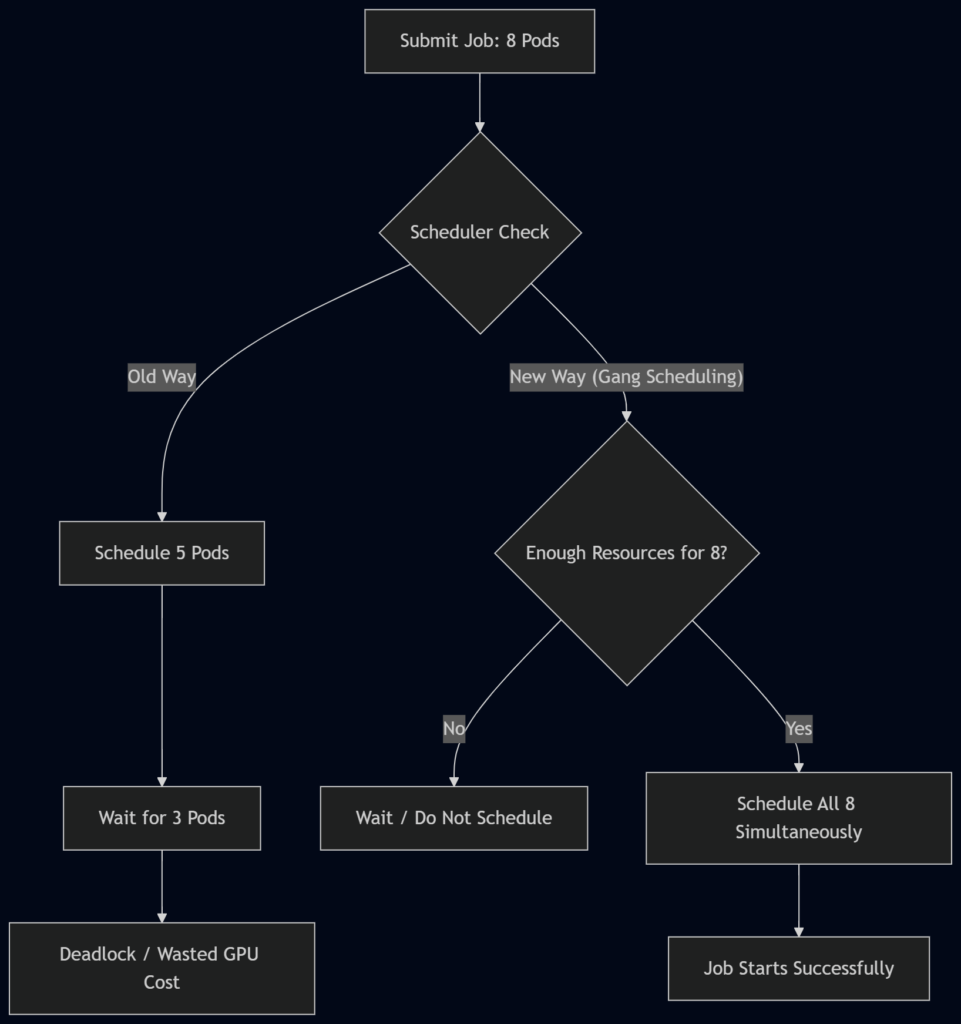
Imagine you are launching a distributed training job. You need eight pods, each requiring a GPU. You hit “apply,” and Kubernetes starts doing its thing. It schedules five pods successfully, but then… disaster. The cluster runs out of GPU resources for the last three.
Now you have five pods sitting there, allocated and burning expensive GPU hours, just waiting for their siblings that will never arrive. They are effectively dead on arrival, draining your budget while doing zero work. Until now, fixing this required complex external tools like Volcano or kube-batch.
The Solution
Kubernetes 1.35 introduces Native Gang Scheduling via a new Pod Group concept. This is currently an Alpha feature, so you’ll need to enable the feature gate to play with it.
The concept is simple but powerful: “All or Nothing.”
You define a PodGroup, specify the minimum number of pods required to run, and Kubernetes guarantees that resources are allocated simultaneously. Either every single pod in the group gets a spot, or none of them do. No partial deployments, no wasted resources.
How it works
Instead of treating pods as individual citizens, the scheduler now sees them as a collective unit.
Why it matters
For AI engineers, this is a game-changer. It prevents the “thundering herd” problem where partial jobs clog up the cluster. It ensures that your expensive GPU resources are only consumed when the entire job is ready to go.
Status: Alpha (Enable feature gate PodGroup to test).
2. In-Place Pod Resource Updates (GA)
This feature has been a “coming soon” headline for about six years. I am happy to report that as of Kubernetes 1.35, In-Place Pod Resource Updates are officially General Availability (GA). This means it is production-ready and safe to use.
The Problem
Let’s say you have a critical service running—maybe a memory-intensive Java application or a database proxy. It was deployed with 512MB of memory. Suddenly, traffic spikes, and the process hits memory pressure. It’s choking.
In the old world (literally last month), vertical scaling was painful. You had to:
- Update the deployment spec.
- Trigger a rollout.
- Kubernetes kills the pod.
- A new pod starts with the new limits.
This causes downtime, drops connections, and clears out all your warm caches.
The Solution
With In-Place updates, you can patch the pod’s CPU and memory limits while it is running. The container keeps humming along; the kernel simply adjusts the Cgroup limits live.
Example Scenario:
You have a pod running with 500MB of RAM. You realize it needs 1GB. You patch the resource spec. The Kubelet sees the change, talks to the container runtime, and expands the memory allocation on the fly. No restart. No dropped connections.
Comparison of Scaling Methods
| Feature | Traditional Vertical Scaling | In-Place Update (K8s 1.35) |
|---|---|---|
| Downtime | Yes (Pod Restart) | None |
| Connection State | Lost (Pod killed) | Preserved |
| Cache State | Cleared (Cold Start) | Preserved (Warm) |
| Complexity | Rollout Management | Simple Patch |
| Use Case | Stateless Apps | Stateful, Batch, ML Services |
This is massive for workloads that are sensitive to restarts, such as machine learning inference services or batch processing jobs where state preservation is key.
3. Fine-Grained Container Restart Rules (Beta)
This feature solves a headache that has plagued anyone running complex pods with sidecars.
The Problem
Currently, Kubernetes restart policies are very blunt instruments. They apply to the entire pod. If a single container inside your pod crashes—let’s say it exits with an error code—the whole pod restarts.
Consider a typical ML training pod containing three containers:
- Main Training Process: The heavy lifter.
- GPU Driver Sidecar: Helper utility.
- Logging Agent: Ships logs.
If the GPU Driver Sidecar hits a transient error and crashes, Kubernetes traditionally restarts the whole pod. That means your Main Training Process—which might have been running for hours and checkpointing progress—gets brutally killed. You lose time, progress, and money.
The Solution
Kubernetes 1.35 introduces Fine-Grained Container Restart Rules. This is now in Beta and enabled by default.
You can now set restart behavior per container. If the GPU driver sidecar crashes, you can configure Kubernetes to restart just that container. The main training process continues untouched.
How to use it
This allows for “surgical recovery.” You can define policies based on exit codes:
- Exit Code 137 (OOMKilled): Maybe restart just the container to recover memory.
- Exit Code 1 (Application Error): Maybe don’t restart automatically; just log it so a human can investigate.
This keeps your main workload stable while fixing the “noisy neighbor” problem inside your own pod.
# Conceptual example of per-container restart policy
spec:
  containers:
  - name: main-app
    # ... config ...
  - name: gpu-sidecar
    restartPolicy: OnFailure # New field in 1.35
# ... config ...4. Native Pod Certificates for Workload Identity (Beta)
Security teams, rejoice. If you have ever tried to implement Zero Trust or mTLS (Mutual TLS) in Kubernetes, you know it requires a lot of infrastructure.
The Problem
To get certificates for your pods today, you probably rely on a stack like:
- cert-manager or SPIRE for issuance.
- Custom CRDs for requests.
- Secrets for storage.
- Sidecars or init containers to mount and rotate those certs.
It works, but it is heavy. There are many moving parts, and if you use a service mesh like Cilium or Istio, the integration can get tricky.
The Solution
Kubernetes 1.35 brings Native Pod Certificates for Workload Identity into Beta.
The Kubelet can now generate keys locally, create a certificate signing request (CSR), and have the API server issue the certificate directly. The Kubelet then writes this credential bundle directly to the pod’s filesystem.
Benefits:
- No External Controllers: The cluster handles it natively.
- Automatic Rotation: Built-in logic handles key rotation.
- Security: The API server enforces node restrictions at admission time, eliminating common security pitfalls where third-party signers accidentally violate node isolation boundaries.
The Workflow
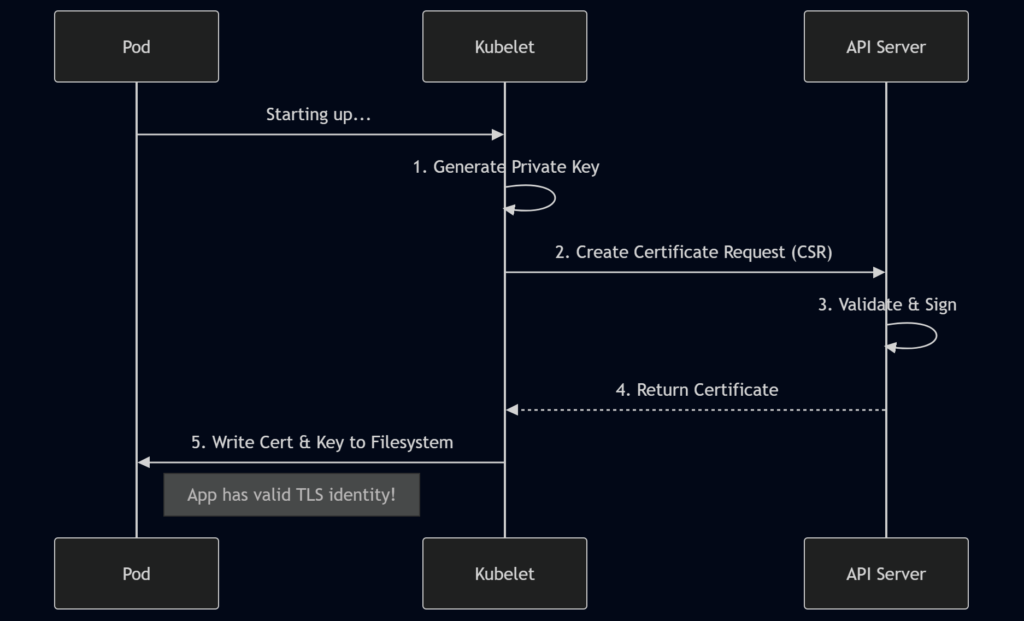
This dramatically simplifies service mesh architecture. You get pure mTLS flows without bearer tokens cluttering the issuance path. While tools like cert-manager aren’t going away (they handle advanced cases), basic workload identity is now a native capability.
5. Mutable Job Resources When Suspended (Alpha)
Have you ever launched a batch job, let it run for 6 hours, and then realized you set the memory limit too low? It crashes with an OOMKilled error.
The Problem
In the past, fixing this was frustrating. You had to:
- Delete the job entirely.
- Edit the YAML to increase resources.
- Recreate the job.
In doing so, you lose all the status history, completion tracking, and logs associated with that specific job object. You are starting from scratch.
The Solution
Feature number five allows you to mutate job resources when suspended. This is an Alpha feature in 1.35.
Now, you can pause a running job, adjust its resource requests, and resume it—all while keeping the same Job object.
The Workflow:
- Patch the job to set
spec.suspend = true. - Wait for the pods to stop.
- Patch the job to change memory/CPU resources.
- Patch again to set
spec.suspend = false.
The job resumes with the new, larger resources, and your completion tracking remains intact. This is huge for iterative workloads like ML training where you might not know the exact resource footprint until you hit a specific data set.
Other Notable Changes & Deprecations
While the five features above are the stars of the show, every release comes with some housekeeping you need to be aware of before upgrading.
- Cgroups v1 Support Removed: Kubernetes has fully moved to cgroups v2. If you are running on an older OS kernel, you might run into compatibility issues.
- IPVS Mode Deprecation: The IPVS mode in
kube-proxyis now deprecated. If you rely on this for load balancing, start planning a migration to iptables or nftables modes. - Containerd 1.x Support Ends: Support for Containerd 1.x ends with this release. Ensure your nodes are running Containerd 2.0 or another supported runtime.
Conclusion
Kubernetes 1.35 “Timbernetes” isn’t just another incremental update; it feels like a maturity milestone for modern workloads.
For years, ML engineers and data scientists have had to hack around Kubernetes’ limitations—writing complex scripts for gang scheduling, accepting downtime for vertical scaling, or building Rube Goldberg machines for certificates. Kubernetes 1.35 natively solves many of these problems.
From Gang Scheduling preventing deadlocks to In-Place Updates saving us from restarts, these features allow us to treat Kubernetes less like an infrastructure manager and more like a true workload orchestrator.
If you are running AI, Batch, or Zero Trust architectures, this release is worth the upgrade effort (after testing, of course).
References:
FAQs
What is the main focus of the Kubernetes 1.35 “Timbernetes” release?
This release is heavily focused on AI and Machine Learning workloads. While it includes the usual bug fixes and minor updates, the standout features are designed to solve specific headaches for AI engineers, such as scheduling massive training jobs and managing expensive GPU resources without wasting money.
What is “Gang Scheduling” and why do I need it?
Gang Scheduling is a new feature that ensures “all or nothing” scheduling. If you have a job that requires 8 pods to work together, Kubernetes previously might start 5 and leave the other 3 waiting. This wastes resources. With Gang Scheduling, Kubernetes waits until it has space for all 8 pods before starting any of them.
Can I really change a pod’s memory without restarting it now?
Yes! With In-Place Pod Resource Updates now moving to General Availability (GA), you can patch the CPU or memory limits of a running pod. The container keeps running without a restart, which is a massive improvement for stateful apps or databases where restarting causes downtime or lost cache.
What happens if a sidecar container crashes in Kubernetes 1.35?
In previous versions, if a sidecar (like a logging agent) crashed, it often triggered a restart of the entire pod, killing your main application too. Kubernetes 1.35 introduces Fine-Grained Restart Rules, allowing you to restart just the broken sidecar while leaving the main application container running untouched.
Is it easier to set up TLS certificates now?
It is. The new Native Pod Certificates feature (currently in Beta) lets the Kubelet request certificates directly from the API server. This removes the need for complex third-party tools like cert-manager for basic setups, making zero-trust security architectures much simpler to implement.
I set the wrong memory limit for a long-running batch job. Do I have to delete it?
Not anymore. The new Mutable Job Resources feature (Alpha) allows you to pause a job, change its resource limits, and resume it. You don’t lose your progress or history, which saves a lot of frustration for long-running data processing tasks.
Are these new features ready for my production environment?
It depends on the specific feature. In-Place Pod Resource Updates is stable (GA) and production-ready. Fine-Grained Restart Rules is in Beta and enabled by default, so it’s relatively safe. However, Gang Scheduling and Mutable Job Resources are currently in Alpha, meaning you should test them in non-production environments first.
Do I need to change my configuration to use these features?
For the Alpha features (like Gang Scheduling), you will need to enable specific “feature gates” in your cluster configuration. The Beta and GA features are generally enabled by default, so you can start using them by updating your YAML files without changing cluster settings.
What old technologies are being removed in 1.35?
This release removes support for Cgroups v1, meaning you must be running a newer OS kernel that supports cgroups v2. It also deprecates IPVS mode in kube-proxy and ends support for Containerd 1.x. You’ll need to verify your nodes are up to date before upgrading.
Why is it called “Timbernetes”?
It is just a codename themed around the “World Tree.” It doesn’t imply any technical change regarding wood or forestry; it is just part of the community’s tradition of giving each release a fun, memorable theme.