If you are a WordPress developer, agency owner, or just someone who manages a couple of sites, you probably felt like 2025 was a bit of a ghost town for major WordPress updates. I know I did. We sat around waiting for the next big thing, only to get incremental patches and a whole lot of silence. But now that we are stepping into 2026, the wait is finally over. The engine is humming again, and WordPress 7.0 is on the horizon.
Let me be straight with you: this is not just another routine update where they move a few buttons around and call it a day. WordPress 7.0 marks the definitive launch of Phase 3 of the Gutenberg project, and the entire focus is on collaboration and workflows. We are moving away from the old “solo editor locked in a room” model and stepping into a shared, real-time creative environment.
Before we dig into the nitty-gritty of how these features will actually change your daily workflow, let’s get the housekeeping out of the way—specifically, the timeline.
Table of Contents
The Bumpy Road to Release: WordPress 7.0 Schedule
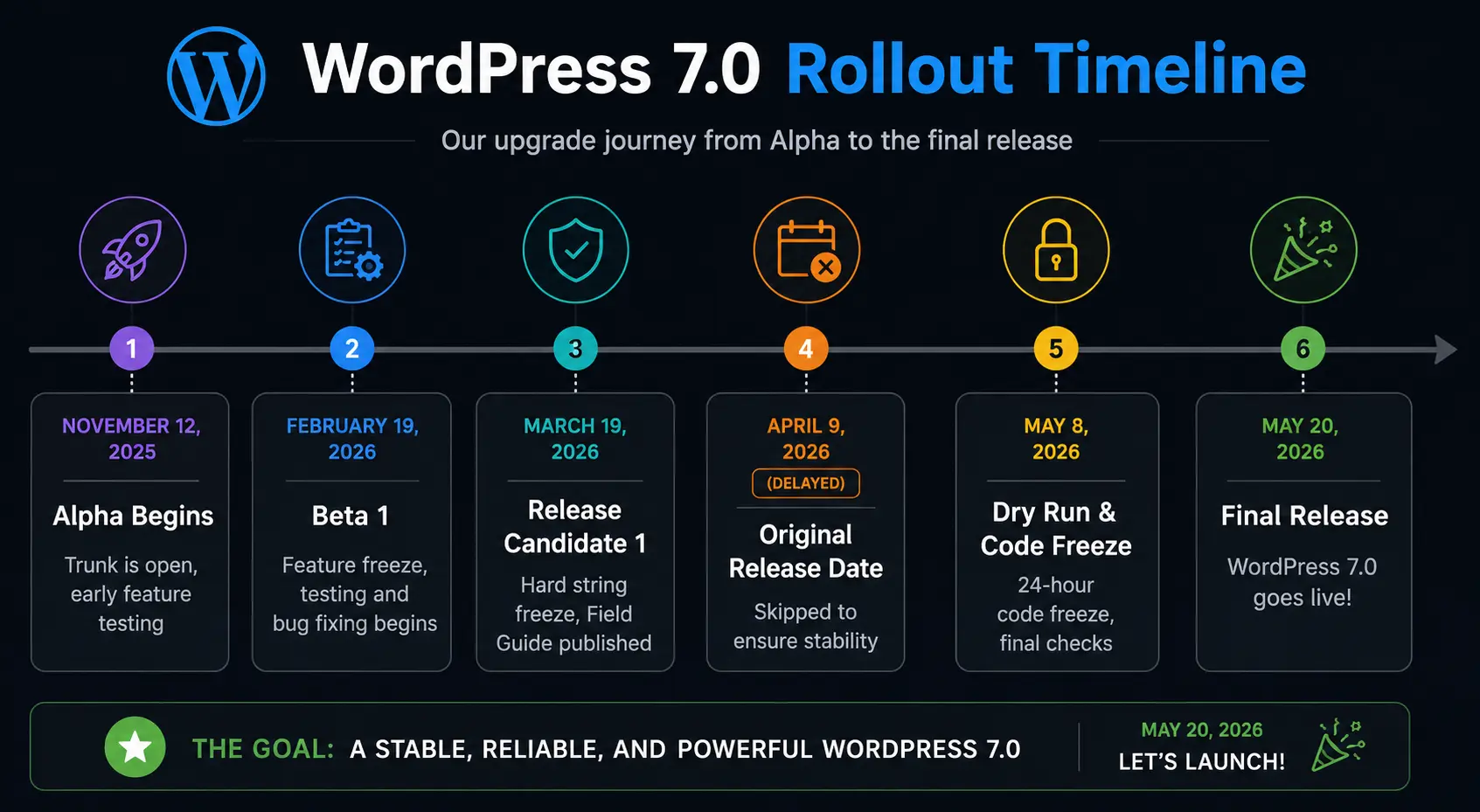
If you recall, WordPress 7.0 was originally supposed to ship on April 9, 2026, right during WordCamp Asia in Mumbai. Well, project leadership hit the brakes and decided to delay the release. Why? Because releasing a massive update alongside a major community event is a recipe for sleep-deprived developers and panicked support tickets. The new, finalized release date is May 20, 2026.
Here is the official timeline so you can plan your agency’s upgrade path:
| Date | Milestone | What it means for us |
|---|---|---|
| November 12, 2025 | Alpha Begins | Trunk is open, early feature testing |
| February 19, 2026 | Beta 1 | Feature freeze, testing and bug fixing begins |
| March 19, 2026 | Release Candidate 1 | Hard string freeze, Field Guide published |
| April 9, 2026 (Delayed) | Original Release Date | Skipped to ensure stability |
| May 8, 2026 | Dry Run & Code Freeze | 24-hour code freeze, final checks |
| May 20, 2026 | Final Release | WordPress 7.0 goes live! |
To visualize how this rollout is structured, here is a quick look at the journey from Alpha to the final release:
Why the Delay? The 2025 Context
You can’t talk about 7.0 without acknowledging why it took so long. Originally, we were supposed to get three major releases in 2025. But between legal battles and a temporary pause in contributions from major stakeholders like Automattic, things slowed down. Project leadership chose stability over rushed features, releasing WordPress 6.9 in late 2025 as a “stabilizer” to clear technical debt.
Because of that intentional pause, 7.0 arrives with a much more polished foundation. It was a “quality over quantity” approach, and honestly? I think it was the right call.
What is New in WordPress 7.0? The Features Explained
Alright, let’s get into the fun stuff. The core theme of 7.0 is Workflows. For years, if you managed a team of writers and designers, you had to juggle Google Docs, Slack, and Trello alongside WordPress. Version 7.0 brings those collaborative interactions directly into the dashboard.
Here is a breakdown of what is new, how it works, and what it actually means for you in your day-to-day work.
1. Enhanced “Notes” and Asynchronous Collaboration
Imagine you are reviewing a client’s homepage draft. In the past, you’d take a screenshot of a weirdly aligned paragraph, paste it into an email or Slack, and try to explain which block you are talking about. It was messy.
WordPress 7.0 introduces Notes—a full inline commenting and feedback system built directly into the block editor.
- You can leave Notes on specific blocks or even specific text fragments.
- You can @ mention teammates, who will then receive an email or dashboard notification.
- The conversation happens exactly where the content lives. No more context switching.
What this means for you: This eliminates an entire layer of back-and-forth for agencies. Client wants the CTA button changed? They just drop a Note on that specific block. You get notified, fix it, and resolve the note. It’s as seamless as commenting in Google Docs.
2. Real-Time Co-Editing (Experimental)
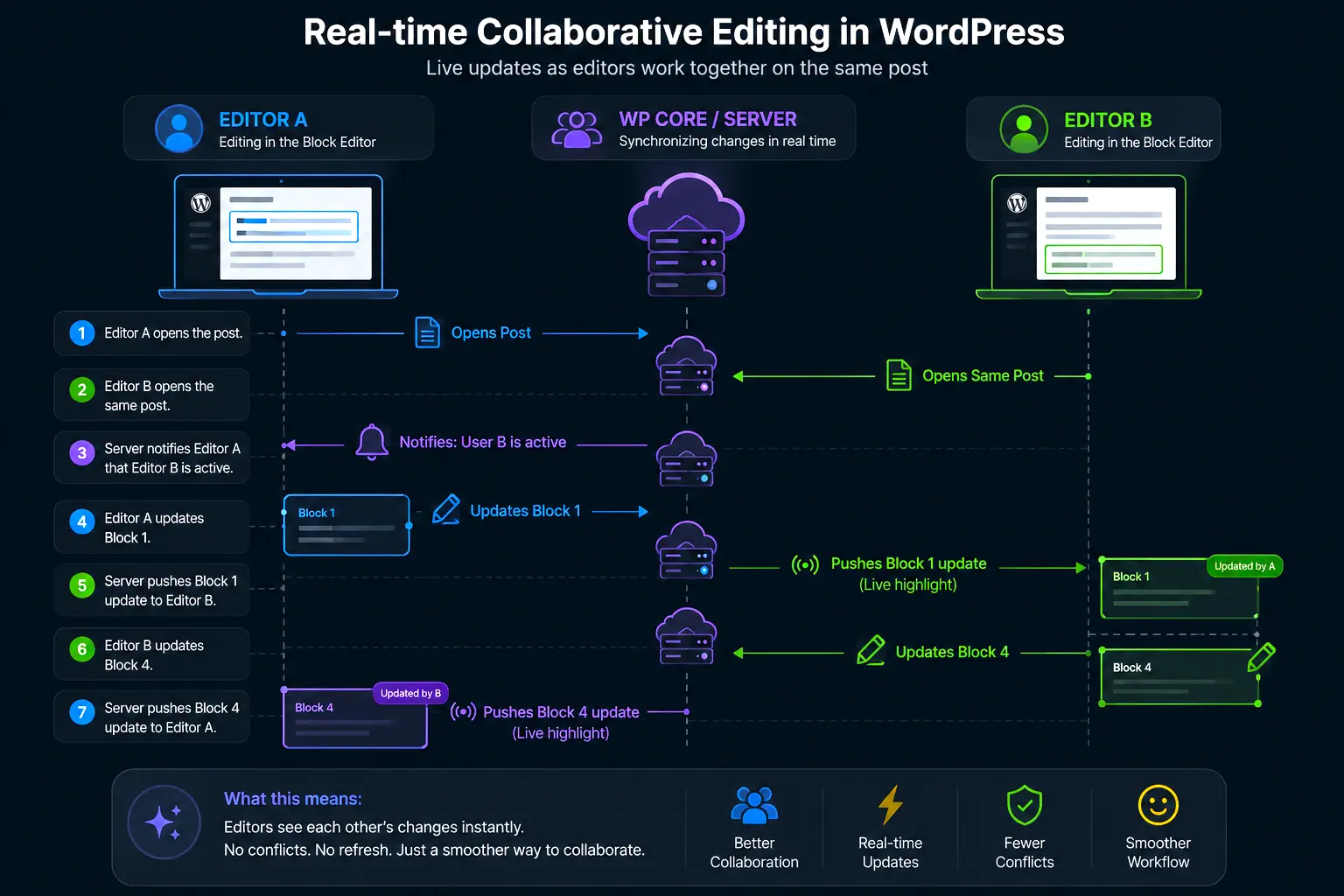
The “holy grail” of Phase 3 is real-time co-editing. Previously, if you tried to edit a post someone else was working on, you’d get a warning that they had taken over the editor. Now, multiple users can co-edit the same post simultaneously.
Once two or more users open the same post, the editor signals that collaboration is active. When a collaborator finishes typing in a block and moves to another, their changes are pushed to all other connected users instantly, highlighted with a brief animation.
Here is how the new real-time data sync flow works under the hood:
The catch: Because this requires WebSocket servers—and many PHP hosting providers don’t support this—real-time features may ship as “experimental” in 7.0. However, WordPress VIP has already open-sourced a WebSocket-based implementation, proving it works. It’s only a matter of time before it becomes standard.
3. Responsive Editing Mode
This one is a massive time-saver. Before 7.0, if you wanted to show a full-width banner on desktop but a condensed call-to-action on mobile, you either needed a plugin, custom CSS classes, or a child theme hack.
WordPress 7.0 adds a Responsive Editing Mode. Content editors can now show or hide specific blocks based on device screen size, directly inside the editor. No CSS required.
What this means for you: You can hand over more editorial control to your clients. They can manage mobile layouts themselves without breaking the site or sending you a support ticket to hide an element on mobile.
4. Pattern Editing, Spotlight & Isolated Editor Mode
Editing synced patterns (reusable block groups used across multiple pages) used to be a disorienting experience. You had to leave your current editor, open the pattern separately, make changes, and navigate back.
7.0 introduces two new modes to fix this:
- Isolated Editor Mode: Lets you edit synced patterns inline, right where you are, without losing the context of the page you are working on.
- Spotlight Mode: Dims everything else in the editor and focuses your view on a single pattern or note. Great for complex pages where you just need to concentrate on one section.
What this means for you: If you manage sites with global elements like announcement banners or footer content, your editors can update them without accidentally navigating away. Fewer mistakes, faster edits.
5. Block Design Tools & Supports
This is where WordPress starts to replace the need for page builders like Elementor or Divi for standard layout tasks. 7.0 ships with a batch of typographic and dimensional controls natively:
- Text line indent: Add indentation to paragraphs without writing CSS.
- Text column support: Flow a single paragraph across multiple columns (like a newspaper layout) natively.
- Aspect ratio controls: Lock wide or full-width images to a specific ratio so they never look stretched.
- Dimension presets: Pre-defined spacing values that keep your layout consistent across the whole site.
What this means for you: Needing multi-column text or consistent spacing shouldn’t require a heavy page builder plugin. WordPress is closing that feature gap, giving theme developers and site builders native control without adding plugin bloat.
6. Heading Block as Block Variations
This sounds small, but it’s a huge quality-of-life improvement. Heading levels (H1–H6) are now proper Block Variations. This means you can insert “Heading 2” directly from the block inserter, with its own icon, style, and default attributes.
What this means for you: Writers no longer have to insert a Heading block and then fumble with a dropdown to change it from H2 to H3. They just search for “Heading 3” and drop it in. It also allows theme developers to define distinct default styles per heading level.
7. The Modern Admin Redesign (DataViews)
The WordPress dashboard has largely looked the same for over a decade—like a 2005-era database table. WordPress 7.0 introduces the most significant visual change to the back-office in years through a system called DataViews.
The Posts, Pages, and Media list screens are rebuilt from the ground up to feel like a modern SaaS app:
- Filter, group, and sort content without page refreshes.
- Multiple layout options: Table, grid, or list views.
- Persistent views that remember your preferences.
What this means for you: Managing a site with hundreds of posts will finally feel fluid and fast. Developer Warning: Any plugin that hooks into or modifies the existing Posts or Pages list view may break. This is the highest-risk compatibility change in 7.0. Audit your plugins before upgrading!
8. The Abilities API and AI Client
Let me be clear: WordPress 7.0 is not trying to be an AI writer. Instead, it’s building the infrastructure that allows AI to work better within the CMS.
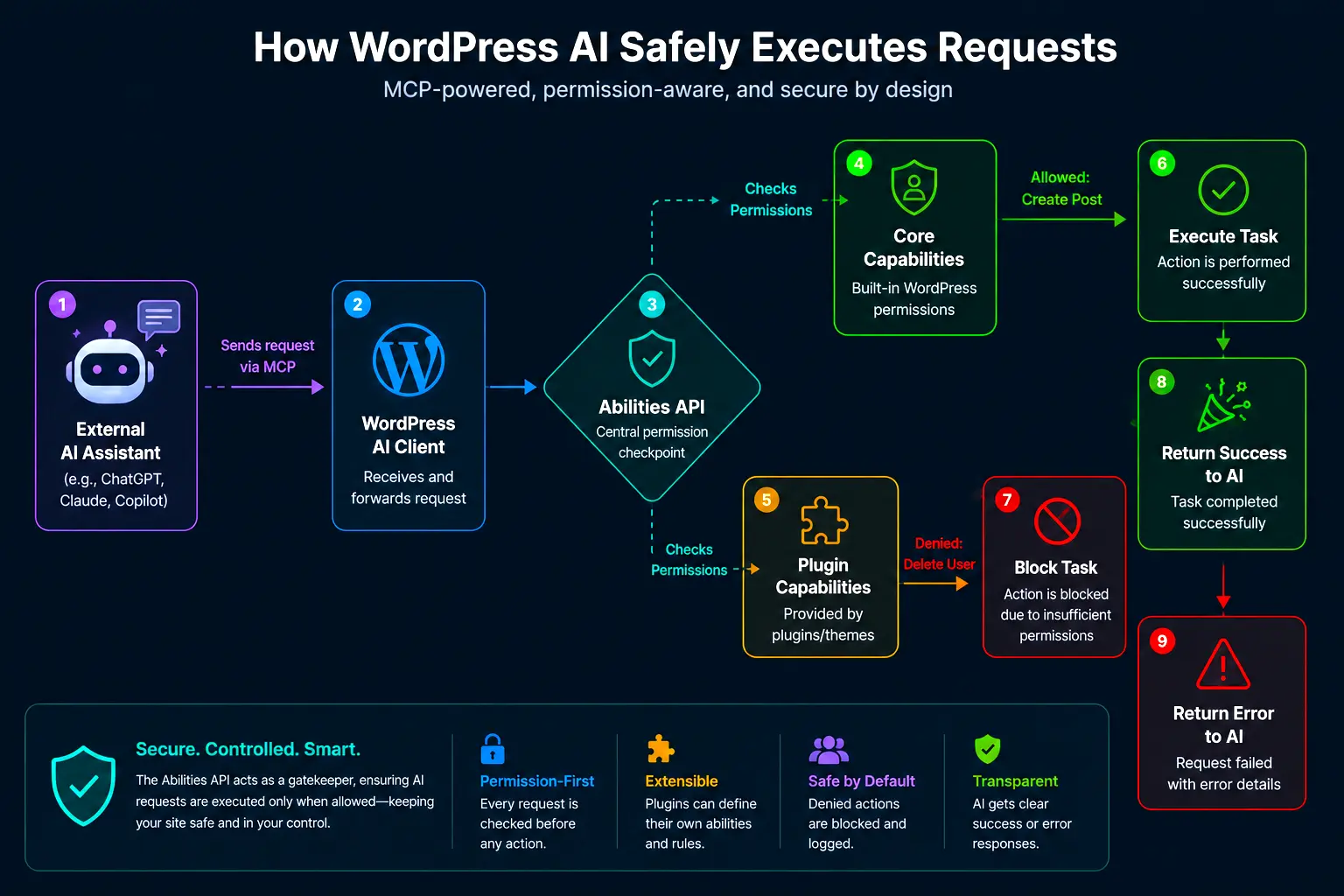
The new Abilities API acts as a bridge. It provides a standardized way for AI services to understand what a specific WordPress site is capable of doing. It works with the Model Context Protocol (MCP), enabling AI assistants like Claude or ChatGPT to:
- Discover what capabilities a WordPress site exposes.
- Request permission to perform specific actions.
- Execute tasks within defined boundaries.
Here is a simplified look at how the Abilities API interacts with external AI tools:
What this means for you: Plugin developers can now build AI features that are consistent across the platform. Whether you’re using AI to generate alt text or automate content workflows, these tools now have a native, secure way to communicate with WordPress core.
9. New Blocks: Breadcrumbs and Icons
Two native blocks are shipping with 7.0 that immediately eliminate common plugin dependencies:
- Breadcrumbs block: Adds hierarchical navigation trails (e.g., Home > Category > Post) to any template without a plugin.
- Icons block: Insert scalable SVG icons directly into content or layouts.
What this means for you: Breadcrumbs have always been a plugin dependency for most themes. Having it native means it integrates cleanly with the Site Editor, and you no longer rely on a plugin that adds three extra database queries just to render “Home > Blog > Post Title.”
10. Gallery, Grid, and Cover Block Improvements
Several core blocks are getting meaningful upgrades:
- Gallery block: Now supports a native lightbox mode. Clicking an image opens it in an overlay instead of a new page.
- Grid block: Responsive layout support—your grid adjusts intelligently to different screen sizes without custom breakpoints.
- Cover block: Video backgrounds can now use embedded videos rather than requiring a direct file URL.
What this means for you: The native lightbox alone eliminates a dependency that many sites carry. For clients who manage their own galleries, these upgrades mean a cleaner experience without extra plugin overhead.
Technical Shifts Under the Hood
For the developers and site maintainers reading this, version 7.0 brings some heavy-duty changes that require your attention before you hit that update button.
Minimum PHP Version Bump to 7.4
The core team is raising the minimum supported PHP version to 7.4. This is necessary to support the modern libraries required for collaboration features and AI APIs.
- PHP 7.4 enables more consistent typing, making the codebase easier for both developers and AI tools to understand.
- Many third-party AI SDKs already require PHP 7.4 or higher.
My Advice: If your sites run PHP 7.2 or 7.3, upgrade to PHP 8.2 or 8.3 now. Don’t wait until May. Test the upgrade thoroughly using a staging environment before touching production.
Editor Isolation and Iframing
To ensure site styles don’t leak into the editor (and vice versa), WordPress 7.0 moves toward full iframing of the editor canvas. This creates a sandboxed environment for content editing, making WYSIWYG significantly more accurate.
- Third-party plugin scripts won’t accidentally break the editor layout.
- Theme styles render exactly as they will on the frontend.
My Advice: If you are a theme developer, you need to test how your theme’s editor styles render in this new isolated environment.
PHP-Only Block Registration (No React Required!)
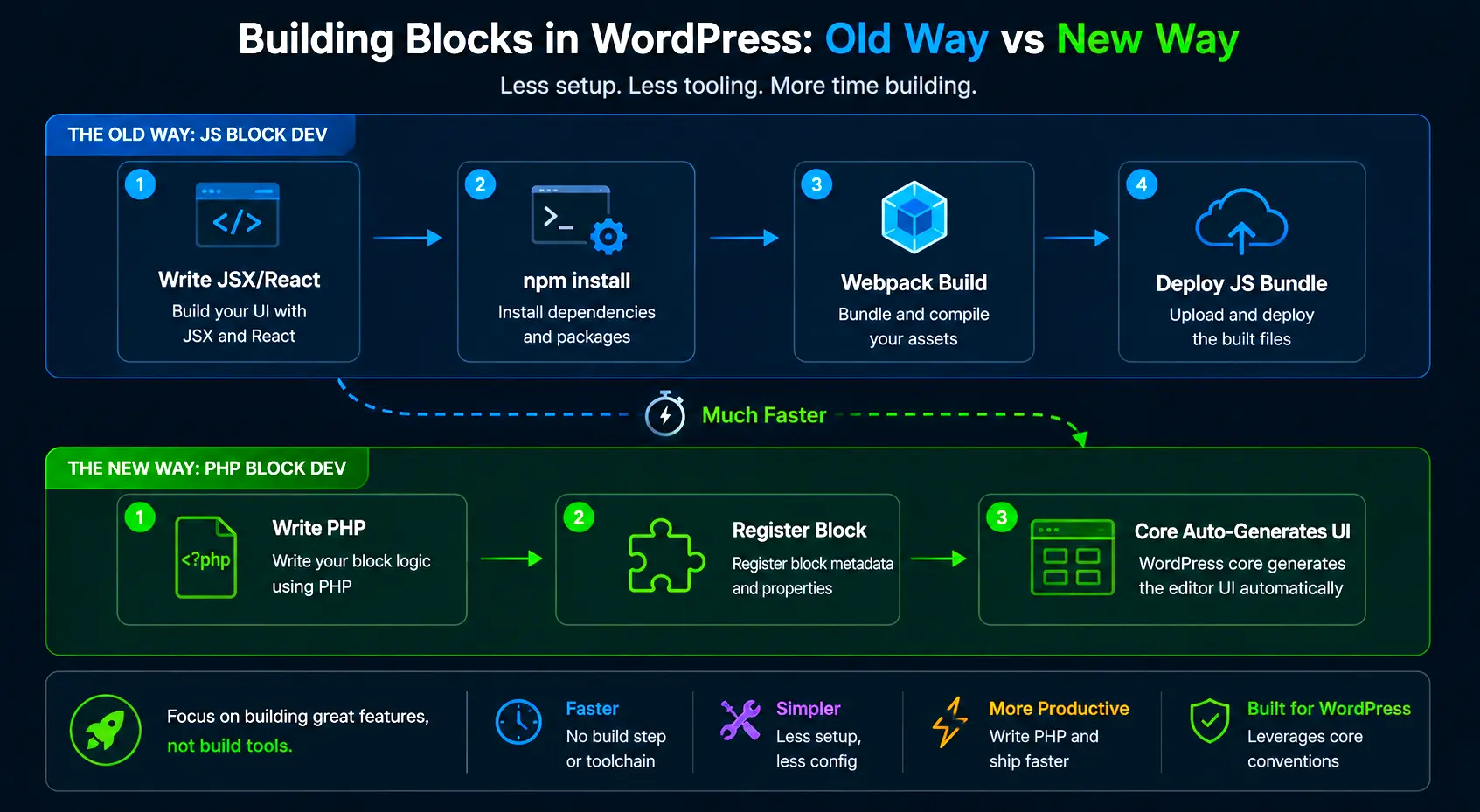
This is perhaps my favorite developer feature. Previously, creating a custom block meant setting up a JavaScript build environment with Node, npm, and React. That barrier kept many traditional PHP WordPress developers from building blocks.
With PHP-only block registration, you write your block in PHP and WordPress automatically generates the inspector controls (the settings panel in the editor sidebar) for you. No build toolchain required!
Here is a quick look at how simple this is:
register_block_type( 'my-plugin/custom-greeting', array(
    'api_version'     => 3,
    'attributes'      => array(
        'message' => array(
            'type'    => 'string',
            'default' => 'Hello from PHP!',
        ),
    ),
    'render_callback' => function( $attributes ) {
        return '<div class="custom-greeting">' . esc_html( $attributes['message'] ) . '</div>';
    },
) );What this means for you: If you’re a PHP developer who has avoided block development because the JavaScript toolchain felt foreign, this removes that barrier entirely. You can build lightweight, dynamic blocks without touching a single .js file.
Here is how the development workflow compares now:
Block Bindings and Pattern Overrides
Block Bindings, introduced in earlier releases, allow you to bind a block’s content to a data source like post meta or custom fields. In 7.0, pattern override support is expanded to custom dynamic blocks.
If you build custom blocks that pull content from ACF fields or custom post types, you can now tie those blocks into the pattern system more reliably. This is the foundation for building truly data-driven templates inside the block editor.
No New Default Theme
Interestingly, WordPress 7.0 will not ship with a “Twenty Twenty-Six” theme. The project has moved away from the tradition of a new theme for every major version. Instead, the focus is on making existing block themes (like Twenty Twenty-Five) more powerful. The goal is to show users that with the Site Editor and Phase 3 tools, you do not need a new theme; you can simply evolve the one you have.
A Pre-Launch Checklist for Agencies and Developers
Between Beta 1 (February 19) and the launch (May 20), you have a solid window to test your entire plugin and theme stack against 7.0. Here is the workflow I recommend:
- Create a WordPress staging site from your production environment.
- Upgrade the staging site to 7.0 Beta when available.
- Test all critical functionality, especially admin customizations.
- Document any plugin incompatibilities and contact vendors immediately.
- Plan your upgrade path for post-launch.
Before May 20, make sure you:
- Check your PHP version — Be on PHP 7.4 at minimum; PHP 8.2 or 8.3 strongly recommended.
- Audit admin-modifying plugins — Anything touching Posts, Pages, or Media list views is at risk with the DataViews migration.
- Test your editor styles — The iframed editor may render things differently.
- Experiment with Notes — Set up a sandbox and run your team through a real feedback workflow.
- Read the Field Guide — Published in March, it will contain all Dev Notes for deprecated functions and breaking changes.
Final Thoughts: A Foundation for the Next Decade
WordPress 7.0 is more than a collection of features—it’s a signal that the platform is maturing. The focus on collaboration and infrastructure shows WordPress is ready to compete with modern “closed” platforms while maintaining the freedom of open source.
By moving away from frantic release cycles and focusing on a coordinated, stable approach in 2026, the WordPress project is ensuring its longevity. Whether you’re a solo developer or managing sites for a large-scale agency, the improvements in version 7.0 will make your daily workflow faster, more communicative, and more modern.
The message is clear: the future of WordPress is collaborative. It’s time to stop building in isolation and start building together.
References:
- WordPress 7.0 Release Field Guide & Dev Notes
- Gutenberg Phase 3 Collaboration Roadmap
- WordPress 7.0: A New Era of Collaboration, Smart Design, and AI Foundations
FAQs
When is WordPress 7.0 actually coming out?
WordPress 7.0 is officially scheduled to be released on May 20, 2026. It was originally supposed to launch in early April, but the team decided to delay it to make sure everything was thoroughly tested and working perfectly before pushing it out to millions of websites.
What is the biggest change in WordPress 7.0?
The biggest change is all about teamwork. They call it Phase 3, and it brings collaboration tools right into the WordPress editor. You can now leave notes on specific parts of a page and even see your teammates editing the same post at the same time, kind of like working in Google Docs.
How does the new Notes feature work?
Instead of taking screenshots and sending emails to give feedback, you can just click on any specific block (like a paragraph or image) and leave a comment right there. You can tag your coworkers using the “@” symbol, and they will get an email or dashboard notification. The conversation happens exactly where the problem is, which saves a ton of time.
Will my current plugins break when I update?
Most plugins will be fine, but there is a higher risk of issues with this update than usual. WordPress is completely redesigning the admin area (like the Posts and Pages lists). If you have a plugin that changes how those lists look or work, it might break. It is highly recommended to test the update on a private staging copy of your site before updating your live site.
Do I need to upgrade my hosting or PHP version?
Yes. WordPress 7.0 is raising the minimum required PHP version to 7.4. If your web host is still running PHP 7.2 or 7.3, you will not be able to install the update. For the best speed and security, you should really update your site to PHP 8.2 or 8.3 before May rolls around.
Is WordPress adding its own AI writer?
No, WordPress is not adding a chatbot or AI writer to the editor. Instead, they are building the “Abilities API,” which is basically a secure bridge. It allows outside AI tools (like ChatGPT or Claude) to safely connect to your WordPress site and do helpful tasks, like generating image alt text or fixing layout issues, without making a mess of your backend.
Will there be a new default theme this year?
Surprisingly, no. WordPress is skipping the yearly tradition of releasing a new “Twenty Twenty-Six” default theme. The idea is that the current Site Editor and block themes are powerful enough now. You do not need a brand new theme every year; you can just update and evolve the block theme you already have.
What is the new responsive editing mode?
It is a super easy way to control what your website looks like on different screens. Before, if you wanted to hide a large image on mobile phones, you had to write custom CSS code or buy a plugin. Now, you can just click a button on any block and choose to hide it on desktop, tablet, or mobile. No coding required.
What does PHP-only block registration mean for developers?
In the past, if a developer wanted to make a custom block, they had to use complicated JavaScript, Node.js, and React. Now, developers can build custom blocks using only PHP, which is the language most WordPress developers already know and use daily. It removes a huge technical barrier, making it much faster and easier to build custom features.