
Imagine you are the bouncer at an exclusive club. Someone walks up and says, “Hey, let me in, I left my jacket inside.” How do you know they were actually in the club earlier and aren’t just some random person trying to sneak in? You need a way to verify their story.
In the world of WordPress, that verification method is called a Nonce.
Whenever you hear someone talk about WordPress security, the term nonce pops up almost immediately. It stands for “number used once,” which sounds incredibly technical and a little intimidating. But when you strip away the jargon, a nonce is simply a temporary secret handshake between your website and your user’s browser. It is a security token designed to make sure that when someone asks your site to do something important—like deleting a post or updating a password—they actually meant to do it.
Let’s break down exactly what a WordPress nonce is, why your site desperately needs it, and how it quietly protects you from some of the most common attacks on the internet.
Table of Contents
The Problem: Why Do We Even Need Nonces?
To understand the solution, we first have to understand the problem. The biggest threat a nonce protects you from is called a CSRF attack (Cross-Site Request Forgery).
Think of CSRF as a digital pickpocket. Here is how it works without nonce protection:
- You log into your WordPress dashboard. Your browser now holds a special “session cookie” that proves you are an admin.
- You get bored and open a new tab to check the news.
- On that news site, a sneaky hacker has hidden an invisible image tag. But instead of loading an image, the source code points to your WordPress site:
yourwebsite.com/wp-admin/post.php?delete=5. - Because your browser still has that admin session cookie active from the first tab, it sends that request to your WordPress site.
- WordPress looks at the cookie, says, “Yep, you’re an admin,” and deletes post number 5.
You didn’t click a button. You didn’t fill out a form. But the action happened because the hacker forged a request using your active session.
This is where the nonce steps in to save the day.

What Exactly is a WordPress Nonce?
Let’s clear up a massive misconception right out of the gate. The word nonce stands for “number used once.” However, in WordPress, that name is actually a lie.
A WordPress nonce is not a number, and it is not strictly used once.
In reality, a WordPress nonce is a hash—a string of random-looking letters and numbers. It looks something like this: a1b2c3d4e5. Furthermore, it doesn’t expire the exact second you use it. Instead, it has a “time window.” By default, a WordPress nonce is valid for 12 to 24 hours. During that time frame, you can use the same nonce multiple times for the same specific action.
So, if it’s not a number used once, what is it?
Think of it as a temporary, context-specific permission slip. It ties an action (like deleting a post) to a specific user (you) and a specific timeframe (the next 12 hours). If a hacker tries to trick your browser into sending that delete request from a different site, the hacker’s site cannot generate a valid permission slip because it doesn’t know the secret keys hidden inside your WordPress database.
The Anatomy of a WordPress Nonce: What’s Inside?
To really understand how this works, let’s look at the recipe WordPress uses to bake a nonce. When WordPress creates one, it mixes four main ingredients together:
| Ingredient | What It Is | Why It Matters |
|---|---|---|
| Action Name | A simple word or phrase you choose (e.g., delete_post). | It tells WordPress what the user is trying to do. |
| User ID | The numerical ID of the currently logged-in user. | It ensures the nonce only works for that specific person. |
| Session Token | A random string stored in the user’s browser cookies. | Adds an extra layer of unpredictability. |
| Timestamp | The exact time the nonce was created (rounded to the half-day). | This creates the 12-24 hour expiration window. |
WordPress takes these four ingredients, throws them into a cryptographic blender (using an MD5 hash), and spits out your nonce string.
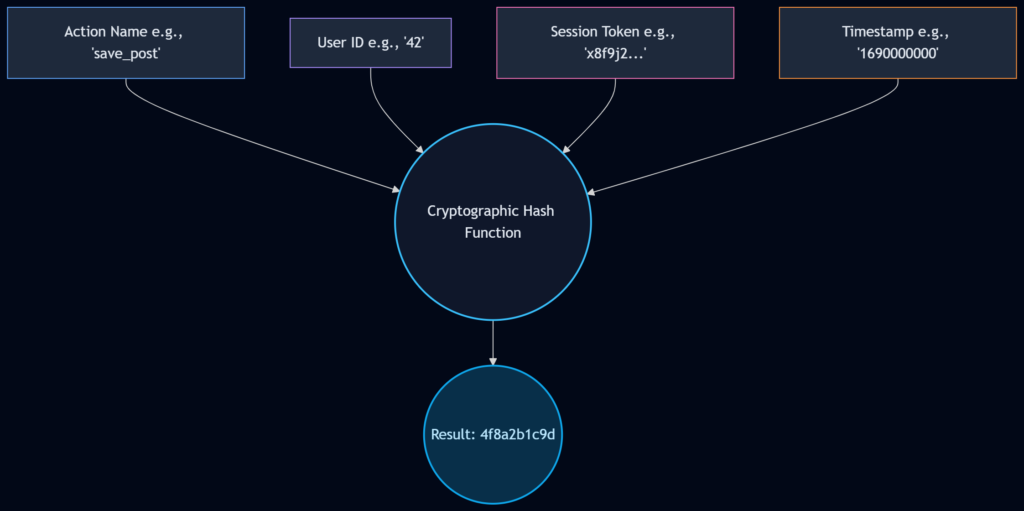
Because the timestamp is part of the recipe, the nonce you generate at 10:00 AM will look completely different from the nonce you generate for the exact same action at 10:00 PM. This time-sensitivity is what stops hackers from stealing an old nonce and reusing it later.
How WordPress Handles Nonces: The Sliding Window
Here is a fascinating detail about WordPress nonces that most beginners don’t know: WordPress is actually quite forgiving when it checks them.
When your site receives a nonce and tries to verify it, it doesn’t just check the exact half-day it was created. It uses a sliding window. Let’s say your window is 12 hours.
If a nonce fails the check for the current 12-hour window, WordPress will secretly check the previous 12-hour window. Why? Because what if a user opened a settings page at 11:50 AM, got distracted by a phone call, and finally clicked “Save” at 12:10 PM? If WordPress didn’t check the previous window, the user would get a frustrating “Link Expired” error.
This sliding window makes the user experience smooth while still maintaining top-tier security.
Creating and Using Nonces in Your Code
If you are building plugins, themes, or custom forms, you need to know how to use nonces. WordPress makes this incredibly easy with a few built-in functions. Let’s look at how we use them in the real world.
1. Protecting a Form (The wp_nonce_field Function)
Imagine you have a custom form in your admin dashboard where an editor can change a post’s status. You need to add a nonce to this form.
<form method="post" action="">
    <!-- Some form fields here -->
    <input type="text" name="post_title" value="My Post">

    <!-- This generates the hidden nonce field -->
    <?php wp_nonce_field( 'update_post_status', 'my_status_nonce' ); ?>

    <button type="submit">Update Status</button>
</form>Let’s break down those two parameters:
'update_post_status': This is the action. It’s the first half of our security handshake. Make it highly specific.'my_status_nonce': This is the name. It is the HTMLnameattribute given to the hidden input field.
When the page loads, WordPress drops a hidden field into your form that looks something like <input type="hidden" id="my_status_nonce" name="my_status_nonce" value="a1b2c3d4e5">.
2. Protecting a URL (The wp_nonce_url Function)
Sometimes, you don’t have a form. You just have a simple link that does something, like emptying the trash. You can append a nonce directly to a URL.
$url = admin_url( 'edit.php?post_type=post&action=empty_trash' );
$secure_url = wp_nonce_url( $url, 'empty_trash_action', 'trash_nonce' );

echo '<a href="' . esc_url( $secure_url ) . '">Empty Trash</a>';This will output a URL that looks slightly messy but very secure:yourwebsite.com/wp-admin/edit.php?...&trash_nonce=a1b2c3d4e5
3. Verifying the Nonce (The Most Important Step)
Creating a nonce is useless if you don’t verify it. When the user submits that form or clicks that link, you must catch the nonce and check if it’s legitimate. We do this using the wp_verify_nonce function.
if ( isset( $_POST['my_status_nonce'] ) ) {

    // Check if the nonce is valid
    if ( wp_verify_nonce( $_POST['my_status_nonce'], 'update_post_status' ) ) {

        // The nonce is good! It's safe to process the data.
        update_post_meta( $post_id, 'status', 'approved' );
        echo 'Status updated successfully!';

    } else {
        // The nonce is bad. This could be an expired link or a CSRF attack.
        die( 'Security check failed. Please refresh the page and try again.' );
    }

}Notice how we match the two parameters exactly: the value from the form ($_POST['my_status_nonce']) and the action string ('update_post_status'). If a hacker tried to submit this form from an external site, they wouldn’t know what the current nonce value is supposed to be, wp_verify_nonce would return false, and the script would die.
Nonces and AJAX: Protecting Asynchronous Requests
Modern WordPress sites rarely reload the page anymore. We use AJAX (Asynchronous JavaScript and XML) to do things in the background—like clicking a “Like” button or saving a draft.
Nonces are just as crucial here. If you have an AJAX script that deletes a comment, you have to pass the nonce to your JavaScript, and then pass it back to PHP for verification.
Here is the general flow of how that looks:
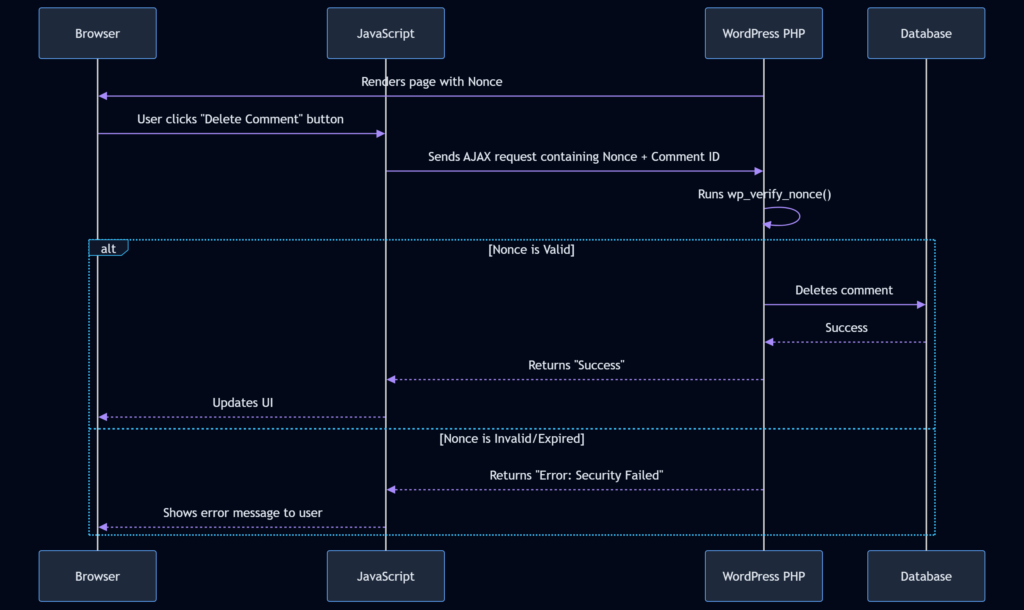
To do this, you usually “localize” the nonce in PHP so your JavaScript file can see it:
// In your PHP file
wp_enqueue_script( 'my_custom_js', get_template_directory_uri() . '/js/custom.js' );
wp_localize_script( 'my_custom_js', 'myAjaxData', array(
    'nonce' => wp_create_nonce( 'delete_comment_action' )
) );Then, in your JavaScript file, you grab that nonce and send it along with your AJAX request. On the backend PHP side, you verify it using check_ajax_referer( 'delete_comment_action', 'nonce' ) (which is just a wrapper for wp_verify_nonce tailored specifically for AJAX calls).
Common Nonce Mistakes to Avoid
Even though the system is simple, developers (even experienced ones) make a few common mistakes that render their nonces useless.
- Forgetting to Verify: This is the cardinal sin. Generating a nonce doesn’t protect you. Verifying it does. Always use
wp_verify_nonceon the receiving end. - Using Generic Action Names: Don’t use
wp_nonce_field('save', 'nonce'). That is too broad. If you have three different forms that all use the action name'save', a nonce generated for form A might accidentally validate for form B. Always be specific:'save_user_profile_settings'. - Caching Pages with Nonces: This is a huge trap. If you use a caching plugin (like WP Rocket or W3 Total Cache) to cache an HTML page that contains a form with a nonce, you are giving every single visitor the exact same nonce. Remember, nonces are tied to specific users. If a cached page hands out User A’s nonce to User B, User B will fail the security check. You must either exclude dynamic forms from caching or load nonces via AJAX after the page loads.
- Ignoring Expiration Errors Gracefully: Sometimes, a user leaves a tab open overnight, comes back, and submits a form. The nonce will fail. Instead of just showing a white screen of death or a cryptic error, catch the failure and politely ask the user to refresh the page.
What Nonces Cannot Do: Setting Realistic Expectations
While nonces are amazing for CSRF protection, they are not a magic shield against every type of attack. It is important to know their limitations.
- They do not stop XSS (Cross-Site Scripting): If a hacker can inject malicious JavaScript directly into your site (XSS), that script runs inside your trusted environment. It can easily read the nonces on the page and use them legitimately. Nonces protect against outside attackers, not inside infiltrators.
- They do not stop Brute Force Attacks: If someone is trying to guess your admin password 1,000 times a minute, a nonce won’t stop them. (You need rate-limiting or a firewall for that).
- They are not CAPTCHAs: Nonces do not prove the user is a human. A bot that visits your site directly can easily fetch a nonce and submit a form. Nonces only prove that the request originated from your site, not who is sitting at the keyboard.
WrapUP
At the end of the day, a WordPress nonce is simply your website’s way of asking, “Were you specifically asked to do this by me, within the last few hours?”
By mixing together an action, a user ID, a session token, and a timestamp, WordPress creates a temporary, unpredictable key that completely neutralizes the threat of CSRF attacks. Whether you are building a simple contact form, a complex settings page, or a lightning-fast AJAX endpoint, adding a nonce is the bare minimum requirement for responsible WordPress development.
It takes just one line of code to create a nonce, and one line of code to verify it. There is absolutely no reason to leave your users’ sessions vulnerable to digital forgery. Start treating nonces like the essential security locks they are, and your WordPress site will be vastly safer because of it.
References:
- WordPress Developer Handbook: WordPress Nonces
- WordPress Codex: Function Reference/wp verify nonce
- OWASP Foundation: Cross-Site Request Forgery (CSRF)
FAQs
What does the word “nonce” actually stand for?
It officially stands for “Number Used Once.” However, that name is actually pretty confusing because in the WordPress world, it is neither a number nor is it only used once. In reality, a WordPress nonce is just a temporary string of random letters and numbers. It acts more like a timed permission slip than a strict one-time number.
How long is a nonce good for before it stops working?
By default, a WordPress nonce has a lifespan of 12 to 24 hours. After that time window closes, the code expires and WordPress will reject any action trying to use it. This time limit is a crucial security feature because it stops bad actors from stealing an old code and trying to use it days or weeks later.
What specific kind of attack does a nonce protect my site from?
Nonces are specifically designed to stop CSRF attacks, which stands for Cross-Site Request Forgery. Imagine a hacker tricks your web browser into sending a command to your website while you are logged in, just because you clicked a bad link on another site. A nonce stops this because the hacker’s fake link cannot generate the correct, time-sensitive secret code that your website is waiting for.
Can a hacker just guess what my nonce is going to be?
It is practically impossible. Nonces are generated using a complex mathematical blending process that mixes your specific user ID, the exact time of day, and secret keys hidden deep inside your WordPress files. Because all of these factors are constantly shifting and are unique to your setup, guessing the correct string of characters is virtually impossible.
Do I really need to use nonces if my site is just a simple blog?
Yes, you absolutely do. Anytime you log into your WordPress dashboard and do something like save a post, change a password, or delete a comment, a nonce is working behind the scenes to protect you. Even if you are the only person using the site, you still need that protection to prevent malicious websites from hijacking your admin session.
What happens if a user leaves a settings tab open all night and tries to save it the next morning?
Because the nonce has expired overnight, the save action will fail. The user will usually see an error message saying something like “Are you sure you want to do this?” or “Link expired.” As a website owner, it is your job to make sure your site handles this gracefully by asking the user to refresh the page instead of just crashing or showing a scary error.
Will adding a nonce protect my site from every single type of hacker?
No, nonces only do one very specific job. They prove that a request came directly from your website and not from an outside source. They will not stop someone from guessing your password, they will not stop someone from flooding your site with traffic, and they will not protect you if a hacker has already injected malicious scripts directly into your site.
Why do my nonces sometimes break when I turn on a caching plugin?
This is a very common headache for developers. Caching plugins work by taking a snapshot of your page and saving it so it loads faster for the next visitor. But if you save a page that has a form with a nonce, you are accidentally giving every single visitor the exact same saved nonce. Since nonces are supposed to be tied to specific users, the next visitor’s security check will instantly fail.
Does a nonce work differently for background actions like AJAX?
The concept is exactly the same, but the delivery method changes a bit. With a normal form, the nonce is just hidden in the page’s HTML code. But with AJAX (where the page doesn’t refresh), you have to pass the nonce over to your JavaScript file first, and then your JavaScript has to carefully hand that code back to the server in the background when it asks to do something.