Hey everyone,
We shipped v1.6.4 on 6 November 2026, and honestly this one feels a bit different from our usual updates. Most of the time a release is about adding things. This one is mostly about removing things — the small daily frictions that wear you down when you use a tool every day.
A lot of these changes came from our own team using CloudCusp Mailer on real accounts over the last few weeks. Big contact lists. Multiple people logging into the same workspace. Campaigns that had already gone out and needed cleaning up afterward. We kept running into the same walls you’ve been telling us about, and that turned out to be the most useful kind of feedback we could get.
We started keeping a shared list. Every time someone on the team muttered something under their breath while using the product — ugh, why does this take so many clicks or I have to leave again to write this stupid email — it went on the list. By the time we sat down to plan v1.6.4, the list was long, and the top items clustered into the six problems below.
So instead of writing a typical changelog, here’s the version that explains what was broken, what we did about it, and what it actually feels like now. Quick note: this post is a bit longer than our usual release notes because we wanted to explain the why behind each change, not just the what. If you only want the headlines, scroll to the “Stepping back” section near the bottom — there’s a one-line summary of each fix.
Table of Contents
Problem 1: Writing emails meant living in two tabs at once
We heard this one over and over. People were constantly jumping out of CloudCusp to write or rewrite copy. Open another AI tool in a new tab, paste in the context, get a draft, copy it back, adjust the tone, paste it into the template, hate it, do it again. It worked. But it kept breaking concentration, and every context switch cost a minute you weren’t getting back.
What we did about it
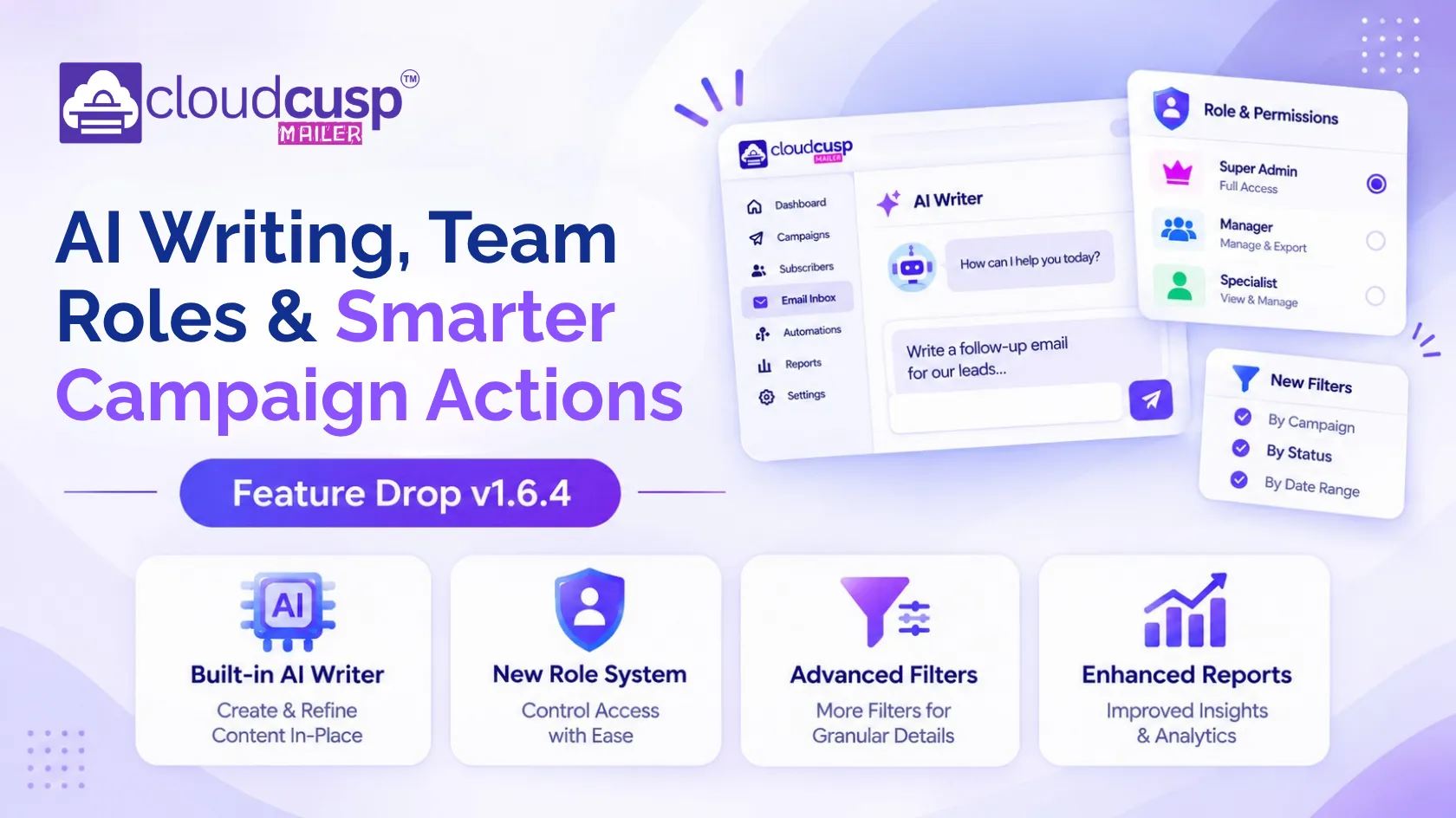
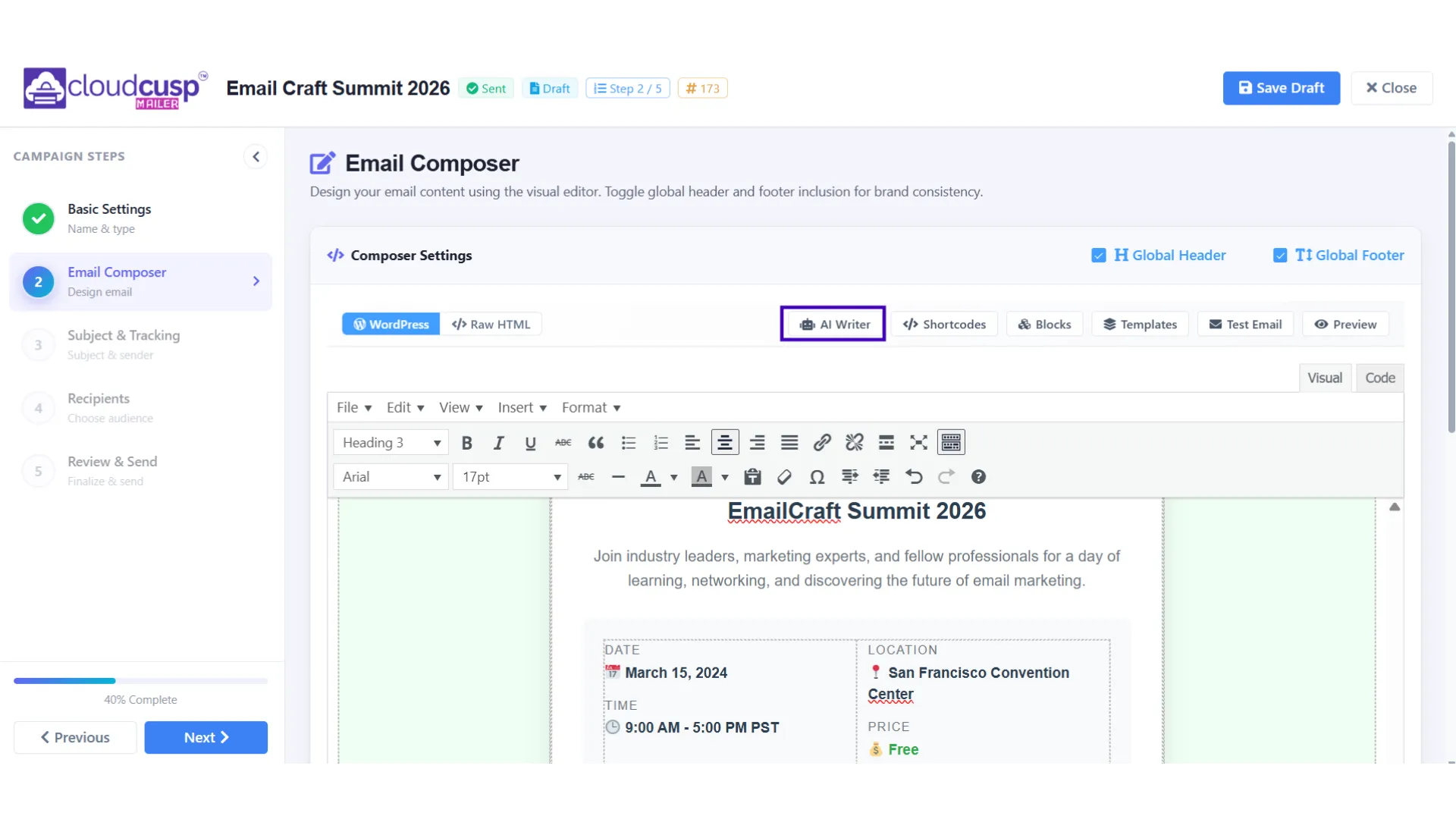
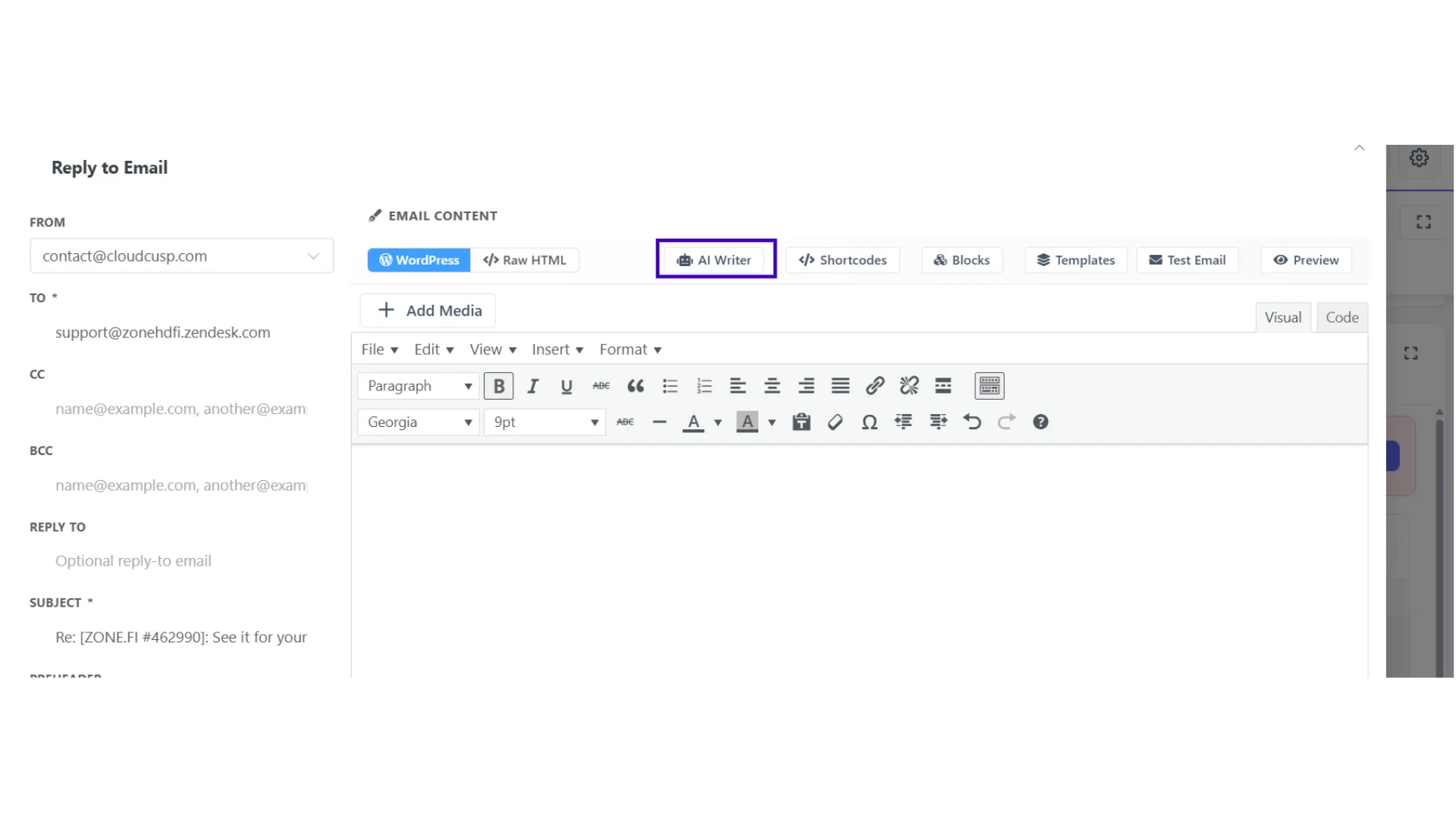
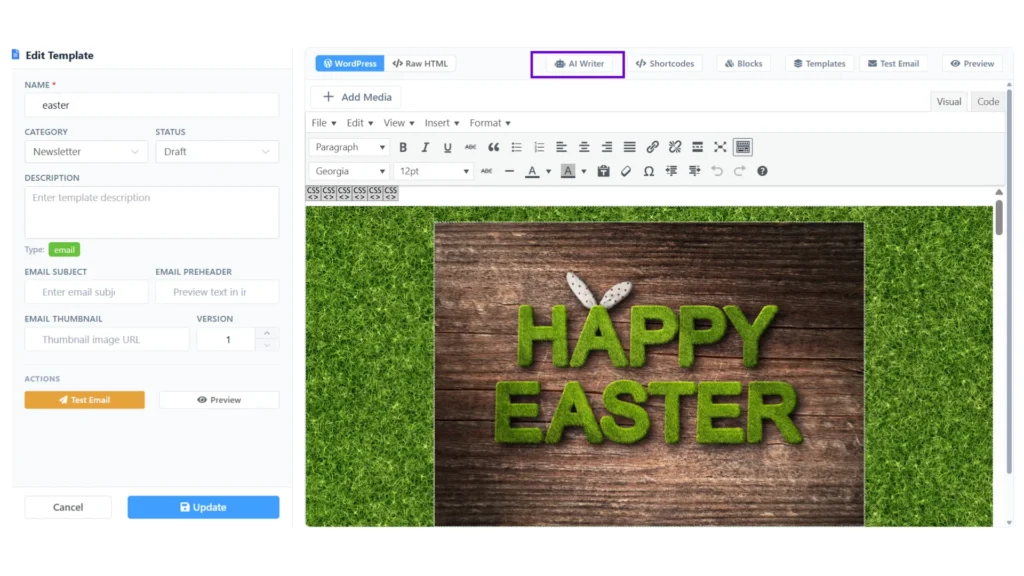
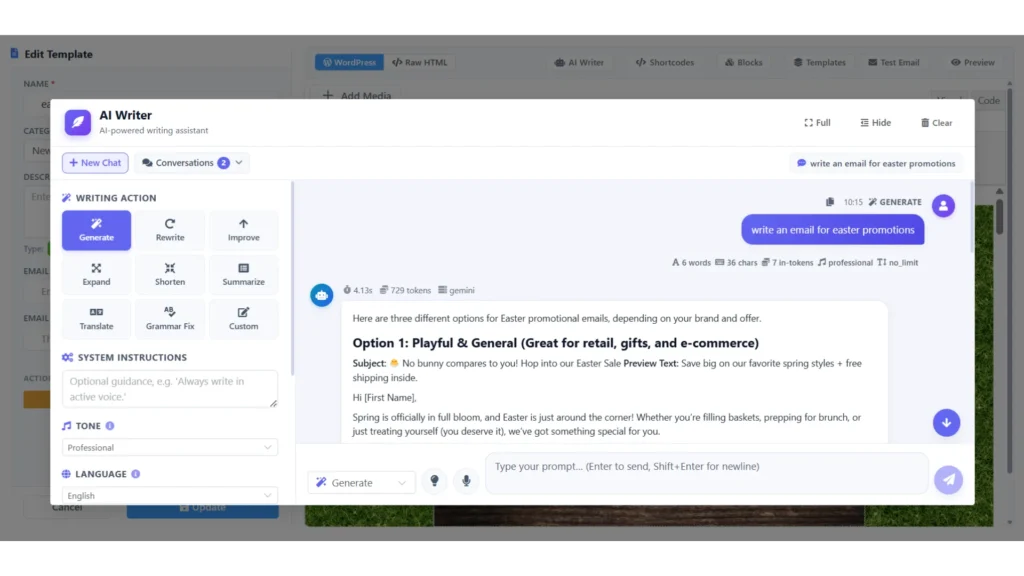
In v1.6.4 we put a full AI Writer directly inside the places where you actually need it — Templates, Campaigns, and Emails. No more leaving the page just to generate or refine content.
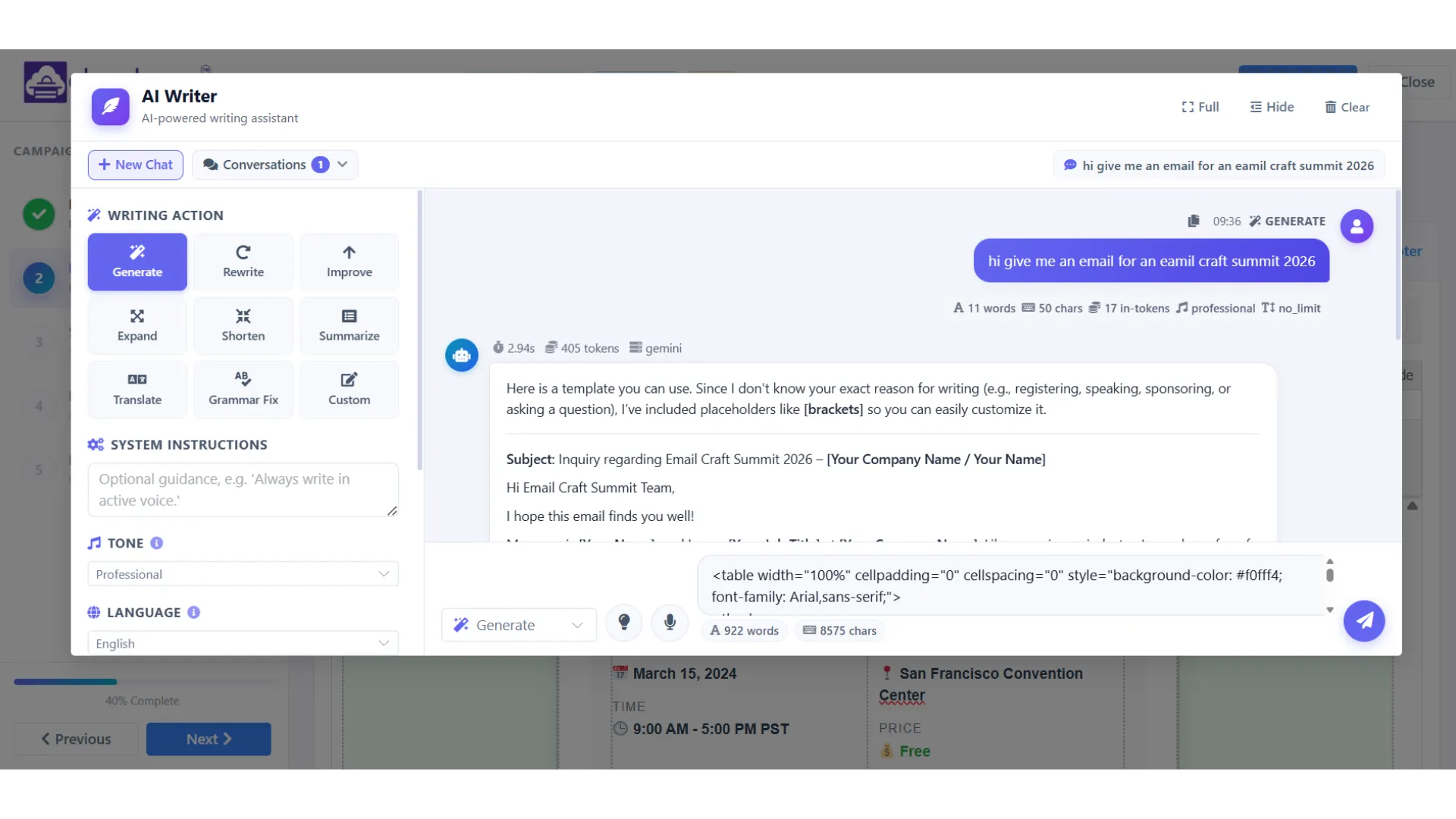
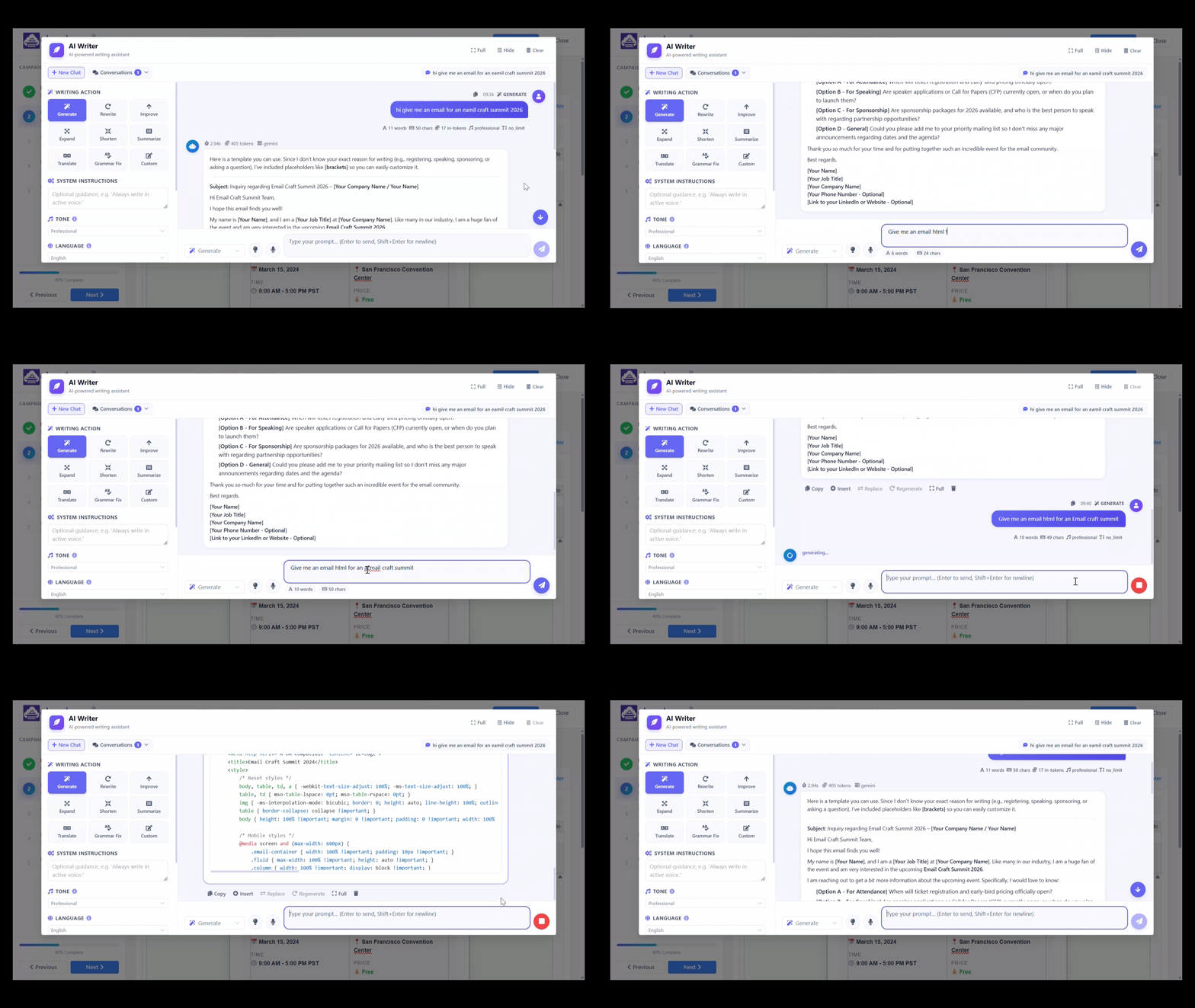
The part we’re most happy with is the chat-style interface. It’s not a “generate” button that hands you one block of text and then goes quiet. It’s an actual conversation. You start with a rough idea, ask for a variation, change the tone, make it shorter, make it more formal, ask for a completely different angle — all without leaving the page. It feels closer to brainstorming with a colleague than operating a tool.
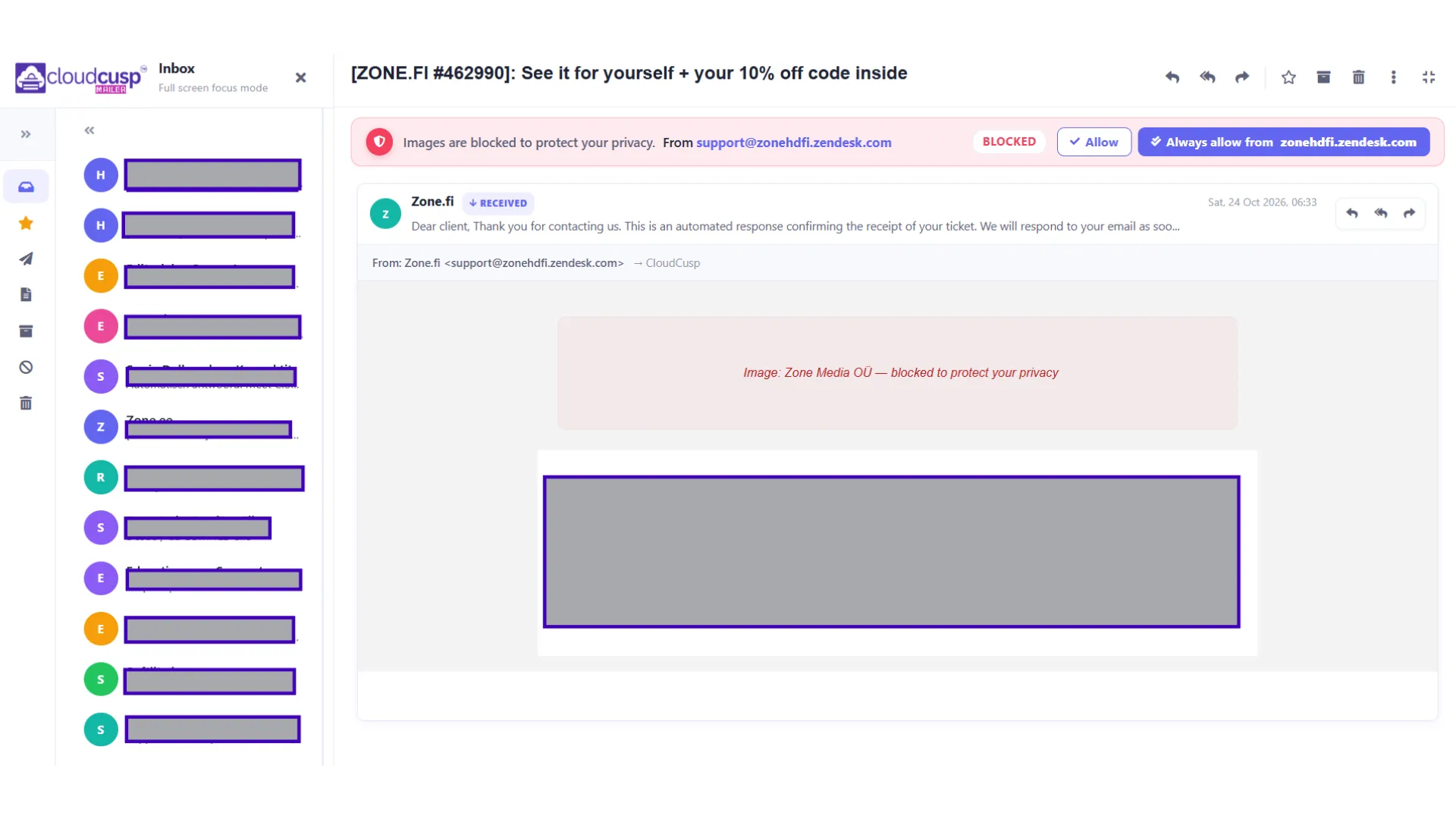
You can use it to write full templates, draft replies, sharpen subject lines, or knock out follow-ups. And because it lives inside the templates, campaigns, and emails sections, the context of what you’re building stays in front of you the whole time.
A typical chat might go like this. You start with: Write a follow-up email for leads who opened our pricing page but didn’t book a call. The AI gives you a first draft. You reply: Too salesy. Make it sound like a quick check-in from a person, not a marketing email. It rewrites. You say: Shorter. And add a line asking if Tuesday or Thursday works for a 15-minute call. It tightens it. You’re done in maybe four messages, and the email reads like you wrote it, not like a template spat it out.
What it feels like now
We tested this with people who write sequences and one-off campaigns regularly, and the most common reaction was something like: I didn’t realise how much mental switching I was doing until it stopped. One of our internal QA, who manages several client accounts, finished a full five-email sequence in about half her usual time. Not because the AI wrote it for her — but because she never had to leave the platform or lose her train of thought.
Another QA — someone who openly hates writing subject lines — told us he used to spend ten minutes on each one, second-guessing every word. With the chat interface he’d ask for ten variants, pick the two he liked, and tweak from there. Two minutes, tops.
The chat interface also nudges people toward better results in a way we didn’t fully expect. Instead of accepting the first draft and moving on, you naturally refine it through a short back-and-forth. The final copy ends up a lot closer to what you actually wanted to say — and you actually like it by the time you hit send, which is a small but real thing.
Problem 2: You either had to give people full access, or do everything yourself
As more companies started using CloudCusp with bigger teams, this one got painful fast. Permissions were too flat. Either someone had full access or they didn’t. Which meant one of two things kept happening: junior team members could change things they had no business touching, or managers ended up doing everything themselves because they didn’t trust the permissions.
Both versions are bad. The first is dangerous. The second is exhausting.
What we did about it
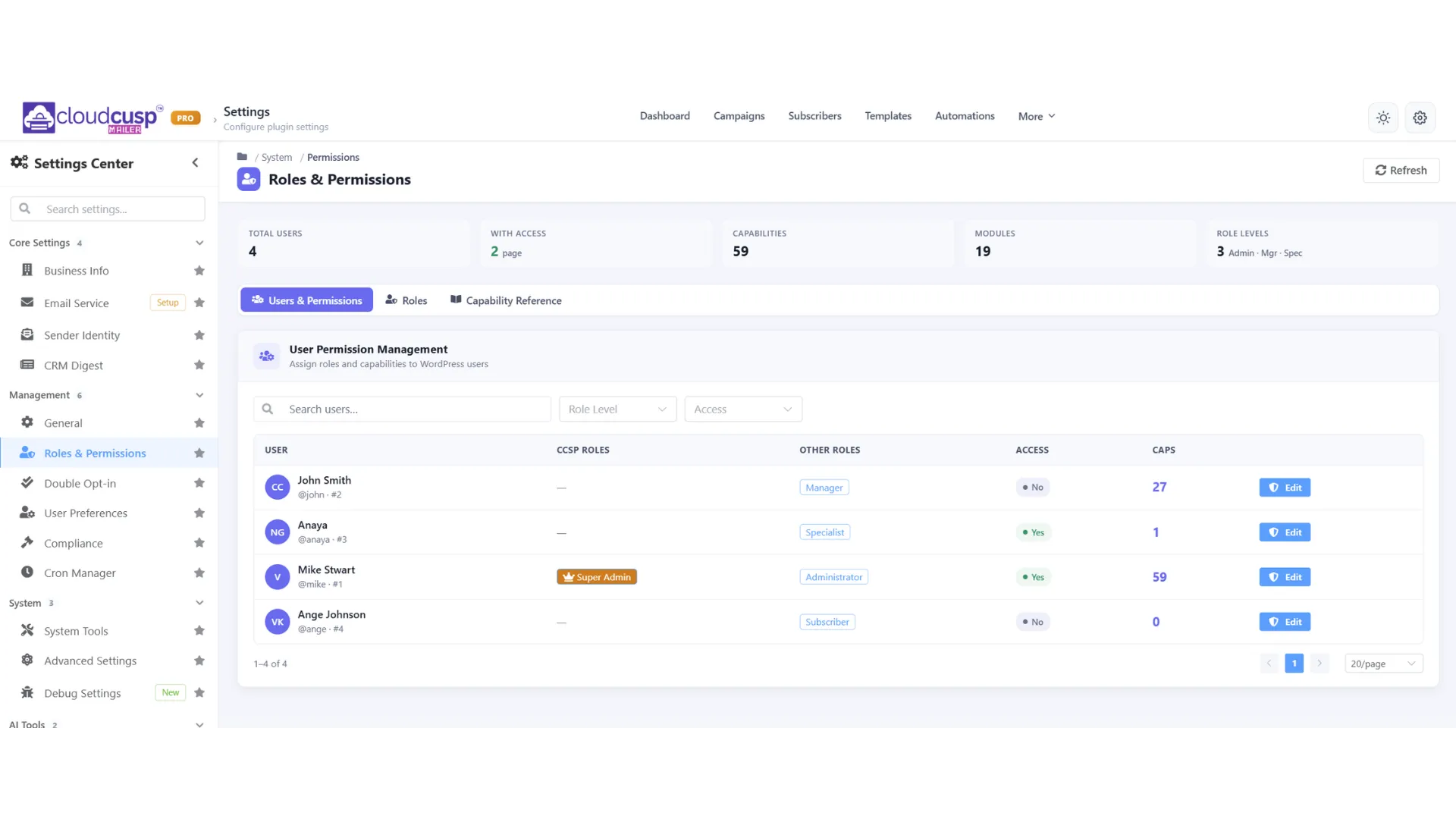
We added a proper role system with three levels. Clear enough that you can set it up in a minute, structured enough that it actually means something.
- Super Admin — Full access to every module, every setting, and role management itself. These are the global keys. The Super Admin can do anything, including creating and assigning roles to other people.
- Manager — Full module access: view, manage, delete, export. Managers can do almost everything inside the modules they’re allowed into. What they don’t get is control over the overall role system — that stays with Super Admins.
- Specialist — View and manage only. Specialists can’t delete records or export data. This one’s for the team members who live in the platform every day doing real work, without the risk of an accidental delete or an unwanted export ending up in someone’s downloads folder.
A typical setup looks like this: one or two Super Admins (usually the founder or head of marketing), a few Managers (campaign leads, ops people), and everyone else as Specialists (the people actually building and sending campaigns). The point isn’t to lock people out — it’s to make sure the only people who can permanently delete a list of 50,000 contacts or export the entire subscriber base are the ones who genuinely should be able to.
What it feels like now
We tested this with accounts that had five to eight people sharing the same workspace. Before the update, the account owner was constantly checking what everyone else was doing. After they set up the new roles, the same owners told us the daily anxiety dropped noticeably. Team members moved faster because the boundaries were clear, and the people in charge stopped feeling like they had to double-check every click.
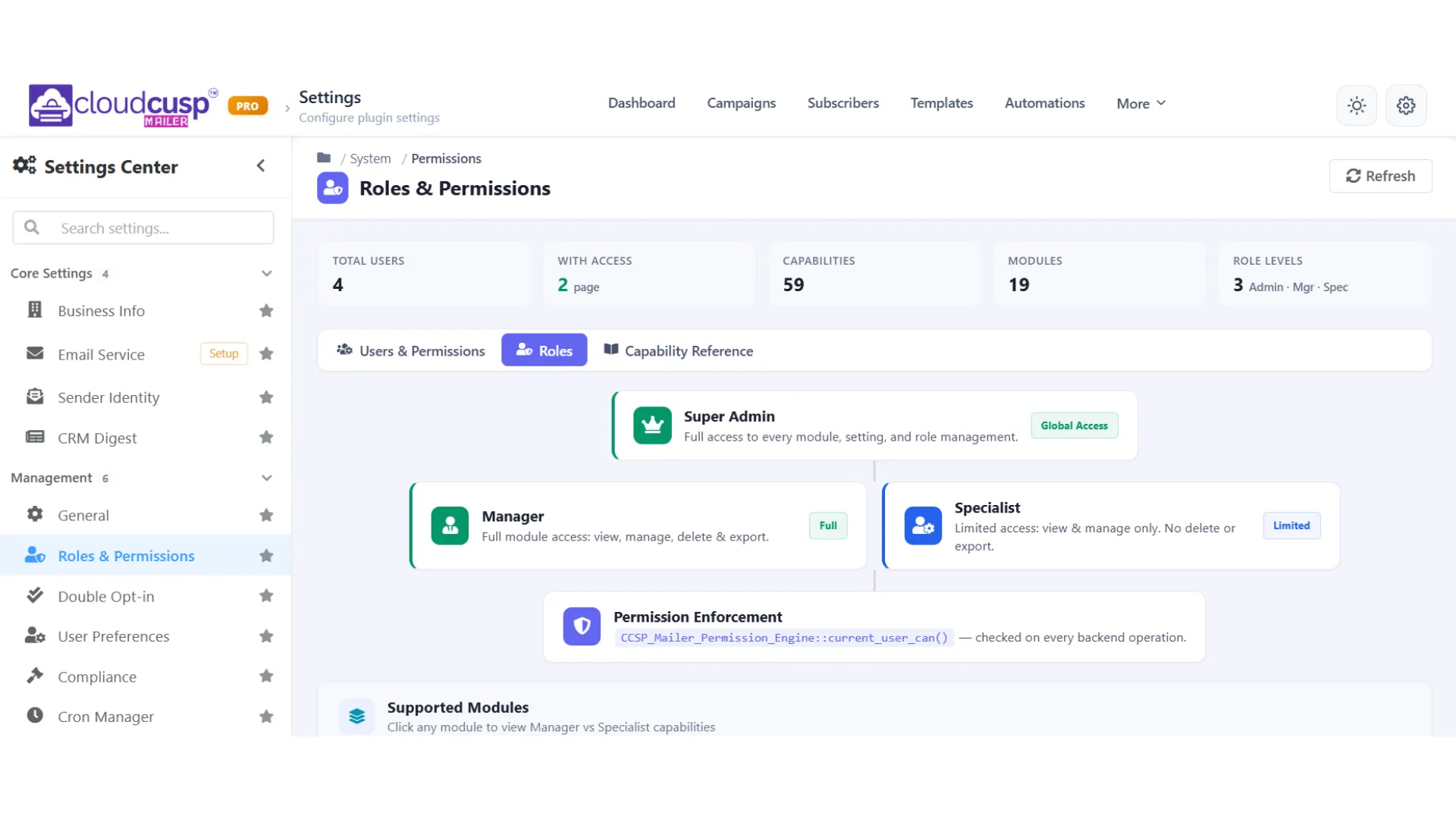
Setting it up is straightforward. You pick Super Admin, Manager, or Specialist for someone, and the access level applies immediately. For teams that are growing, this removes a layer of friction and risk that used to sit quietly in the background of every campaign.
Problem 3: Bounce rates kept creeping up, even when people thought they were being careful
This one came from a specific, painful place. Bounce rates slowly climbing, even on lists that were supposedly being maintained.
Here’s what usually happens. You send a campaign. Some people open it, some click, some reply, some bounce, some never engage at all. Later, you want a fresh list of just the engaged people so the next send lands cleaner. Previously that process was manual and incomplete — export, filter in a spreadsheet, re-import. It worked, sort of, but it was slow and very easy to mess up. Which meant people skipped it. Which meant bounce rates kept creeping up.
What we did about it
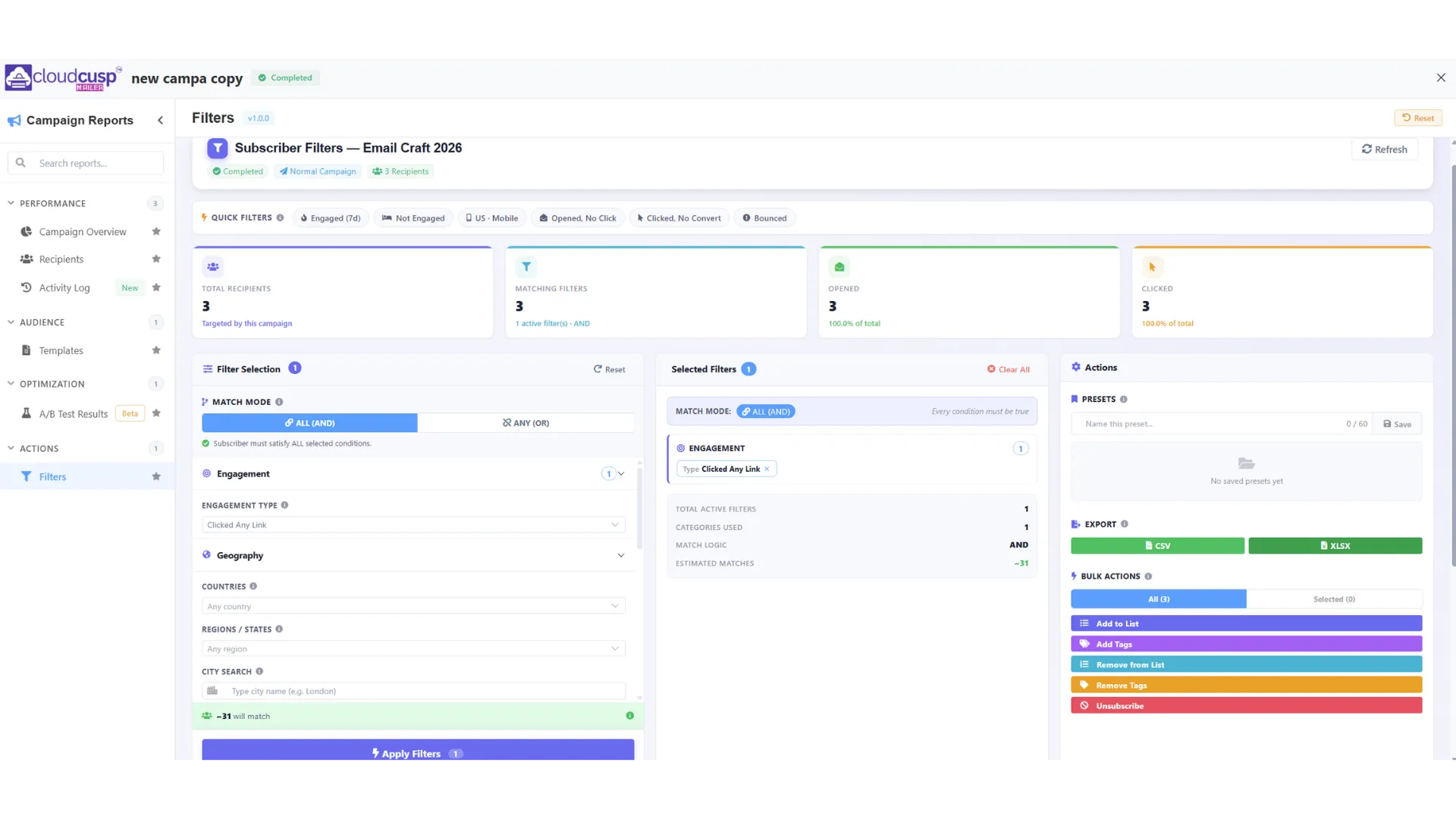
In v1.6.4 we added Campaign Actions. After a campaign has gone out, you can now filter the people who engaged with it (opened, clicked, replied, and so on) and move them straight into a new list with a few clicks. You can also exclude the ones who bounced or never engaged. The result is a clean list, ready for the next send, which directly helps keep bounce rates lower over time.
The actual workflow looks like this. Open the campaign report. Pick your filters — say, opened at least once or clicked a link. Hit Move to new list. Name it. Done. Want to also pull in people who replied but exclude anyone who bounced in the last 30 days? That’s a couple more checkboxes. The whole thing takes maybe 20 seconds for a list of thousands.
What it feels like now
We tested this on a few accounts that had been struggling with gradual list decay. One of them had been watching bounce rates slowly climb across successive campaigns. After they used Campaign Actions to pull only the engaged contacts into a fresh list, their next send showed a clear drop in bounces. It wasn’t magic. It was just better list hygiene, finally made easy enough that people actually do it.
This is especially useful for sequence campaigns and recurring sends. You keep feeding the next stage with only the people who are still responsive, instead of sending to a list that quietly degrades underneath you.
There’s a second-order benefit here too, and it’s a bigger deal than it sounds. Bounce rates aren’t just a vanity metric — they feed directly into your sender reputation. When your reputation drops, even your good emails start landing in spam. So keeping bounces low isn’t just about list hygiene; it’s about making sure the next campaign you send has a fighting chance of actually reaching the inbox. That’s why we cared enough to build this properly, instead of leaving it as a ‘filter in a spreadsheet’ workaround.
Problem 4: Finding the right number in reports took longer than it should
Reports have been getting better for a while, but people were still digging. You’d want one specific number, and you’d end up clicking through three screens to find it. The data was there. It just wasn’t where you needed it.
What we did about it
In v1.6.4 we refined the layouts further, improved how large datasets load, and made key metrics easier to compare across campaigns. Nothing flashy — just less hunting.
The sequence-step view (the one that shows how each step in a multi-email sequence performed) got a layout pass so you can scan all the steps at a glance instead of scrolling. And large datasets — we’re talking accounts with hundreds of thousands of sends — load without the awkward pause they used to have.
What it feels like now
The practical result is that you spend less time looking for answers. Whether you’re checking how a sequence performed step by step, comparing two similar campaigns, or scanning engagement trends over time, the reports surface the important numbers faster. We sat with a few people while they put together their weekly performance summaries, and most of them finished the same reports noticeably quicker than before.
Problem 5: The sending queue moved too slow when it really mattered
In earlier releases we added multi-threaded sending to clear pending email logs faster. It helped, but there was still headroom, especially under sustained load or on certain hosting setups.
What we did about it
In v1.6.4 we enhanced the sending engine further. It’s more efficient at handling large backlogs now, and the performance improvements are more consistent across different hosting environments.
What that means in practice: previously, on some shared hosting setups, the multi-threaded sender would throttle back hard because of resource limits, which kind of defeated the point. We reworked how the worker threads are scheduled, so the engine now adapts to what the host can actually handle instead of either overloading it or backing off too much. On a decent VPS we were seeing queues of 10,000+ pending emails clear in a couple of minutes during testing. On shared hosting it was slower, as you’d expect, but still markedly better than v1.6.3.
What it feels like now
We pushed large queues through the system again during testing. The ability to clear thousands of pending emails in a short window is still strong, and the process feels more stable under sustained load. For teams that occasionally build up a backlog — after big imports or high-volume periods — this keeps cutting the wait time down.
Problem 6: Small security gaps we wanted to close before they got bigger
Most of the security work in this release stays under the hood, and that’s intentional. We made several quieter improvements around authentication, data access, and protection against common risks. You might notice slightly tighter session handling, or clearer messaging in a couple of places. The main goal is just to keep the platform more resilient over time.
If you’re the kind of team that likes to know what changed under the hood, the short version is: tighter checks around session tokens, stricter validation on a few endpoints that handled user input a bit too generously, and some cleanup of older code paths that were technically working but had accumulated small inconsistencies over time. None of these were known exploitable — they were just things we wanted to fix before they ever became that.
Stepping back: what these changes feel like together
When we looked at everything that went into v1.6.4, a pattern showed up. Almost every feature maps to a real interruption that used to happen in a normal working day:
- Jumping out to write content → now the AI Writer sits inside Templates, Campaigns, and Emails, with a proper chat interface.
- Worrying about what team members can change → now there are clear roles (Super Admin, Manager, Specialist) with permission checks on every action.
- Manually cleaning lists after campaigns → now Campaign Actions make it fast and reliable.
- Spending too long finding the right report number → reports are clearer and faster.
- Waiting on large pending queues → multi-threaded sending continues to improve.
We didn’t set out to add features for the sake of a bigger changelog. We set out to remove the small daily tax that piles up when a tool makes you work around it. After testing the full set of changes across different account sizes and use cases, the overall feeling is that CloudCusp gets in the way less and helps more. That’s the bar we were aiming for.
How to get the update
CloudCusp Mailer v1.6.4 went out on 6 November 2026. Most accounts should already see the new features. If the AI Writer, Teams & Roles section, or Campaign Actions aren’t showing up yet, try a hard refresh, or log out and back in. The in-app changelog will also list any account-specific notes.
What’s next
We’re already looking at the next set of improvements. Some of the things on the table: deeper AI assistance inside sequences, more flexible role permissions, and further refinements to how campaign engagement data can be reused. As always, what we prioritise will be shaped by how people actually use these new tools — and by what friction is still left.
If you’ve already started using the AI Writer or the new Campaign Actions, we’d genuinely like to hear how it’s going. The best feedback tends to come from people who’ve put the features through real campaigns, not just clicked around.
Thanks for sticking with CloudCusp Mailer, and for the detailed feedback that shaped this release. We’re trying hard to make the product feel like it was built by people who actually send email for a living — because that’s exactly what we do.
Happy sending,
The CloudCusp Team