I’ve been running websites for years — small client sites, a couple of WordPress installs for side projects, even a Laravel app that still pays a few bills. Every so often something critical drops and the whole community panics. This week felt different. On October 21, 2026, the PHP team pushed emergency fixes for two holes that sit right in the core of the language. Not in a plugin. Not in a theme. In PHP itself.
These two flaws — tracked as CVE-2026-109618 and CVE-2026-109619 — can let an attacker run code on your server without ever logging in. No username. No password. Just a carefully crafted request. That is the kind of bug that keeps people awake.
Table of Contents
Why This One Hit Harder Than Usual
Most of the web still runs on PHP. WordPress alone powers a huge chunk of sites. Drupal, Joomla, Magento, Laravel, Symfony — they all sit on top of PHP. When the language itself has a remote code execution problem, the blast radius is enormous.
What made these bugs especially nasty is where they live. They can trigger before your application code even starts running. On Apache with mod_php, the attack can happen at the worker level. Your carefully written middleware, your input validation, your WAF rules that look for suspicious patterns inside the app — none of that gets a chance if the request never reaches your code.
I remember the first time I saw a similar situation years ago with an older PHP issue. We thought the application layer would protect us. It didn’t. This time the warning from the PHP team was crystal clear: every installation that serves web requests is at risk. PHP-FPM, mod_php, php-cgi, FrankenPHP, LiteSpeed — all of them.
Breaking Down the Two Vulnerabilities in Plain English
Let’s talk about what actually went wrong, without the heavy jargon.
CVE-2026-109618 – RCE via Out-of-Memory (OOM) Corruption
PHP has a memory limit. When a request tries to use more memory than allowed, PHP is supposed to cleanly abort and clean up. In certain edge cases, that cleanup could happen while internal request data was only half-initialized. The system then treated that broken data as valid. An attacker who could force the memory limit at exactly the wrong moment could corrupt memory and eventually execute their own code.
Think of it like a builder who is halfway through assembling a machine when the power cuts out. Instead of discarding the half-built parts, the next person comes along and treats those incomplete pieces as finished components. Chaos follows.
CVE-2026-109619 – RCE via Stale Global State
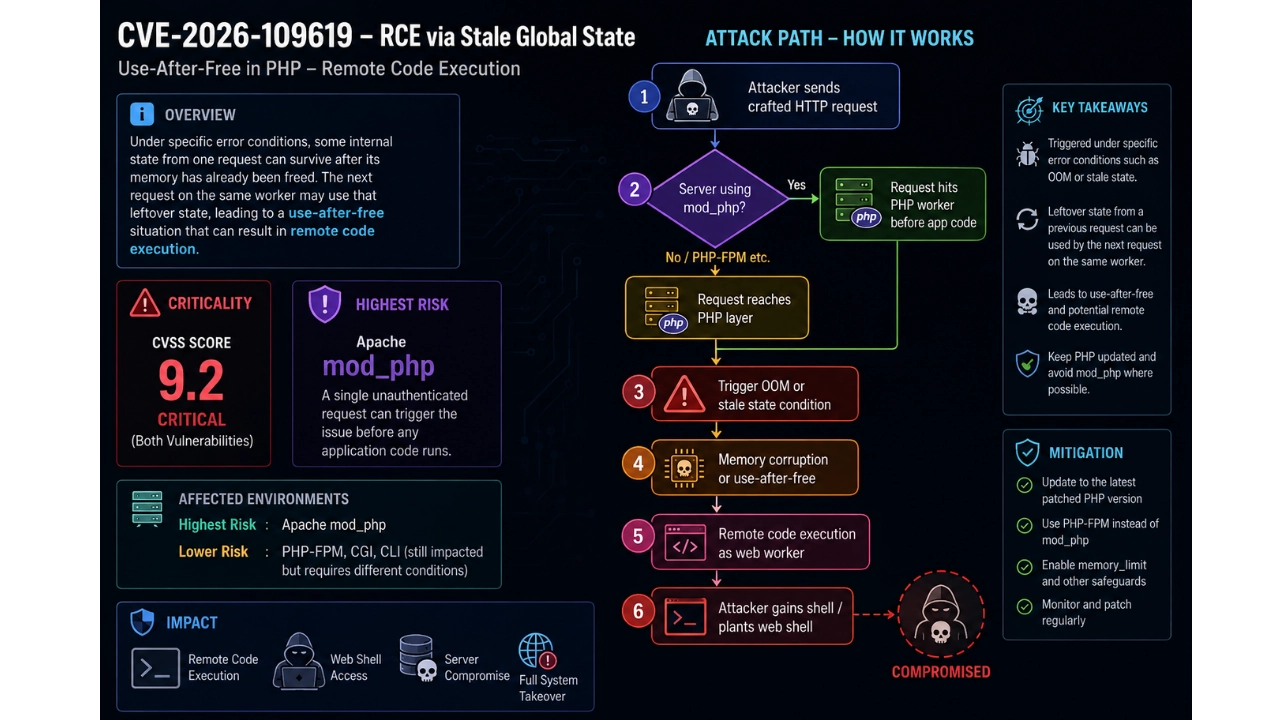
PHP workers often handle many requests in sequence. Normally, each request starts clean. Under specific error conditions, some internal state from one request could survive after its memory had already been freed. The next request on the same worker could then use that leftover state. That is a classic use-after-free situation, and researchers showed it could lead to remote code execution as well.
Both bugs received a CVSS score of 9.2 — critical by any measure. The highest risk sits with Apache mod_php setups because a single unauthenticated request can trigger the problem before any application code runs.
Here’s a simple view of how the attack path looks:
Who Was Actually Affected
Pretty much anyone running PHP for web requests. Supported versions that needed the patch were:
| PHP Branch | Fixed Version | Notes |
|---|---|---|
| 8.5 | 8.5.12 | Active support |
| 8.4 | 8.4.27 | Active support |
| 8.3 | 8.3.36 | Security support |
| 8.2 | 8.2.35 | Security support (ends Dec 31, 2026) |
PHP 8.1 and everything older are already end-of-life. The project provided limited source-code fixes for teams that compile PHP themselves, and some long-term support vendors offered backports. But the official message stayed the same: upgrade to a supported version as soon as possible. A temporary vendor patch is not ongoing security support.
Government sites and universities in a few countries took the precautionary step of going offline before the patch landed. Dutch parliament and cyber agency sites, some Finnish government services, and a handful of university sites disappeared for a while. That tells you how seriously the risk was taken.
What Website Owners Should Do Right Now
If you manage sites, the checklist is straightforward and non-negotiable.
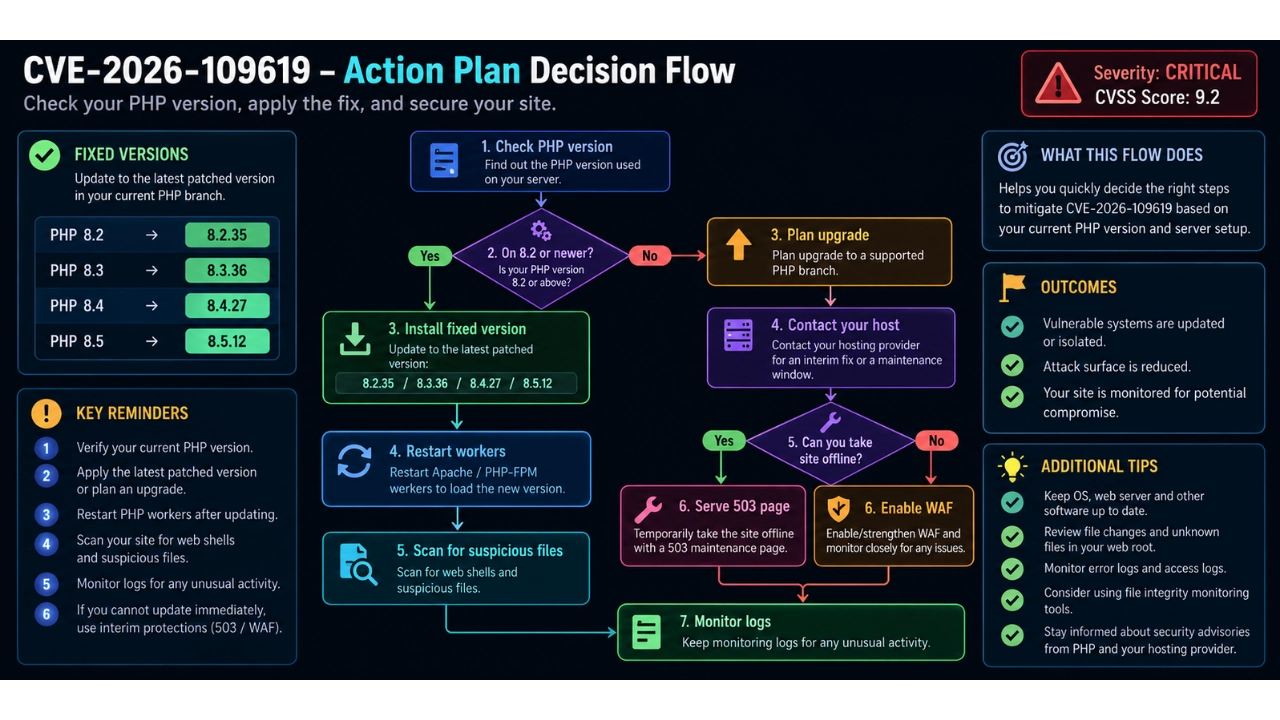
- Check your PHP version first.
On WordPress: Tools → Site Health → Info → Server.
On other systems, a simplephpinfo()page or your host’s control panel will show it. - Ask your host to install one of the fixed versions.
If you can switch versions in cPanel or Plesk, double-check that the version you select actually includes the patch. Updating WordPress or plugins does nothing for the PHP runtime. - If you are still on PHP 8.1 or older, plan the upgrade. Back up everything first. Talk to your host about any interim vendor fix while you move.
- Temporary mitigations exist but are incomplete.
Settingmemory_limit = -1can block the OOM path for one of the bugs. Disabling certain session features can reduce the surface of the other. A good web application firewall may catch some attack attempts. None of these replace the actual patch. - If you cannot patch immediately, discuss taking the site offline and serving a proper 503 maintenance page. Google treats a clean 503 as temporary, which is better for SEO than a broken or compromised site.
- After you patch, look for signs of compromise.
Check for unexpected PHP files, unfamiliar admin accounts, and web shells. A patch stops new attacks; it does not clean up an existing breach.
Here’s a practical decision flow many of us followed this week:
Real-World Impact and Why Timing Mattered
Security researchers had already confirmed remote code execution against common platforms — WordPress, Drupal, Magento, Joomla, Laravel and others. Some reports of early attack tools circulating before the official release made the situation more urgent. When details of a critical bug leak before the fix is ready, the window between public knowledge and mass exploitation can shrink to hours or even minutes.
I saw hosts scrambling. Some pushed the new packages within a couple of hours. Others took longer. A few clients of mine who run older PHP versions had to schedule emergency maintenance windows. One small e-commerce site I help with decided to stay offline for half a day rather than risk an unpatched window. That decision felt extreme at the time, but looking at the severity, it was probably the safer call.
Temporary Workarounds and Their Limits
People immediately asked for configuration changes that could buy time. The most commonly discussed ones were:
- Setting
memory_limit = -1(preferably in a way the application cannot override) - Lowering
post_max_sizeif file uploads are not critical - Disabling
session.upload_progresswhere possible - Making sure every request still passes through a WAF
These steps can reduce the chance of a successful exploit. They do not close the holes. The PHP team was explicit: updating is the only complete and safe solution.
Looking Ahead — Why This Kind of Bug Will Keep Appearing
One uncomfortable truth that came out of the disclosure is how the bugs were found. AI-assisted research played a major role. Tools that can dig through large codebases and reason about memory handling are getting better. That means more serious issues will surface, and the time between discovery and public knowledge may keep shrinking.
For site owners the lesson is simple. Keep the runtime updated. Treat PHP version upgrades with the same seriousness you give to application updates. Maintain a relationship with your host so emergency patches can be applied quickly. And have a plan for what you will do if a patch is not immediately available — whether that means temporary isolation, a maintenance page, or extra monitoring.
Final Thoughts from the Trenches
I’ve spent enough late nights chasing down compromised sites to know that “it probably won’t happen to me” is a dangerous attitude. These two PHP core flaws were a reminder that the foundation itself can crack. The good news is the patches exist. The fixed versions are available. Hosts and distributions have started rolling them out.
If you haven’t checked your PHP version yet, do it today. Ask your host the direct question: “Are we running one of the fixed versions — 8.5.12, 8.4.27, 8.3.36 or 8.2.35?” Get a clear answer. Then verify it yourself.
After the update, restart the PHP processes, scan for anything that looks out of place, and keep an eye on your logs for a while. A successful compromise often leaves traces — new files in unexpected places, unusual process activity, or sudden spikes in traffic that don’t match normal patterns.
This incident will fade from the headlines in a week or two. The sites that stay safe will be the ones that treated the patch as urgent rather than optional. I’ve already updated everything I manage. I hope you do the same.
Stay safe out there.
References
- Official PHP security advisory and release notes for the October 21, 2026 emergency updates.
- CISA alert urging immediate patching of CVE-2026-109618 and CVE-2026-109619.
FAQs
What exactly happened with PHP this week?
Two serious security holes were found deep inside PHP itself. They let an attacker run their own code on a web server without needing any login or password. The PHP team released emergency fixes on October 21, 2026 for the supported versions.
How bad are these bugs really?
Very bad. Both are rated critical (score 9.2). On some server setups, especially Apache with mod_php, a single carefully made request can trigger the problem before your website’s own code even starts running. That means normal protection inside your site may not help.
Which websites are at risk?
Any website that uses PHP to serve pages is potentially at risk. This includes WordPress, Drupal, Joomla, Magento, Laravel, and many others. The highest risk is on servers running Apache with mod_php, but other setups like PHP-FPM are also affected.
Which PHP versions have the fix?
The fixed versions are:
PHP 8.5.12
PHP 8.4.27
PHP 8.3.36
PHP 8.2.35
If your site is running any of these or newer, you are protected once the update is installed and the PHP processes are restarted.
What if my site is still on PHP 8.1 or older?
Those versions no longer get regular official updates. The PHP team released limited source-code fixes for some older versions, and some hosting companies or long-term support providers may offer their own patches. The safest long-term step is still to upgrade to a currently supported version as soon as you can.
Will updating WordPress or my plugins fix this?
No. WordPress and plugin updates only change the application code. This problem sits in the PHP language itself, so you need your hosting provider (or server admin) to update the actual PHP version on the server.
Is a firewall or WAF enough protection until I can update?
A good web application firewall can block some attack attempts and is better than nothing. However, the PHP team has clearly said that no configuration change or firewall is a complete substitute for installing the official fix. Updating remains the only fully safe solution.
How can I quickly check which PHP version my site is using?
On a WordPress site, go to Tools → Site Health → Info and open the Server section. On other platforms, ask your host or create a simple test page that shows the PHP version. Many hosting control panels also display the current PHP version clearly.
What should I do right after installing the update?
Restart Apache or the PHP-FPM workers so the new version is actually running. Then check your site for any strange new PHP files, unknown admin accounts, or unexpected changes. A patch stops new attacks but does not remove malware that may already be present.
What if I cannot update PHP immediately?
Talk to your host about temporary options. Some people take the site offline and show a proper maintenance page (HTTP 503) until the update is ready. Others strengthen their firewall and monitor logs closely. Neither is ideal, so treat the update as urgent and schedule it as soon as possible.