Let me tell you a story. A few years ago, I was running a mid-sized e-commerce business. We were killing it with marketing. Our ads were bringing in hundreds of new customers every week. I felt like we were on top of the world. But then, at the end of the quarter, I looked at the revenue. It was flat.
I dug into the numbers and realized something frustrating: for every ten new customers we brought in, eight were leaving by the next month. We were pouring water into a leaky bucket. We had no system to keep track of who we already had.
That was the year I finally implemented a Customer Relationship Management (CRM) system. It completely changed how we operated. Today, I want to share my experiences with you. I’m going to explain, in plain English, exactly how a CRM improves customer retention—and why you need one if you want your business to survive and thrive.
Table of Contents
The Leaky Bucket: Why Retention Matters More Than Acquisition
Before we dive into the software, let’s talk about the problem. Most businesses are obsessed with getting new customers. We spend money on ads, SEO, and social media. But we ignore the people who already bought from us.
Here is a hard truth I learned the hard way: acquiring a new customer is up to five times more expensive than keeping an existing one.
Furthermore, increasing your customer retention rate by just 5% can increase your profits by 25% to 95%. When you keep a customer, you don’t just get their next purchase; you get their loyalty, their word-of-mouth referrals, and their lifetime value.
I used to track my customers on spreadsheets. I had one tab for emails, one for purchase history, and one for customer service complaints. It was a mess. I’d call a customer to upsell them, only to find out they had a screaming fit with our support team the day before. That’s embarrassing, and it’s a quick way to lose someone forever.
A CRM fixed this by putting everything in one place. But it didn’t just organize my data; it actively helped me keep my customers happy.
What Exactly is a CRM? (In Simple Terms)
Think of a CRM as a super-powered digital rolodex mixed with a personal assistant. It’s a software platform that tracks every single interaction a customer has with your business.
- What emails have they opened?
- What have they bought in the past?
- Have they ever filed a support ticket?
- When is their birthday?
A CRM collects all this data and makes it actionable. Instead of guessing what your customer wants, you know.
To understand how this works, let’s look at a simple workflow of how a CRM manages a customer from the moment they show interest to the moment they become a loyal fan.
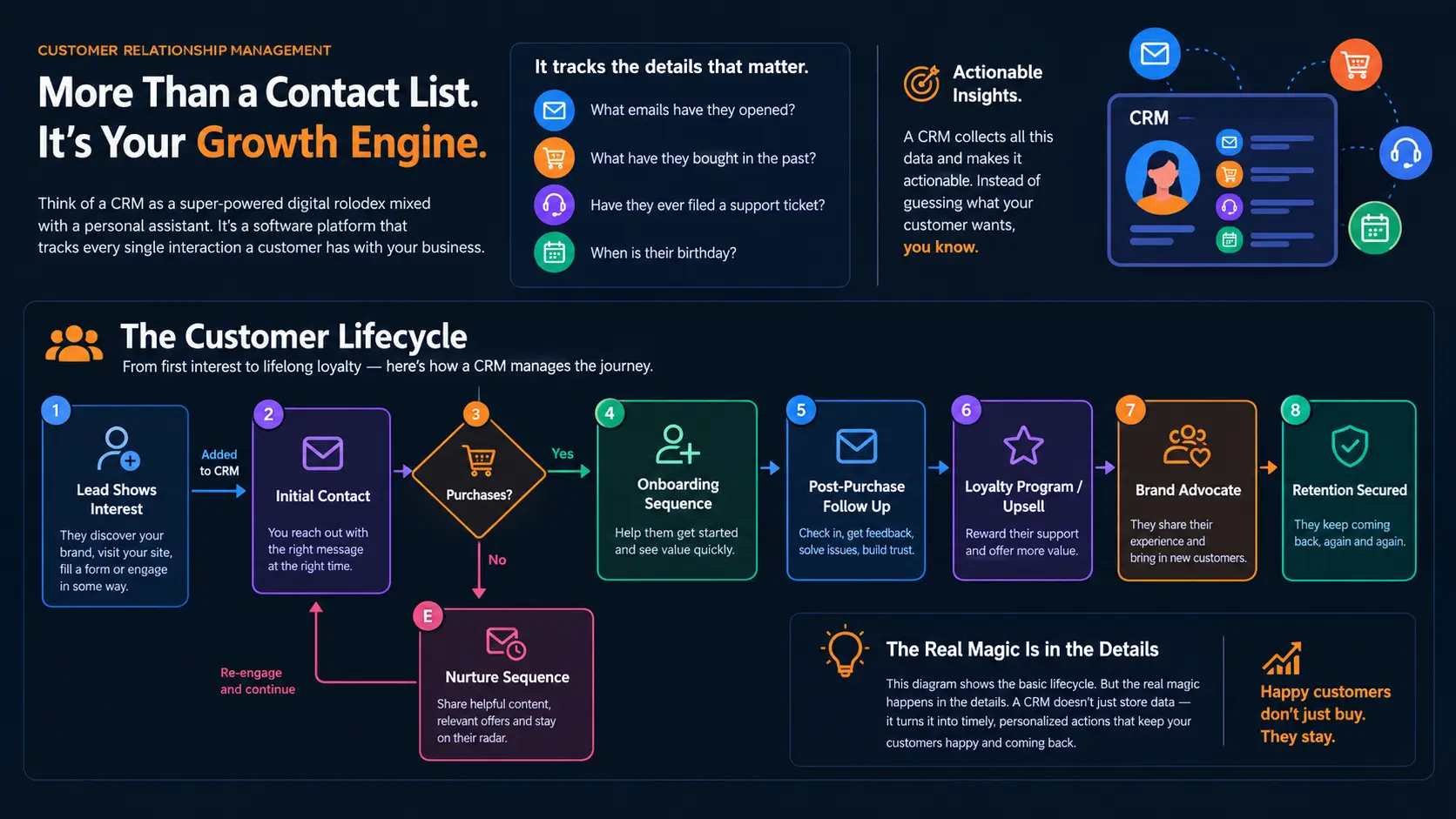
This diagram shows the basic lifecycle. But the real magic happens in the details. Let’s break down exactly how a CRM stops your customers from leaving.
1. Centralizing Data: The “Memory Bank” Effect
Have you ever called your internet provider, explained a complex issue to the rep, and then got transferred to another department—only to have to explain the whole thing again? It makes your blood boil, right?
Customers hate being treated like strangers. They want you to remember them.
Before my CRM, I had a customer named Sarah. She bought from us every month for six months. Then, she had a shipping delay. She emailed support, who gave her a generic apology. A week later, I called her to ask if she wanted to upgrade her subscription. She canceled on the spot. Why? Because I didn’t know about the shipping delay. I didn’t check my messy spreadsheets.
A CRM creates a single customer profile. When Sarah calls, the support rep, the sales rep, and the marketing team all see the exact same dashboard.
Here is a look at what a centralized customer profile in a CRM actually tracks:
| Data Category | What It Tracks | Why It Matters for Retention |
|---|---|---|
| Purchase History | What they bought, when, and how much they spent. | Helps you suggest relevant products and spot buying habits. |
| Communication Log | Every email, call, and chat transcript. | Prevents repetition and ensures the customer feels heard. |
| Support Tickets | Past and current issues, resolution times. | Lets you identify frustrated customers and prioritize fixing their issues. |
| Engagement Score | How often they open emails or log into your app. | Warns you before a customer churns so you can intervene. |
When your whole team has access to this “memory bank,” you stop treating customers like numbers. You start treating them like old friends. And people don’t leave their friends.
2. Hyper-Personalized Communication
In the early days of my business, I sent out a monthly newsletter. It went to 5,000 people. It said, “Hi everyone! Check out our new products!”
It got a 2% open rate. Nobody cared.
Today, consumers are bombarded with marketing. If an email doesn’t feel like it was written specifically for them, they ignore it (or unsubscribe).
A CRM allows you to use customer segmentation. Instead of blasting everyone, you slice your audience into specific groups based on their data.
For example, my CRM automatically segments customers based on their behavior:
- The VIPs: Customers who spent over $500 in the last 6 months.
- The Window Shoppers: People who added items to their cart but didn’t buy.
- The At-Risk Customers: Customers who usually buy every month, but haven’t logged in for 45 days.
Because the CRM tracks this automatically, I can send highly targeted messages.
Here is how different the communication looks:
| Segment | Old Way (No CRM) | New Way (With CRM) |
|---|---|---|
| VIPs | “Buy our new stuff!” | “Sarah, thanks for being a VIP. Here is early access to our new line and a 20% discount as a thank you.” |
| Window Shoppers | “Why haven’t you bought?” | “Hey John, you left a blue widget in your cart. We saved it for you. Here’s $10 off to finish your order.” |
| At-Risk | (Ignored until they left) | “We haven’t seen you in a while! Is everything okay? Reply to this email and let us know how we can help.” |
Personalization isn’t just about using their first name. It’s about context. A CRM gives you the context to speak to your customer exactly where they are in their journey.
3. Proactive Customer Service (Fixing Problems Before They Blow Up)
Most businesses practice reactive customer service. They wait for a customer to complain, and then they try to fix it. By that point, the customer is already annoyed.
A CRM allows you to practice proactive customer service. You spot the red flags before the customer even has a chance to get mad.
Let me give you a real example. We sold a software tool that had a bit of a learning curve. We noticed through our CRM that customers who didn’t use the “reporting feature” within their first 14 days had a massive churn rate. They would cancel their subscription because they didn’t see the value.
So, we set up a rule in our CRM. If a user hadn’t clicked on the “reports” tab 10 days after signing up, the CRM automatically triggered an email.
The email said: “Hey [Name], I noticed you haven’t checked out our reporting dashboard yet. It’s the #1 reason our customers save time. I recorded a 2-minute video showing you how to use it. Want me to walk you through it live?”
Suddenly, our retention rate for new users jumped by 30%. We didn’t change the software; we just used the CRM to intervene before the customer gave up.
Here is how a CRM creates a proactive support loop:
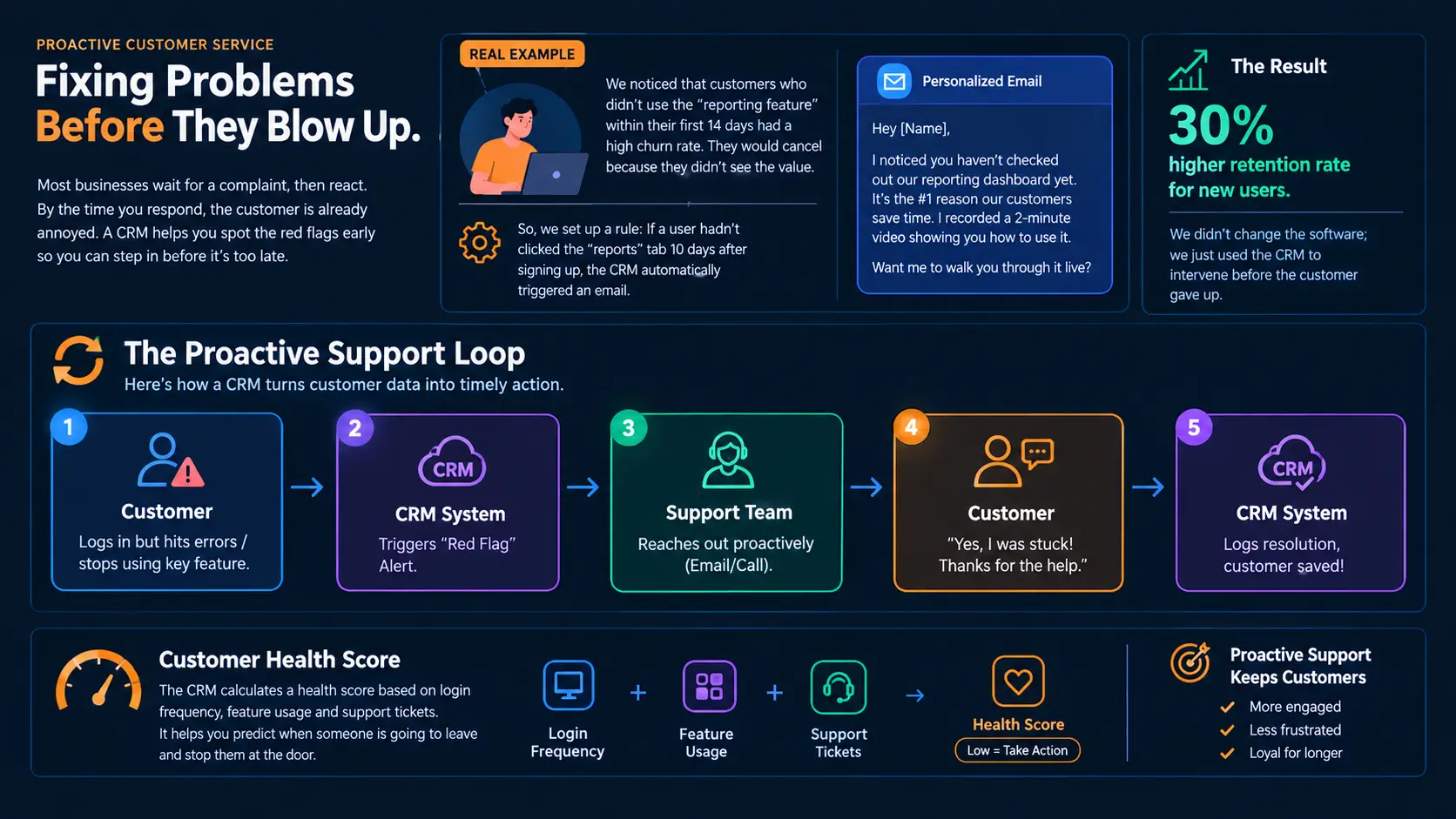
By monitoring customer health scores—a metric calculated by the CRM based on login frequency, feature usage, and support tickets—you can predict when someone is going to leave and stop them at the door.
4. Automated, Heartfelt Follow-Ups
I’m terrible at remembering dates. Birthdays, anniversaries, holidays—I forget them all. My CRM doesn’t.
One of the easiest ways to retain a customer is simply to show you care at the right time. A CRM lets you build automated workflows that trigger based on specific dates or actions.
- Anniversary Emails: Sending a “Happy 1-Year Anniversary with us!” email with a small gift card. It costs you $5, but it makes the customer feel special.
- Post-Purchase Check-ins: Three days after a customer receives a physical product, the CRM automatically emails them: “Did your package arrive safely? We want to make sure you love it!”
- Replenishment Reminders: If you sell consumable goods (like coffee or skincare), the CRM calculates the average usage time and emails the customer right when they are likely running low: “Time to restock? Tap here for a one-click reorder.”
These aren’t pushy sales tactics. They are helpful reminders that build a relationship. And because they are automated, they run 24/7 without me lifting a finger.
A Quick Peek Under the Hood (The Technical Side)
For those of you who are a bit tech-savvy, you might wonder how this automation actually works. Often, it requires connecting your app or website to your CRM via an API (Application Programming Interface).
I’m not a master coder, but I used a simple Python script to send data from our website to our CRM whenever a customer made a repeat purchase. This updated their profile instantly. Here is a simplified example of what that code looks like so you understand the logic:
import requests
import json

# Function to update CRM when a customer makes a purchase
def update_crm_customer(customer_email, purchase_amount, item_bought):
    # This is the API endpoint provided by your CRM (e.g., HubSpot, Salesforce)
    crm_api_url = "https://api.yourcrm.com/v3/contacts/update"

    # Your secret API key
    headers = {
        "Authorization": "Bearer YOUR_API_KEY",
        "Content-Type": "application/json"
    }

    # The data we are sending to the CRM
    payload = {
        "email": customer_email,
        "properties": {
            "last_purchase_date": "2023-10-27",
            "total_lifetime_value": purchase_amount,
            "last_item_purchased": item_bought,
            "loyalty_tier": "Gold" # Automatically upgrade them if they hit a threshold
        }
    }

    # Send the data to the CRM
    response = requests.post(crm_api_url, headers=headers, data=json.dumps(payload))

    if response.status_code == 200:
        print(f"Successfully updated CRM for {customer_email}")
    else:
        print(f"Failed to update CRM. Status code: {response.status_code}")

# Example usage: Sarah just bought a premium widget
update_crm_customer("sarah@example.com", 150.00, "Premium Widget")You don’t need to know how to code this yourself—most modern CRMs have “no-code” integrations where you just click a few buttons. But understanding that the CRM is constantly listening for data from your website helps you realize how powerful it is. The moment Sarah buys, her profile updates. The next time she calls, the rep knows she’s a Gold tier member.
5. Building a Feedback Loop
Customers leave when they feel ignored. When they take the time to give you feedback and nothing changes, they walk away.
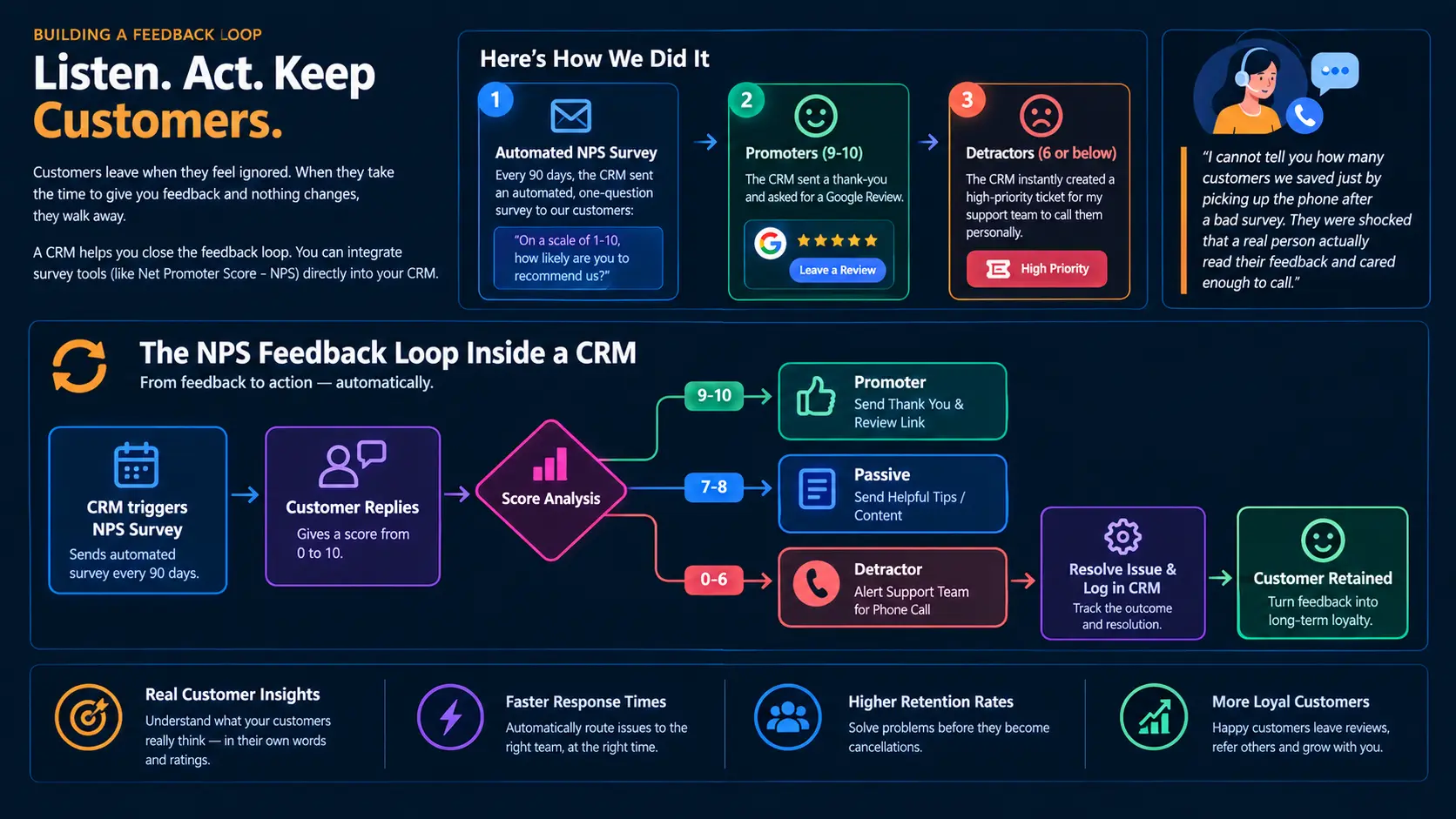
A CRM helps you close the feedback loop. You can integrate survey tools (like Net Promoter Score – NPS) directly into your CRM.
Here is how we did it:
- Every 90 days, the CRM sent an automated, one-question survey to our customers: “On a scale of 1-10, how likely are you to recommend us?”
- If a customer scored us a 9 or 10 (Promoters), the CRM sent an automated thank-you and asked for a Google Review.
- If a customer scored us a 6 or below (Detractors), the CRM instantly created a high-priority ticket for my support team to call them personally.
I cannot tell you how many customers we saved just by picking up the phone after a bad survey. They were shocked that a real person actually read their feedback and cared enough to call.
Here is a visual representation of the NPS feedback loop inside a CRM:
The Game Changer: Loyalty Programs Tied to CRM
If you want to take retention to the next level, you can use your CRM to run a loyalty program.
In the past, loyalty programs were just punch cards at a coffee shop. Today, a CRM tracks points, tiers, and rewards automatically.
- Tier 1 (Bronze): Gets standard support.
- Tier 2 (Silver): Gets 10% off all orders and free shipping.
- Tier 3 (Gold): Gets a dedicated account manager and early access to new products.
When a customer is close to moving from Silver to Gold, the CRM can trigger an email: “You’re only $50 away from Gold status! Buy now to unlock your exclusive perks.”
This gamification works wonders. People will buy things they don’t even need just to maintain their “status.” It’s human psychology, and a CRM helps you leverage it without being sleazy.
Common Mistakes to Avoid with CRMs
I’ve made a lot of mistakes with CRMs over the years. If you’re going to use one for retention, please learn from my blunders:
- Don’t over-automate: Automation is great, but if every single email a customer gets is from a robot, they will notice. Mix in real human interaction. Use the CRM to remind you to call them, rather than having the robot email them every time.
- Garbage in, garbage out: A CRM is only as good as the data inside it. If your team is lazy about logging calls or updating email addresses, the CRM becomes useless. You must enforce strict data hygiene.
- Ignoring the human element: A CRM doesn’t magically make you a good company. If your product is terrible or your staff is rude, a CRM just organizes the complaints. You still have to deliver a great experience.
Conclusion: Stop Pouring Water in a Leaky Bucket
Implementing a CRM was the single best decision I made for my business. It transformed us from a disorganized group of people trying to remember customer details into a well-oiled machine that anticipates needs, solves problems proactively, and makes every customer feel like our only customer.
Customer retention isn’t about tricking people into staying. It’s about providing so much value and such a personalized experience that leaving doesn’t make sense. A CRM gives you the tools to do exactly that.
If you are currently relying on spreadsheets and sticky notes to manage your customer relationships, I promise you, you are losing money. Find a CRM that fits your business size, take the time to set it up properly, and start plugging the holes in your bucket. Your future customers (and your bank account) will thank you for it.
References & Further Reading:
- Harvard Business Review: The Value of Keeping the Right Customers – hbr.org/keeping-the-right-customers
- HubSpot: What is a CRM? Complete Guide to Customer Relationship Management – hubspot.com/crm
- CloudCusp mailer: Email , Push , SMS, WhatsApp Marketing and CRM Plugin
FAQs
What exactly does a CRM do in simple terms?
Think of a CRM as a super-smart digital address book. Instead of just storing a customer’s name and phone number, it remembers every single interaction they’ve ever had with your business—what they bought, emails they opened, and even complaints they’ve filed. It keeps all your customer info in one organized place so nothing falls through the cracks.
Can a small business use a CRM, or is it just for giant corporations?
Absolutely! You don’t need to be a massive company to use one. In fact, small businesses often benefit the most because they can use a CRM to punch above their weight class. Making a small customer base feel incredibly special and well-cared-for is the fastest way to grow, and a CRM helps you do exactly that.
How does a CRM actually stop customers from leaving?
It gives you a heads-up before they walk out the door. A CRM tracks your customers’ habits. If a customer who usually buys from you every month suddenly goes quiet for 45 days, the CRM flags them as “at risk.” This allows you to reach out and fix a problem or offer a discount before they decide to shop with a competitor.
Do I need to know how to code to set up a CRM?
Not at all. While I mentioned a little bit of code in the article to show how the background mechanics work, you rarely need to touch it. Most modern CRMs are built for regular people. They feature “drag-and-drop” builders and easy menu options, so setting up emails and tracking customer data is as easy as posting on social media.
What’s the biggest mistake people make when using a CRM?
Over-automating everything. It’s tempting to set up a robot to send every single email so you never have to lift a finger. But customers can smell a robotic email from a mile away. The best way to use a CRM is to have it remind you when to step in and personally call or write a heartfelt message to a customer.
How does a CRM improve customer service?
It stops customers from having to repeat themselves. Have you ever called a company and had to explain your problem to three different people? It’s incredibly frustrating. With a CRM, every employee looks at the same screen. If a customer calls in, the rep instantly sees the customer’s past complaints and purchase history, making the customer feel heard and respected.
Is using a CRM spammy? Will my customers feel annoyed?
It’s only spammy if you use it poorly. If you use the CRM to blast generic “BUY NOW!” emails to everyone every single day, yes, they will be annoyed. But if you use it to send helpful tips, a birthday discount, or a message checking in on a product they just bought, it feels like excellent, personalized service.
How long does it take to see a difference in customer retention after getting a CRM?
You can see quick wins in the first few months, especially if you set up simple things like an automated “we miss you” email or a post-purchase check-in. However, the massive, long-term gains come after about six to twelve months, once the CRM has gathered enough data to show you clear patterns in your customers’ buying habits.
What if my customer data is currently a messy pile of spreadsheets? Can a CRM still help?
Yes, but you have to do a little housekeeping first. A CRM operates on the rule of “garbage in, garbage out.” If you import a spreadsheet full of fake emails, duplicates, and outdated phone numbers, the CRM will just organize your mess. It’s best to spend a day cleaning up your current data before moving it into the new system.
Does a CRM replace my customer service or sales team?
Never. A CRM is a tool, not a replacement for human connection. It takes away the boring, repetitive tasks (like looking up order numbers or typing out routine follow-up emails) so your team has more free time to do what humans do best: build relationships, solve complex problems, and connect with customers on a personal level.