Let me tell you a story that might feel a little too familiar. A few years ago, I was running a small digital marketing agency. We had about five people on the team, a decent roster of clients, and a steady stream of leads coming in through our website. On paper, things looked great.
But behind the scenes? It was an absolute circus.
I was tracking leads in a spreadsheet. Client communication was scattered across my personal Gmail, Slack, and text messages. I once forgot to send a proposal to a hot lead for three weeks because I got swamped with another project. By the time I remembered, they had already signed with a competitor.
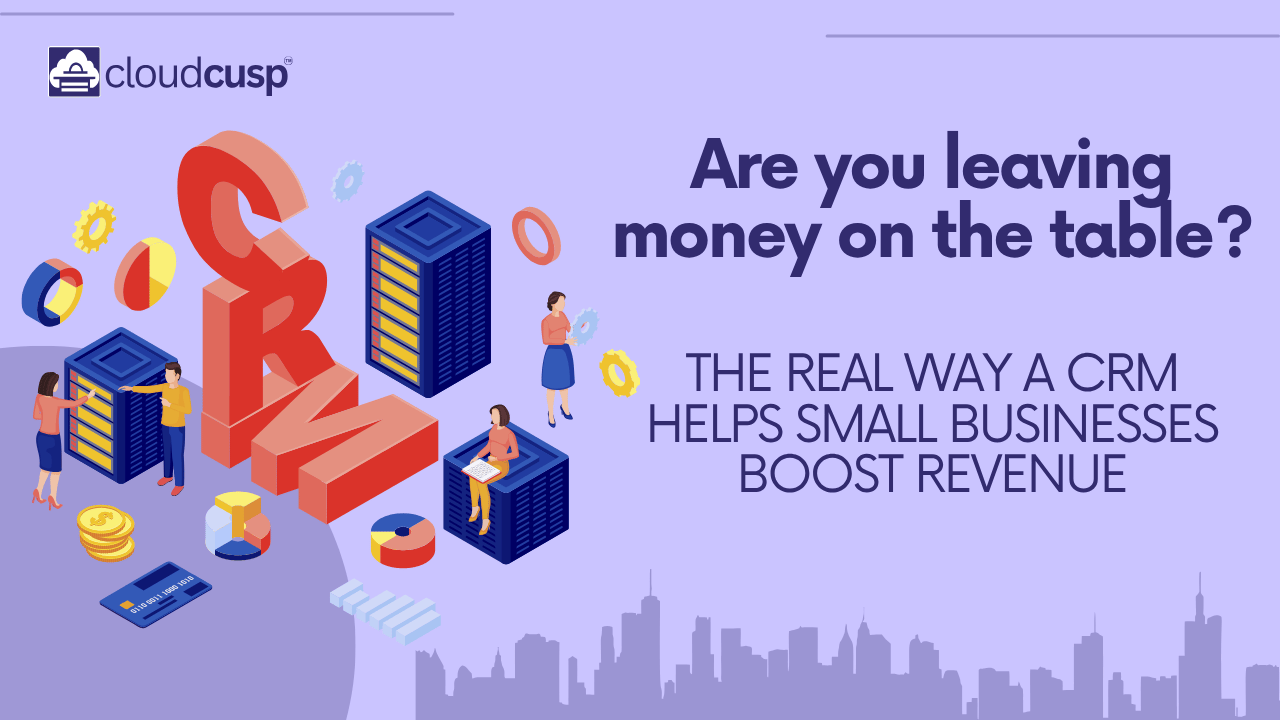
I was literally leaving money on the table because I didn’t have a system. That’s when I finally bit the bullet and invested in a CRM (Customer Relationship Management) system. And honestly? It was the single best business decision I’ve ever made.
Today, I want to break down exactly how a CRM helps small businesses increase revenue. I’m not going to throw fancy tech jargon at you. I’m going to explain this the way I wish someone had explained it to me back when I was losing sleep over lost leads and messy invoices.
Table of Contents
What Actually is a CRM? (Let’s Dumb It Down)
If you ask a software salesman, they’ll give you a pitch full of buzzwords like “omnichannel orchestration” and “synergistic data silos.” Forget all of that.
At its core, a CRM is just a super-powered digital Rolodex. It’s a single place where you keep track of every single person who has ever interacted with your business.
But it’s smarter than a notebook. A good CRM remembers things so you don’t have to. It tells you when to call someone, what you talked about last time, how much money they’ve spent with you, and what they might want to buy next.
Here is a simple look at how data flows when you actually use a CRM compared to the old-school way:
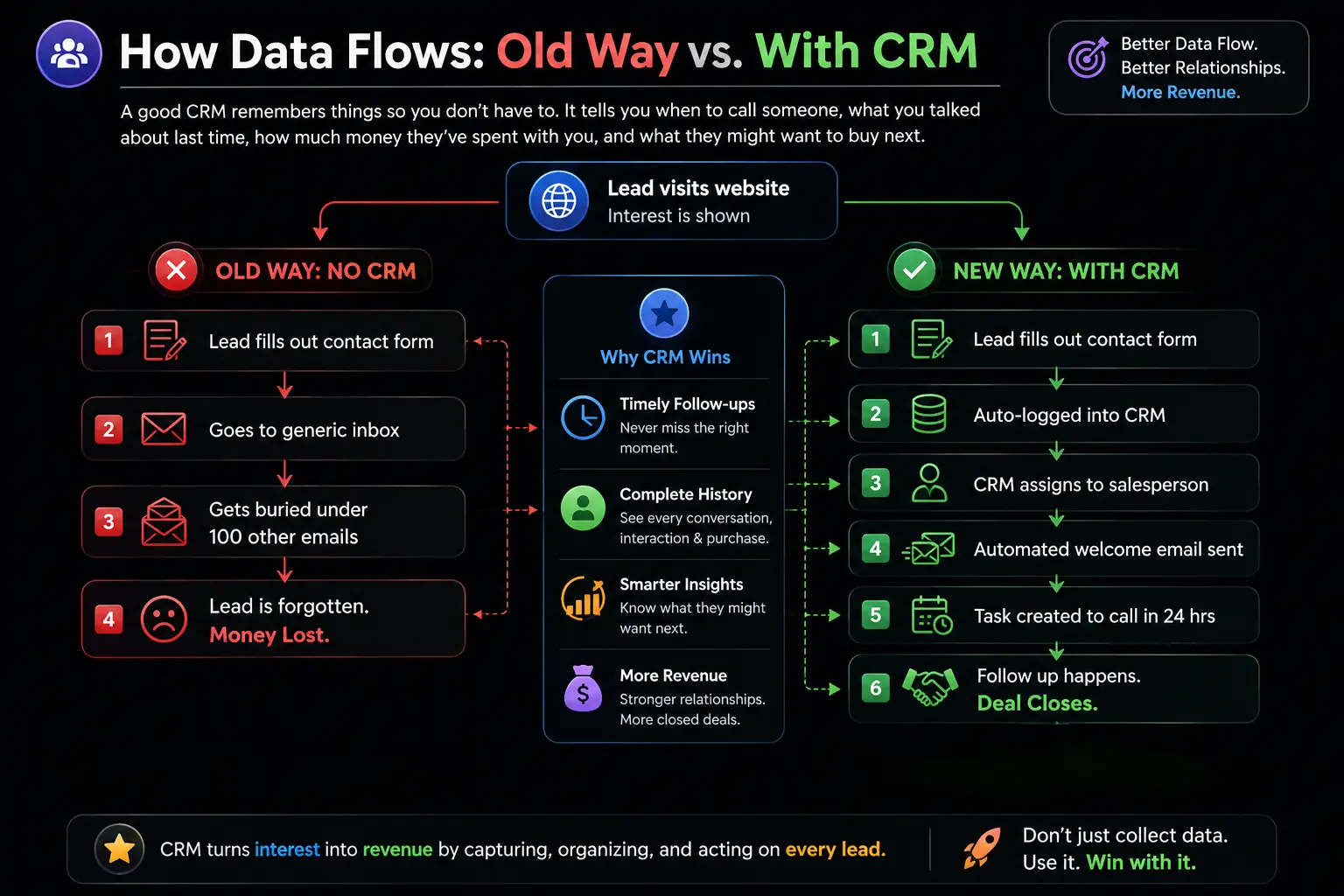
See the difference? The old way relies on your memory and willpower. The new way relies on a system. Systems don’t forget. Systems don’t get distracted. That right there is where the revenue increase starts.
Reason 1: Plugging the “Leaky Bucket” (Lead Management)
In the small business world, we spend a ton of money and time getting people to raise their hands. We run Facebook ads, pay for SEO, go to networking events, and hand out business cards. Every time someone gives you their email or phone number, it costs you money to acquire that lead.
But here is the dirty little secret of small businesses: Up to 80% of leads generated never get a follow-up.
Think of your business as a bucket. Marketing pours water (leads) into the top of the bucket. But if your bucket has holes in it, the water just drains out the bottom. Those holes are missed phone calls, forgotten emails, and lost sticky notes.
A CRM plugs those holes.
When a new lead comes in, the CRM instantly captures their info. It forces you (or your team) to input a status: New, Contacted, Qualified, Proposal Sent, Closed Won, Closed Lost.
The Lead Lifecycle Flow
If you can visualize where a lead is, you know exactly what to do with them. Look at how a CRM organizes this journey:
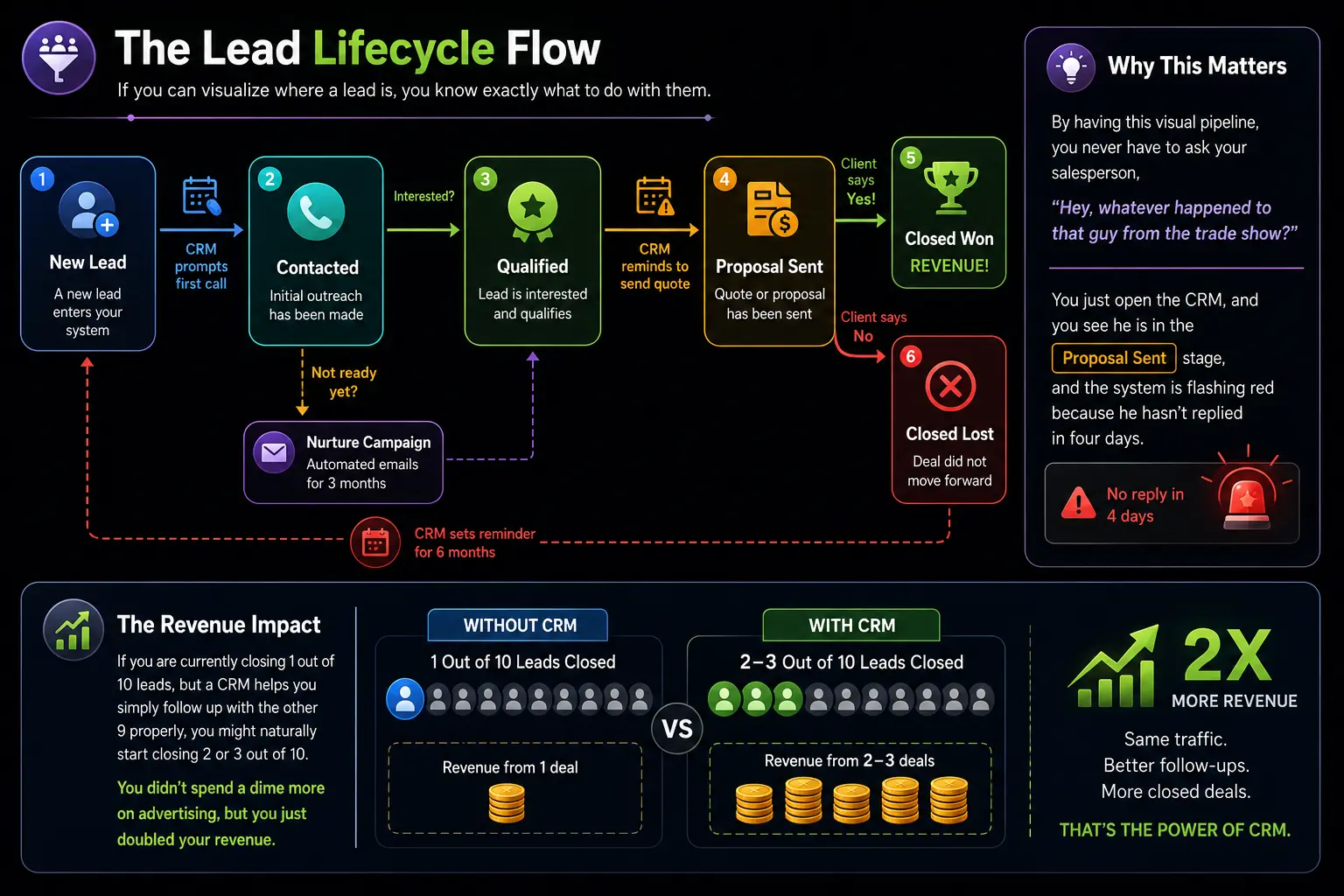
By having this visual pipeline, you never have to ask your salesperson, “Hey, whatever happened to that guy from the trade show?” You just open the CRM, and you see he is in the “Proposal Sent” stage, and the system is flashing red because he hasn’t replied in four days.
The Revenue Impact: If you are currently closing 1 out of 10 leads, but a CRM helps you simply follow up with the other 9 properly, you might naturally start closing 2 or 3 out of 10. You didn’t spend a dime more on advertising, but you just doubled your revenue.
Reason 2: The Fortune is in the Follow-Up (Automation)
I used to hate following up. It felt sleazy. I didn’t want to be “that guy” who bugs people. But here is what experience taught me: people are busy. They don’t ignore your emails because they hate you; they ignore them because they are dealing with their own emergencies.
Statistically, most sales happen between the 5th and 12th contact attempt. But 90% of salespeople give up after the first or second try.
A CRM takes the awkwardness and the mental load out of follow-ups through automation. You set up rules once, and the system does the work forever.
Let me give you a real example. When I used to sell website design, I set up this exact automation in my CRM:
- Day 0: Lead downloads my pricing guide. CRM instantly sends them a personalized email saying, “Thanks! Here is the guide you asked for.”
- Day 2: If they haven’t replied, the CRM sends a casual text: “Hey [Name], just checking if you had time to look through that guide?”
- Day 5: The CRM shoots me a notification: “Call [Name] right now.”
- Day 14: If they still haven’t bought, the CRM adds them to a “long-term nurture” list where they get one helpful email a month from me about marketing tips.
I didn’t have to remember any of that. I was building relationships on autopilot while I was actually doing the billable work for my clients.
Manual Work vs. CRM Automation
To really see the value, look at the time difference. Time is money for a small business owner.
| Feature | Manual Approach (No CRM) | Automated Approach (With CRM) |
|---|---|---|
| Data Entry | Manually typing name, email, and phone into a spreadsheet. Takes 3 minutes. | Form on website auto-populates the CRM. Takes 0 minutes. |
| Follow-up Reminders | Sticky notes on desk, or hoping you remember to check your calendar. | Automatic task generated and assigned to your phone. |
| Sending Emails | Writing individual emails, searching for the last sent email to remember the context. | Pre-written templates sent automatically based on a trigger. |
| Pipeline Visibility | Guessing how much money might come in this month based on “gut feeling.” | A real-time dashboard showing exactly how much is in the “Proposal” stage. |
Reason 3: Upselling and Cross-Selling (Because They Already Trust You)
If there is one mistake small businesses make, it’s focusing 100% of their energy on getting new customers and completely ignoring the people who already gave them money.
Think about it. Who is easier to sell to? A complete stranger who doesn’t know if you’re legit, or a past client who already handed you their credit card and was happy with the result?
It costs five to twenty-five times more to acquire a new customer than to keep an existing one. A CRM increases your revenue by helping you squeeze more value out of your existing customer base through upselling (selling them a premium version of what they bought) and cross-selling (selling them something related).
How a CRM Makes This Easy
Because your CRM is a historical record of everything a client has done, it spots opportunities that a human brain would miss.
- Example 1: Let’s say you own a small landscaping company. Your CRM shows that Client A paid you to mow their lawn every week last summer. In May, your CRM can automatically filter out everyone who bought “Weekly Mowing” last year but hasn’t booked this year. You send them a simple text: “Hey, getting the mowers ready! Want me to put you on the schedule for Tuesdays again?” Boom. Recurring revenue locked in without spending a penny on Facebook Ads.
- Example 2: You run an IT firm. A client bought a basic antivirus package from you two years ago. Your CRM flags that their contract is up for renewal next month, and also shows they recently hired five new employees. You call them and say, “I see you’re expanding. Let’s upgrade your antivirus to our enterprise package so your new hires are covered.”
You can’t do this if your client data is sitting in a dusty filing cabinet. You need it digitized, searchable, and organized in a CRM.
Reason 4: Keeping Customers Longer (Reducing Churn)
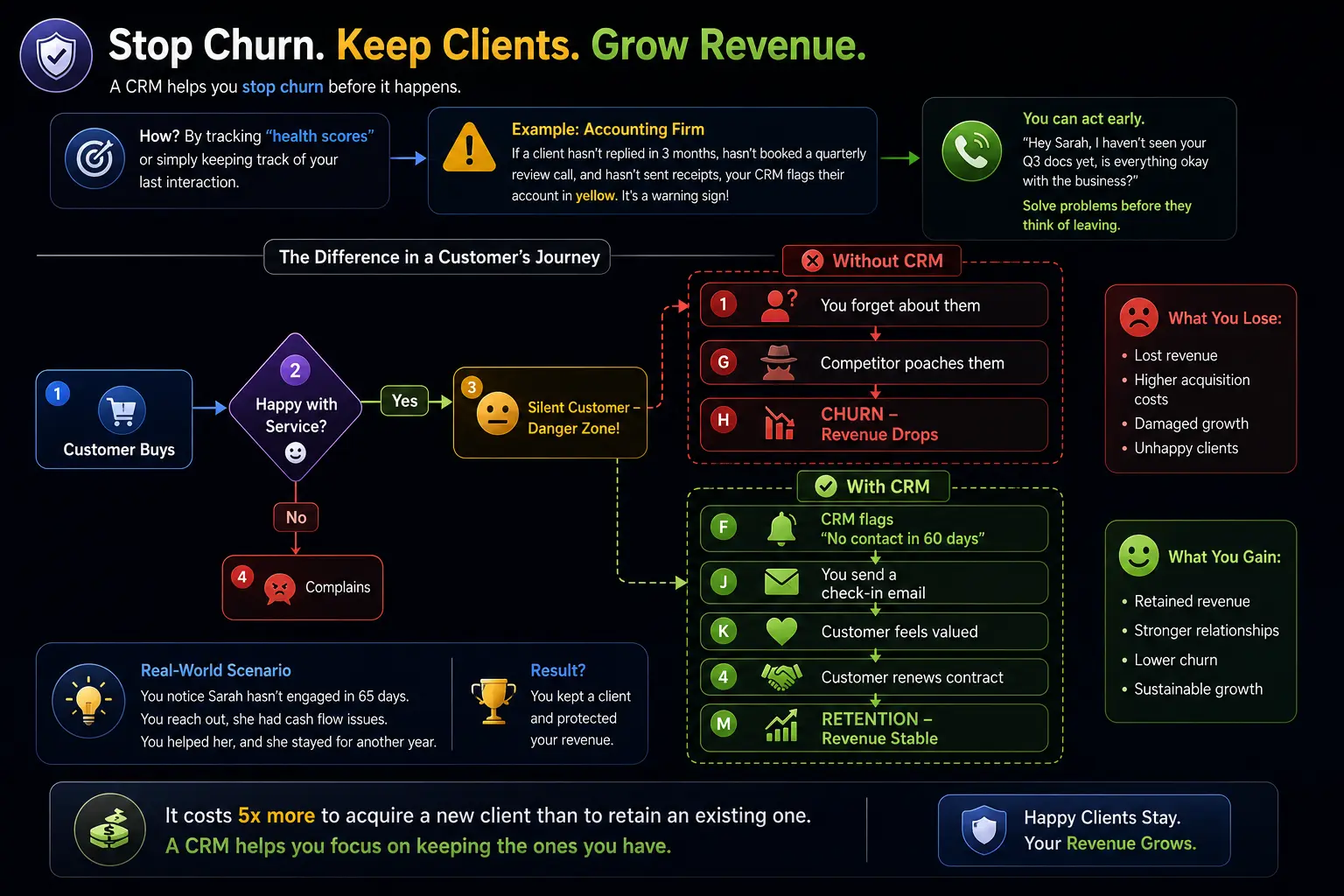
Revenue isn’t just about making new sales; it’s about keeping the money you already make. In the subscription world, we call losing a customer “churn.” If you lose 2 customers a month but only gain 2 customers a month, your revenue is completely flat. You are running on a hamster wheel.
A CRM helps you stop churn before it happens.
How? By tracking “health scores” or simply keeping track of your last interaction.
Let’s say you run a small accounting firm. If a client hasn’t replied to an email in three months, hasn’t booked a quarterly review call, and hasn’t sent you their receipts, your CRM can flag their account in yellow. It’s a warning sign that they might be looking for another accountant.
Because you got that alert, you can pick up the phone and say, “Hey Sarah, I haven’t seen your Q3 docs yet, is everything okay with the business?” You solve their problem before they even think about leaving.
Here is what the difference looks like in a customer’s journey:
Reason 5: Team Collaboration (No More “I Thought You Were Handling That”)
If you have even one employee, you know this nightmare. A customer calls your main line. Your employee, Bob, promises to send them a replacement part. Bob goes on vacation the next day and forgets to tell you. The customer calls back a week later furious, and you have no idea what they are talking about.
That customer is probably gone forever.
A CRM acts as the single source of truth for your entire company. When Bob logs a note in the CRM saying, “Promised John Smith a replacement widget,” you see it. If Bob gets sick, you can step in, read the history, and take care of John Smith seamlessly. John Smith doesn’t care that Bob is sick; he just wants his widget.
The Handoff Process
When a small business grows, handoffs between marketing, sales, and customer service get messy. A CRM makes these handoffs invisible to the customer.
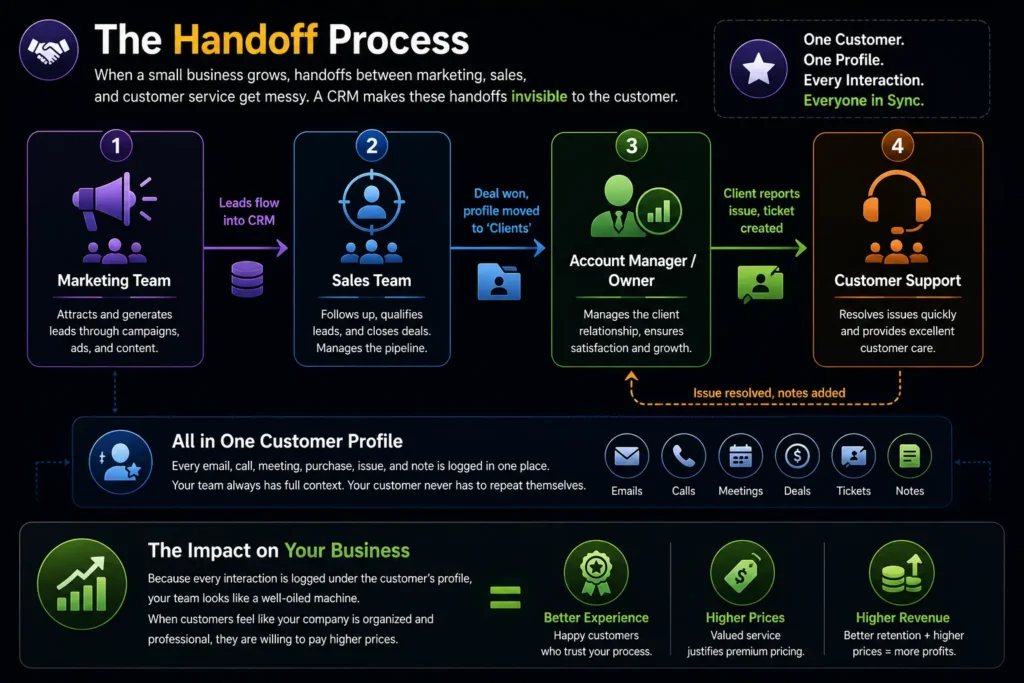
Because every interaction is logged under the customer’s profile, your team looks like a well-oiled machine. When customers feel like your company is organized and professional, they are willing to pay higher prices. Higher prices equal higher revenue.
Reason 6: Data-Driven Decisions (Stopping the Guesswork)
Before I got a CRM, I made business decisions based on my mood. If I had a good week, I thought about hiring someone. If I had a bad week, I panicked and thought about running more discounts.
I didn’t have actual data. A CRM changes you from a “gut-feeling” business owner into a tactical CEO.
Modern CRM dashboards give you incredible visibility into your business. Here are the kinds of questions a CRM answers in two seconds:
- “Where is my money stuck?” You look at your pipeline and see $50,000 stuck in the “Proposal Sent” stage. You realize your proposals are too long, or you aren’t following up aggressively enough after sending them.
- “Where is my best business coming from?” Your CRM reports show that leads from LinkedIn close at a rate of 30%, but leads from Facebook ads close at 5%. You immediately cancel the Facebook ads and put all that money into LinkedIn. You just saved thousands of dollars.
- “Who is my best salesperson?” You look at the team reports and see that Sarah closes 10 deals a month, while John closes 3. You can look at John’s call logs in the CRM and realize he isn’t making enough calls. You can train him based on data, not assumptions.
Real-World Examples: How Different Small Businesses Use CRMs
To make this even more concrete, let’s look at how a CRM impacts revenue in totally different industries.
Example 1: The Local Bakery (B2C)
- The Problem: A bakery makes most of its money on custom wedding cakes, but they lose track of engaged couples who ask for quotes in January for a June wedding.
- The CRM Fix: The bakery puts a simple form on their website. The CRM captures the lead and automatically sends a follow-up email two days later with a link to a tasting booking calendar.
- The Revenue Increase: By automating the initial outreach, the bakery books 4 more cake tastings a month. At an average of $500 per cake, that’s an extra $2,000 a month in revenue, simply because they didn’t drop the ball on the initial inquiry.
Example 2: The Freelance Web Developer (B2B)
- The Problem: The developer finishes a website for a client and moves on. He never offers hosting, maintenance, or SEO updates because he forgets.
- The CRM Fix: Six months after a project is marked “Completed” in the CRM, an automated task pops up: “Email [Client] to offer a free website speed audit.”
- The Revenue Increase: The client takes the audit, realizes the site is slow, and pays the developer $200/month for ongoing maintenance. The developer builds a stable base of monthly recurring revenue (MRR) without actively “selling.”
Example 3: The Small B2B SaaS Startup
- The Problem: The sales cycle is long (3-6 months). Sales reps lose track of where prospects are in the process.
- The CRM Fix: The startup uses a CRM to enforce a strict sales process. You cannot move a lead to the “Demo” stage unless you have logged a discovery call. You cannot move them to “Contract” unless a proposal is uploaded to their file.
- The Revenue Increase: By forcing discipline, the sales team identifies exactly where deals get stuck. They realize their demos are boring, so they revamp the presentation. Close rates jump from 15% to 25%.
Choosing the Right CRM Without Going Broke
I know what you might be thinking: “This sounds great, but I bet it costs a fortune and takes a month to set up.”
It used to be that way. Ten years ago, only Fortune 500 companies could afford CRM systems. Today, there is a CRM for literally every budget and skill level. One such CRM cum Email marketing platform is CloudCusp Mailer which is worth trying.
Here are a few tips from my experience on choosing one:
- Don’t overbuy: If you are a one-person shop, you do not need Salesforce. It’s too complex and expensive. Look at simpler tools built for small businesses.
- Focus on adoption: The best CRM in the world is useless if you and your team don’t use it. Pick one with a clean, easy-to-understand interface. If it looks like the dashboard of a spaceship, you will hate logging into it.
Quick Feature Checklist
When you are evaluating options, make sure it has these three non-negotiable features:
- Email Integration: It should connect to your Gmail or Outlook so you can send emails directly from the CRM and it logs them automatically.
- Pipelines / Kanban Boards: You need to be able to visually drag and drop deals from “New” to “Closed.”
- Mobile App: You are a small business owner. You aren’t always at your desk. You need to be able to look up a client’s info on your phone while you are standing in line at the post office.
Final Thoughts
At the end of the day, a CRM isn’t magic. It’s not going to magically summon customers out of thin air. What it is going to do is make sure you are capturing every single drop of value from the hard work you are already doing.
If you are spending money on ads, networking, or marketing, you are paying to open the front door of your business. A CRM makes sure that once people walk through that door, they are greeted warmly, guided to the right product, reminded to come back, and never ignored.
For me, getting the CoudCusp Mailer CRM cum EMAIL marketing WordPress plugin was the turning point where I stopped feeling like a frantic worker and started feeling like a business owner. It brought structure to the chaos. And when you bring structure to the chaos, revenue naturally follows.
Stop leaving money on the table. Stop relying on sticky notes and your “good memory.” Get a system in place. Your future bank account will thank you for it.
References
FAQs
What exactly does CRM stand for?
It stands for Customer Relationship Management. But honestly, forget the fancy corporate name. Just think of it as a super-powered digital notebook that remembers every detail about your customers and leads so you don’t have to rely on your own memory or sticky notes.
Are CRMs only for big companies with huge sales teams?
Not at all. That is a massive myth. Small businesses probably benefit from them the most. When you are a giant corporation, losing a few leads doesn’t hurt much. When you are a small shop, every single lead puts food on your table. A CRM helps you protect those precious leads.
Can’t I just use an Excel spreadsheet to track my customers instead?
You absolutely can, and I did it for years. But spreadsheets are basically just dead lists. They don’t remind you to call someone next Tuesday. They don’t automatically send a follow-up email when a customer opens your quote. A spreadsheet just holds data; a CRM actually does the work for you.
I am just a one-person freelancer. Do I really need one?
If you are totally happy with your current income and never want to grow, then no. But if you are juggling the roles of doing the actual work, marketing, and selling all at once, a CRM takes a huge mental load off your plate. It frees up your brain so you can focus on your craft instead of stressing over who you forgot to email.
How does a CRM actually make me money?
It just sounds like an extra expense. Think of your business as a leaky bucket. You are already spending money and time to get leads (water) into the bucket. A CRM simply plugs the holes. It makes sure you don’t lose money because you got busy and forgot to follow up. By just closing the leads you are already getting, your revenue goes up.
Are these systems going to cost me a fortune?
They used to be incredibly expensive, but not anymore. You do not need to spend thousands of dollars. There are plenty of powerful CRMs that offer totally free versions for small businesses. Even the paid plans are usually just a few dollars a month, which easily pays for itself if it helps you close just one extra sale.
Is it going to take me weeks to learn how to use it?
It shouldn’t. If a CRM takes you weeks to figure out, it is the wrong one for you. The whole point of the software is to make your life easier, not harder. You should
Won’t using automated emails and templates make me look like a spammy robot?
Only if you use it lazily. A good CRM actually helps you be more personal. Because it keeps a record of every phone call and email, you can look at a client’s file right before you talk to them and say, “How did your daughter’s soccer game go last weekend?” instead of sounding like a clueless salesperson.