If you’ve been paying attention to the world of Artificial Intelligence lately, you’ve probably noticed a massive shift. We stopped just asking chatbots to write haikus or summarize emails. We started building Agentic AI systems. These aren’t just chatbots that talk; they are systems that actually do things. They write code, fix server incidents, manage files, and operate autonomously.
But here’s the dirty little secret about these AI agents: they are incredibly forgetful.
You see, the brains behind these agents—Large Language Models (LLMs)—are essentially stateless entities. They don’t have a permanent memory in the way you or I do. When you spin up an AI agent, its entire world, its entire memory, exists inside what we call the context window.
Think of the context window like RAM (Random Access Memory) in your computer. It’s fast, it’s active, but it’s volatile. It’s temporary storage. The moment that session ends, or if the context window fills up with too much information, the agent’s memory effectively resets. It forgets what it did five minutes ago.
For an agent that’s supposed to write code and manage complex tasks, that’s a huge problem. That is where Agentic Storage comes in.
In this article, we’re going to break down exactly what Agentic Storage is, why our current methods like RAG aren’t enough, and how a new standard called MCP (Model Context Protocol) is changing the game. We’ll keep the technical jargon to a minimum and explain it like I’m sitting next to you at a coffee shop.
Table of Contents
The “Goldfish” Problem: Why AI Needs a Hard Drive
To understand why we need Agentic Storage, we first need to understand the limitation of the current tech stack.
Imagine you hire a highly skilled assistant to organize your digital life. They are brilliant, fast, and capable. But there’s a catch: every time they leave the room, they get amnesia. If they write a report or create a spreadsheet, and then the door closes, that work vanishes from their mind. Next time they walk in, they have to start from scratch.
This is how LLMs work. They are stateless.
Why RAG Was Only Half the Solution
Now, the industry tried to fix this memory problem a while back with something called RAG (Retrieval Augmented Generation). You might have heard of it. RAG connects an LLM to a vector database full of documents, policies, or historical data.
When the agent needs info, it performs a semantic search, pulls relevant information into its context window, and generates a response.
This was a great step forward. But here’s the thing: RAG is fundamentally read-only.
It solves the input problem (getting info into the model), but it completely ignores the output problem.
Let’s say your AI agent writes a Python script to automate a backup. Or maybe it creates a remediation playbook for a server outage. Where does that work go? In a standard RAG setup, it effectively disappears once the session ends. The agent can “read” the library of past data, but it can’t “write” the new book it just authored.
Agentic Storage is here to address this exact gap. It’s tempting to say we are just giving the agent a hard drive instead of just RAM. So its work product persists between sessions. But I think it’s a bit more than that. It’s a storage layer that is aware of and designed specifically for autonomous agents.
The Integration Nightmare: Why We Can’t Just Use APIs
So, we know we need storage. Why not just give the agent access to a cloud drive or a database?
Well, the traditional approach would be to write custom API integrations for every single storage system the agent needs to touch.
Let’s visualize this mess:
- System A: Object Storage (like AWS S3).
- System B: Block Storage.
- System C: Network Attached Storage (NAS).
Each of these has different APIs, different data models, different authentication methods, and different quirks. You would be writing and maintaining custom code integrations for each one. If you change the agent, you have to rewrite the integrations. If you add a new storage type, you write more code.
That doesn’t scale. It creates a fragile system where the agent is tangled up in “spaghetti code” just to save a file.
The Solution: Enter MCP (Model Context Protocol)
This is where the industry is converging on a standard called the Model Context Protocol, or MCP.
Think of MCP as a universal language or a standard plug. Just like USB allows you to plug a mouse, a keyboard, or a hard drive into any computer without needing a custom port for each, MCP allows an AI agent to talk to any storage system in a uniform way.
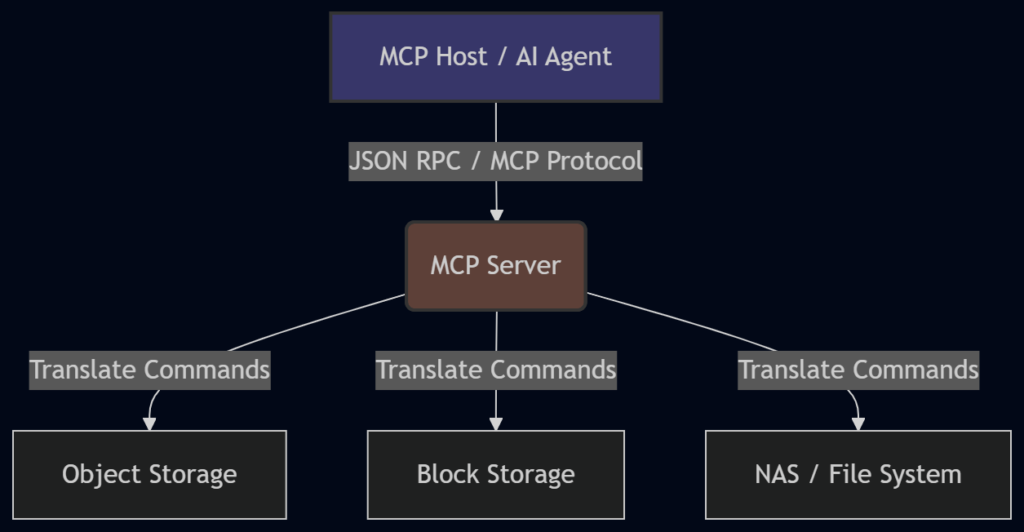
Here is a simple diagram to visualize how MCP sits between the Agent and the Storage:
How MCP Works
In this architecture, we have three main parts:
- The MCP Host: This is the AI application where the agent lives and runs.
- The MCP Server: This is the storage layer interface. It sits in front of the actual storage hardware.
- The MCP Protocol: This connects them using JSON RPC (a standard remote procedure call format).
The beauty of this is that the MCP Server presents a uniform interface to the agent. The agent doesn’t care if the underlying storage is Object, Block, or NAS. It just calls a standard command, and the MCP Server handles the translation.
MCP Primitives: Resources vs. Tools
Now, how does the agent actually interact with this storage? MCP exposes capabilities through two main “primitives,” or building blocks: Resources and Tools.
It’s important to understand the difference, so let’s break them down.
1. Resources (The “Read” Side)
Resources are passive data objects. Think file contents, database records, or configuration snippets.
When the agent needs context—maybe it needs to read a log file to understand an error—it requests a Resource.
- Concept: This is very similar to RAG.
- Action: Reading existing information.
- Standardization: It provides a standard way for the agent to say, “Show me the file at this path,” regardless of where that file lives.
2. Tools (The “Write” Side)
This is where the magic happens for Agentic Storage. Tools are executable functions that the agent can invoke.
The MCP server exposes tools like:
list_directoryread_filewrite_filecreate_snapshot
The agent calls the tool, and the MCP server handles the translation to the underlying storage system.
A Coding Example
To make this concrete, let’s look at a simplified example of what an MCP interaction might look like in code.
Imagine an agent wants to save a Python script it just wrote.
The Agent’s Request (JSON RPC):
{
  "jsonrpc": "2.0",
  "id": 1,
  "method": "tools/call",
  "params": {
    "name": "write_file",
    "arguments": {
      "path": "/scripts/backup.py",
      "content": "print('Backing up data...')"
    }
  }
}What happens behind the scenes:
- The MCP Host sends this JSON request.
- The MCP Server receives it.
- The Server translates this into the specific API call needed for the storage backend (maybe an S3
put_objectcall or a local file system write). - The Server returns a success message to the agent.
The agent didn’t need to know AWS credentials or S3 bucket syntax. It just used the standard MCP Tool.
The Safety Paradox: Why You Can’t Just Give AI Write Access
At this point, you might be thinking, “Okay, give the agent a hard drive via MCP, and we’re done, right?”
Not so fast. If you have a skeptical, security-focused friend (let’s call him “Jeff”), they would likely have a meltdown at this idea.
Why?
Because agents are not perfect. They hallucinate. They misinterpret instructions. They can take actions that seem logical to them in isolation but are catastrophic in the broader context of your business.
If you give an AI agent full write access to your company’s storage infrastructure, you are inviting disaster. It might accidentally delete critical database snapshots because it thought they were “old files” taking up space.
Agentic Storage isn’t just storage that agents can write to. It is storage designed for autonomous agents. This means we need to build in safety layers that might seem like overkill for humans but are absolutely essential for AI.
Here are the three safety layers you need to implement:
1. Immutable Versioning
This is the “Time Machine” feature.
In a standard file system, if you overwrite a file, the old one is often gone (or in the trash can). In Agentic Storage, every write operation should create a new version.
- The Rule: The agent can never truly delete data. It can only archive it or create a new version.
- The Benefit: You have a complete audit trail. If the agent messes up and overwrites a critical config file with nonsense, you can instantly roll back to the previous version.
2. Sandboxing
This is the “Playpen” feature.
You must implement strict sandboxing. This means the agent operates within a constrained environment. It has access to specific directories and specific operations—and nothing else.
- Example: If an agent is supposed to manage application logs, it should have no path to system binaries or financial records.
- Prevention: This prevents the “Confused Deputy” problem. This is where an agent with broad permissions gets tricked (by a malicious prompt or a logic error) into acting outside its intended scope.
3. Intent Validation
This is the “Explain Yourself” feature.
Before executing high-impact operations (like deleting a folder or changing permissions), the storage layer should require the agent to explain why.
- The Process: The agent generates a reasoning chain (Chain of Thought).
- Example: The agent wants to delete
log_files_2026.zip. The storage layer asks, “Why?” The agent responds: “I am deleting these files because they are older than 90 days, and the retention policy states logs > 90 days should be removed.” - The Check: The storage layer verifies that claim against the actual policy before proceeding.
Let’s look at a comparison of these layers:
| Safety Layer | Purpose | Why it’s needed for AI |
|---|---|---|
| Immutable Versioning | Data Recovery | AI can hallucinate and overwrite correct data with garbage. You need an undo button. |
| Sandboxing | Access Control | AI can be tricked or confused. You need to physically limit where it can go. |
| Intent Validation | Logic Check | AI follows instructions literally. You need to verify the reasoning before the action happens. |
Putting It All Together: A Real-World Scenario
Let’s walk through a scenario to see how this works in real life.
The Task: An AI agent is tasked with “cleaning up the development server.”
Without Agentic Storage:
The agent might SSH into the server, run a rm -rf command to delete files it thinks are old, and accidentally wipe the entire development environment because it misidentified the directory. There is no record of exactly what happened, and no easy way to recover.
With Agentic Storage (and MCP):
- Connection: The agent connects via MCP. It sees the file system through the
list_directorytool. - Sandbox: The MCP Server restricts the agent to the
/dev/tempfolder. It literally cannot see or touch the/prodor/systemfolders thanks to Sandboxing. - Action: The agent identifies a file
temp_data.csv. It decides to delete it to save space. - Intent Validation: The storage layer intercepts the delete command. It asks the agent for a reason. The agent replies: “This file has not been accessed in 180 days.”
- Verification: The storage layer checks the access logs. The agent is correct.
- Execution & Versioning: The storage layer executes the delete. However, because of Immutable Versioning, it doesn’t actually wipe the data bits. It archives the file version in a hidden state.
- Result: The agent feels like it did the job. The storage admin (Jeff) is happy because he has an audit trail of the agent’s reasoning, and if the file was actually needed, he can restore it instantly.
The Architecture of Trust
The diagram below shows how these safety layers wrap around the storage to create a trusted environment for the agent.
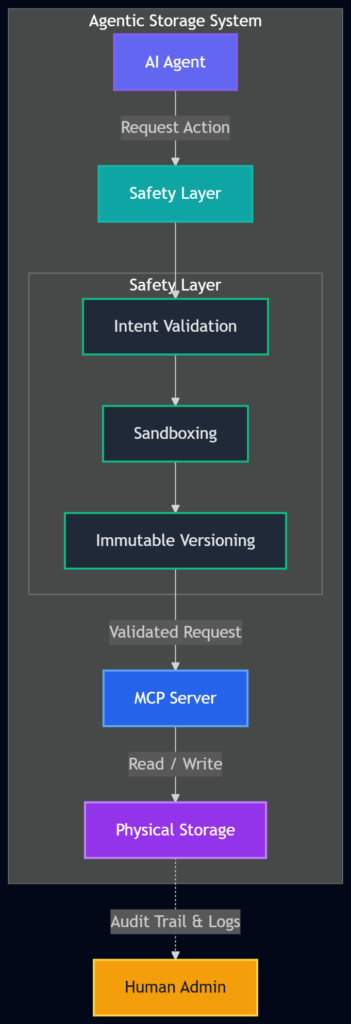
This architecture acknowledges a fundamental truth: Trust is earned, not given. Even if our AI agents become incredibly smart, we still need a system that assumes they might make a mistake. Agentic Storage provides that safety net.
The Future of Work: Persistence and Autonomy
We are moving rapidly from an era of “Chatbots” (conversational AI) to “Agents” (autonomous AI). Chatbots don’t need hard drives; they just need to talk. But agents need to work. And work implies creating things, modifying things, and remembering things.
If we want AI to handle complex workflows—like managing cloud infrastructure, organizing data lakes, or handling customer service backend tasks—we have to solve the stateless problem.
Agentic Storage represents the next layer in the AI stack. It is the infrastructure that allows AI to have a persistent, safe, and auditable impact on the digital world.
It’s not just about giving the AI a place to save files. It’s about creating a robust environment where:
- Agents get the persistence they need to be useful.
- Humans get the safety and auditability they need to trust the system.
So, the next time you hear about an AI agent managing a server or writing code autonomously, ask yourself: “Where is it saving that work?” The answer should be Agentic Storage.
WrapUP
The rise of Agentic AI is inevitable, but its success depends on the infrastructure we build around it. LLMs are powerful engines, but without a transmission and a place to store fuel, they aren’t going anywhere. By combining the read capabilities of RAG with the write capabilities enabled by MCP, and wrapping it all in strict safety layers like sandboxing and immutable versioning, we solve the biggest hurdle of autonomous AI: Memory.
We are essentially building a digital workplace where our AI colleagues can not only read the manuals but also write reports, save them in the correct filing cabinet, and—crucially—clean up their own messes without burning down the office.
References:
FAQs
What exactly is Agentic Storage?
Think of Agentic Storage as a dedicated, permanent hard drive for AI agents. Unlike traditional cloud storage designed for humans (like Dropbox or Google Drive), this storage is built specifically for autonomous AI systems. It lets AI agents read, write, organize, and remember files across different sessions, solving the problem of their built-in “amnesia”.
Why do AI agents need special storage? Can’t they just use regular databases?
AI agents, powered by Large Language Models (LLMs), are stateless by default. This means they have no memory between sessions or API calls. If an agent writes a report or creates a script today, it will forget all about it tomorrow when you start a new session. Regular databases and file systems aren’t designed to be the primary “brain” for software that operates autonomously. Agentic Storage provides the persistence and programmatic access agents need to function reliably over time.
How is this different from RAG (Retrieval-Augmented Generation)?
Great question. RAG is like giving an agent a library card. It lets the agent read and search through existing documents to find information . However, RAG is read-only. It doesn’t solve the problem of where the agent should save its own work. Agentic Storage provides the “write” capability, giving the agent a place to save its outputs, progress, and learned information for later . You need both: RAG for memory (reading context) and Agentic Storage for storage (saving work).
What is MCP and how does it help?
MCP (Model Context Protocol) is a new open standard that acts like a universal translator or a USB-C port for AI . Instead of an agent needing a different custom connection for every type of storage (object, block, file), MCP provides a single, standard way to connect. An MCP Server wraps around a storage system and presents a uniform interface to the agent. The agent just calls standard “tools” like read_file or write_file, and the MCP Server handles the translation to the specific storage system underneath . This makes it much easier to build and maintain agentic systems.
What are the main safety concerns with giving AI write access?
Giving an autonomous AI agent the ability to write and delete data is risky. Agents can hallucinate, misunderstand instructions, or cause unintended consequences . The main fears are:
Accidental deletion: Deleting critical files.
Data corruption: Overwriting correct data with incorrect information.
Security breaches: An agent with broad access could be tricked into exposing sensitive data.
How does Agentic Storage address these safety concerns?
Properly designed Agentic Storage includes built-in safety layers :
Immutable Versioning: Every save creates a new version. The agent can never truly delete data; it can only create new versions, preserving a complete history and allowing rollback .
Sandboxing: The agent is confined to a specific, limited workspace. It can’t access or affect files outside its designated area .
Intent Validation: For risky actions, the storage can ask the agent to explain why it wants to perform the action (e.g., “I’m deleting this because it’s 90 days old per policy”). The system can then verify this reasoning before executing .
Can you give a simple example of how an agent uses MCP?
Imagine an AI coding assistant that needs to save a new Python script.
The agent decides to save a file and calls the write_file tool provided by the MCP Server.
The MCP Host (where the agent runs) sends a standard request in JSON format, like:
{
"method": "tools/call",
"params": {
"name": "write_file",
"arguments": {
"path": "/project/main.py",
"content": "print('Hello, World!')"
}
}
}
The MCP Server receives this and translates it into the correct command for the actual storage (maybe saving to a cloud bucket or a local server).
The file is saved, and the agent gets a success message. The next day, the agent can use the read_file tool to get it back, even in a new session .
What happens if the agent makes a mistake and saves something wrong?
This is exactly why immutable versioning is crucial. If an agent saves a corrupted file, it doesn’t overwrite the good version. Instead, a new version is created. A human administrator (or another agent) can later review the history and restore the previous, correct version. It’s like having a “undo” button that works for every single action .
Is Agentic Storage only for tech companies and developers?
While it’s essential for building reliable AI agents, the concept benefits any organization looking to deploy AI that performs tasks over time. This includes:
Customer Support: An agent that manages ticket history and learned solutions.
Research Teams: An agent that compiles findings and references across multiple projects.
IT Operations: An agent that logs actions, maintains runbooks, and tracks system states . Any workflow where an AI needs to maintain state, remember context, or produce durable outputs can benefit from Agentic Storage.
What’s the main takeaway?
The main takeaway is that Agentic Storage transforms forgetful AI agents into reliable, long-term workers. It bridges the gap between an AI that can talk about doing a task and one that can consistently do the task, remember what it did, and build upon that knowledge over time. By combining standards like MCP with critical safety features, we create a trustworthy foundation for the next generation of autonomous AI systems.