The latest Windows 11 23H2 update (KB5034765) by Microsoft has stirred controversy by opting to remove the default “Show desktop” button from the Taskbar.This alteration has elicited frustration among seasoned Windows users, including our Editor, who perceive the change as significant and unwelcome.
Many users have observed the disappearance of the “Show desktop” button on the Windows 11 Taskbar, replaced by Copilot, leading to frustration. If you find yourself missing the “Show desktop” button on your PC, fret not, simply follow our guide to promptly resolve it. Below are the steps to follow:
1. Right Click on Taskbar and open Taskbar Settings
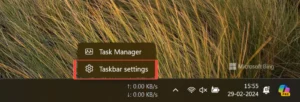
2. Scroll Down and Click Taskbar Behavior

3.Scroll down and find checkbox marked in pic , Click the checkbox to enable Show Desktop Button , that’s it !! you are all set !!

Here’s a swift method to reinstate the “Show desktop” functionality if it has vanished from your Windows 11 PC.