Ever wondered how to run a massive, intelligent AI model on a machine that isn’t a supercomputer? Maybe you’re sitting with a standard laptop, or perhaps a tiny device like a Raspberry Pi, and you’re thinking, “There is no way I can run something as powerful as ChatGPT on this thing.”
Well, I’m here to tell you that you absolutely can.
We are living in a time where AI is exploding, but most of the action happens in the cloud. You type a prompt, it shoots off to a massive data center, chews through terabytes of data, and shoots an answer back. That’s amazing, but it comes with a price tag, usage limits, and a lack of privacy. What if you could bring that power home? What if you could have an AI that has no subscription cost, no usage limits, and—most importantly—keeps your data completely under your control?
This is where a fascinating piece of technology called Llama.cpp enters the picture. It isn’t just another AI tool; it is the engine that makes local AI possible for the average person. Let’s sit down and break this apart, piece by piece, to understand how this software is changing the game for developers, hobbyists, and privacy advocates alike.
Table of Contents
The Problem: AI is Hungry
To understand why Llama.cpp is so special, we first need to look at the problem it solves.
Most large language models (LLMs) like GPT-4 or the standard Llama family are designed to run on expensive, power-hungry hardware. We’re talking about clusters of GPUs (Graphics Processing Units) that cost thousands of dollars and consume enough electricity to power a small neighborhood.
When you interact with these models via an API (sending data to the cloud), you are essentially renting time on that expensive hardware. You pay for “tokens”—chunks of words. It’s like paying for water by the gallon. It adds up quickly. If you are a developer building an app, or a business dealing with sensitive documents, sending data to an external server can be a deal-breaker.
Imagine you have a stack of private PDFs—financial reports or medical records—and you want an AI to summarize them. sending those to a third-party server in the cloud might violate privacy laws or your own company policies. You need that AI to run right there, on your desk, inside your computer. But your computer likely doesn’t have the massive VRAM (Video Random Access Memory) required to load these models in their raw, uncompressed state.
That is the gap. We have powerful open-source models, and we have everyday hardware. Llama.cpp is the bridge between them.
What Exactly is Llama.cpp?
At its simplest level, Llama.cpp is an inference engine. Think of an inference engine as the “runtime” or the player for an AI model. Just as you need a video player to watch a movie file, you need an inference engine to “run” an AI model.
Originally developed by Georgi Gerganov, the project started as a way to run Meta’s LLaMA model in pure C++. But it has grown into something much bigger. It is now the go-to solution for running a massive variety of quantized LLMs on almost any hardware.
Why C++? Because C++ is the language of performance. Unlike Python, which is the default language for most AI research but can be slow and heavy, C++ allows for fine-grained control over memory and hardware resources. It’s lean, it’s mean, and it strips away the bloat.
The Superpower: Quantization
If there is one word you need to learn in the world of local AI, it is Quantization. This is the secret sauce of Llama.cpp.
Models are typically trained in high precision, usually 16-bit or 32-bit floating-point numbers. This allows for very high accuracy because the model remembers weights (the knowledge inside the AI) with extreme detail. However, this takes up a ton of space. A 7-billion parameter model in 16-bit might require around 14 GB of VRAM just to load. Most consumer laptops or standard graphics cards don’t have that kind of dedicated memory.
Llama.cpp solves this by compressing the model. It takes those high-precision numbers and rounds them down. It’s a bit like compressing a high-resolution RAW photo into a JPEG. The file size drops dramatically, but for the human eye (or in this case, the human reading the text), the difference in quality is barely noticeable.
Here is how it works:
- Original State: A weight might be
0.123456789. This takes up a lot of memory. - Quantized State (4-bit): The engine rounds this to something simpler, effectively storing it in a much smaller format.
The result? You can often run a model with 25% of the hardware requirements. You lose a tiny fraction of intelligence (often imperceptible), but you gain the ability to run the model on a standard laptop or even a phone.
The GGUF Format: Packing It All In
Llama.cpp introduced a file format called GGUF. Before GGUF, running a model was a messy affair. You had the model weights, the configuration files, the tokenizer (which breaks words down for the AI), and a bunch of metadata scattered across multiple files.
GGUF bundles everything into a single file. It’s a self-contained package. You download one file, point Llama.cpp at it, and you are good to go. This makes model swapping incredibly easy. One minute you are running a creative writing model, the next you are swapping to a coding assistant model, all by just loading a different .gguf file.
How It Fits Together: The Local AI Stack
Let’s visualize how this works in a real-world scenario. You might have heard of tools like Ollama, LM Studio, or GPT4All. These are user-friendly applications that let you download and chat with AI models.
Here is the secret: Under the hood, most of them are using Llama.cpp.
They wrap the complex C++ code in a nice user interface or a command-line tool that makes it easier for you to use. But the heavy lifting—the matrix multiplications, the memory management, and the hardware optimization—is done by the Llama.cpp library.
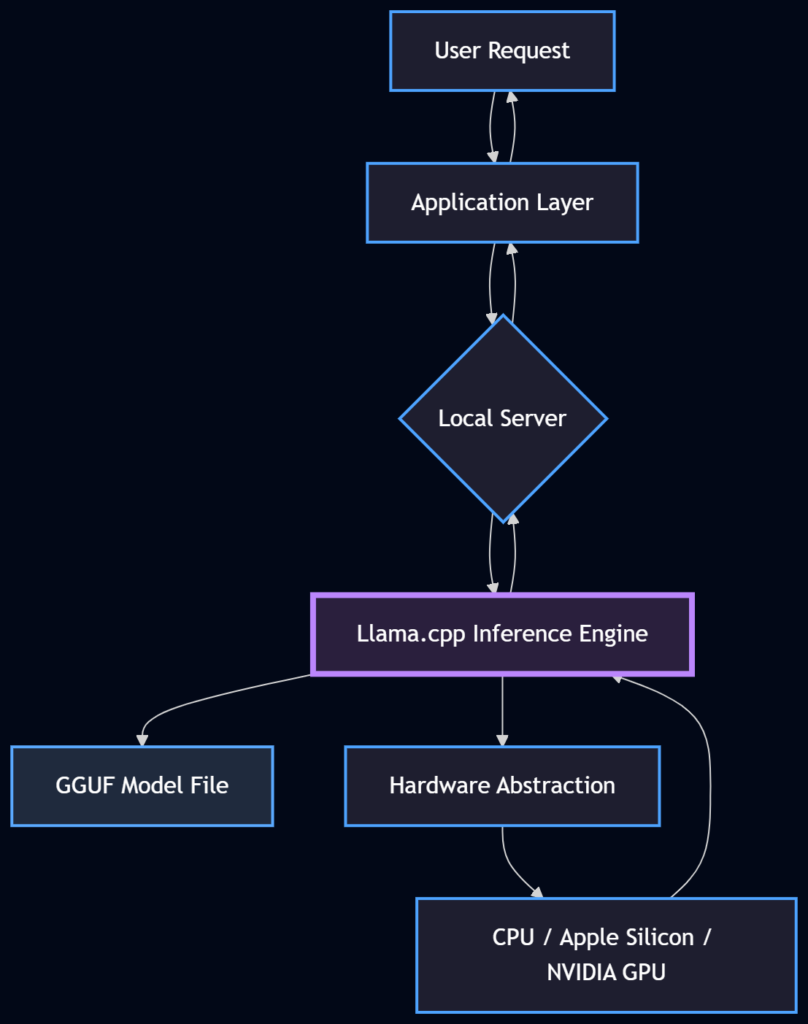
Diagram: The flow of a local AI request. Llama.cpp sits at the core, bridging the application and the raw hardware.
Hardware Support: Running Everywhere
One of the most impressive feats of the Llama.cpp project is its hardware support. Because it is open-source and written in C++, contributors have optimized it for almost every modern processor architecture.
- Apple Silicon (M1/M2/M3): This is where Llama.cpp shines brightest. Apple’s chips have a “Unified Memory Architecture,” meaning the CPU and GPU share the same RAM. Llama.cpp utilizes the Metal framework (Apple’s graphics API) to run models incredibly fast on standard MacBooks. It essentially turns a MacBook Air into a portable AI server.
- NVIDIA GPUs: The engine supports CUDA, the standard for NVIDIA cards. If you have a gaming PC with an RTX card, you can offload the heavy lifting to the GPU for blazing fast speeds.
- AMD GPUs: Through ROCm and Vulkan, AMD users aren’t left out either.
- CPU Only: Don’t have a fancy GPU? No problem. Llama.cpp is optimized to run decently on standard CPUs, using techniques like AVX/AVX2 instructions to speed up calculations.
This cross-platform nature is vital. It ensures that local AI isn’t just for gamers or tech enthusiasts with $3,000 rigs, but for anyone with a decent computer.
Real-World Application: The Local Server
So, how does a developer actually use this? Let’s move away from theory and look at practice.
Most developers are used to the OpenAI API format. They write code that sends a request to api.openai.com. The beauty of Llama.cpp is that it provides a “server” mode that mimics this API perfectly.
This means you can take an application built for ChatGPT, change the URL from OpenAI to your local server (e.g., localhost:8080), and it will work instantly with a local model.
Here is a conceptual example of how you might run this via the command line (the CLI):
# This command starts a local server with a specific model
./llama-server -m ./models/qwen-7b-q4_k_m.gguf -c 2048 --host 0.0.0.0 --port 8080Let’s break that down in plain English:
./llama-server: The command to start the engine.-m ./models/qwen-7b-q4_k_m.gguf: This points to the specific model file we want to use. Note theq4in the name, indicating it’s a 4-bit quantized model.-c 2048: This sets the “context window.” It tells the AI how many words (tokens) of conversation history it can remember at once.--port 8080: This opens a door on your computer where other programs can send requests.
Once this is running, your computer is now an AI server. You can build chatbots, document analyzers, or automation agents that talk to your local model without internet access.
Beyond Chatting: RAG and Agents
The provided transcript touches on a crucial advanced use case: Retrieval Augmented Generation (RAG).
Running a local model is great, but how do you make it smart about your data?
- The Problem: A standard LLM only knows what it was trained on. It doesn’t know your company’s internal policies or your personal diary.
- The Solution (RAG): You take your documents (PDFs, spreadsheets), convert them into numbers (embeddings), and store them. When you ask a question, the system searches your documents for relevant info, pastes that info into the prompt, and sends it to the LLM.
Llama.cpp is the perfect endpoint for this. Because it has no usage limits, you can send massive amounts of context (your document text) to the model without worrying about racking up a bill. If you were doing this with a cloud API, feeding a 100-page document with every prompt would cost a fortune. Locally? It costs you nothing but a bit of RAM.
Comparison: Cloud vs. Local
| Feature | Cloud API (e.g., OpenAI) | Local Inference (Llama.cpp) |
|---|---|---|
| Cost | Pay per token (ongoing cost) | Free (after hardware purchase) |
| Privacy | Data leaves your machine | Data stays on your machine |
| Latency | Depends on internet speed | Instant (hardware speed) |
| Reliability | Subject to outages/limits | Always available (offline) |
| Control | Fixed model versions | Choose any open model |
| Hardware | None required | Requires decent RAM/CPU/GPU |
The Workflow: From Download to Chat
To make this feel more real, let’s walk through the human experience of setting this up.
- The Search: You head over to Hugging Face, the “GitHub of AI.” You search for a model, say “Llama-3” or “Mistral.” You don’t download the massive 100GB original file. You look for the “GGUF” version.
- The Download: You see filenames like
Q4_K_M.gguforQ5_K_M.gguf. These look confusing, but they are just quality settings.Q4is a good balance of speed and smarts.Q8is heavier but smarter. You download the file. It’s usually only 4GB to 8GB. - The Execution: You open your terminal. You don’t need to install a complex Python environment. You just run the Llama.cpp executable.
- The Interaction: The prompt appears. You type: “Write a poem about a robot who loves coffee.”
- The Result: The text starts streaming. It’s happening right there, on your desk. No loading spinners from the cloud, no “server overloaded” errors.
Why This Matters for the Future
We are at a crossroads in technology. On one path, AI becomes a utility provided by a few massive corporations—a black box that we rent but never own. On the other path, AI becomes a commodity, a tool that runs on our devices just like a calculator or a spreadsheet.
Llama.cpp is paving the way for that second path. It democratizes access to intelligence. It allows a student in a dorm room to experiment with state-of-the-art models without a credit card. It allows a hospital to analyze patient data with AI without sending that data to the cloud.
It also fosters innovation. Because the engine is open-source, developers are constantly adding features. One day it supports image inputs (LLaVA), the next it supports sound, or specialized math kernels. It is a living, breathing project driven by the community.
Optimizations: The “Kernel” of Speed
You might wonder, “Okay, it’s C++, but why is it so fast?” The developers behind Llama.cpp have spent countless hours optimizing the “kernels.”
In computer science terms, a kernel is a small function that does a specific calculation. AI models are basically billions of multiplication and addition operations. Llama.cpp rewrites these basic operations specifically for the hardware you have.
If you have a CPU, it rearranges the data to match the CPU’s cache size perfectly (cache-aware computing). If you have a GPU, it writes code that maximizes the bandwidth between memory and the processor. This attention to detail is why a simple C++ file can outperform complex frameworks on consumer hardware.
Getting Started: A Gentle Push
If you are technically inclined, you might want to try building it yourself. But for many, the best way to leverage Llama.cpp is through the tools built on top of it. However, understanding that Llama.cpp is the engine under the hood helps you troubleshoot issues.
If you ever see an error saying “Bus error” or “Segmentation fault” in tools like Ollama, it usually means the Llama.cpp engine is trying to load a model that is too big for your RAM. Knowing this helps you solve the problem: just pick a smaller quantization (e.g., switch from Q5 to Q4).
WrapUP
Llama.cpp is more than just a piece of code; it is a movement. It represents the idea that powerful technology doesn’t have to be locked away in distant data centers. It proves that with clever engineering—specifically through quantization and hardware optimization—we can fit the future of AI into the devices we already own.
Whether you are a developer building a private AI application, a researcher experimenting with new models, or just a curious soul who wants a digital friend to chat with offline, Llama.cpp is the key. It takes the “black box” of AI and turns it into a transparent, accessible tool that belongs to you.
The next time you hear about “Local AI” or “Edge AI,” remember the engine that makes it possible. It’s a humble C++ library that let us bring the giants down to earth.
References:
- Llama.cpp GitHub Repository – The source code and documentation for the project.
- Hugging Face – GGUF Models – A directory of models compatible with Llama.cpp.
FAQs
What exactly is Llama.cpp in simple terms?
Think of Llama.cpp as a media player for AI. Just as you need a video player to watch a movie file on your laptop, you need Llama.cpp to “play” or run an AI model on your computer. It is a piece of software that acts as the engine, allowing your personal hardware to understand and process AI models without needing a massive server farm.
Why would I want to run AI locally instead of using ChatGPT?
There are three huge reasons: privacy, cost, and reliability. When you use cloud-based AI, your data leaves your computer, and you usually pay a monthly fee or pay per use. When you run it locally with Llama.cpp, your data never leaves your device (great for sensitive documents), it is completely free to use after you have the hardware, and it works even if your internet goes down.
My laptop isn’t a supercomputer. Can I still run these models?
Yes, that is the whole point of Llama.cpp! Originally, AI models required massive amounts of memory. Llama.cpp uses a technique called quantization, which shrinks the model down. It compresses the “brain” of the AI so it can fit onto standard laptops, including MacBooks and regular Windows PCs, without losing too much of its intelligence.
What is “quantization” and does it make the AI stupid?
Quantization is essentially compression. Imagine a high-resolution photo that takes up 50MB of space. If you compress it to a 2MB JPEG, it looks 95% as good but takes up way less space. Quantization does the same for AI. It reduces the precision of the numbers the model uses. While the AI might lose a tiny fraction of accuracy, it is usually so small that you won’t notice it in normal conversation.
What is a GGUF file?
A GGUF file is the specific format Llama.cpp uses. Before this, running a model meant juggling multiple files for settings, weights, and vocabulary. A GGUF file packs everything into one single file. It makes it super easy to download an AI model (just like downloading a song) and load it up instantly.
Do I need an expensive NVIDIA graphics card to use this?
No. While having a dedicated GPU helps with speed, Llama.cpp is famous for running well on CPUs (your main processor). It is specifically optimized to run efficiently on Apple Silicon (M1, M2, M3 chips) using the Mac’s unified memory, and it works on standard AMD cards and regular processors too.
Is Llama.cpp the same thing as Ollama or LM Studio?
Not exactly, but they are related. Llama.cpp is the “engine.” Tools like Ollama, LM Studio, and GPT4All are user-friendly applications that sit on top of that engine. They use Llama.cpp under the hood to make it easier for you to chat with the model without needing to use complex command-line codes.
Can I use Llama.cpp to read my private documents?
Absolutely. This is one of its best use cases. You can use a setup (often called RAG or Retrieval Augmented Generation) where you feed your documents to the model running on your computer. Because the AI is running locally, you can feed it confidential financial reports or personal journals, and you can be 100% sure that data isn’t being uploaded to a stranger’s server.
Is it difficult to install?
It depends on how you want to use it. If you are a developer comfortable with a terminal, it is very straightforward. If you are a casual user, you might find it easier to download a tool like Ollama or Jan, which handles the installation of Llama.cpp for you in the background. You get the power of Llama.cpp without the technical headache.
Is this technology free to use?
Yes. Llama.cpp is open-source. You don’t have to pay any subscription fees or token costs. You download the software and the model weights (which are usually open-weights models like Llama or Mistral), and you own that capability forever. The only “cost” is the electricity your computer uses while running the model.